
If you’re looking to streamline your workspace, 4K KVM Over IP switches could be the solution you need. These devices let you manage multiple computers seamlessly from one set of peripherals, all while delivering stunning 4K visuals. With features like zero latency and easy installation, they enhance both productivity and convenience. But with so many options available, how do you choose the right one for your setup? Let’s explore the top contenders.
AV Access 4K HDMI USB KVM Extender over TCP/IP

If you’re looking for a reliable solution to extend your KVM setup over long distances, the AV Access 4K HDMI USB KVM Extender over TCP/IP is an excellent choice. This device lets you transmit signals up to 120 meters (390 feet) using a single Cat5e/6/6a/7 cable, supporting stunning 4K@30Hz and 1080P@120Hz resolutions along with 7.1-channel audio. With a built-in USB hub featuring three USB 2.0 ports, you can easily connect multiple devices. Plus, its plug-and-play compatibility with Windows, Mac, and Linux guarantees a hassle-free setup. Enjoy seamless control and flexibility for all your remote applications.
Best For: Those seeking a reliable and high-quality KVM solution for extending connections over long distances while maintaining excellent video and audio quality.
Pros:
- Supports high resolutions up to 4K@30Hz and 1080P@120Hz for crystal-clear image quality.
- Plug-and-play compatibility with major operating systems like Windows, Mac, and Linux eliminates the need for driver installations.
- Built-in USB hub with three ports allows for easy connection of multiple USB devices.
Cons:
- Limited to a single TX to RX pairing, which may restrict multi-device setups.
- Requires repowering the units to apply DIP switch configuration changes, which can be inconvenient.
- Video flickering or signal issues may occur if not using a gigabit switch, necessitating additional hardware upgrades.
GL.iNet Comet Remote KVM Over Internet (GL-RM1)

The GL.iNet Comet Remote KVM Over Internet (GL-RM1) stands out as an outstanding choice for IT professionals and smart home users who need reliable remote control capabilities. You can effortlessly reboot, install operating systems via BIOS, and power on computers from anywhere. Its universal compatibility allows for seamless connections to various devices, requiring only a simple one-click setup through the app. With impressive 3840×2160@30Hz visuals and low latency, your remote experience is first-rate. Plus, file transfers are smooth, and H.264 hardware encoding guarantees efficient management, making it perfect for both home offices and data centers.
Best For: The GL.iNet Comet Remote KVM Over Internet (GL-RM1) is best for IT professionals and smart home users seeking reliable remote access for managing devices.
Pros:
- Effortless rebooting and OS installation via BIOS without physical presence.
- Universal compatibility with laptops, desktops, and servers, enabling easy one-click connection.
- High-quality visuals at 3840×2160@30Hz and smooth file transfers enhance the remote work experience.
Cons:
- Initial setup may require some technical knowledge for optimal configuration.
- Limited support for certain legacy systems or devices.
- Dependence on internet connection quality for optimal performance.
OREI 4K KVM HDMI Extender Over IP

For those seeking reliable signal extension over long distances, the OREI 4K KVM HDMI Extender Over IP is an excellent choice. It allows you to extend USB and HDMI signals up to 400 feet at 4K@60Hz using a Cat6 cable. You can set it up for point-to-point or one-to-many connections via a 1G network switch. This extender features low-latency transmission and one-way IR control for your source devices. With plug-and-play ease and robust performance, it’s perfect for connecting multiple displays in various settings, from homes to churches. Plus, it comes with a one-year warranty for added peace of mind.
Best For: Those needing to extend USB and HDMI signals over long distances, such as in homes, churches, or professional settings.
Pros:
- High-definition video support up to 4K@60Hz with low-latency transmission.
- Easy plug-and-play setup with automatic EDID/DDC management.
- Versatile connectivity options for point-to-point or one-to-many configurations.
Cons:
- Requires separate power supplies for both transmitter and receiver.
- Some users may need to adjust resolution settings for optimal performance.
- Flat Cat6 cables are not recommended as they can cause signal issues.
AV Access 4K HDMI Fiber KVM Extender Over IP (4KIP500F-KVM)

Offering zero latency and impressive 4K ultra HD transmission, the AV Access 4K HDMI Fiber KVM Extender Over IP (4KIP500F-KVM) stands out as an excellent choice for professionals needing high-performance remote control of PCs and NVR systems. With a transmission range of up to 550m using multi-mode fiber, you can connect devices over great distances. Its plug-and-play setup supports up to 16 transmitter/receiver pairs, while three USB 2.0 ports guarantee smooth operation of peripherals. Though users appreciate its performance, be aware of potential issues with extended desktops and occasional graphical glitches, especially during gaming or streaming.
Best For: Professionals seeking high-performance remote control of PCs and NVR systems with long-distance connectivity requirements.
Pros:
- Zero latency during 4K@60fps transmission, ensuring high-quality video and surround audio.
- Easy plug-and-play setup with support for up to 16 transmitter/receiver pairs.
- Effective operation of USB peripherals with high-speed transfer capabilities.
Cons:
- Issues with extended desktop configurations may require manual adjustments.
- Occasional graphical glitches and intermittent black screens reported during gaming or streaming.
- Mixed experiences with customer support and concerns about product reliability.
OREI 4K KVM HDMI Extender Over IP (UHD-EXM500-KVM)

Designed for those who need to extend USB and HDMI signals over long distances, the OREI 4K KVM HDMI Extender Over IP (UHD-EXM500-KVM) excels with its ability to transmit 4K video up to 330 feet using Cat6 cables. It supports point-to-point or one-to-many setups with a 1G network switch. Enjoy seamless control with two USB 1.1 ports for your keyboard and mouse, and take advantage of the HDMI loop-out for local monitoring. Low latency guarantees you won’t miss a beat, while the included IR cables allow for remote control of devices. Plus, it comes with a one-year warranty.
Best For: Those needing to extend USB and HDMI signals over long distances for seamless remote control and monitoring of devices.
Pros:
- Supports 4K video transmission up to 330 feet, ensuring high-definition performance.
- Flexible setup options with point-to-point or one-to-many configurations using a 1G network switch.
- Low latency transmission for real-time control, perfect for remote access to PCs.
Cons:
- Requires high-quality shielded Cat6 cable for optimal performance, which may increase installation costs.
- Dependent on a 1G network switch for one-to-many setups, adding to the overall system requirement.
- Limited USB support with only two USB 1.1 ports available for keyboard and mouse.
BliKVM v4 IPKVM Device for Remote Server Management

If you’re looking for a robust solution for remote server management, the BliKVM v4 IPKVM Device stands out with its plug-and-play design and 4K HDMI loop out. This device allows you to power on/off, restart computers, and configure UEFI/BIOS settings effortlessly via an emulated Mass Storage Device. You can access keyboard, mouse, and monitor functions through your web browser, providing flexibility without being tied to specific ports or protocols. Weighing just one pound and measuring 5.6 x 5 x 11.81 inches, it’s compact yet powerful. Plus, with a 30-day return guarantee, you can try it worry-free.
Best For: IT professionals seeking a reliable and efficient solution for remote server and workstation management.
Pros:
- Plug-and-play design makes installation quick and user-friendly.
- 4K HDMI loop out ensures high-quality video output for remote monitoring.
- Full hardware-level access allows for control over UEFI/BIOS settings and OS reinstallation.
Cons:
- Initial EDID issues may require additional troubleshooting with pass-through HDMI.
- Limited to users comfortable with web-based interfaces for management.
- Availability may be restricted to specific platforms like Amazon.
4K HDMI KVM USB Extender Over Cat5e/6/7

For professionals seeking a reliable solution to extend their HDMI KVM USB connections over long distances, the 4K HDMI KVM USB Extender over Cat5e/6/7 stands out as an exceptional choice. This extender supports uncompressed 4K@30Hz video, zero-latency KVM control, and features four USB 2.0 ports. With a straightforward plug-and-play design, installation is a breeze, though managing cabling may take time. You’ll enjoy seamless control, thanks to bidirectional RS232 integration and dual audio channels. Users praise its durability and performance, particularly in AV and data center applications, making it a top recommendation for remote KVM setups.
Best For: Professionals seeking a reliable and high-performance solution to extend HDMI KVM USB connections over long distances.
Pros:
- Supports uncompressed 4K@30Hz video and zero-latency KVM control for seamless performance.
- Easy installation with a plug-and-play design, compatible with various peripherals.
- Durable metal housing ensures long-term reliability and stable connectivity over extended distances.
Cons:
- Performance may be affected by lower-quality network switches, potentially causing signal flickering.
- Some users experienced issues that required adjustments, such as changing refresh rates from 60Hz to 30Hz.
- The inclusion of USB 4.0 instead of USB 2.0 in future models could enhance performance further.
4K HDMI KVM USB Extender Over Single Cat5e/6/7

The 4K HDMI KVM USB Extender over a single Cat5e/6/7 cable stands out as an ideal solution for professionals who need to manage multiple devices across long distances without compromising on quality. With a range of up to 150 meters, this extender supports 4K×2K@30Hz resolution, ensuring crisp visuals. It features HDMI, audio, USB 2.0 ports, and even RS-232 and IR controls, making it versatile for various environments. Its plug-and-play design means you can set it up quickly, and users appreciate the near-zero latency for smooth operation, perfect for digital signage or remote workstations.
Best For: Professionals and users who need reliable KVM control over long distances with high-resolution video quality.
Pros:
- Plug-and-Play: Easy setup with no driver installation required.
- Versatile Connectivity: Supports multiple ports including HDMI, audio, USB 2.0, RS-232, and IR.
- Near-Zero Latency: Provides smooth performance ideal for digital signage and remote workstations.
Cons:
- USB Limitations: Only supports USB 2.0, which may not meet the needs of users requiring faster data transfer.
- Distance Performance Variability: Performance can vary with longer distances and lower-quality network switches.
- Resolution Issues at 60Hz: Users may experience problems at 60Hz, requiring a switch to 30Hz for stable output.
J-Tech Digital 4K USB KVM HDMI Extender Over Cat6/6a/7 Ethernet

Designed for users who need to extend HDMI signals over long distances without sacrificing quality, the J-Tech Digital 4K USB KVM HDMI Extender excels in large environments like churches or auditoriums. It supports HDMI 1.4 and HDCP 1.4, extending signals up to 328 feet over CAT6/6a/7 cables. With dual USB 2.0 ports, you can easily connect keyboards and mice. Plus, it features dual HDMI outputs for flexible monitoring. The installation is straightforward—just connect the transmitter to your source and run the CAT6 cable. Enjoy reliable performance, backed by lifetime technical support and a one-year warranty.
Best For: Users needing to extend HDMI signals in large spaces like churches or auditoriums without compromising video quality.
Pros:
- Supports high-resolution video up to 4K@30Hz with minimal latency.
- Easy plug-and-play installation with no additional drivers required.
- Dual HDMI outputs and USB ports provide flexible connectivity options.
Cons:
- Some users reported audio issues after extended use.
- Customer service responses can be slow post-warranty.
- Optimal performance may require solid copper Ethernet cables.
OREI KVM 4K HDMI Over Ethernet Extender Balun
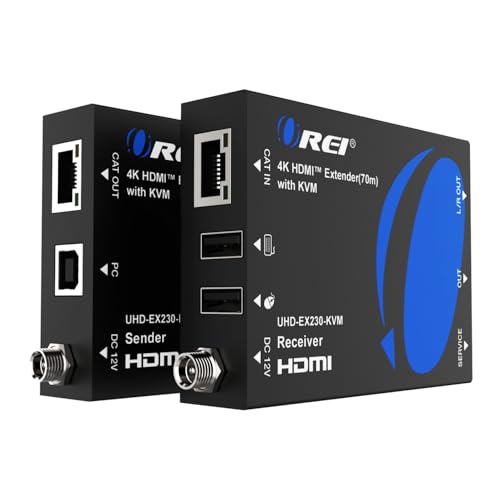
Experience seamless video transmission with the OREI KVM 4K HDMI Over Ethernet Extender Balun, ideal for anyone needing to extend 4K signals over long distances without compromising quality. Supporting resolutions up to 4K@60Hz over CAT6/7 cable, it guarantees zero latency and lossless video. Its compact design simplifies installation, while USB KVM extension allows remote keyboard and mouse control. You’ll appreciate the HDMI loop-out for additional displays and 3.5mm audio output for speakers. With a range of up to 230 feet and Power over Ethernet support, this extender balances performance and convenience perfectly for your setup.
Best For: Those needing to extend 4K HDMI signals over long distances while maintaining high video quality and minimal latency.
Pros:
- Supports a wide range of resolutions up to 4K@60Hz with zero latency and lossless video transmission.
- Compact design and Power over Ethernet feature simplify installation and reduce cable clutter.
- Includes USB KVM extension for remote control of keyboard and mouse, and HDMI loop-out for additional displays.
Cons:
- Some users reported compatibility issues with specific resolutions and USB devices.
- Requires high-quality HDMI cables (version 2.1) for optimal performance; cheaper cables may lead to problems.
- A few customers experienced failures after limited use, raising concerns about long-term reliability.
Factors to Consider When Choosing KVM Over IP Switches 4K
When choosing a 4K KVM over IP switch, you need to evaluate several key factors. Think about your resolution support requirements, distance limitations, and USB compatibility. Also, take into account how easy the installation is and what power supply options are available.
Resolution Support Requirements
Choosing the right KVM over IP switch hinges on understanding its resolution support, especially if you’re aiming for 4K capabilities. Many switches offer 4K resolution at either 30Hz or 60Hz, and this difference considerably impacts visual quality. To achieve 4K@60Hz, you’ll need robust bandwidth and possibly high-quality cables like CAT6 to maintain signal integrity. While some switches support lower resolutions like 1080p, these may not suffice in high-definition environments where detail matters. Additionally, check for HDR format compatibility, as it enhances color and contrast at higher resolutions. Be cautious, too, as some KVM extenders have limitations on resolution scaling, meaning they may not automatically adjust if your display doesn’t support 4K.
Distance and Range Limitations
Understanding distance and range limitations is essential for guaranteeing ideal performance with your KVM over IP switch. Some switches extend signals up to 120 meters (394 feet) using standard Cat5e/6/7 cables, while others can reach up to 550 meters (1800 feet) with fiber optics. Keep in mind that longer distances may lead to signal degradation or latency issues. Many extenders support 4K video at 30Hz over shorter distances, but you might need to lower the resolution or refresh rate for longer ranges. Always consider the cable type; high-quality shielded Cat6 cables are recommended, as flat cables could cause issues. Additionally, verify your network infrastructure is up to par to maintain range and reliability.
USB Compatibility and Ports
After considering the distance and range limitations of your KVM over IP switch, it’s time to focus on USB compatibility and ports. Verify your switch supports high-speed USB 2.0 or higher for ideal connectivity and data transfer rates, which typically reach 480 Mbps. Look at the number of USB ports available; having multiple ports—like three or more—lets you connect various peripherals such as keyboards, mice, and storage devices. Check for compatibility with different operating systems, like Windows, Mac, and Linux, to guarantee seamless functionality. Some extenders come with built-in USB hubs, simplifying your setup. Finally, verify that the KVM switch supports bidirectional USB communication for flexible usage between local and remote systems.
Installation and Setup Ease
How easy is it to set up your KVM over IP switch? Many models offer plug-and-play installation, allowing you to skip driver installations and simplify the process. You’ll just connect the transmitter to your source device and run an Ethernet cable to the receiver, making it straightforward. Look for switches that support automatic EDID/DDC management, as they help maintain stable signal transmission without requiring manual tweaks. Keep in mind the cabling; high-quality, shielded Cat6 or Cat7 cables are recommended for peak performance over longer distances. If you’re planning a multi-monitor setup, features like HDMI loop-out ports can enhance usability during installation, making your experience even smoother.
Power Supply Options
When selecting a KVM over IP switch, it’s essential to evaluate the power supply options available, as these can greatly impact your setup. First, consider whether the switch requires separate power supplies for both the transmitter and receiver, which can complicate installation. Some models offer Power over Ethernet (PoE), simplifying cabling by allowing one device to power another through the network cable. Make sure the power supply voltage and current ratings match the specifications to avoid damage. Opt for devices with locking power connectors to reduce the risk of accidental disconnections during operation. Finally, check if the KVM switch is compatible with international power adapters to enhance flexibility if you’re using it in various locations.
Video and Audio Quality
Selecting the right KVM over IP switch means not only considering power supply options but also guaranteeing high-quality video and audio. Look for switches that support high resolutions like 4K@60Hz to assure ideal video clarity. Lower resolutions can seriously compromise your visual experience. Zero latency video transmission is essential for real-time interaction, so prioritize devices that offer this feature. Don’t overlook audio quality; switches supporting multi-channel formats, such as 7.1-channel audio, will greatly enhance your multimedia experience. Additionally, consider models with HDMI Loop Out for local monitoring without sacrificing resolution. Finally, verify compatibility with various audio outputs, like 3.5mm analog ports, to integrate seamlessly with existing audio systems, giving you versatility in every scenario.
Latency and Performance Issues
While many factors influence your choice of a KVM over IP switch, latency and performance stand out as essential elements that can make or break your experience. High-performance models offer near-zero latency, important for fast-paced tasks like gaming or video editing. The transmission technology matters too; fiber optics typically deliver lower latency and higher bandwidth compared to copper cables. When selecting a switch, consider its support for 4K resolutions at 30Hz or 60Hz, as higher refresh rates demand better bandwidth to reduce latency. Your network infrastructure also plays a significant role—lower-quality switches can introduce delays, especially over long distances. Features like EDID management and compression can help mitigate latency while preserving video quality.
Network Compatibility and Switches
To guarantee ideal performance with KVM over IP switches for 4K applications, compatibility with your network infrastructure is essential. Make sure you’re using a gigabit switch to minimize latency and secure peak performance. Look for switches that support both point-to-point and one-to-many configurations, as this flexibility enhances scalability and usability. The choice of cabling matters too; high-quality shielded Cat6 or better is recommended to maintain signal integrity for 4K video transmission. Verify that the KVM switch handles the specific resolutions and refresh rates needed for your applications, since some may only support lower resolutions. Finally, confirm the switch offers features like EDID management and IR pass-through for seamless device communication over extended distances.
