
When a workstation, server, or remote office PC needs hands-on help, a good KVM over IP switch can save time and reduce downtime.
This roundup focuses on practical options for small business buyers, from single-port remote access devices to rackmount models for multi-system management.
Best 10 Kvm Over Ip Switch for Small Business Picks for 2026
Best for Remote BIOS Access

- BIOS-level control for installs and troubleshooting
- 4K@30Hz video with keyboard/mouse remote access
- Tailscale support for secure remote connections
Best For: Small teams needing remote recovery and setup access for PCs or servers.
Best for High-Performance Remote Access
Raritan Dominion KX IV-101 4K KVM Switch
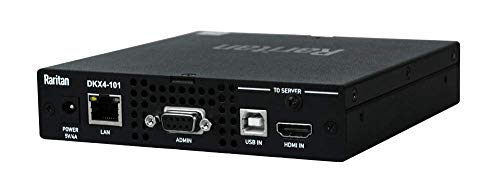
- BIOS-level remote control for troubleshooting
- Supports up to 8 users
- 4K-capable, business-grade KVM-over-IP access
Best For: Small businesses managing one critical machine that needs secure, high-performance remote access.
Best for Wireless Remote Access

- Wi‑Fi 6 and wired support for flexible deployment
- 4K@30fps passthrough with two-way audio
- Tailscale and self-hosted options for secure remote control
Best For: Small businesses that want wireless remote KVM access with secure out-of-band recovery tools.
Best for 4K Desktop Sharing

- Controls 4 computers from one monitor, keyboard, and mouse
- 4K@60Hz with EDID emulation helps prevent display glitches
- Multiple switching methods and USB passthrough improve convenience
Best For: Small offices and home workstations that need dependable local switching across four PCs.
Best for Remote Management
ATEN KN1116VA 16-Port Cat 5 KVM Over IP
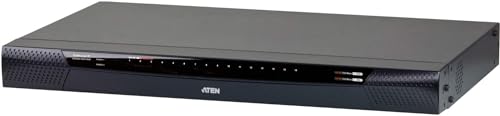
- 1-local/1-remote access for flexible server control
- 1920 x 1200 video plus virtual media support
- FIPS 140-2 level 1 security and LUC port
Best For: Small IT teams that need secure remote access and BIOS-level troubleshooting.
Best for 4-Computer Desk Sharing
USB-C HDMI KVM Switch for 4 PCs

- Controls 4 computers from one monitor, keyboard, and mouse
- 4K@60Hz with EDID emulation helps keep switching smooth
- Extra USB port and four switch methods improve usability
Best For: Small offices or shared desks that need simple control of up to four computers.
Best for BIOS-Level Remote Control

- BIOS-level remote access for recovery and maintenance
- 4K HDMI, USB, and Ethernet connectivity
- 2048-bit RSA and AES encryption for secure business use
Best For: Small businesses that need secure remote access to a single PC or server for troubleshooting and BIOS-level control.
Best for Dual-PC 4K Desk Sharing
DisplayPort 4K@60Hz KVM Switch

- 4K@60Hz support for sharp single-monitor sharing
- Four switching methods, including IR remote and hotkeys
- USB ports add flexibility for drives, printers, and scanners
Best For: Small offices and home offices that want a simple 2-PC DisplayPort KVM for one 4K monitor.
Best for Centralized Management
Vertiv Avocent AV3000 16-Port KVM Over IP

- 16-port rackmount design
- Local and remote IP access
- CAC and DSView 4 support
Best For: Small businesses and IT teams that need secure centralized access to multiple servers.
Best for Simple Dual-PC Sharing
HDMI KVM Switch for 2 PCs, 4K@60Hz

- 4K@60Hz with HDR10 and Dolby Vision
- EDID emulation keeps displays stable while switching
- Four switching methods plus USB pass-through
Best For: Small offices and home users who want one monitor and peripherals shared between two computers.
Best for Remote BIOS Access – GL.iNet Comet GL-RM1
If you need a kvm over ip switch for small business that makes remote maintenance easier, the GL.iNet Comet (GL-RM1) is built for practical admin work. It supports remote keyboard, video, and mouse control, 4K at 30Hz, and can help with BIOS-level access for OS installs and troubleshooting when a machine will not boot normally.
Best For: Small teams that want dependable remote access to office PCs or servers for setup, recovery, and light-to-moderate support tasks.
Pros:
- BIOS-level control helps with OS installation and early-boot troubleshooting.
- 4K@30Hz support gives clear video for remote admin sessions.
- Tailscale support makes it easier to reach devices securely over the internet.
- Useful fit for home offices, SMB workstations, and compact IT setups.
Cons:
- Not a full enterprise KVM matrix switch for larger rack environments.
- 4K is limited to 30Hz, which may feel slow for high-motion tasks.
This is a strong pick if your kvm over ip switch for small business needs are centered on remote recovery, OS installs, and straightforward off-site support rather than advanced data-center switching.
Best for High-Performance Remote Access – Raritan Dominion KX IV-101 4K KVM Switch
Raritan Dominion KX IV-101 Ultra High Performance 1-Port 4K KVM-Over-IP Switch
Check Price On AmazonIf you need a kvm over ip switch for small business that prioritizes low-latency remote access and BIOS-level control, the Raritan Dominion KX IV-101 is a serious business-grade option. Its single-port design makes it a focused fit for managing one critical server or workstation, while support for up to 8 users gives teams flexible access when needed.
Best For: Small businesses that want a high-performance, one-system KVM-over-IP solution for secure remote administration.
Pros:
- BIOS-level access for remote troubleshooting before the OS loads
- Supports up to 8 users for shared access workflows
- 4K-capable, high-performance remote console experience
Cons:
- Only handles a single port, so it is not ideal for multi-server expansion
- More advanced than many small offices need if remote access is occasional
For a kvm over ip switch for small business with enterprise-style remote management, this model stands out for its unblocked access and strong performance. It makes the most sense when reliability and direct control matter more than getting the lowest-cost option.
Best for Wireless Remote Access – GL.iNet Comet Pro GL-RM10
The GL.iNet Comet Pro is a practical kvm over ip switch for small business teams that want remote BIOS access, recovery tools, and fewer cables on the desk. Its Wi‑Fi 6 connectivity, 4K@30fps passthrough, and Tailscale support make it a flexible fit for IT support, home offices, and light-duty remote admin workflows.
Best For: Small businesses and home offices that need wireless remote KVM access, secure remote support, and disaster-recovery capability without relying on software alone.
Pros:
- Dual-band Wi‑Fi 6 plus wired connectivity for flexible installs
- 4K@30fps passthrough with two-way audio for clear remote sessions
- Built-in Tailscale and self-hosted cloud options for secure access
- Supports remote recovery tasks like BIOS access and OS reinstall
Cons:
- ATX board and Fingerbot accessories are sold separately
- Wireless features are convenient, but wired setups may still be more predictable
- More advanced than basic remote desktop tools for casual users
For a kvm over ip switch for small business, the Comet Pro stands out when you need real out-of-band control rather than just remote software access. It is especially appealing if you want a cleaner setup today and a more reliable recovery path when a system won’t boot.
Best for 4K Desktop Sharing – HDMI KVM Switch 4 PCs 4K@60Hz
If you want a practical kvm over ip switch for small business use without the complexity of a full networked KVM setup, this 4-port HDMI switch is built for shared desktop control. It lets four computers use one monitor, keyboard, and mouse, with 4K@60Hz support and EDID emulation to help keep displays stable when you switch between systems.
Best For: Small teams, home offices, and IT workstations that need reliable local switching for multiple PCs on one desk.
Pros:
- Shares one monitor, keyboard, and mouse across 4 PCs
- 4K@60Hz output with EDID emulation for smoother switching
- Multiple control options: hotkeys, buttons, mouse gestures, and IR remote
- USB passthrough plus L/R audio out for extra peripherals
Cons:
- Not a true IP-based remote KVM solution
- IR remote batteries are not included
- Best suited to a single-desk setup rather than remote management
For buyers comparing a kvm over ip switch for small business, this model makes more sense if the goal is simple, dependable local workstation sharing instead of browser-based remote access. It’s a strong fit for compact offices that need stable switching, good image quality, and easy day-to-day operation.
Best for Remote Management – ATEN KN1116VA 16-Port Cat 5 KVM Over IP
If you need a kvm over ip switch for small business that can handle remote troubleshooting and everyday admin tasks, the ATEN KN1116VA is a strong fit. It offers 1-local/1-remote access, 16 Cat 5-connected ports, and virtual media support so you can manage servers without being onsite.
Best For: Small IT teams that want secure remote access, BIOS-level troubleshooting, and a reliable way to manage multiple servers from one console.
Pros:
- Up to 1920 x 1200 resolution for clear local and remote viewing
- Virtual media and out-of-band access help with remote recovery tasks
- FIPS 140-2 level 1 security support adds enterprise-grade protection
- Laptop USB Console makes setup and emergency access easier
Cons:
- More advanced than many small offices need if you only manage a few systems
- Best value comes when you actually use its remote management features
- Higher-end capability usually means a steeper price than basic KVM switches
Overall, the KN1116VA is aimed at teams that want secure, browser-based control and strong recovery tools rather than a simple desk-side switch. For a kvm over ip switch for small business with serious admin features, it stands out as a practical long-term choice.
Best for 4-Computer Desk Sharing – USB-C HDMI KVM Switch for 4 PCs
If you need a practical kvm over ip switch for small business-style desk sharing, this 4-port USB-C/HDMI KVM is built for running multiple workstations from one monitor, keyboard, and mouse. It supports 4K@60Hz, EDID emulation, and several switching methods, making it a strong fit for compact offices that want simpler control without a complicated setup.
Best For: Small teams or solo operators who want one monitor and one peripheral set to manage up to four computers.
Pros:
- Shares one monitor, keyboard, and mouse across 4 computers
- 4K@60Hz support with EDID emulation for smoother switching
- Multiple control options: hotkeys, buttons, mouse gestures, and IR remote
- Includes extra USB port for peripherals like drives or scanners
Cons:
- Not a true network-based KVM over IP system
- IR remote batteries are not included
- Best suited to one shared desk, not remote access workflows
For small business users who mainly want clean, fast switching at a shared workstation, this model covers the essentials well. It is not a full kvm over ip switch for small business remote management, but it does offer a reliable way to centralize multiple PCs at one desk with minimal clutter.
Best for BIOS-Level Remote Control – AweSun IPKVM Switch Q1
If you need a kvm over ip switch for small business that can handle remote troubleshooting without extra software dependencies, the AweSun IPKVM Switch Q1 is built around practical server access. With HDMI, USB, and Ethernet connectivity plus BIOS-level control, it’s a strong fit for managing a single workstation or server from elsewhere in the office or offsite.
Best For: Small teams that want secure remote access to a PC or server for maintenance, recovery, and BIOS-level control.
Pros:
- BIOS-level access helps with boot issues and low-level recovery tasks
- 4K remote access and HDMI support make it useful for clear visual management
- Secure 2048-bit RSA and AES encryption adds peace of mind for business use
- Plug-and-play setup keeps deployment straightforward
Cons:
- Single-pack design is better for one system than multi-device setups
- More advanced than basic users may need for simple desktop sharing
For a kvm over ip switch for small business, this model stands out when secure, low-level remote control matters more than extra ports or multi-machine flexibility. It’s a sensible pick for hands-on IT support, server rooms, and quick intervention when a system won’t boot normally.
Best for Dual-PC 4K Desk Sharing – DisplayPort 4K@60Hz KVM Switch
If you need a practical kvm over ip switch for small business-style desk sharing, this DisplayPort KVM is a solid fit for running two computers through one monitor, keyboard, and mouse. It keeps the setup simple, supports 4K@60Hz, and adds useful extras like USB device sharing and multiple switching methods for everyday workflow.
Best For: Small offices, home offices, and admins who want a straightforward 2-PC KVM for one 4K monitor and shared peripherals.
Pros:
- Supports 4K@60Hz for crisp display quality on a single monitor
- Offers four switch options: hotkeys, buttons, mouse gestures, and IR remote
- Includes USB ports for sharing peripherals like drives, scanners, and printers
- Plug-and-play setup with no drivers required
Cons:
- Limited to two computers, so it is not ideal for larger multi-PC setups
- IR remote batteries are not included
- Not a network/IP-based KVM despite the roundup keyword use case
For a compact workstation where two systems need to share one display and a few USB accessories, this model is easy to live with. It is especially appealing if you want a kvm over ip switch for small business workflows, but actually need a local hardware KVM with faster, simpler switching.
Best for Centralized Management – Vertiv Avocent AV3000 16-Port KVM Over IP
If you want a kvm over ip switch for small business that can handle local and remote access without a lot of setup, the Vertiv Avocent AV3000 is built for managed IT environments. It offers 16 ports, centralized control, and broad video support, making it a strong fit for businesses that need secure access to multiple servers from one console.
Best For: Small businesses and IT teams that want a rackmount KVM over IP switch with centralized management and CAC support.
Pros:
- 16-port rackmount design suits growing server rooms
- Integrated local and remote KVM over IP access out of the box
- Supports CAC/Smart Card security for secure logins
- Compatible with DSView 4 for centralized management
Cons:
- CAC support requires the AVRIQ-VMC module
- More feature-rich than many small offices truly need
- Best value only if you plan to use the management tools
For teams that need secure, scalable server access, this kvm over ip switch for small business stands out for its management features and flexible video compatibility. It is a practical choice when remote administration matters more than a basic low-cost switch.
Best for Simple Dual-PC Sharing – HDMI KVM Switch for 2 PCs, 4K@60Hz
If you need a practical kvm over ip switch for small business workflows, this HDMI KVM is really a straightforward dual-computer sharing tool: one monitor, one keyboard, one mouse, and a few extra USB devices across two PCs. It’s a good fit when you want cleaner desk setup, fast switching, and solid 4K@60Hz performance without adding extra software or drivers.
Best For: Small offices, home offices, and solo operators who need to switch quickly between two computers on one display.
Pros:
- Supports 4K@60Hz with HDR10 and Dolby Vision for sharp, modern display output.
- EDID emulation helps keep window layouts and resolutions stable when switching PCs.
- Four switching methods make it easy to change inputs with minimal friction.
- Includes USB pass-through and 1.5m KVM cables for a more complete setup.
Cons:
- Not a true network-based IP KVM, so it won’t replace remote-over-network control.
- Designed for two computers only, which limits larger workstation setups.
- IR remote batteries are not included.
For buyers comparing a kvm over ip switch for small business use, this model makes more sense as a local dual-PC sharing hub than an IT remote-access solution. If your priority is stable desk-side switching and better cable management, it’s a strong value.
How We Picked the Best Kvm Over Ip Switch for Small Business
For this Kvm Over Ip Switch for Small Business roundup, we prioritized remote-access reliability, video quality, BIOS-level control, virtual media support, security features, and ease of deployment. We also favored models that make sense for lean IT teams, not just enterprise data centers.
That means a mix of single-host units for one critical machine, desktop KVMs for shared workstations, and higher-port rackmount options for growing environments.
Quick Comparison
The fastest way to narrow the list is by use case. Choose a compact remote-access device if you need to recover one PC or server from anywhere. Pick a traditional multi-computer KVM if several systems share one desk setup. Go with a rackmount KVM over IP when you need centralized control over many machines and stronger admin features.
Key Buying Factors for Kvm Over Ip Switch for Small Business
Number of Systems
Start with how many devices you need to control today, then leave room for growth. A 1-port model is ideal for a single critical server or workstation, while 2- to 4-port units suit small shared desks. Larger businesses should look at 8-port or 16-port platforms.
Remote Access Quality
Look for stable out-of-band access, low-latency video, and support for the resolutions your team actually uses. If you manage BIOS, firmware, or OS installs, make sure the unit supports pre-boot access and virtual media.
Security and User Management
Security matters even for smaller teams. Features like encrypted connections, role-based access, and modern authentication help protect remote admin sessions. If compliance is important, verify support for CAC or similar controls where needed.
Compatibility and Cabling
Match the ports to your equipment: HDMI, DisplayPort, USB-C, and Ethernet all matter. Also confirm whether the switch needs adapters, special cabling, or local/remote console hardware.
Display and Peripheral Needs
If your workflow depends on 4K output, dual displays, or shared peripherals like storage and printers, confirm those features before buying. EDID support can also reduce display handoff issues.
Who Should Buy Which Kvm Over Ip Switch for Small Business?
Buy a compact IP KVM if you need dependable remote rescue access for one server, kiosk, or office PC. Choose a small desktop KVM if your team shares a monitor and multiple computers at one desk. Select a rackmount, multi-port unit if you manage several systems, need centralized control, or want a more scalable setup for a growing IT environment.
In short, the best choice depends on how many devices you manage, how often you need remote intervention, and how much security and automation your business requires.
