
If you need reliable remote access to a desktop, workstation, or server, a KVM over IP switch can give you near-local control from anywhere. It is especially useful for BIOS changes, OS installs, troubleshooting, and systems that are hard to reach physically.
In this roundup, we focus on the best options for everyday remote administration, with attention to video quality, latency, power flexibility, network failover, and ease of setup.
Best 7 Kvm Over Ip Switch for Remote PC Access Picks for 2026
Best for BIOS-Level Remote Control
GL.iNet Comet GL-RM1 Remote KVM

- BIOS access for recovery and OS installs
- 4K@30Hz low-latency remote viewing
- Tailscale support with software-free target setup
Best For: IT admins and power users who need hardware-based remote control for PCs and servers.
Best for Failover Recovery

- 5G RedCap, Ethernet, and Wi‑Fi 6 failover for resilient access
- Browser-based KVM works without client software
- 64GB eMMC supports OS images and recovery workflows
Best For: IT teams and MSPs that need dependable out-of-band access for recovery and maintenance.
Best for ZeroTier Remote Access
Remote KVM Over IP 4K Control Switch
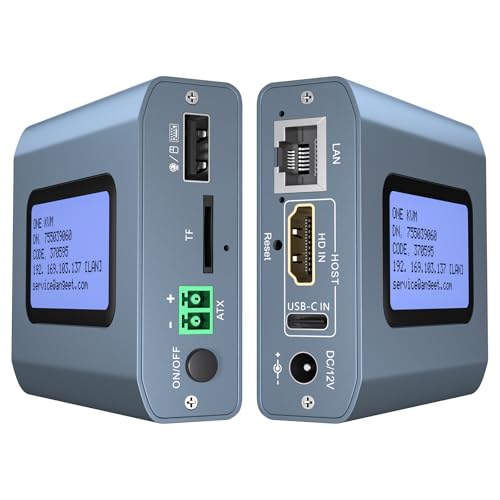
- Built-in ZeroTier simplifies cross-network access.
- 4K/60Hz video with low latency supports BIOS-level control.
- Web, app, and desktop power control options add flexibility.
Best For: Remote admins and power users who want secure, low-latency hardware access without complex VPN setup.
Best for Open-Source Tinkerers
JetKVM Remote IP KVM with Cloud Access

- 1080p/60fps video with low 30–60ms latency
- Local browser, cloud, and Wake-on-LAN access
- Open-source platform with expansion support
Best For: Home lab users, developers, and IT pros who want a customizable remote KVM.
Best for PoE Remote Access

- PoE or USB-C power for flexible installation
- Built-in Tailscale for secure remote access
- 4K@30Hz video with low-latency troubleshooting
Best For: People managing home labs, servers, or office PCs who want easy PoE-powered remote KVM access.
Best for Open-Source Control

- Open-source KVM with BIOS-level access
- 1080p/60FPS streaming with low latency
- Built-in touchscreen for local status monitoring
Best For: IT admins and home lab users who want hardware-level remote access without software installs.
Best for BIOS-First Remote Access
JetKVM IP KVM with Touchscreen

- BIOS-level access with no software fees
- 1080p 60FPS streaming with low latency
- Built-in LCD touchscreen for quick status checks
Best For: Home labs, small offices, and admins who need remote BIOS access and open-source flexibility.
Best for BIOS-Level Remote Control – GL.iNet Comet GL-RM1 Remote KVM
If you need a kvm over ip switch for remote pc access that can handle real troubleshooting, the GL.iNet Comet GL-RM1 is built for BIOS-level control, OS installs, and always-on access without extra software on the target machine. It’s a practical fit for home offices, IT support, and small server setups where reliable remote reboot and file transfer matter.
Best For: IT admins, power users, and remote workers who need hardware-based control for desktops, laptops, or servers.
Pros:
- BIOS access and remote reboot support make recovery and OS installs much easier.
- 4K@30Hz video with low latency delivers a sharp, responsive remote viewing experience.
- Tailscale support and app-based setup help simplify remote access anywhere.
- Works without installing software on the controlled computer.
Cons:
- Not ideal if you only need basic screen sharing or lightweight remote desktop access.
- PD adapters cannot be used, which may limit some power setups.
- Hardware KVM pricing is typically higher than software-only alternatives.
This is a strong pick if your kvm over ip switch for remote pc access needs to go beyond convenience and into true maintenance, recovery, and offline management. It trades simplicity for control, but that’s exactly what makes it valuable for demanding remote-admin tasks.
Best for Failover Recovery – GL.iNet Comet 5G Remote KVM
If you need a kvm over ip switch for remote pc access that stays reachable when the primary network goes down, the GL.iNet Comet 5G is built for exactly that scenario. Its multi-WAN failover, browser-based console, and 5G RedCap backup make it a strong fit for IT teams that manage edge PCs, branch servers, and recovery-sensitive systems.
Best For: IT pros, MSPs, and lab admins who need reliable out-of-band access with automatic failover and remote recovery tools.
Pros:
- 5G RedCap plus Ethernet and Wi-Fi 6 failover helps keep remote access alive during outages.
- Browser-based KVM access works on Windows, macOS, and Linux without client software.
- Built-in 64GB eMMC supports OS images, ISOs, and disaster-recovery workflows.
- Touchscreen, HDMI passthrough, and low-latency H.264 encoding add day-to-day convenience.
Cons:
- More advanced than a basic KVM, so casual users may not need all the features.
- 5G RedCap benefits depend on carrier support and coverage.
- Premium capabilities likely put it above entry-level KVM options.
For buyers who value redundancy over simplicity, this stands out as a kvm over ip switch for remote pc access that is designed for outages, recovery, and hands-on maintenance from anywhere.
Best for ZeroTier Remote Access – Remote KVM Over IP 4K Control Switch
If you need a kvm over ip switch for remote pc access without installing extra software on the target machine, this IP KVM is built for that workflow. It combines 4K/60Hz video, low-latency control, web and app access, and built-in ZeroTier for easier cross-network use, making it a practical option for remote IT, homelab, or off-site admin tasks.
Best For: Users who want secure remote keyboard, video, and mouse control with built-in ZeroTier and remote power features for desktop PCs.
Pros:
- Built-in ZeroTier helps avoid complex port forwarding or VPN setup.
- 4K at 60Hz with low latency is strong for remote troubleshooting and BIOS access.
- Web login and app access make it flexible across Windows, macOS, Linux, and Android.
- Remote power on/off support adds convenience for desktop management.
Cons:
- Remote power control is desktop-only and does not work with laptops.
- ZeroTier requires an online upgrade step before use.
- Setup is more involved than a simple remote desktop app.
For buyers comparing a kvm over ip switch for remote pc access, this model stands out for network flexibility and BIOS-level control rather than software-based convenience. It is a strong fit when you need direct hardware access from anywhere and want fewer networking headaches.
Best for Open-Source Tinkerers – JetKVM Remote IP KVM with Cloud Access
JetKVM is a strong kvm over ip switch for remote pc access if you want low-latency 1080p/60fps control, flexible access options, and a platform you can actually customize. It works through HDMI and USB-C, offers browser-based local access, optional cloud access, and Wake-on-LAN, making it a practical fit for home labs, small offices, and recovery scenarios.
Best For: Home lab users, developers, and IT pros who want an open-source IP KVM with remote rescue features and expansion potential.
Pros:
- 1080p at 60fps with low 30–60ms latency for responsive remote use
- Multiple access paths: local browser, cloud dashboard, and Wake-on-LAN
- Open-source design with SSH-friendly customization and expansion support
- Flexible power and extension options for ATX, DC, and serial use cases
Cons:
- Best suited to users comfortable with a more technical setup
- Cloud features are optional, but some buyers may prefer a simpler plug-and-play experience
For buyers comparing a kvm over ip switch for remote pc access, JetKVM stands out by combining smooth video, remote recovery tools, and open-source flexibility in one compact unit. If you value control, tinkering, and future expandability, it is one of the most versatile picks in this category.
Best for PoE Remote Access – GL.iNet Comet PoE KVM
If you want a kvm over ip switch for remote pc access that’s easy to power and simple to reach from anywhere, the GL.iNet Comet PoE is a practical pick. PoE support reduces cable clutter, while Tailscale and browser-based access make it well suited to home labs, office gear, and remote troubleshooting.
Best For: Users who want a flexible remote KVM with PoE convenience, secure network access, and support for mixed local/remote workflows.
Pros:
- PoE or USB-C power options help simplify installation and improve flexibility.
- Built-in Tailscale support makes secure remote access easier to set up.
- 4K@30Hz video with low-latency H.264 is useful for clear remote troubleshooting.
- 32GB eMMC storage adds room for system images and recovery workflows.
Cons:
- Some advanced remote power features require extra accessories like ATX Board or Fingerbot.
- Not the cheapest option if you only need basic KVM access.
- Remote setup may be more than casual users need.
Overall, this is a strong fit if you need a kvm over ip switch for remote pc access with cleaner wiring, secure networking, and a more polished remote-management feature set than basic models.
Best for Open-Source Control – JetKVM IP KVM Remote Control
If you want a kvm over ip switch for remote pc access that goes beyond basic screen sharing, JetKVM stands out with browser-based BIOS-level control, low-latency 1080p streaming, and built-in touchscreen status monitoring. It’s designed for hands-off administration of PCs, servers, and mini PCs without installing software on the target machine.
Best For: IT admins, home lab users, and remote workers who want open-source, hardware-level access to a Windows, Mac, Linux, or Raspberry Pi system.
Pros:
- BIOS-level remote access with no software or recurring fees
- 1080p/60FPS H.264 streaming with claimed 30-60ms latency
- Open-source platform with SSH access and customization options
- Built-in LCD touchscreen for quick local status checks
Cons:
- Advanced feature set may be more than casual users need
- Some power-control accessories are sold separately
- Best experience depends on a stable network connection
For buyers comparing a kvm over ip switch for remote pc access, JetKVM’s mix of open-source flexibility, remote BIOS control, and free cloud connectivity makes it especially appealing for pros who want more control than a typical remote desktop solution.
Best for BIOS-First Remote Access – JetKVM IP KVM with Touchscreen
If you need a kvm over ip switch for remote pc access that can handle BIOS-level work, OS installs, and day-to-day troubleshooting without being on site, JetKVM is a strong fit. It combines browser-based control with a built-in touchscreen for quick status checks, plus low-latency video for more responsive remote input.
Best For: Home labs, small offices, and admins who want remote BIOS access, open-source flexibility, and free cloud connectivity.
Pros:
- BIOS-level access with plug-and-play remote control and no software fees
- 1080p 60FPS streaming with low latency for smoother mouse and keyboard control
- Built-in LCD touchscreen for local status monitoring
- Open-source platform with SSH access and hardware expansion support
Cons:
- Advanced features may be more than casual users need
- Some power-control accessories are sold separately
For buyers who prioritize direct BIOS access and flexible remote management, JetKVM stands out as a capable kvm over ip switch for remote pc access. Its free cloud path, open-source design, and responsive video make it especially useful when you need reliable control over PCs, mini PCs, or servers from anywhere.
How We Picked the Best Kvm Over Ip Switch for Remote PC Access
We prioritized real-world remote management needs: stable video capture, responsive keyboard and mouse input, BIOS-level access, and dependable connectivity. We also looked at power options, passthrough and switching behavior, support for tools like Tailscale or ZeroTier, and whether each unit is practical for home labs, small offices, or always-on server racks.
Quick Comparison
The main differences come down to bandwidth, latency, and resilience. Higher-end models with 4K output are better if you need sharper text and more usable desktop space, while 1080p models can still be excellent for headless servers and command-line work. If uptime matters, consider PoE, dual power, or cellular/Wi-Fi failover. If you want simpler deployment, look for built-in remote access software and an intuitive touchscreen or web interface.
Key Buying Factors for a Kvm Over Ip Switch for Remote PC Access
Video Resolution and Latency
For general administration, 1080p is often enough. If you work with multiple windows, small UI elements, or high-DPI systems, 4K capture can make remote work much easier. Low latency matters more than peak resolution when you are typing in BIOS, dragging windows, or diagnosing boot issues.
Network Connectivity and Failsafes
A good Kvm Over Ip Switch for Remote PC Access should stay reachable even when the main OS is down. Look for Ethernet as the baseline, then decide whether you need PoE for cleaner cable management, Wi-Fi for flexibility, or 5G/failover for backup connectivity.
Power Control and Out-Of-Band Access
Remote power cycling, wake functions, and BIOS-level control are critical when a machine freezes or fails to boot. If you manage unattended systems, these features are often more valuable than extra visual polish.
Software, Security, and Remote-Tunnel Support
Support for secure remote access tools can simplify use outside your local network. If you plan to manage devices across multiple locations, favor models that integrate cleanly with your preferred networking setup and keep credentials, firmware, and access controls easy to manage.
Who Should Buy Which Kvm Over Ip Switch for Remote PC Access?
Choose a 4K model if you want the best clarity for desktop work, OS installation, or multi-monitor-adjacent workflows. Pick a 1080p option if your focus is server maintenance, BIOS access, and dependable basic control. Go with PoE if you want cleaner installs, 5G or failover if uptime is mission-critical, and open-source-friendly models if you prefer flexibility and community support.
For most buyers, the best choice is the one that matches your network environment first and your video resolution second. A well-chosen Kvm Over Ip Switch for Remote PC Access should be boring in the best way: easy to reach, quick to respond, and ready when the machine itself is not.
