
As you explore the evolving landscape of KVM over IP solutions for remote servers in 2026, you’ll find a range of options tailored for secure and efficient management. From advanced features like BIOS-level access to cutting-edge security protocols, these devices are designed to enhance your remote access experience. Curious about which solutions stand out and what factors to evaluate when making your choice? Let’s uncover the top contenders that could meet your needs.
StarTech.com Portable Laptop Crash Cart Adapter

If you’re looking for a compact and efficient way to troubleshoot legacy systems, the StarTech.com Portable Laptop Crash Cart Adapter is your best choice. Weighing only 0.17 kg and measuring 5.2 x 2.9 x 0.6 inches, it’s incredibly portable. This adapter connects your laptop to various legacy systems, offering instant BIOS/UEFI control via USB/VGA ports. You can transfer files, capture screenshots, and even record video at a resolution of 1920 x 1200 @ 60Hz. Plus, it’s self-powered, so you won’t need an AC outlet. With included cables and lifetime technical support, setup is a breeze.
Best For: IT professionals and technicians who need a portable solution for troubleshooting legacy systems.
Pros:
- Compact and lightweight design for easy transport.
- Supports bi-directional file transfers and video capture at high resolution.
- Self-powered via USB connection, eliminating the need for an AC outlet.
Cons:
- Limited compatibility with some systems based on firmware restrictions.
- Linux compatibility is restricted to standard QWERTY keyboards in U.S. English configuration.
- Requires latest drivers and software for optimal functionality.
TinyPilot Voyager 3 KVM Over IP Console Server

The TinyPilot Voyager 3 KVM Over IP Console Server is an ideal choice for IT professionals and remote teams who need seamless access to servers without the hassle of complex setups. Weighing just 2 pounds and measuring 14 x 7 x 2 inches, it’s compact and user-friendly. With zero-hassle setup and Tailscale compatibility, you can get started in mere clicks. The bright LCD screen and HDMI passthrough simplify management, while multi-user support allows up to eight simultaneous connections. Enjoy full BIOS-level access and virtual media support for updates and recovery, all while ensuring secure, zero-trust access.
Best For: IT professionals and remote teams seeking efficient and secure access to servers without complex setups.
Pros:
- Zero-hassle setup allows for quick installation and easy use with Tailscale compatibility.
- Supports up to 8 simultaneous remote users, making it ideal for collaborative environments.
- Provides full BIOS-level access and virtual media support for effective server management and recovery.
Cons:
- Limited customer feedback with only one review, which may not provide a comprehensive view of user experiences.
- The product may not have extensive warranty details readily available.
- Its size and weight, while compact, may still be less portable compared to other lightweight alternatives on the market.
GL.iNet Comet Remote KVM Over Internet (GL-RM1)

For IT professionals and remote workers seeking seamless control over their devices, the GL.iNet Comet Remote KVM Over Internet (GL-RM1) stands out with its exceptional 4K resolution at 30Hz. Weighing just 85 grams and measuring 3.15L x 2.36W x 0.68H inches, it’s compact and easy to use. You can remotely reboot systems, install operating systems via BIOS, and power on devices without being physically present. Its universal compatibility means no extra software is needed, ensuring a hassle-free connection. Plus, file transfer is instant, making it perfect for efficient remote management and technical support. Enjoy crystal-clear visuals and low latency!
Best For: IT professionals, remote workers, and anyone needing seamless access to their devices from afar.
Pros:
- Universal Compatibility: No additional software is required for connection, making setup hassle-free.
- High Resolution: Offers crystal-clear visuals at 4K@30Hz for an enhanced remote experience.
- Compact Design: Lightweight and small dimensions make it easy to transport and use in various settings.
Cons:
- Limited Resolution at 30Hz: Some users may prefer higher refresh rates for smoother visuals.
- Dependence on Internet Connection: Performance can be affected by network speed and stability.
- Button Control Only: Lacks more advanced control methods which may be preferred by some users.
StarTech.com HDMI KVM Extender Over IP Network

StarTech.com’s HDMI KVM Extender Over IP Network is an ideal solution for professionals needing to control computers remotely with precision and ease. With support for stunning 4K resolution at 60Hz, you can maintain image quality even over distances of up to 330ft using Ethernet or CAT6. Enjoy driverless operation—no configuration hassles—and seamless compatibility across various platforms. Plus, the durable metal housing guarantees stability in demanding environments. Expand your setup with additional IP KVM receivers, and benefit from local HDMI output, RS232, and audio passthrough. Experience efficient control and management with this robust KVM extender.
Best For: Professionals and businesses needing reliable remote access to computers in industrial or demanding environments.
Pros:
- Driverless operation simplifies setup with no configuration needed across multiple platforms.
- Supports 4K 60Hz resolution for high-quality video output, even at long distances.
- Durable metal housing ensures stability and longevity, making it ideal for rigorous use.
Cons:
- Additional IP KVM receivers must be purchased separately for expanding setups.
- Limited to 330ft distance which may not be sufficient for larger installations.
- Wattage of 50 watts may require careful management in low-power environments.
ONEKVM Wi-Fi Remote KVM Over IP Internet
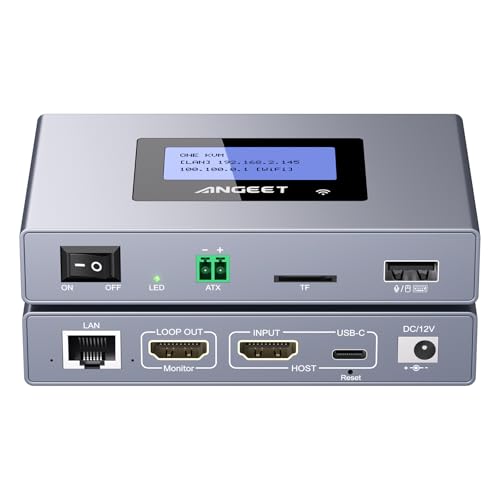
Designed for IT professionals and remote workers, the ONEKVM Wi-Fi Remote KVM Over IP solution offers seamless access to computers and servers without the hassle of extra software or drivers. It’s compatible with various systems, including Windows, macOS, and Linux, supporting 4K resolution with minimal delay. You can connect via 2.4 GHz or 5 GHz Wi-Fi, or Ethernet, ensuring flexibility. The integrated ZeroTier enhances security for remote access, while remote power control simplifies management. With multi-functional features like file transfer and BIOS OS installation support, ONEKVM makes remote server management efficient and straightforward, all backed by a one-year warranty.
Best For: IT professionals and remote workers seeking efficient and secure remote access to computers and servers.
Pros:
- Seamless compatibility with multiple operating systems including Windows, macOS, and Linux.
- Supports 4K resolution with minimal delay, enhancing visual clarity during remote sessions.
- Integrated ZeroTier allows for secure P2P remote access without complex configurations.
Cons:
- May require initial setup for networking, which could be challenging for non-technical users.
- Limited to a 1-year warranty, which may not be sufficient for some users.
- Some advanced features may require additional configuration or understanding of networking principles.
Lantronix Integrated KVM-over-IP Solution for Remote Equipment

The Lantronix Integrated KVM-over-IP Solution stands out as an ideal choice for IT professionals who require seamless remote server management. With its model number SLS200USB0-02, this cost-effective solution offers secure BIOS-level control over an IP network. You’ll enjoy virtual media support and browser-based access without needing client software. Its zero U rackmount kit allows for easy installation, while CAT5 connectivity eliminates cable restrictions. Compatible with various servers and PCs, it features essential ports and a straightforward setup. Plus, you can rely on a 30-day return policy from Amazon for added peace of mind.
Best For: IT professionals seeking a reliable and cost-effective solution for seamless remote server management.
Pros:
- Supports secure, non-blocked BIOS-level control over an IP network.
- Browser-based access eliminates the need for client software, simplifying usability.
- Scalable add-as-you-grow solution, allowing for easy expansion as needs increase.
Cons:
- Limited to PS/2 or USB keyboard/mouse compatibility, which may not suit all setups.
- Requires CAT5 cables, which may necessitate additional purchases for some users.
- Operating temperature range may limit use in extreme environments.
GL.iNet Comet PoE Remote KVM Control (GL-RM1PE)

For IT professionals and remote workers seeking seamless access to their servers, the GL.iNet Comet PoE Remote KVM Control (GL-RM1PE) stands out with its impressive 4K video support and dual power options. You’ll appreciate its Power over Ethernet capability, reducing cable clutter while ensuring stability with simultaneous power sources. Enjoy ultra-clear, low-latency video streaming thanks to H.264 hardware encoding, along with built-in two-way audio for effective communication. Compatibility with Windows, macOS, and Linux via the GLKVM app and Tailscale makes access easy. Plus, the 32GB eMMC storage allows for quick updates, enhancing your remote management experience.
Best For: IT professionals and remote workers seeking seamless and efficient access to their servers with high-quality video and audio capabilities.
Pros:
- Supports ultra-clear 4K video streaming with low latency, enhancing remote monitoring and troubleshooting.
- Power over Ethernet (PoE) reduces cable clutter while providing stable power options.
- Compatible with multiple operating systems (Windows, macOS, Linux) for flexible access.
Cons:
- Requires a PoE switch for optimal use, which may be an additional cost for some users.
- Limited built-in storage (32GB) may not be sufficient for extensive data or applications.
- Potential learning curve for users unfamiliar with remote KVM technology or setup.
Voyager 3 Plus | KVM Over IP & Console Server (PoE)

With its bright LCD screen and support for up to eight simultaneous remote users, the Voyager 3 Plus KVM Over IP & Console Server (PoE) stands out as an ideal choice for IT professionals managing multiple servers from a distance. You’ll appreciate the zero-hassle setup—no software installs needed—and the HDMI passthrough for non-blocking operation. Plus, you get full BIOS-level access and tiered account control, allowing unlimited accounts with distinct roles. Its built-in console server makes remote management of switches and firewalls a breeze. With virtual media support and Zero Trust compatibility, security is a top priority for your operations.
Best For: IT professionals looking for a reliable and efficient solution for remote server management and collaboration.
Pros:
- Up to 8 simultaneous remote users allows for effective multi-user collaboration.
- Zero-hassle setup requires no software installation, making it easy to get started quickly.
- Full BIOS-level access provides control over the server even before the operating system loads.
Cons:
- Limited to 8 users, which may not be sufficient for larger teams or environments.
- Dependent on PoE, which requires compatible power infrastructure.
- Initial cost may be higher compared to simpler KVM solutions.
StarTech.com HDMI KVM Receiver Over IP Network (Receiver Only)

Designed for professionals needing seamless remote access to their systems, the StarTech.com HDMI KVM Receiver offers outstanding 4K 60Hz resolution for crystal-clear video. This plug-and-play device requires no drivers, making it easy to set up with Windows, macOS, Linux, and more. Its durable metal housing supports wall or under-desk installation, ensuring stability in various environments. With an RS232 port for serial extension and 3.5mm audio passthrough, you can efficiently manage audio alongside video. Plus, you can expand your setup by adding multiple receivers, making it a flexible choice for your growing business needs.
Best For: Professionals seeking seamless remote access to their systems with high-resolution video and flexible installation options.
Pros:
- Plug-and-play design allows for easy setup without needing drivers or software.
- Supports 4K 60Hz resolution for exceptional video quality, ideal for detailed visual work.
- Expandable setup by adding multiple receivers, catering to growing business needs.
Cons:
- Receiver only; requires a separate KVM switch for full functionality.
- Limited dimensions and weight may not be ideal for all installation types.
- Audio passthrough may not support all audio formats or devices.
GL.iNet Comet Pro Remote KVM Over Wi-Fi (GL-RM10)

The GL.iNet Comet Pro Remote KVM Over Wi-Fi (GL-RM10) is ideal for IT professionals and remote workers who need seamless access to their servers from anywhere. With dual-band Wi-Fi 6 connectivity, you’ll enjoy reliable performance. The 4K@30FPS video passthrough and two-way audio enhance your remote experience. You can manage devices running Windows, macOS, Linux, and mobile platforms effortlessly through the GLKVM app or web-based control. Its compact design and built-in touchscreen make operation intuitive. Plus, features like BIOS access and WireGuard encryption guarantee secure and efficient management, making it a top choice in KVM solutions.
Best For: IT professionals and remote workers who require seamless access to their servers from any location.
Pros:
- Offers dual-band Wi-Fi 6 connectivity for reliable performance.
- Features 4K@30FPS video passthrough and two-way audio for an enhanced remote experience.
- Allows remote management of multiple operating systems through the GLKVM app and web-based control.
Cons:
- Limited to a compact design which may not accommodate additional ports or features.
- Requires a stable internet connection for optimal performance, which may not be available in all locations.
- May have a learning curve for users unfamiliar with KVM technology or remote management tools.
Factors to Consider When Choosing KVM Over IP Solutions for Remote Servers
When you’re choosing a KVM over IP solution for remote servers, it’s essential to take into account several key factors. Think about the resolution and video quality you need, as well as the remote access features that will enhance your experience. Additionally, make sure the solution is compatible with your devices and offers robust security measures for peace of mind.
Resolution and Video Quality
Choosing the right resolution and video quality for KVM over IP solutions can greatly impact your remote server experience. High resolutions, like 4K (3840×2160) at 60Hz, deliver superior detail, making them perfect for graphic-intensive applications. If your tasks are more basic, lower resolutions such as 1920×1200 at 60Hz might suffice, but they won’t offer the same clarity. Latency plays a significant role too; solutions with lower latency provide a more responsive feel, enhancing your control experience. Additionally, features like HDMI passthrough and virtual media can improve video output and file management. Finally, verify compatibility with your operating systems and hardware, as this will influence the video quality and resolution options available to you.
Remote Access Features
How can you guarantee seamless remote management of your servers? Look for KVM over IP solutions that offer full BIOS-level access, allowing you to manage servers even before the operating system loads. This feature is vital for troubleshooting and maintenance. Additionally, verify the solution supports remote power control, so you can power machines on or off without being physically present. Virtual media support lets you mount ISO images or files for updates and installations remotely. Consider solutions that enable multi-user collaboration, allowing simultaneous access for team members during management tasks. Finally, evaluate the ease of setup, opting for options that require no client software for quicker deployment and reduced technical barriers.
Compatibility With Devices
To guarantee your KVM over IP solution integrates smoothly with your existing infrastructure, it’s essential to evaluate its compatibility with various devices and operating systems. Ascertain the solution supports a range of systems like Windows, macOS, and Linux, accommodating diverse server environments. Check for compatibility with different device types, including desktops, laptops, and servers, to maintain versatility. It’s also vital to reflect on video resolutions and formats, such as 4K at various refresh rates, for high-quality visual output. Don’t forget to verify support for specific connection types like HDMI, VGA, or USB to guarantee seamless integration. Finally, look for universal compatibility that doesn’t require additional software installations, simplifying setup across multiple devices.
Power Options and Management
Power options and management are crucial factors when evaluating KVM over IP solutions for remote servers. You’ll want to check if the solution supports Power over Ethernet (PoE) to reduce cable clutter and simplify installation. Models with dual power options provide flexibility, allowing you to power devices using both PoE and traditional adapters, enhancing stability. The ability to remotely power on or off connected devices makes management and troubleshooting easier. Additionally, look for solutions that feature built-in storage for quick device restoration and updates, which is essential for effective power management. Finally, verify compatibility with various power management extensions like ATX boards or smart power devices to maintain thorough control over your connected equipment.
Security and Encryption
When selecting a KVM over IP solution for remote servers, security and encryption should be at the forefront of your decision-making process. Look for systems that offer end-to-end encryption methods like TLS or SSH to protect data transmitted over networks. Implementing a Zero Trust architecture guarantees every access request is thoroughly vetted, minimizing vulnerabilities. Multi-user collaboration features with tiered access controls let you define roles and permissions, enhancing security by limiting access to sensitive functions. Additionally, Virtual Media support allows for secure remote installations and updates without physical access, protecting against unauthorized interventions. Regular firmware updates and secure VPN connections are vital for maintaining the integrity of your KVM over IP system against evolving cyber threats.
User Access Control
Selecting a KVM over IP solution involves not only securing the connection but also managing who gets access to your remote servers. User access control is essential for defining roles like Admin or Operator, guaranteeing each user has appropriate permissions. Multi-user collaboration features can enhance efficiency, but you need robust controls to prevent unauthorized actions. Opt for tiered account control to support unlimited user accounts with varying access levels, maintaining security while offering flexibility. Implement secure access protocols, such as Zero Trust, to guarantee only authenticated users can access sensitive functions. Finally, thorough logging and monitoring of user activities will help you identify access patterns and potential security threats, keeping your remote server environment secure.
