
If you need portable storage that treats security as the priority, Kingston IronKey USB drives are built for exactly that job. They combine hardware encryption, password controls, and business-friendly compliance features in compact flash drives.
This roundup focuses on the best options for protecting sensitive files at work, on the move, or in regulated environments. Use it to narrow down the right capacity, connector, and certification level for your needs.
Best 10 Kingston Ironkey USB Drives Picks for 2026
Best for Encrypted Work Files
IronKey Locker+ 50 64GB USB Flash Drive

- Hardware-encrypted storage for sensitive files
- Durable metal design for daily portability
- Multi-password access helps manage shared use
Best For: Professionals who need compact encrypted storage for confidential work files.
Best for High-Security Access
Kingston IronKey Keypad 200 32GB

- XTS-AES 256-bit hardware encryption
- PIN access with admin and user modes
- Brute-force, BadUSB, and tamper protection
Best For: Sensitive files and users who want PIN-only, hardware-encrypted storage.
Best for Maximum Data Security
Kingston IronKey D300SM 16GB USB 3.1

- 256-bit AES hardware encryption
- FIPS 140-2 Level 3 certified
- Rugged, tamper-evident metal design
Best For: IT admins and regulated teams that need secure, trackable storage.
Best for Hardware-Level Protection
Kingston IronKey Vault Privacy 50 16GB

- FIPS 197 certified with XTS-AES 256-bit encryption
- BadUSB and brute-force attack protection
- Multi-password and read-only mode options
Best For: People who need a secure encrypted USB drive for sensitive data and business use.
Best for Hardware Encryption
Kingston IronKey Keypad 200 512GB USB Drive

- XTS-AES 256-bit hardware encryption
- FIPS 140-3 Level 3 (pending) security target
- Admin/user PINs plus read-only modes
Best For: Security-conscious users who need portable encrypted storage with PIN access controls.
Best for Admin-Controlled Encryption
Kingston IronKey Locker+ 50 G2 32GB

- XTS-AES 256-bit hardware encryption
- FIPS 197 certified for added trust
- Admin and user multi-password support
Best For: Users who need a portable encrypted USB drive with controlled access and compliance-friendly security.
Best for Comfort
Kingston IronKey Keypad 200 16GB Encrypted USB
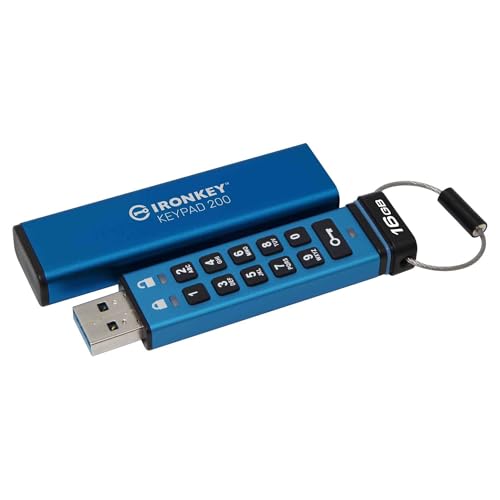
- XTS-AES 256-bit hardware encryption
- Alphanumeric keypad with admin/user PINs
- Brute-force and BadUSB protection
Best For: People who need a secure, PIN-protected USB drive for sensitive files.
Best for High-Security Data

- Hardware encryption with on-device cryptochip
- FIPS 140-2 Level 3 validation
- Rugged aluminum casing with multi-password options
Best For: Security-conscious users who need a rugged encrypted USB drive for confidential files.
Best for Multi-User Security
Kingston IronKey Locker+ 50 G2 256GB
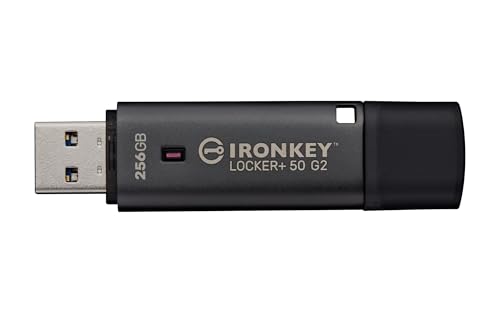
- FIPS 197 certified with XTS-AES 256-bit hardware encryption
- Admin and user passwords for controlled access
- USB 3.2 Gen 1 with up to 145MB/s read speeds
Best For: Businesses and security-conscious users who need encrypted portable storage with multi-user controls.
Best Simple Pick
Kingston IronKey Keypad 200 USB-C 16GB
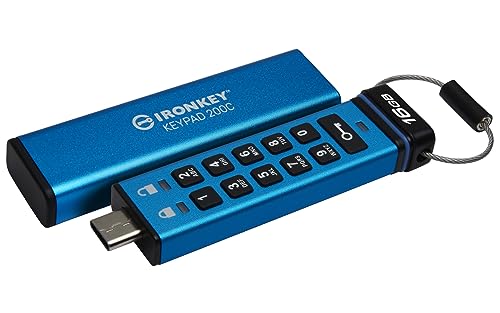
- FIPS 140-3 Level 3 pending with 256-bit hardware encryption
- PIN keypad access with multi-PIN support and read-only mode
- BadUSB, brute force, and tamper-evident protection
Best For: IT teams and security-conscious users who need portable encrypted storage.
Best for Encrypted Work Files – IronKey Locker+ 50 64GB USB Flash Drive
If you need a secure, portable drive for sensitive documents, the Kingston IronKey Locker+ 50 is a smart fit among kingston ironkey usb drives. It combines hardware encryption, multi-password access options, and a durable metal body, making it a practical choice for everyday business or compliance-focused use.
Best For: Professionals, teams, and anyone who needs easy-to-manage encrypted storage for confidential files.
Pros:
- XTS-AES hardware encryption for stronger data protection
- Metal casing feels sturdy enough for daily carry
- Multi-password security options help separate user access
- USB 3.2 Gen 1 support keeps transfers straightforward
Cons:
- Security features add complexity compared with basic flash drives
- 64GB capacity may be limiting for larger media libraries
- Priced higher than non-encrypted USB drives
For buyers comparing kingston ironkey usb drives, this model stands out for balancing practical security features with a simple plug-and-use workflow. It is less about raw storage value and more about protecting files that matter.
Best for High-Security Access – Kingston IronKey Keypad 200 32GB
If you need a lockable, hardware-encrypted option among kingston ironkey usb drives, the IronKey Keypad 200 stands out for password-based access and tough tamper resistance. It’s built for users who want strong data protection without relying on software or a host machine to unlock the drive.
Best For: Sensitive files, regulated environments, and anyone who wants PIN-only access with serious physical security.
Pros:
- XTS-AES 256-bit hardware encryption with FIPS 140-3 Level 3 (pending) certification
- Alphanumeric keypad supports admin and user PINs for flexible access control
- Brute-force protection and digitally signed BadUSB defense add extra peace of mind
- Tamper-evident, epoxy-sealed design helps protect the internal components
Cons:
- Slower and less convenient than plug-and-play drives for casual file transfers
- Requires PIN entry, so it is not ideal for quick shared use
- 32GB capacity may feel limited if you store large media libraries
This is one of the more security-focused kingston ironkey usb drives, making it a smart fit when protection matters more than simplicity or speed. If your priority is controlled access and strong tamper resistance, it’s an easy drive to shortlist.
Best for Maximum Data Security – Kingston IronKey D300SM 16GB USB 3.1
If you need kingston ironkey usb drives for sensitive business files, this 16GB IronKey D300SM is built around security first. It combines 256-bit AES hardware encryption, FIPS 140-2 Level 3 certification, and tamper-resistant construction, making it a strong fit for compliance-focused teams.
Best For: IT admins, regulated workplaces, and anyone who needs a rugged encrypted flash drive for confidential data.
Pros:
- 256-bit AES hardware encryption with on-drive protection
- FIPS 140-2 Level 3 certified for high-security use cases
- Rugged zinc casing with tamper-evident design
- Managed model adds serial-number tracking for asset control
Cons:
- 16GB capacity is modest for large file libraries
- Security features make it more expensive than standard USB drives
- Best suited to protection, not everyday value shopping
This is one of the more security-heavy kingston ironkey usb drives, so it makes the most sense when compliance, privacy, and device accountability matter more than raw storage size.
Best for Hardware-Level Protection – Kingston IronKey Vault Privacy 50 16GB
If you want kingston ironkey usb drives with serious data protection, the Vault Privacy 50 is built for secure everyday use. It combines FIPS 197 certification, XTS-AES 256-bit encryption, and anti-tamper defenses with practical transfer speeds for files you still need to move quickly.
Best For: Users who need a highly secure encrypted USB drive for business files, sensitive documents, or regulated environments.
Pros:
- FIPS 197 certified with XTS-AES 256-bit encryption
- Helps defend against brute force and BadUSB attacks
- Multi-password support with complex and passphrase modes
- Read-only modes add an extra layer of file protection
Cons:
- More expensive than basic flash drives
- Security features add setup and password management steps
- Not the best choice if you just need a simple plug-and-play drive
For buyers comparing kingston ironkey usb drives, this model stands out for combining strong encryption, attack protection, and flexible access controls in one compact drive. It is a smart pick when security matters more than having the lowest price.
Best for Hardware Encryption – Kingston IronKey Keypad 200 512GB USB Drive
If you want one of the more security-focused kingston ironkey usb drives, the IronKey Keypad 200 is built for locked-down data transport. It combines XTS-AES 256-bit hardware encryption with FIPS 140-3 Level 3 (pending) certification, plus OS-independent use so it works without special software on most systems.
Best For: Users who need portable, hardware-encrypted storage with PIN-based access and read-only control options.
Pros:
- Hardware encryption with FIPS 140-3 Level 3 (pending) security positioning
- Multi-PIN support for separate admin and user access
- Global and session read-only modes add extra control over file access
- OS/device independent design keeps setup simple across different machines
Cons:
- Security-first design means it is less convenient than a basic plug-and-play flash drive
- Type-A connection may require an adapter for newer USB-C-only devices
For buyers comparing kingston ironkey usb drives, this model stands out when security policy matters more than speed or convenience. It is a practical pick for sensitive files, shared work environments, and users who want strong access controls on a portable drive.
Best for Admin-Controlled Encryption – Kingston IronKey Locker+ 50 G2 32GB
If you want a secure, easy-to-manage drive in the kingston ironkey usb drives lineup, the IronKey Locker+ 50 G2 is built for protecting sensitive files without adding much hassle. It combines hardware-based AES-XTS encryption, FIPS 197 certification, and multi-password access controls, making it a strong fit for business users and anyone handling private data.
Best For: Users who need a portable encrypted USB drive with admin/user access controls and strong compliance-friendly security.
Pros:
- XTS-AES 256-bit hardware encryption helps keep data protected on the device.
- FIPS 197 certification adds reassurance for security-focused buyers.
- Multi-password admin and user options offer flexible access management.
- USB 3.2 Gen 1 speeds are solid for everyday encrypted file transfers.
Cons:
- 32GB capacity may be limiting for large media libraries or backups.
- Security-focused design can feel more complex than a basic flash drive.
For buyers comparing kingston ironkey usb drives, this model stands out for balancing practical speed with serious security features. It is a sensible choice when controlled access matters more than maximum storage or the lowest price.
Best for Comfort – Kingston IronKey Keypad 200 16GB Encrypted USBIf you want one of the more security-focused kingston ironkey usb drives, this model stands out for its hardware encryption, keypad-based PIN access, and tough defense against brute-force and BadUSB attacks. It’s a practical choice when you need portable storage that keeps sensitive files locked down without depending on software on the host computer.
Best For: Users who need a rugged, PIN-protected encrypted drive for sensitive business, government, or personal files.
Pros:
- XTS-AES 256-bit hardware encryption helps protect data at rest.
- Alphanumeric keypad with admin and user PIN support adds flexible access control.
- FIPS 140-3 Level 3 certification target and anti-tamper security features improve trust.
- OS/device-independent design makes it easy to use across different systems.
Cons:
- Security features make it more expensive than basic USB drives.
- Keypad PIN entry can be slower than plug-and-play flash drives.
- 16GB capacity is modest if you need large file storage.
For buyers comparing kingston ironkey usb drives, this one is a strong fit when security matters more than speed or storage size. It’s especially appealing for anyone who wants straightforward encrypted access with built-in physical PIN protection.
Best for High-Security Data – Kingston IronKey S1000 64GB
If you need one of the most security-focused kingston ironkey usb drives, the Kingston IronKey S1000 is built for sensitive data, compliance-minded workflows, and users who want hardware-level protection instead of basic file encryption.
Best For: Professionals and teams that need a rugged encrypted USB drive with FIPS 140-2 Level 3 validation and strong access controls.
Pros:
- On-device cryptochip and 256-bit AES XTS hardware encryption
- FIPS 140-2 Level 3 validation for stronger security requirements
- Multi-password support with either a complex password or long passphrase
- Digitally signed firmware helps protect against BadUSB-style attacks
Cons:
- Security-first design is overkill for casual everyday file transfers
- Higher cost than standard flash drives
- Requires password management discipline to avoid lockout issues
For buyers comparing kingston ironkey usb drives, this model stands out when the priority is protecting confidential files rather than maximizing convenience or low price. It’s a solid pick if you want a durable encrypted drive with serious enterprise-style safeguards.
Best for Multi-User Security – Kingston IronKey Locker+ 50 G2 256GB
If you want one of the more security-focused kingston ironkey usb drives, the IronKey Locker+ 50 G2 is built for locked-down file transport rather than basic everyday storage. It combines FIPS 197 certification with XTS-AES 256-bit hardware encryption, plus admin and user password modes for better control over who can access data.
Best For: Businesses, IT-managed environments, and anyone who needs a simple encrypted USB drive with multi-user access controls.
Pros:
- XTS-AES 256-bit hardware encryption with FIPS 197 certification
- Admin and user password options with complex/passphrase modes
- USB 3.2 Gen 1 performance for faster transfers than older secure drives
- 256GB capacity gives you room for documents, backups, and media
Cons:
- Security features add setup steps compared with a standard flash drive
- Not the fastest option if you prioritize raw speed over encryption
For buyers comparing kingston ironkey usb drives, this model stands out when security policy matters more than convenience. It’s a practical pick if you need encrypted portability, controlled access, and a trusted name for sensitive files.
Best Simple Pick – Kingston IronKey Keypad 200 USB-C 16GB
If you need one of the most security-focused kingston ironkey usb drives, the Keypad 200 stands out with hardware encryption, PIN-based access, and tamper-resistant design. It’s a practical fit for protecting sensitive files without relying on software or a specific operating system.
Best For: IT teams, compliance-focused users, and anyone who needs a portable drive with strong physical and data-level protection.
Pros:
- FIPS 140-3 Level 3 pending security with XTS-AES 256-bit encryption
- OS-independent operation with easy PIN entry on the keypad
- Brute force, BadUSB, and tamper-evident protections
- Multi-PIN support and read-only mode options
Cons:
- 16GB capacity is modest for large media libraries
- Security features add cost compared with basic flash drives
- Keypad workflow is less convenient than simple plug-and-play storage
For buyers comparing kingston ironkey usb drives, this model is more about security assurance than raw capacity or speed. If protecting data matters more than price, it’s a strong, business-ready choice.
How We Picked These Kingston Ironkey USB Drives
We focused on the features buyers actually rely on: hardware-based encryption, certified security standards, durable build quality, and practical capacity choices. We also looked for models with strong access controls such as multi-password support, keypad authentication, and protections against brute-force or BadUSB attacks.
Because Kingston Ironkey USB Drives are often used for business, government, and sensitive personal data, we gave extra weight to compliance markers like FIPS and TAA where they matter. Connectivity was another factor, since the right drive should match your laptop, desktop, or USB-C workflow without adapters.
Quick Comparison
Think of the lineup in simple terms: keypad models are best when you want standalone authentication, Locker+ drives suit users who want easier password-based access, and Vault Privacy or D300SM options appeal to buyers who want a more security-focused feature set. Higher-capacity drives are the better fit for media libraries or large archives, while smaller capacities are often enough for documents, keys, and portable backups.
Key Buying Factors for Kingston Ironkey USB Drives
Security Level
Look for hardware encryption first. AES-256 and XTS-AES are common on stronger models and are the baseline you want for confidential files. If your organization requires it, prioritize certified options rather than just encryption claims.
Authentication Method
Some users prefer a keypad for independent access without software dependence, while others will be fine with multi-password protection through a traditional USB drive. If multiple people may need access, check whether the drive supports admin and user roles or other multi-password workflows.
Compliance and Certification
For regulated use, check whether the drive lists FIPS 140-2 or FIPS 140-3, along with TAA compliance if procurement rules apply. These details matter more in enterprise, healthcare, legal, and public-sector settings.
Capacity and Connector
Choose capacity based on real storage needs, not just price. Smaller capacities work well for transportable documents and password-protected archives, while 32GB, 64GB, and 256GB models are better for larger backups and active file transfer. Also match the connector to your devices, especially if you use USB-C hardware regularly.
Who Should Buy Which Kingston Ironkey USB Drives?
If you want the easiest all-around choice, a Locker+ model is a strong fit. If you need the highest level of hands-on access control, pick a keypad-based drive. If compliance is your top concern, focus on the FIPS-certified options. And if you simply need more encrypted storage, choose the highest capacity model that still fits your budget and workflow.
For most buyers, the best Kingston Ironkey USB Drives are the ones that balance security, convenience, and compatibility with the devices you already use.
