
An iPad can be a useful second screen, reference display, or video-call device—if its stand puts it where you can comfortably see and reach it. The right choice depends on your desk space, preferred viewing height, and how often you move your setup.
These 10 stands cover compact folding holders, raised desktop designs, and rotating options. Use the buying guide below to narrow your choices by fit and function before checking the details of a particular model.
Best 10 Ipad Stands for Desksetups Picks for 2026
Best for Adjustable Height

- Adjustable arm and rotating base
- Fits 4.7–15.6-inch devices
- Cable clips and joint-tightening wrench
Best For: Flexible viewing on a flat, stable desk
Best for Larger Screens
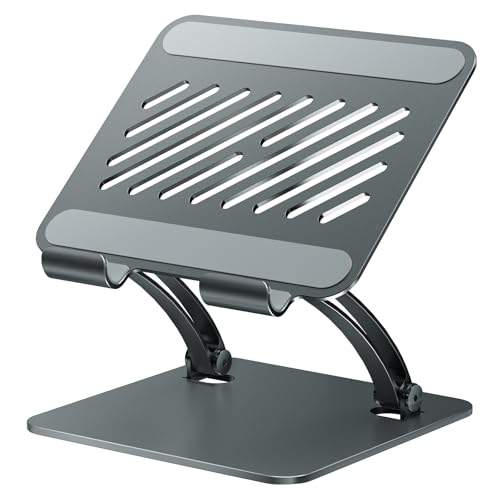
- Fits devices up to 16.9 inches
- Locking height and angle adjustment
- Weighted base; folds flat
Best For: Tablets and portable monitors on a desk
Best for Travel

- Folds flat; weighs 15.2 oz
- Hinge can be retightened
- Lowest angle suits tapping
Best For: Portable tablet viewing with slim cases
Best for Simple Viewing
Lamicall Adjustable Tablet Stand
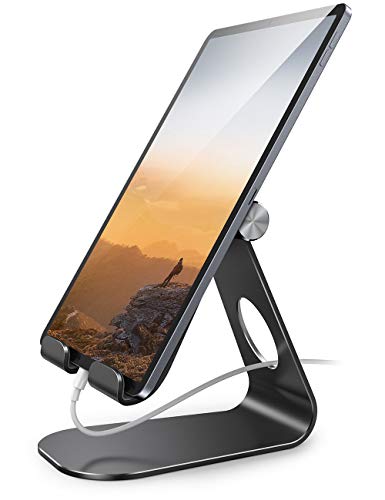
- Portrait or landscape viewing
- Rubber pads protect contact points
- 18 mm maximum hook width
Best For: Everyday tabletop viewing with a slim-cased tablet
Best for Flexible Workstations
Lamicall 360° Foldable iPad Stand
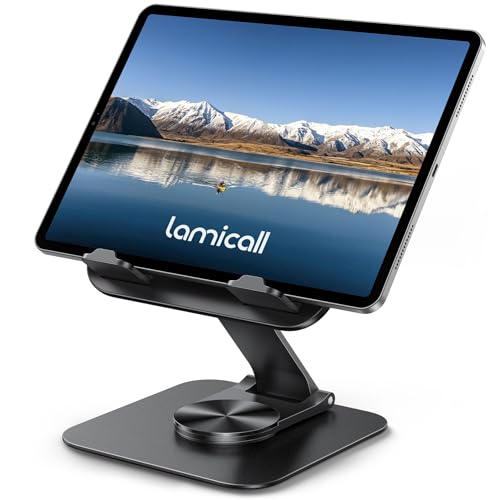
- Adjustable height and tilt
- 360° rotating base
- Folds to 0.59 inches thick
Best For: Video calls, screen sharing, and travel
Best for Larger Tablets
LISEN Rotating Aluminum Tablet Stand

- 360° rotation
- Adjustable height, angle, and joint tension
- Supports tablets up to 12.9 inches
Best For: Adjustable desk viewing with larger tablets
Best Compact Pick
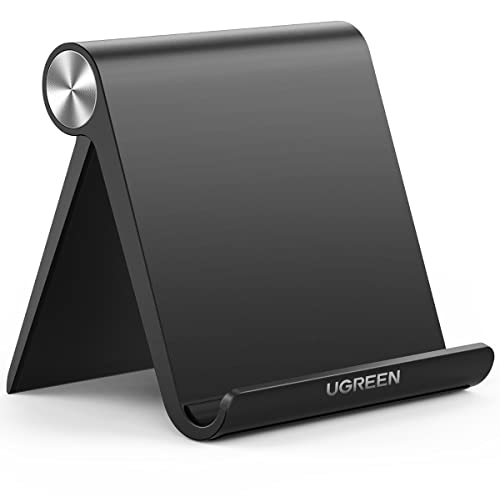
- Folds for easy packing
- Adjusts from 15° to 100°
- Fits devices up to 11 inches
Best For: Portable use with smaller tablets and phones
Best Foldable Option

- Folds flat for storage
- Adjustable height and angle
- Fits listed 4–15.9-inch devices
Best For: Travel-friendly desks and shared workspaces
Best for Higher Screen Placement

- 7–10-inch telescoping range
- 270-degree tilt
- Supports devices up to 4.4 lb
Best For: Elevated screens for desk calls and viewing
Best Rotating Stand

- Rotates 360 degrees
- Adjustable height and angle
- Folds compactly for storage
Best For: Shared desks and changing viewing directions
Best for Adjustable Height – Urmust Rotating Tablet Stand
Among iPad stands for desksetups, this Urmust model suits anyone who wants to raise and reposition a tablet without clamping a stand to the desk. Its adjustable arm and rotating base make it easy to change the viewing position.
Best For: A flat, stable desk where you want adjustable height and angle.
Pros:
- Adjustable height and angle, with a 360-degree rotating base.
- Fits devices from 4.7 to 15.6 inches and supports up to 2.42 lb.
- Includes cable clips and a wrench for tightening the joints if needed.
Cons:
- Designed for flat tabletops, not headboards.
- Joints may need tightening to prevent sagging.
Choose this one if positioning flexibility matters more than a set-and-forget hinge. Keep it on a stable surface and use the included wrench when the arm needs a firmer hold.
Best for Larger Screens – tounee Dual-Rod Tablet Stand
If your iPad stands for desksetups need to accommodate a larger tablet or portable monitor, the tounee dual-rod stand covers devices from 4.7 to 16.9 inches. Its locking adjustment lets you move between lower and higher viewing positions.
Best For: Desk users switching between tablets and portable monitors.
Pros:
- Locking mechanism adjusts and holds the selected height and angle.
- Weighted all-metal base and silicone pads help resist tipping and slipping.
- Folds flat for storage or carrying.
Cons:
- Not designed for laptops.
- Needs tabletop space for its weighted base.
This is the broadest size range in this group, making it a practical pick for a mixed-device workspace. Check that your device is a tablet or portable monitor rather than a laptop.
Best for Travel – LISEN Fold-Flat iPad Stand
For iPad stands for desksetups that move between home, office, and travel bags, this LISEN holder prioritizes a compact fold-flat design. You can adjust its height and angle, then retighten the hinge with the included bridge-screw tool.
Best For: A portable desk stand for tablets without thick cases.
Pros:
- Folds flat and weighs about 15.2 ounces.
- Adjustable height and angle, with a tool for retightening the hinge.
- Metal bottom panel and anti-slip silicone help steady the stand.
Cons:
- Devices thicker than 0.7 inches, including some heavy-duty cases, are not supported.
- Phones are supported in landscape mode only.
The gravity-based cradle avoids clips and magnets, but its holding position matters: use the lowest angle for better stability when tapping or typing.
Best for Simple Viewing – Lamicall Adjustable Tablet Stand
For straightforward iPad stands for desksetups, the Lamicall stand offers angle adjustment without a raised arm. Its padded holder supports portrait or landscape viewing for tablets and phones within its stated size range.
Best For: Reading, watching videos, or keeping a tablet visible beside your keyboard.
Pros:
- Adjusts for vertical and horizontal viewing.
- Rubber pads and feet help protect against scratches and sliding.
- Supports tablets and phones up to 13 inches.
Cons:
- The 18 mm hook will not fit a thicker tablet-and-case combination.
- Tablets larger than 12 inches may be more stable in landscape orientation.
This is a sensible option when you need an adjustable viewing angle rather than extra height. Measure your device with its case before buying, especially if you use a larger tablet.
Best for Flexible Workstations – Lamicall 360° Foldable iPad Stand
For iPad stands for desk setups that need to move between work and travel, this Lamicall model combines height and tilt adjustment with a 360° rotating base. It folds to 0.59 inches thick for packing.
Best For: People who want an adjustable stand for video calls, presentations, and occasional travel.
Pros:
- Rotating base makes it easy to share your screen without moving the stand.
- Two adjustable hinges let you change height and tilt; an included wrench adjusts hinge tightness.
- Fits 4.7- to 13-inch devices, with hooks designed for cases up to 0.75 inches thick.
Cons:
- Its tight hinges may take firm force to unfold the first time.
- The weighted metal base may be less appealing if minimum carry weight is your priority.
The combination of a weighted base and compact fold makes this a versatile choice when you need both a steady desk position and a stand you can pack.
Best for Larger Tablets – LISEN Rotating Aluminum Tablet Stand
Among iPad stands for desk setups built around adjustability, the LISEN offers a 360° rotating design, adjustable height and angle, and a foldable aluminum-alloy construction. Its weighted base has silicone underneath to help protect the desk.
Best For: Tablet users who want a rotating, adjustable stand for a fixed workspace that can also fold for travel.
Pros:
- Rotates 360° and offers height and angle adjustment.
- Locking mechanism and adjustable truss-rod screw let you address joints that feel too loose or tight.
- Foldable design supports tablets and e-readers up to 12.9 inches.
Cons:
- Smartphones are supported only in landscape orientation.
- The stated tablet size limit is 12.9 inches; check dimensions before buying for a larger device.
Choose this one if rotation and adjustable joint tension matter more than having the simplest stand. Its phone-orientation limitation is worth noting if you switch between an iPad and a smartphone.
Best Compact Pick – UGREEN Foldable Tablet Stand
If you want iPad stands for desk setups without a large footprint, this UGREEN holder measures 4.7 by 4.2 inches and folds for carrying. Its viewing angle adjusts from 15° to 100° for reading, calls, or watching videos.
Best For: Smaller tablets and phones when portability and adjustable viewing angles are the main priorities.
Pros:
- Compact, foldable design is easy to pack.
- Offers multiple viewing angles from 15° to 100°.
- Silicone pads help reduce slipping and scratches.
Cons:
- Fits devices only up to 11 inches, so it is not suited to larger iPads.
- Maximum supported device thickness is 0.55 inches, including the case.
This is the straightforward portable option of the three. Check your tablet size and case thickness first, especially if you use a larger iPad or a bulky case.
Best Foldable Option – LISEN Adjustable iPad Stand
Among iPad stands for desk setups, the LISEN is a practical pick if you want adjustable height and angle without giving up easy storage. It folds flat, while its weighted base and silicone padding are designed to help it stay put on a desk.
Best For: People who move between a home desk, office, and travel bag.
Pros:
- Folds compactly for storage or travel.
- Adjustable height and angle, with a joint-locking mechanism that can be tightened or loosened.
- Supports devices listed from 4 to 15.9 inches, including tablets and portable monitors.
Cons:
- Devices thicker than 0.7 inches, including some heavy-duty cases, are not supported.
- Phones are supported only in landscape orientation.
The adjustable joint is useful for repositioning your screen, but the maker recommends the lowest angle with the bottom bracket resting on the desk when you tap the tablet. Check your case thickness before buying.
Best for Higher Screen Placement – COOPER TabHolder
If you want iPad stands for desk setups that lift a screen higher, the COOPER TabHolder offers a stated 7–10-inch telescoping range and 270-degree tilt. Its weighted metal base and non-slip padding are intended to keep the stand steady during hands-free use.
Best For: Desk users who want an elevated tablet or portable-monitor screen for calls and viewing.
Pros:
- Telescoping height adjustment and broad tilt range.
- Rated to hold devices up to 4.4 pounds, including listed portable monitors up to 17 inches.
- Weighted base, EVA underside padding, and silicone padding on the holding plate.
Cons:
- The weighted base is less convenient if you need a stand that folds away for travel.
- No 360-degree rotation is specified in the supplied details.
Choose this one for height and a wide range of viewing angles rather than compact packing. Before using a portable monitor, confirm that it falls within the stated 4.4-pound limit.
Best Rotating Stand – OCYCLONE 360° Tablet Stand
For iPad stands for desk setups where you regularly turn the screen toward someone else, the OCYCLONE stand offers 360-degree rotation without repositioning its base. Two support arms and three adjustment points also let you change the viewing height and angle.
Best For: Shared desks or workspaces where the screen needs to face different directions.
Pros:
- 360-degree rotation makes it easier to share your screen.
- Adjustable height and angle with a two-arm design.
- Folds to a stated 4.72 by 4.69 by 1.2 inches for storage.
- Metal base with a non-slip silicone pad.
Cons:
- The stated device range stops at 15.6 inches, below some larger portable monitors.
- No maximum supported device weight is specified in the supplied notes.
This is the most flexible choice here for changing screen direction while keeping a foldable design. If you plan to use a heavier portable monitor, verify its weight compatibility before ordering.
How We Picked the Best Ipad Stands for Desksetups
This roundup brings together 10 desk-oriented options with different approaches to height, angle, portability, and rotation. We prioritized features that matter at a workstation: a usable viewing position, a stable base, accessible charging ports, and a holder that fits the intended tablet. Product names and stated compatibility ranges help narrow the field, but they do not establish real-world stability or build quality. Check the current listing for dimensions, weight limits, and included parts before buying.
Quick Comparison of Desk Stand Styles
Compact folding stands are easiest to store or carry and usually take up less space. They are a practical choice if you move between desks, though a low viewing height may mean looking down more often. Raised or dual-rod stands can position a tablet closer to eye level, but their bases need more room and stability matters when you tap the screen. Rotating stands make it easier to switch between portrait and landscape or share the display across a desk; check whether their joints hold position at your preferred angle. If you use an iPad as a second display, also consider where its screen will sit relative to your main monitor.
Key Buying Factors for IPad Stands for Desk Setups
Fit and Case Clearance
Compare your iPad’s dimensions—not just its model name—with the stand’s stated device range. A thick case, keyboard cover, or attached grip can change the fit. Look for enough support at the bottom edge without blocking the charging port or controls you regularly use.
Viewing Height and Angle
For reading or video calls, choose a design that places the screen at a comfortable height and tilts away from glare. If you frequently draw or type directly on the iPad, a lower position may feel more natural than a tall arm. An adjustable stand offers more flexibility, but check that its joints stay put when touched.
Stability and Desk Footprint
A wide, well-supported base matters most with larger tablets or frequent touchscreen use. Consider whether the stand will sit on a smooth desk, beside a keyboard, or near a monitor base. Non-slip contact points can help protect the tablet and desk, while a smaller footprint preserves working space.
Portability and Rotation
A foldable stand suits a shared desk or travel bag. A heavier desktop design may be preferable if it will stay in one place. Choose 360-degree rotation only if you will use it; otherwise, prioritize the height and stability you need every day.
Who Should Buy Which Ipad Stands for Desksetups?
For a tight or mobile setup: start with a slim folding option and confirm it supports your iPad with its case on. For video calls or a second-screen layout: consider a raised, height-adjustable stand that can align the display more closely with your monitor. For drawing or frequent tapping: favor a stable base and a comfortable lower angle over maximum height. For shared viewing: a rotating design may make turning the screen easier. Whichever style you choose, verify the seller’s current compatibility details for your exact iPad before ordering.
