
As technology evolves, finding the right workstation can make all the difference in your productivity and creativity. In 2025, Intel Core Ultra workstations are set to redefine performance standards. With options like the Lenovo ThinkStation P3 Tower Gen 2 and ThinkPad P16s Gen 3, you’ll discover innovative features tailored for demanding tasks. But what should you really look for? Let’s explore the top contenders and essential factors to contemplate before making your choice.
Lenovo ThinkStation P3 Tower Gen 2 Workstation

The Lenovo ThinkStation P3 Tower Gen 2 Workstation is an exceptional choice for professionals who demand top-tier performance in their computing tasks. With its Intel Core Ultra 9 processor, featuring E-cores up to 4.60 GHz and P-cores up to 5.40 GHz, you’ll experience lightning-fast speeds. The 64GB DDR5 memory and 1TB SSD guarantee rapid loading and multitasking. Plus, the NVIDIA RTX 2000 graphics card enhances your visual experiences. Equipped with robust connectivity options and AI-driven performance, this workstation handles complex simulations and large files seamlessly. You’ll appreciate its design and the included peripherals, making it an ideal work companion.
Best For: Professionals and creatives who require high-performance computing for demanding tasks such as simulations, large file handling, and graphics-intensive applications.
Pros:
- Powerful Performance: Intel Core Ultra 9 processor and NVIDIA RTX 2000 graphics card provide exceptional speed and visual quality.
- High Capacity Memory and Storage: 64GB DDR5 memory and 1TB SSD ensure rapid loading times and efficient multitasking capabilities.
- Robust Connectivity: Multiple high-speed USB ports and display options facilitate seamless connections to various devices.
Cons:
- Weight: At approximately 32 lbs, the workstation may be cumbersome to transport.
- Price Point: High-end specifications may come with a premium price, making it less accessible for budget-conscious users.
- Limited Availability: As the product is set to be available from August 12, 2025, immediate purchase may not be possible.
Lenovo ThinkPad P16s Gen 3 Mobile Workstation Laptop

For designers and engineers seeking a powerful mobile workstation, the Lenovo ThinkPad P16s Gen 3 stands out with its robust Intel Core Ultra 7 155H processor and dedicated NVIDIA RTX 500 Ada GPU. You’ll appreciate its 16 FHD+ touchscreen, perfect for detailed visuals and multitasking, backed by 64GB DDR5 RAM and a spacious 2TB SSD. With integrated AI capabilities, it accelerates workloads efficiently. Connectivity is a breeze with multiple ports, including Thunderbolt 4, while built-in security features like a fingerprint reader enhance your data protection. Plus, the three-year warranty guarantees peace of mind for your investment.
Best For: Designers, engineers, and professionals who require high-performance computing for graphics-intensive tasks and multitasking.
Pros:
- Powerful performance with Intel Core Ultra 7 155H processor and NVIDIA RTX 500 Ada GPU for demanding applications.
- Generous memory and storage with 64GB DDR5 RAM and 2TB SSD, facilitating smooth multitasking and ample space for files.
- Versatile connectivity options including Thunderbolt 4 and Wi-Fi 6E, ensuring fast data transfer and reliable wireless connections.
Cons:
- Higher price point may not be suitable for budget-conscious users.
- Weight and portability might be a concern for those needing a lightweight laptop for travel.
- Limited upgrade options post-purchase due to the resealed nature of the product.
Dell Tower Desktop ECT1250

Designed for professionals and creatives alike, the Dell Tower Desktop ECT1250 stands out with its impressive Intel Core Ultra 7-265 processor and robust 32GB DDR5 memory. You’ll appreciate its 1TB M.2 SSD for fast storage, while the Intel UHD Graphics supports stunning visuals up to 4K resolution. With connectivity options like 802.11ax and Bluetooth, staying connected is seamless. The sleek design, made from recycled materials, fits perfectly in any workspace. Plus, the built-in AI capabilities boost productivity, and the hardware TPM chip guarantees your data stays secure. It’s no surprise this model ranks #1 in tower computers!
Best For: Professionals and creatives seeking a powerful and efficient desktop solution for multitasking and high-resolution tasks.
Pros:
- Impressive Performance: Equipped with an Intel Core Ultra 7-265 processor and 32GB DDR5 memory for seamless multitasking.
- High Storage Capacity: Features a fast 1TB M.2 SSD ensuring quick boot times and program loading.
- Versatile Connectivity: Supports multiple monitors and modern connectivity options like 802.11ax and Bluetooth.
Cons:
- Limited Upgrade Options: Some users report restrictions on SSD upgrades and power supply compatibility.
- External Storage Recommendations: Users may need external storage solutions for media files due to storage limitations.
- Mixed Purchasing Experience: Varied experiences with Dell’s website for purchases and discounts compared to other retailers like Amazon.
Lenovo ThinkStation P3 Tiny Gen 2 Workstation
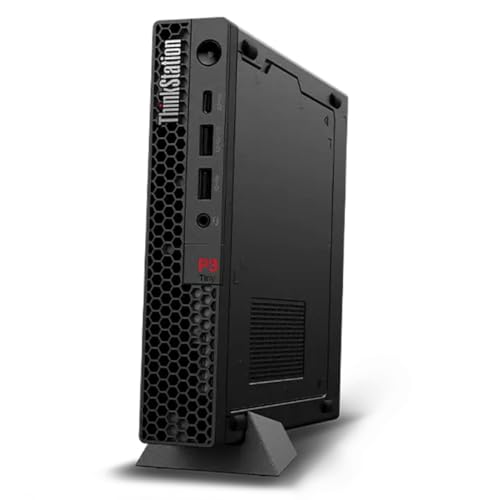
With its compact size and powerful performance, the Lenovo ThinkStation P3 Tiny Gen 2 Workstation is perfect for professionals in fields like architecture, engineering, and finance. Weighing just 3 lbs and measuring only 1.5 inches tall, it fits seamlessly into any workspace. Equipped with an Intel Core Ultra 5 processor, 16GB of DDR5 memory, and a 512GB SSD, it delivers exceptional speed and responsiveness. Plus, with AI-driven capabilities and Wi-Fi 7 support, you’ll experience enhanced productivity. The ThinkShield security solution guarantees your data remains protected, while the one-year onsite warranty offers peace of mind for your investment.
Best For: Professionals in architecture, engineering, finance, and healthcare looking for a compact and powerful workstation.
Pros:
- Compact Design: At just 1.5 inches tall and weighing 3 lbs, it saves space while providing high performance.
- AI-Driven Performance: Offers up to 36 TOPS for AI inferencing, enhancing productivity for demanding tasks.
- Robust Security: Features ThinkShield security solutions, including a Trusted Platform Module for data encryption.
Cons:
- Limited Graphics Capability: Integrated Intel Graphics may not meet the needs of users requiring high-end graphics performance.
- Upgradability Concerns: The compact size may limit future expansion options for memory or storage upgrades.
- Price Point: Higher initial investment compared to some other mini PCs without similar specifications.
Lenovo ThinkPad P14s Gen 5 Mobile Workstation

The Lenovo ThinkPad P14s Gen 5 Mobile Workstation stands out as a top choice for professionals who demand high performance on the go. With its 14.5″ WUXGA display and powerful Intel Core Ultra 7 155H processor running at 4.8 GHz, you’ll experience seamless multitasking thanks to 32 GB of DDR5 RAM. The 1 TB SSD provides ample storage for your HD videos and projects, while the NVIDIA RTX 500 graphics deliver stunning visuals. Weighing just 3.55 pounds, it combines portability with workstation-level performance. Plus, its 5-star customer rating highlights its dependability for compute-intensive tasks.
Best For: Professionals seeking a high-performance mobile workstation that excels in multitasking and compute-intensive tasks.
Pros:
- Powerful Performance: Equipped with an Intel Core Ultra 7 155H processor and 32 GB of DDR5 RAM for seamless multitasking.
- Ample Storage: 1 TB SSD provides plenty of space for storing large files, including HD videos and projects.
- Portability: Weighing only 3.55 pounds, it is lightweight and easy to carry without compromising performance.
Cons:
- No Optical Drive: Lacks an optical drive, which may be a drawback for users who still rely on physical media.
- Higher Price Point: As a mobile workstation, it may be priced higher than standard laptops, making it less accessible for budget-conscious buyers.
- Limited Graphics Memory: The NVIDIA RTX 500 graphics with 4 GB RAM may not suffice for extremely demanding gaming or graphic design tasks.
HP ZBook Firefly G11 Mobile Workstation

For professionals on the go, the HP ZBook Firefly G11 Mobile Workstation stands out as a top choice in the domain of Intel Core Ultra workstations for 2025. Powered by the Intel Core Ultra 7 155U processor and equipped with 32 GB of memory, it lets you run multiple applications seamlessly. The 16″ WUXGA display with a 1920 x 1200 resolution delivers stunning visuals, perfect for work and entertainment. With a 512 GB SSD, you have plenty of space for your important files. Plus, its Smart Buy designation means you’re getting great value for your investment in productivity.
Best For: Professionals who need a powerful, portable workstation for multitasking on the go.
Pros:
- High Performance: Equipped with an Intel Core Ultra 7 processor and 32 GB of memory for efficient multitasking.
- Impressive Display: The 16″ WUXGA display provides exceptional clarity, enhancing visual experiences for work and media consumption.
- Ample Storage: The 512 GB SSD offers sufficient space for essential files, documents, and media.
Cons:
- Limited Upgrade Options: Being a mobile workstation, internal upgrades may be restricted compared to desktop alternatives.
- Higher Price Point: As a premium product, it may be more expensive than standard laptops.
- Weight and Portability: While portable, the 16″ size may be bulkier compared to smaller laptops, affecting mobility for some users.
HP ZBook Studio G11 Workstation Laptop
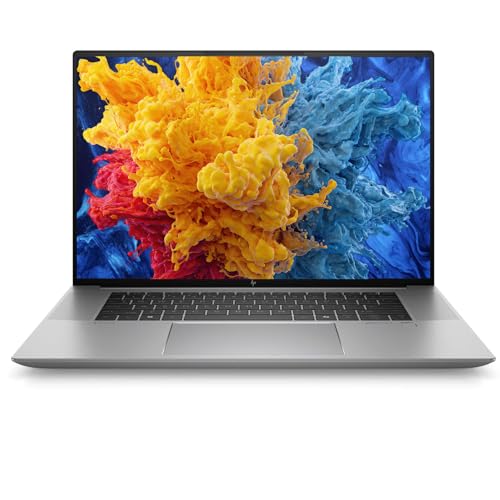
Engineers and creative professionals seeking a powerful yet portable solution will find the HP ZBook Studio G11 Workstation Laptop an ideal choice. With its Intel Core Ultra 7 165H processor and 32GB DDR5 RAM, it handles demanding applications with ease. The 16-inch FHD+ display features an anti-glare finish, perfect for productivity in various environments. You’ll appreciate the NVIDIA RTX A3000 GPU, certified for professional software like AutoCAD and Adobe Creative Cloud. Plus, it’s lightweight at 3.8 lbs and offers up to 12 hours of battery life, making it a perfect companion for traveling professionals and remote work.
Best For: Professionals such as engineers, architects, and creatives looking for a high-performance and portable workstation.
Pros:
- Powerful Intel Core Ultra 7 165H processor and NVIDIA RTX A3000 GPU for demanding applications.
- Lightweight design at 3.8 lbs with long battery life of up to 12 hours for enhanced portability.
- Comprehensive security features and modern connectivity options for a secure and efficient workflow.
Cons:
- The price may be higher compared to standard laptops due to its advanced features.
- Limited storage capacity at 512GB, which may not suffice for users with extensive data needs.
- The FHD+ display, while good, may not satisfy users looking for a 4K resolution for detailed graphic work.
Lenovo ThinkPad P14s Gen 5 Laptop

Designed for professionals who demand high performance on the go, the Lenovo ThinkPad P14s Gen 5 Laptop features the powerful Intel Core Ultra 7 155H processor. With its stunning 14.5” 3K display and 64 GB of DDR5 RAM, you’ll experience exceptional visuals and speed. The NVIDIA RTX 500 graphics guarantee smooth performance for demanding applications. Advanced connectivity options, including Thunderbolt 4 and Wi-Fi 6E, keep you connected wherever you are. Plus, security features like Intel vPro and a fingerprint reader provide peace of mind. Weighing just 3.55 lbs, it’s perfect for on-the-move professionals seeking top-tier performance.
Best For: Professionals seeking high-performance computing with advanced graphics and security features in a portable laptop.
Pros:
- Exceptional performance with Intel Core Ultra 7 155H processor and NVIDIA RTX 500 graphics.
- Impressive 14.5” 3K display with vibrant colors and high refresh rate for enhanced visual experience.
- Robust security features including Intel vPro and a fingerprint reader for added data protection.
Cons:
- Relatively high price point may not be suitable for casual users or those on a tight budget.
- Weight of 3.55 lbs may be heavier compared to other ultraportable laptops.
- Limited upgrade options due to compact design and specific hardware configurations.
Intel Core Ultra 9 285K Processor

The Intel Core Ultra 9 285K Processor stands out with its impressive 24-core configuration, making it an exceptional choice for professionals who demand top-tier performance in their workstations. With 8 P-cores and 16 E-cores, it delivers up to 5.7 GHz unrestrained speed, ensuring smooth multitasking. This processor supports the Intel 800 series chipset and features cutting-edge PCIe 5.0 and DDR5 memory support. Its integrated Intel graphics enhance visual performance, while customer ratings of 4.6 out of 5 stars reflect its reliability. Plus, you can enjoy a full refund within 30 days if you encounter any issues.
Best For: Professionals who require high-performance computing for demanding applications and multitasking capabilities.
Pros:
- Exceptional 24-core configuration with high clock speeds for enhanced performance.
- Supports advanced technologies such as PCIe 5.0 and DDR5 memory.
- Integrated Intel graphics provide improved visual performance without the need for a separate graphics card.
Cons:
- Higher power consumption with a base power of 125W may require better cooling solutions.
- Compatibility limited to Intel 800 series chipset-based motherboards.
- Potential for higher restocking fees on returns for damaged products.
Lenovo ThinkPad P16s Gen 3 Mobile Workstation
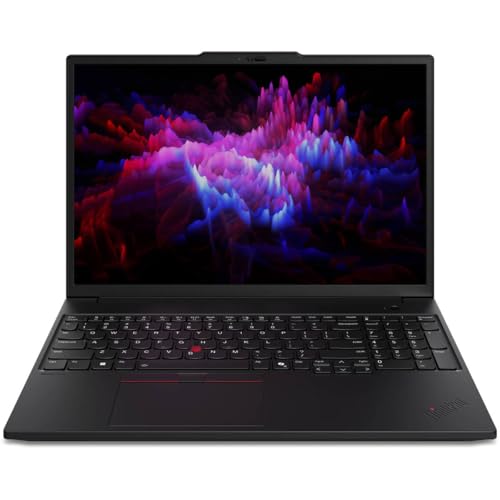
For professionals seeking a powerful mobile workstation, the Lenovo ThinkPad P16s Gen 3 stands out with its robust Intel Core Ultra 7 165H processor and impressive 32 GB of RAM. This 16″ mobile workstation features a WUXGA display (1920 x 1200), ensuring clarity for movies and games. With a 1 TB SSD, you’ll enjoy spacious storage and faster data transfer speeds. Plus, the NVIDIA RTX 500 Ada Generation graphics card delivers excellent performance in multimedia applications. Whether you’re multitasking or tackling demanding tasks, this workstation is designed to meet your professional needs with efficiency and style.
Best For: Professionals and creatives who require a powerful and portable workstation for demanding tasks and multitasking.
Pros:
- High-performance Intel Core Ultra 7 165H processor enables efficient handling of complex applications.
- 32 GB of RAM allows for seamless multitasking and improved productivity.
- NVIDIA RTX 500 Ada Generation graphics card provides excellent performance for multimedia applications and gaming.
Cons:
- Higher price point compared to standard laptops, which may not be suitable for casual users.
- Weight and size might be less portable for users who prioritize ultra-light laptops.
- Limited upgrade options for certain components, potentially restricting future enhancements.
Factors to Consider When Choosing Intel Core Ultra Workstations
When choosing an Intel Core Ultra workstation, you should consider several key factors that affect performance and usability. You’ll want to look at performance specifications, graphics capabilities, storage and memory options, connectivity, and available support services. Each of these elements plays an essential role in ensuring you get a workstation that meets your needs.
Performance Specifications Overview
Choosing the right Intel Core Ultra workstation hinges on understanding its performance specifications, as these details can greatly impact your productivity. These processors feature a hybrid architecture, blending performance cores (P-cores) and efficiency cores (E-cores) to optimize multitasking, with frequencies soaring up to 5.7 GHz in top models. Look for workstations supporting high-capacity memory configurations, like 64GB DDR5 RAM, which guarantees smooth multitasking and effective handling of complex applications. The integration of AI-driven capabilities accelerates processing for machine learning and data analysis tasks. Additionally, enhanced connectivity options like PCIe 5.0 and Wi-Fi 7 facilitate faster data transfer, helping you stay efficient and connected in your demanding workflows.
Graphics Capabilities Assessment
Evaluating the graphics capabilities of your Intel Core Ultra workstation is essential, as it directly influences your ability to handle demanding visual tasks. Consider the dedicated GPU options available, such as NVIDIA RTX Ada generation graphics, which enhance performance for graphics-intensive applications. Also, evaluate the VRAM size; 8GB or more is ideal for managing high-resolution textures and complex computations. Look for support for multiple display outputs like HDMI and DisplayPort to connect several monitors, boosting productivity. Keep an eye out for AI-driven performance features in the GPU, as they can accelerate workloads in creative and engineering tasks. Finally, check for ISV certifications for graphics drivers to guarantee compatibility and optimized performance with professional software.
Storage and Memory Options
As you explore storage and memory options for Intel Core Ultra workstations, it’s crucial to prioritize high-speed SSDs, such as PCIe Gen4 and Gen5, which greatly boost data access speeds and overall system responsiveness. You’ll want to take into account memory configurations too; options like 32GB or 64GB of DDR5 RAM cater to demanding multitasking and heavy workflows. Many workstations also support additional storage upgrades, giving you the flexibility to expand your storage for large datasets or multimedia files. The combination of advanced AI-driven performance features with high memory bandwidth enhances efficiency, making these workstations ideal for complex tasks like 3D rendering and data analysis. Integrated memory options can further reduce latency and improve bandwidth for computational tasks.
Connectivity and Port Availability
When selecting an Intel Core Ultra workstation, the connectivity and port availability can greatly impact your workflow. Look for a variety of ports, such as Thunderbolt 4, USB-C, and HDMI, to connect multiple devices seamlessly. High-speed data transfer options like USB-A (10Gbps) and USB-C (20Gbps) are essential for boosting productivity during data-intensive tasks. Make certain there are enough USB-A and USB-C ports to support various external devices, including storage drives and monitors. Additionally, evaluate the inclusion of legacy ports like Ethernet and HDMI, as they may be necessary for specific professional environments. Finally, check for integrated wireless options like Wi-Fi 6E or Wi-Fi 7 to guarantee reliable internet connectivity alongside your wired connections.
Warranty and Support Services
Choosing the right warranty and support services for your Intel Core Ultra workstation can greatly impact your long-term satisfaction and productivity. Consider the warranty duration, which typically ranges from one to three years, with options to extend for extra peace of mind. Look for on-site support services included in the warranty; they can offer quicker resolutions for hardware issues right at your location. Review the return policy, ensuring it allows for a full refund within 30 days for unopened or damaged items, while being aware of conditions for opened products. Finally, check that your warranty covers both parts and labor, and explore additional support options like Lenovo Premier Support for enhanced assistance with complex issues.
