
Choosing the right USB-C hub can make a slim laptop, tablet, or Chromebook far more usable. The best HyperDrive USB C hubs add the ports you actually need without clutter or guesswork.
This roundup focuses on practical features like display output, power delivery, storage card support, and transfer speed so you can match a hub to your workflow.
Best 10 Hyperdrive USB C Hubs Picks for 2026
Best for Power Users
HyperDrive Next 10-Port USB-C Hub

- 4K60Hz HDMI for sharp external display support
- 10Gbps USB and 312MB/s card readers for fast transfers
- 140W PD passthrough with Ethernet and audio built in
Best For: Users who want a feature-packed hub for work, travel, and demanding laptop setups.
Best for Thunderbolt Performance
HyperDrive USB C Hub 6-in-2 for MacBook

- 40Gbps USB-C/Thunderbolt data with up to 5K or dual 4K support
- 4K30Hz HDMI plus Gigabit Ethernet for display and networking needs
- 100W USB-C power delivery and 5Gbps USB-A ports
Best For: MacBook users who need a compact, high-speed hub with display output, Ethernet, and charging.
Best for iMac 24-Inch Fit

- Color-matched design blends with the 2021 iMac.
- 4K60 HDMI and 10Gbps ports cover key workflows.
- Includes SD and microSD slots for quick media access.
Best For: iMac 2021 24-inch owners who want a clean, integrated-looking hub with display and card-reader support.
Best for Dual 4K Setups
HyperDrive Next Dual 4K 7-Port Dock

- Dual 4K output for compatible laptops and desktops
- 10Gbps USB ports for faster file transfers
- 100W PD passthrough with audio jack support
Best For: People who want a compact dock for dual monitors, quick transfers, and laptop charging.
Best for iPad Media Control
HyperDrive iPad USB-C Media Hub

- Media shortcut buttons for easy play/pause control
- 4K60 HDMI plus USB-C and USB-A expansion
- SD/microSD and 3.5mm audio for creator workflows
Best For: iPad owners who want media controls and a well-rounded USB-C hub.
Best for Charging and Displays
HyperDrive Flex 5-Port USB C Hub

- 4K HDMI output for presentations and external screens
- 100W pass-through charging for all-day use
- Dual USB-A ports plus 5Gbps USB-C for accessories and transfers
Best For: Students and remote workers who need a compact hub for charging, display output, and core peripherals.
Best for High-Speed Travel Workflows
HyperDrive Next 8-Port USB-C Hub

- 4K60Hz HDMI for external displays
- 10Gbps USB-A plus fast SD/microSD transfers
- 140W PD support with Ethernet included
Best For: Traveling professionals and creators who need a compact all-in-one USB-C hub.
Best for Students and Hybrid Work
HyperDrive Flex 8-Port USB-C Hub

- 4K30Hz HDMI for monitors and presentations
- 100W charging keeps your laptop powered
- SD/microSD, USB-A, and audio jack cover daily needs
Best For: Students and remote workers who want an all-in-one hub for displays, charging, and accessories.
Best for 4K Displays
HyperDrive Next 7-Port USB-C Hub
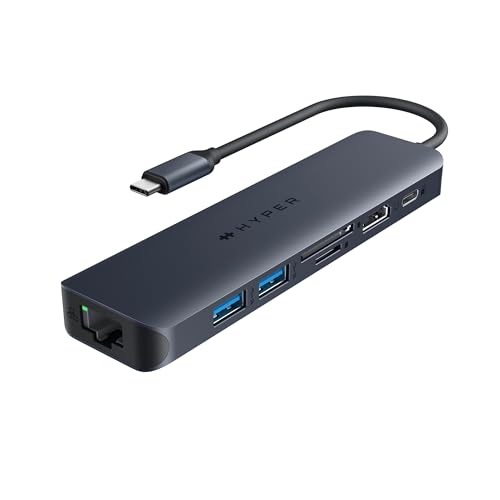
- 4K60Hz HDMI for sharp external monitor support
- 10Gbps USB-C and USB-A ports for fast transfers
- 100W PD passthrough plus Ethernet and SD card reader
Best For: Users who want a compact hub with strong display output, fast data, and wired networking.
Best for Multi-Monitor Work
HyperDrive Next 11-Port USB-C Hub
- Dual 4K60Hz HDMI for supported dual-display setups
- 140W Power Delivery with 10Gbps USB-C and USB-A ports
- Includes SD/microSD, Ethernet, and 3.5mm audio
Best For: Users who want a high-connectivity hub for dual monitors, charging, and fast file transfers.
Best for Power Users – HyperDrive Next 10-Port USB-C Hub
If you want one of the most complete hyperdrive usb c hubs for a desk or travel setup, this 10-port model packs in the essentials: 4K60Hz HDMI, fast data ports, card readers, Ethernet, audio, and high-wattage charging in one compact adapter.
Best For: Mac, PC, and Chromebook users who need a single hub for external display support, fast file transfers, wired networking, and pass-through charging.
Pros:
- 4K60Hz HDMI supports smooth high-resolution monitor output
- 10Gbps USB-A/USB-C ports speed up file transfers and backups
- SD and microSD 4.0 readers help photographers and video creators
- 140W PD passthrough keeps powerful laptops charged while connected
Cons:
- More features than basic users may actually need
- Best charging results require a compatible PD 3.1 power adapter
- Can be overkill if you only need a simple display or USB splitter
For buyers who need a highly capable all-in-one dock, this is one of the strongest hyperdrive usb c hubs for balancing display, storage, networking, and power in a travel-friendly design.
Best for Thunderbolt Performance – HyperDrive USB C Hub 6-in-2 for MacBook
If you want one of the more capable hyperdrive usb c hubs for a MacBook Pro or Air, this 6-in-2 model stands out for its Thunderbolt-class speed, 4K HDMI output, and real charging support. It is a practical pick for users who need a compact dock that handles display, storage, networking, and power from one USB-C connection.
Best For: MacBook users who want a compact hub with fast data, external display support, and wired Ethernet for everyday work.
Pros:
- 40Gbps USB-C/Thunderbolt data and up to 5K or dual 4K display support
- 4K30Hz HDMI output for presentations, streaming, and extra screen use
- Gigabit Ethernet adds a steadier connection than Wi‑Fi alone
- 100W USB-C power delivery helps keep your laptop charged while connected
Cons:
- Only one HDMI port, so multi-monitor flexibility is limited
- USB-A speeds top out at 5Gbps, which may not suit the fastest drives
- Best features are most relevant to Thunderbolt-compatible MacBooks
Overall, this is a strong choice if you value fast I/O and dependable desk connectivity in a small footprint. Among hyperdrive usb c hubs, it leans more toward performance-focused Mac users than basic travel adapters.
Best for iMac 24-Inch Fit – HyperDrive 6-in-1 iMac Hub
If you want hyperdrive usb c hubs that feel built into your desktop, this HyperDrive 6-in-1 adapter is tailored for the 2021 24-inch iMac. It adds 4K60 HDMI, fast 10Gbps USB connections, and SD card slots while keeping the setup clean and color-matched.
Best For: iMac 2021 24-inch owners who want an integrated-looking hub with display output, fast file transfers, and easy access to memory cards.
Pros:
- Color-matched faceplates help it blend into the iMac design.
- 4K60 HDMI supports high-resolution external displays.
- Three 10Gbps data ports make transfers and accessories quick.
- SD and microSD slots are handy for photo and video workflows.
Cons:
- Only compatible with the 2021 24-inch iMac, not older models.
- Limited port variety compared with larger desktop docking hubs.
- The pass-through charging output is modest for power-hungry devices.
This is a strong pick if you value a tidy, purpose-built accessory over a generic hub. Among hyperdrive usb c hubs, it stands out for matching the iMac’s look while still covering the core everyday connections most users need.
Best for Dual 4K Setups – HyperDrive Next Dual 4K 7-Port Dock
If you need one of the more capable hyperdrive usb c hubs for a desk-based multitasking setup, this HyperDrive dock is built around dual 4K external displays, fast 10Gbps USB connectivity, and laptop charging through a single USB-C connection. It’s a practical fit for M-series MacBooks, PCs, and Chromebooks that need more ports without adding clutter.
Best For: Users who want dual-monitor support, fast file transfers, and pass-through charging in a compact dock.
Pros:
- Supports dual extended 4K displays for compatible Mac, PC, and Chromebook setups
- 10Gbps USB 3.2 ports help move large files quickly from SSDs and drives
- 100W PD passthrough can power a connected laptop while the dock is in use
- Includes a 3.5mm audio combo jack for headphones and microphone use
Cons:
- Dual-monitor support depends on host device compatibility, especially on M1/M2 Macs
- Not the simplest choice if you only need a basic travel adapter
- Requires a separate PD 3.0 charger to reach the full charging potential
Overall, this is a strong pick if your priority is turning a USB-C laptop into a more serious workstation. Among hyperdrive usb c hubs, it stands out for combining dual 4K output, fast data ports, and charging in one travel-friendly dock.
Best for iPad Media Control – HyperDrive iPad USB-C Media Hub
If you want one of the more specialized hyperdrive usb c hubs for iPad, this model stands out with media shortcut buttons, 4K video output, and the essential storage and audio ports most creators actually use. It’s a practical dock-style upgrade for turning an iPad Pro, Air, or mini into a more capable desk setup.
Best For: iPad users who want quick media controls plus a compact hub for displays, cards, and accessories.
Pros:
- Media shortcut keys make playback control easier without leaving your workflow.
- Includes HDMI 4K60Hz, USB-C, USB-A, SD/microSD, and a 3.5mm headphone jack.
- Magnetic grip helps the hub attach securely to compatible USB-C iPads.
Cons:
- Designed specifically for USB-C iPads, so it’s not a universal laptop hub.
- Power delivery is limited to 60W, which may not suit all charging needs.
For shoppers comparing hyperdrive usb c hubs, this one makes the most sense if media control and iPad-first convenience matter as much as port expansion. It’s less of an all-purpose travel hub and more of a focused productivity-and-entertainment add-on.
Best for Charging and Displays – HyperDrive Flex 5-Port USB C Hub
If you’re comparing hyperdrive usb c hubs for a laptop setup that needs both screen output and everyday expandability, the HyperDrive Flex 5-Port USB C Hub is a practical all-in-one pick. It combines 4K HDMI, 100W pass-through charging, and a small-but-useful port selection that works well for school, office, or travel.
Best For: Students, remote workers, and Chromebook or Mac users who want a simple hub for external displays, charging, and a few essential accessories.
Pros:
- 4K HDMI output is useful for presentations, editing, and dual-screen work.
- 100W Power Delivery helps keep your laptop charged while the hub is in use.
- Dual USB-A ports plus a 5Gbps USB-C port cover common peripherals and file transfers.
- Compact design and broad Mac, Windows, and Chromebook compatibility make setup easy.
Cons:
- Only one display output, so it’s not ideal for multi-monitor workflows.
- 4K support is limited to 30Hz, which is fine for productivity but not as smooth for fast motion.
- Not the most port-rich option if you need a lot of connections at once.
Overall, this is a solid choice if you want hyperdrive usb c hubs that emphasize reliable charging, clean 4K display support, and just enough expansion for everyday carry. It’s not the most advanced dock, but it covers the basics well without feeling bulky.
Best for High-Speed Travel Workflows – HyperDrive Next 8-Port USB-C Hub
If you want one of the more capable hyperdrive usb c hubs for a laptop setup, this HyperDrive Next model stands out for its mix of display output, fast storage access, and strong charging support. It is a practical pick for users who need a compact dock that can handle external monitors, card transfers, and everyday peripherals without feeling underpowered.
Best For: Mac, PC, and Chromebook users who need a travel-friendly hub for 4K display output, fast file transfers, and pass-through charging.
Pros:
- 4K60Hz HDMI output helps keep an external monitor sharp and smooth.
- 10Gbps USB-A ports and 312MB/s SD/microSD support speed up file transfers.
- 140W power delivery support is strong enough for demanding laptops.
- Ethernet adds a reliable wired connection for work or travel.
Cons:
- No native USB-C data ports for newer accessories.
- Full power output depends on using a compatible PD 3.1 charger.
Overall, this is one of the more versatile hyperdrive usb c hubs for people who move between desk and travel setups. It is especially appealing if you want a single hub that covers display, networking, storage, and charging without adding much bulk.
Best for Students and Hybrid Work – HyperDrive Flex 8-Port USB-C Hub
If you want one of the more versatile hyperdrive usb c hubs for school, work, or travel, the HyperDrive Flex packs the basics you actually use: 4K HDMI output, 100W charging, 5Gbps data, card readers, and a 3.5mm audio jack. It’s built to reduce dongle clutter while keeping laptops powered and peripherals connected.
Best For: Students, remote workers, and anyone who needs a simple plug-and-play USB-C hub for displays, charging, and everyday accessories.
Pros:
- Supports 4K30Hz HDMI for external monitors and presentations
- 100W Power Delivery lets you charge while using the hub
- Includes SD and microSD slots plus 2 USB-A ports for flexible expansion
- Built-in audio jack is handy for meetings and media playback
Cons:
- HDMI tops out at 4K30Hz, not 4K60Hz
- Only one USB-C data port, so heavy accessory users may want more
- Best suited to everyday productivity rather than pro creator workflows
For buyers comparing hyperdrive usb c hubs, this model stands out as a balanced, desk-friendly option with enough ports for most daily setups without getting overly bulky or complicated.
Best for 4K Displays – HyperDrive Next 7-Port USB-C Hub
If you need one of the more capable hyperdrive usb c hubs for a desk or travel setup, this model stands out for its 4K60Hz HDMI output, 10Gbps USB ports, and built-in Ethernet. It’s designed to reduce dongle clutter while keeping your laptop charged and your workflow moving.
Best For: Mac, PC, and Chromebook users who want a compact hub with strong display support, fast file transfers, and reliable wired networking.
Pros:
- 4K60Hz HDMI is ideal for crisp external monitor use
- 10Gbps USB-C and USB-A ports handle fast data transfers
- 100W Power Delivery supports pass-through charging while you work
- Includes SD card reader and Ethernet for more complete connectivity
Cons:
- Not the cheapest option in the hyperdrive usb c hubs category
- Best features depend on a compatible host and charger
Overall, this is a strong pick if you want a well-rounded hub that prioritizes monitor output, speed, and everyday versatility. Among hyperdrive usb c hubs, it makes the most sense for users who value a cleaner desktop setup with fewer tradeoffs.
Best for Multi-Monitor Work – HyperDrive Next 11-Port USB-C Hub
If you want one of the most capable hyperdrive usb c hubs for desk setups and travel, this HyperDrive Next model stands out with dual 4K60Hz HDMI outputs, fast 10Gbps data ports, and high-wattage charging in a single compact dock. It is built for users who need real multitasking support without carrying a full docking station.
Best For: Mac, PC, and Chromebook users who need dual-display support, fast transfers, and all-in-one connectivity.
Pros:
- Dual 4K60Hz HDMI outputs for expanded screen space on supported systems
- Two 10Gbps USB-C ports plus two USB-A ports for fast peripheral and storage use
- 140W Power Delivery helps keep power-hungry laptops charged while connected
- Includes SD and microSD readers, Ethernet, and 3.5mm audio for fewer dongles
Cons:
- Dual extended displays require MST-enabled devices, so compatibility matters
- 4K60Hz output depends on DP 1.4 USB-C support
- More feature-rich than a simple travel hub, so it may be overkill for basic needs
For buyers comparing hyperdrive usb c hubs, this one is a strong pick when display expansion and port variety matter more than minimal size. It packs the kind of connectivity that makes a laptop feel closer to a full workstation.
How We Picked the Best Hyperdrive USB C Hubs
We focused on the features most buyers notice every day: reliable charging pass-through, useful video output, strong data speeds, and a port mix that fits real-world use. For Hyperdrive USB C Hubs, that means looking beyond raw port counts and checking whether the hub supports the devices and displays you already own.
We also gave more weight to models that balance portability with capability, since many shoppers want one hub for travel, desk use, and hybrid work.
Quick Comparison
In simple terms, choose a compact 5- to 7-port hub if you want the lightest setup, an 8- to 10-port model if you need more everyday flexibility, and a dual-display dock if your workflow depends on multiple monitors. If you use SD cards, wired Ethernet, or high-wattage charging, prioritize those features over extra filler ports.
Key Buying Factors for Hyperdrive USB C Hubs
Video Output
Check whether the hub supports 4K at 30Hz or 60Hz, and whether it offers one or two HDMI outputs. For smoother text and motion, 4K60Hz is the better choice when your laptop supports it.
Charging and Power Delivery
Power Delivery matters if you want to charge your laptop through the hub while using other accessories. Higher-wattage pass-through, such as 100W or 140W, is especially useful for larger laptops and busier desk setups.
Data Ports and Speed
Look at USB-A and USB-C data ratings carefully. A 10Gbps port is better for fast drives and accessories, while 5Gbps is fine for everyday peripherals like mice, keyboards, and webcams.
Media, Network, and Workflow Extras
SD and microSD readers help photographers and creators move files quickly. Ethernet is valuable for stable video calls, remote work, and gaming. If you regularly connect storage, cameras, or external drives, these extras can be more useful than another generic USB port.
Who Should Buy Which Hyperdrive USB C Hubs?
Travelers and students should lean toward smaller Hyperdrive USB C Hubs with the ports they use most: charging, HDMI, and a couple of USB connections. Creators and power users should look at larger hubs with SD readers, faster data ports, and stronger power delivery. If you work from a desk with dual monitors, a dock with two HDMI outputs is the most efficient pick.
For most buyers, the best choice is the hub that matches your daily devices first, then adds one or two future-proof features. That keeps the setup simple, avoids paying for ports you will not use, and ensures the hub stays useful as your workflow grows.
