
Replacing a drive should not require dismantling your PC or unplugging an entire storage setup. Hot-swap bays make it easier to access compatible drives for backups, testing, and storage changes.
These 10 options range from external USB enclosures to internal mobile racks and multi-drive cages. The right choice depends first on where the drives will live, then on drive size, available bays, and connection type.
Best 10 Hot Swappable Drive Bays Picks for 2026
Best Four-Bay USB DAS
CENMATE 4-Bay Aluminum Enclosure

- Four SATA HDD/SSD bays, up to 80TB total
- Tool-free hot swapping and built-in fan
- USB 3.0 DAS; no RAID or NAS
Best For: Desktop access to four external SATA drives
Best Expandable Three-Bay DAS
CENMATE 3-Bay Aluminum Enclosure

- Three SATA bays, up to 60TB total
- Tool-free hot swapping
- USB HOST port for stated daisy-chain expansion
Best For: Expandable desktop direct-attached storage
Best Lockable PC Backplane
StarTech.com 3-Bay Trayless Mobile Rack

- Three 3.5-inch slots use two 5.25-inch bays
- Trayless access with individual key locks
- SATA I/II/III and SAS I/II support
Best For: Lockable front-access drives in a PC
Best Four-Drive Internal Cage

- Four drives fit in three 5.25-inch bays
- Accepts 2.5- or 3.5-inch HDDs
- SATA hot swapping and 120mm exhaust fan
Best For: Four-drive expansion inside a compatible PC case
High-Capacity Pick
StarTech 4-Bay Trayless SATA/SAS Backplane
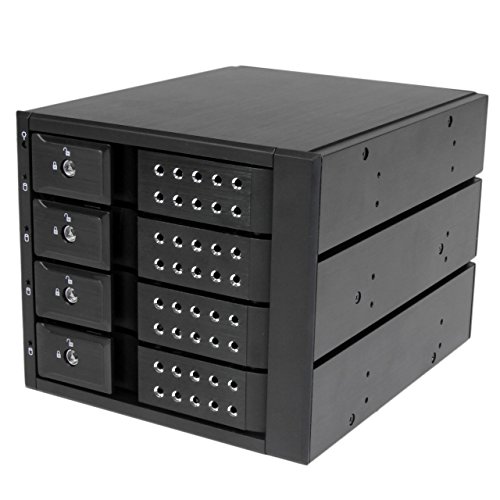
- Four 3.5-inch drives in three 5.25-inch bays
- SATA I/II/III and SAS I/II support
- Fan control, locks, and per-bay LEDs
Best For: Systems needing frequent access to four 3.5-inch drives
Compact Dual-Drive Pick
Kingwin Trayless 2.5-Inch Mobile Rack

- Two 2.5-inch drives in one 3.5-inch bay
- Trayless access with a key lock
- SATA and SAS support up to 6Gbps
Best For: Two accessible 2.5-inch SSDs or HDDs in a compact bay
Single-Drive Pick
StarTech Trayless 3.5-Inch SATA/SAS Bay

- One 3.5-inch drive in a 5.25-inch bay
- Lockable trayless door and activity LED
- SATA cable included
Best For: Regularly exchanging one 3.5-inch SATA or SAS drive
Best for Compact Bays
ICY DOCK flexiDOCK Dual 2.5-Inch Rack

- Two drives in one 3.5-inch bay
- Trayless, doorless drive access
- SATA 6Gbps or SAS 12Gbps support
Best For: Frequent swaps of two 2.5-inch drives
Best for a Single 3.5-Inch Drive
StarTech Trayless SATA Mobile Rack
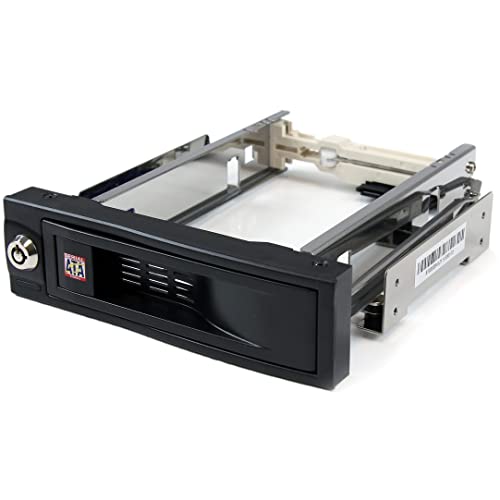
- One front-accessible 3.5-inch slot
- Lockable, trayless drive bay
- Rated for 50,000-plus insertions
Best For: Front access to one 3.5-inch SATA drive
Best for Four-Drive Capacity
SilverStone FS304-V Hot-Swap Cage

- Four 3.5-inch drive slots
- Uses three 5.25-inch bays
- Fan and individual status LEDs
Best For: Four-drive desktop builds with ample front-bay space
Best Four-Bay USB DAS – CENMATE 4-Bay Aluminum Enclosure
If you need hot swappable drive bays on your desk rather than inside a PC, this CENMATE enclosure holds four 2.5- or 3.5-inch SATA HDDs or SSDs. It connects over USB 3.0 and operates as direct-attached storage, not a RAID or NAS system.
Best For: Desktop users who want tool-free access to four external SATA drives.
Pros:
- Four bays support up to 20TB per drive, or 80TB total.
- Tool-free, hot-swappable design makes drive changes straightforward.
- Aluminum enclosure and built-in fan provide active cooling.
- Includes USB-A/USB-C 3.0 cabling; rated for up to 5Gbps USB transfer.
Cons:
- Fan noise is listed at approximately 40–50 dB.
- No built-in RAID or network storage functionality.
Choose this model when bay count matters more than a quiet workspace or built-in storage management. Its four slots offer room to rotate drives without opening a computer.
Best Expandable Three-Bay DAS – CENMATE 3-Bay Aluminum Enclosure
This CENMATE unit gives you three external hot swappable drive bays for 2.5- or 3.5-inch SATA HDDs and SSDs. It is a USB 3.0 direct-attached enclosure with a tool-free tray design, plus a USB HOST port for the stated daisy-chain expansion.
Best For: Users who want three easy-access desktop bays with an option to link additional enclosures.
Pros:
- Supports up to 20TB per bay, or 60TB across three drives.
- Tool-free installation and hot swapping simplify drive changes.
- USB HOST port supports daisy-chaining up to three devices, with a stated 180TB expansion limit.
- Aluminum construction and a 2.7-inch fan provide cooling.
Cons:
- Listed fan noise of approximately 40–50 dB may bother noise-sensitive users.
- It is not a RAID or NAS enclosure.
The expansion port distinguishes this from a basic three-bay USB enclosure. Consider it if you may add more external drive capacity later, but plan for audible fan noise.
Best Lockable PC Backplane – StarTech.com 3-Bay Trayless Mobile Rack
For hot swappable drive bays built into a PC, this StarTech.com backplane converts two 5.25-inch bays into three trayless slots for 3.5-inch SATA or SAS HDDs. It is an internal mobile rack, not a standalone USB enclosure.
Best For: PC builders who need lockable, front-access drive slots in two available 5.25-inch bays.
Pros:
- Fits three 3.5-inch drives in two 5.25-inch bays.
- Individual ejection levers and key locks support quick, controlled access.
- Supports SATA I/II/III and SAS I/II drives, with power and status LEDs for each bay.
- Vented aluminum housing and a fan with speed control aid cooling.
Cons:
- Requires a compatible PC case with two free 5.25-inch bays.
- Its three slots are for 3.5-inch drives; 2.5-inch support is not specified.
This is a practical fit when you need internal SATA/SAS access and want to lock individual bays. Check case space and drive size before choosing it over an external enclosure.
Best Four-Drive Internal Cage – Rosewill RSV-SATA-Cage-34
The Rosewill RSV-SATA-Cage-34 turns three 5.25-inch case openings into four internal hot swappable drive bays. It accepts 2.5- or 3.5-inch SATA or SAS HDDs and uses a rear 120mm exhaust fan for airflow.
Best For: Builders with three free 5.25-inch bays who want four accessible drives in one cage.
Pros:
- Holds four drives in the space of three 5.25-inch bays.
- Supports both 2.5- and 3.5-inch HDD sizes.
- Provides SATA I/II/III hot-swap support.
- Includes a rear 120mm exhaust fan.
Cons:
- Requires three available 5.25-inch case openings.
- SAS support is specified for 6Gbps only; the stated hot-swap support specifically covers SATA.
This cage makes sense when drive density and cooling are priorities inside a compatible case. Check your case layout and SAS requirements before buying.
High-Capacity Pick – StarTech 4-Bay Trayless SATA/SAS Backplane
If you need hot swappable drive bays for several full-size hard drives, this StarTech backplane fits four 3.5-inch SATA or SAS drives into three 5.25-inch case bays. Its trayless design makes individual drives easier to exchange.
Best For: Desktop or enterprise systems that need frequent access to up to four 3.5-inch drives.
Pros:
- Supports SATA I/II/III and SAS I/II drives, with SATA III speeds up to 6Gbps.
- Individual ejection levers, key locks, and per-bay power and status LEDs.
- Vented aluminum housing and a built-in fan with speed control.
Cons:
- Requires three available 5.25-inch bays.
- Designed for 3.5-inch drives, not direct installation of 2.5-inch drives.
Choose this model when four-drive density and built-in cooling matter more than conserving case bays. Check that your case has the required three open 5.25-inch slots.
Compact Dual-Drive Pick – Kingwin Trayless 2.5-Inch Mobile Rack
For hot swappable drive bays focused on smaller drives, this Kingwin rack holds two 2.5-inch SSDs or HDDs in one open 3.5-inch case bay. The trayless mechanism lets you insert and remove bare drives without screws or drive trays.
Best For: Desktop or server builds that need two accessible 2.5-inch drives without using a 5.25-inch bay.
Pros:
- Fits two 2.5-inch drives into a single 3.5-inch bay.
- Supports SATA I/II/III and SAS I/II, with speeds up to 6Gbps.
- Key lock and power and HDD-activity LEDs.
Cons:
- Does not accommodate 3.5-inch drives.
- Requires an available 3.5-inch case bay.
This is the space-efficient option for swapping two smaller drives. Its main limitation is straightforward: it is built for 2.5-inch media, not full-size HDDs.
Single-Drive Pick – StarTech Trayless 3.5-Inch SATA/SAS Bay
If you only need one of your hot swappable drive bays to handle a full-size drive, this StarTech unit installs in a 5.25-inch case bay and accepts one 3.5-inch SATA or SAS drive. Its trayless design suits routine drive changes between systems.
Best For: IT workstations that regularly swap, replace, or move a single 3.5-inch HDD or SSD.
Pros:
- Trayless access to one 3.5-inch SATA or SAS drive.
- Supports SATA I/II/III and SAS I/II, with up to 6Gbps using a compatible controller.
- Ventilated aluminum housing, lockable door, and power/activity LED.
- Includes a SATA data cable.
Cons:
- Holds only one drive.
- Requires an open 5.25-inch case bay.
Pick this bay when simple, secure access to one 3.5-inch drive is enough. For multiple drives, a multi-bay backplane makes better use of your available slots.
Best for Compact Bays – ICY DOCK flexiDOCK Dual 2.5-Inch Rack
If you need hot swappable drive bays but have only one external 3.5-inch bay available, the ICY DOCK flexiDOCK holds two bare 2.5-inch SATA or SAS SSDs or HDDs. Its doorless, trayless design makes drive changes straightforward.
Best For: Systems that need frequent access to two 2.5-inch drives without using trays.
Pros:
- Fits two 5–9.5 mm drives in one external 3.5-inch bay.
- Individual eject buttons and drive-activity lights aid day-to-day use.
- Supports SATA 6Gbps or single-channel SAS 12Gbps drives.
Cons:
- Does not accommodate 3.5-inch drives.
- Requires an available external 3.5-inch bay.
This is the space-efficient choice when quick swaps matter more than accommodating full-size hard drives.
Best for a Single 3.5-Inch Drive – StarTech Trayless SATA Mobile Rack
For a desktop with a spare 5.25-inch opening, this StarTech rack adds one front-accessible slot to your hot swappable drive bays. A 3.5-inch SATA drive slides in without being mounted in a separate tray.
Best For: A PC that needs convenient front access to one 3.5-inch SATA drive.
Pros:
- Trayless design simplifies drive insertion and removal.
- Lockable bay provides a way to secure the installed drive.
- Internal rubber shock absorbers and a 50,000-plus insertion rating suit repeated use.
Cons:
- Holds only one drive.
- Requires a free 5.25-inch bay and a 3.5-inch SATA drive.
Choose this straightforward rack when you want a single accessible hard-drive slot rather than a multi-drive cage.
Best for Four-Drive Capacity – SilverStone FS304-V Hot-Swap Cage
If capacity is the priority, the SilverStone FS304-V turns three 5.25-inch openings into four hot swappable drive bays for 3.5-inch SAS 12G or SATA 6G drives. It also includes a cooling fan and individual drive-status LEDs.
Best For: Desktop builds with three available 5.25-inch bays that need front access to four 3.5-inch drives.
Pros:
- Fits four 3.5-inch drives into three 5.25-inch bays.
- Supports SAS 12G and SATA 6G drives.
- Built-in fan and independent status LEDs help with cooling and monitoring.
Cons:
- Requires three available 5.25-inch bays.
- Designed for 3.5-inch drives, not bare 2.5-inch drives.
Its four-drive layout makes sense for a larger build; check your case’s front-bay space before choosing it.
How We Picked the Best Hot Swappable Drive Bays
We focused on practical differences across the 10 selected products: external versus internal installation, supported drive sizes, capacity by bay count, SATA or SAS compatibility, tool-free access, and stated cooling features. These are selection criteria, not hands-on performance rankings. Before buying, verify the current specifications and your system’s physical fit.
Quick Comparison: Which Format Fits?
External USB enclosures: The CENMATE three- and four-bay models suit buyers who want multiple 2.5-inch or 3.5-inch SATA drives outside the PC without installing an internal cage. Check the enclosure’s host connection and power requirements against your setup.
Internal multi-drive cages: The StarTech three- and four-bay backplanes, Rosewill cage, and SilverStone FS304-V target systems with available 5.25-inch front-bay space. They offer front access to several 3.5-inch drives but require more case space and internal connections.
Single- and dual-drive racks: The Kingwin dual 2.5-inch rack, ICY DOCK dual 2.5-inch rack, and two StarTech single-drive options make more sense when you need access to one or two drives rather than a full storage cage. Check their different mounting-bay requirements before ordering.
Key Buying Factors for Hot Swappable Drive Bays
Physical Fit and Drive Size
Count your case’s usable external-facing bays, not just the openings visible on a spec sheet. Some cages occupy three 5.25-inch slots; other racks mount in a single 5.25-inch or 3.5-inch bay. Confirm both the mounting size and whether the product accepts 2.5-inch drives, 3.5-inch drives, or both. Also check drive thickness for 2.5-inch models.
Connections and Hot-Swap Support
Match the drive interface to the rack and the host. A product that accepts SAS drives still needs a compatible SAS controller; a SATA-only host does not become SAS-capable through a backplane. For internal racks, check the number of SATA or SAS data connections and power connectors required. For external enclosures, check the USB connection and remember that the USB link, not the drive’s SATA rating, governs host-side transfer capability. Safe hot removal also depends on controller settings, operating-system behavior, and whether the drive is actively in use. Eject or unmount removable volumes before pulling them.
Cooling and Access
Closely packed hard drives need airflow. Check whether a cage includes a fan or relies on case airflow, and leave room for cables behind it. Tool-free, trayless access is convenient, but confirm the door or latch design works with your drive dimensions and how often you plan to swap.
Who Should Buy Which Hot Swappable Drive Bays?
Choose an external CENMATE enclosure if you want multi-drive access without modifying a desktop case. Choose an internal multi-bay cage or backplane if you have the front-bay space and want several 3.5-inch drives accessible from the front. Choose a compact single- or dual-drive rack if frequent swaps matter more than drive count. If SAS is essential, verify the entire path—drive, rack, cables, and controller—before you buy.
