
When you’re setting up a local LLM PC, choosing the right GPU can make all the difference. With high VRAM options, you’ll enhance performance for AI workloads considerably. The ASUS Prime GeForce RTX 5080 OC Edition, AI Workstation with RTX 5060 Ti, and Nimo eGPU Docking Station with AMD Radeon RX 7600M XT stand out as top contenders. Curious about what makes these GPUs ideal for your needs? Let’s explore their features further.
ASUS Prime GeForce RTX 5080 OC Edition Graphics Card
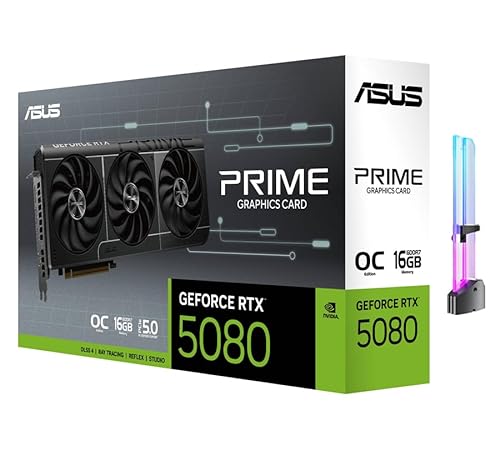
The ASUS Prime GeForce RTX 5080 OC Edition Graphics Card is an excellent choice for content creators and AI enthusiasts who demand high performance and ample VRAM for local LLM applications. With 16GB of GDDR7 memory and 1827 AI TOPS, it handles demanding tasks effortlessly. Its triple-fan cooling system guarantees stable performance, while the 30 Gbps memory interface offers high throughput for editing and AI workloads. You’ll appreciate features like DLSS 4 and ray tracing for exceptional gaming experiences. Plus, with multiple display outputs, you can easily set up a versatile workstation tailored to your creative needs.
Best For: Content creators and AI enthusiasts who require high-performance graphics and ample VRAM for demanding tasks.
Pros:
- Supports advanced AI content creation and local LLM inference for efficient workflows.
- Triple-fan cooling system ensures stable performance even during heavy use.
- High memory speed and interface provide excellent throughput for editing and gaming.
Cons:
- Requires a recommended 850W PSU, which may necessitate an upgrade for some users.
- High-end specifications may lead to a higher price point compared to lower-tier options.
- The size and weight of the card may pose installation challenges in compact cases.
AI Workstation with RTX 5060 Ti and Ryzen 9600X

For professionals and enthusiasts who prioritize data privacy and high-performance capabilities, the AI Workstation equipped with an RTX 5060 Ti and Ryzen 9600X stands out as an exceptional choice. It features 16GB of VRAM, enabling local AI inference at impressive speeds of up to 80 tokens per second. With 16GB DDR5 RAM and a 1TB NVMe SSD, you’ll enjoy responsiveness and ample storage for your projects. Pre-configured for immediate use, it supports various applications, from text generation to image creation. Plus, its complete data privacy guarantees your sensitive information remains secure, making it perfect for personal or professional workflows.
Best For: Professionals and enthusiasts seeking high-performance computing with a focus on data privacy and local AI capabilities.
Pros:
- Complete data privacy: No cloud storage or third-party data uploads, ensuring sensitive information stays secure.
- High-performance capabilities: Supports local AI inference with impressive speed and handles models with up to 34B parameters.
- Ready for immediate use: Pre-configured with essential software for quick setup and productivity right out of the box.
Cons:
- Limited to Ubuntu: Operating system may not be suitable for users who prefer Windows or macOS.
- Expansion limitations: While expandable up to 256GB, initial memory of 16GB may not meet the needs of very large projects.
- Higher upfront cost: As a one-time purchase, the initial investment may be significant compared to subscription-based services.
Nimo eGPU Docking Station with AMD Radeon RX 7600M XT

If you’re looking to elevate your gaming or creative workflow, the Nimo eGPU Docking Station with the AMD Radeon RX 7600M XT is an excellent choice. With its 8GB GDDR6 VRAM and RDNA3 architecture, you can expect graphics performance that outshines integrated options by up to 10x. The Thunderbolt 5 connection offers a staggering 80Gbps bandwidth, perfect for multi-display setups across three screens. Whether you’re gaming, rendering 3D graphics, or diving into AI model inference, this eGPU delivers. Plus, its sleek design and robust build make it a reliable companion for any workstation.
Best For: Gamers, creative professionals, and AI enthusiasts seeking high-performance graphics and multi-display capabilities in a compact design.
Pros:
- Exceptional Graphics Performance: Outperforms integrated graphics by up to 10x, ideal for AAA gaming and 3D rendering.
- High Connectivity: Features Thunderbolt 5 for fast data transfer and supports multiple display setups with dual 8K output.
- Durable Design: Built with a metal chassis for reliable heat dissipation and certified for 24/7 operation.
Cons:
- Price Point: May be expensive for casual users who do not require high-end graphics performance.
- Limited Compatibility: Requires Thunderbolt 3/4/5 or USB4 devices for optimal use, which may not be available on all systems.
- Size Consideration: While compact, it may still take up additional space on a workstation compared to integrated graphics solutions.
Factors to Consider When Choosing High VRAM GPUs for Local LLM PCs
When you’re choosing a high VRAM GPU for your local LLM PC, there are several key factors to keep in mind. You’ll want to assess memory capacity requirements, GPU architecture efficiency, and the importance of effective cooling solutions. Additionally, consider power supply requirements and compatibility with your software to guarantee everything runs smoothly.
Memory Capacity Requirements
How do you guarantee your local LLM setup can handle demanding tasks efficiently? Start by ensuring you choose a GPU with at least 16GB of GDDR6 or GDDR7 VRAM. Models with parameter sizes up to 34 billion require this capacity to avoid lag and maintain smooth performance. If you’re diving into complex AI workflows like image generation or video processing, high VRAM is essential to minimize bottlenecks during multitasking. Additionally, pay attention to memory interface and speed—look for specs around 30 Gbps and 3000 MHz to enhance throughput. A GPU that meets these memory capacity requirements will enable real-time processing of large datasets without relying on cloud services, ensuring your local LLM applications run efficiently.
GPU Architecture Efficiency
Choosing a high VRAM GPU isn’t just about memory capacity; GPU architecture efficiency plays a key role in maximizing performance for local LLM tasks. Newer architectures typically deliver better performance per watt, essential for handling AI workloads effectively. Look for GPUs with Tensor Cores and AI acceleration, as these greatly speed up local LLM inference. Memory bandwidth is also important; higher bandwidth guarantees quicker data transfer between the GPU and memory, critical for large AI models. Additionally, advanced features like hardware support for ray tracing and DLSS offload tasks from the CPU, optimizing your system. Finally, effective use of GDDR memory types, such as GDDR6 or GDDR7, enhances data rates for improved handling of complex workloads.
Cooling Solutions Importance
While selecting a high VRAM GPU, don’t overlook the importance of effective cooling solutions. These systems are essential to prevent thermal throttling, which can greatly degrade performance during intensive tasks like local LLM inference and AI content creation. Look for GPUs with advanced cooling features, such as triple-fan designs or vapor chamber technology, as they enhance heat dissipation and assure stable operation under heavy workloads. Maintaining ideal thermal levels not only sustains performance but also extends your GPU’s lifespan, as high temperatures can lead to hardware degradation. In multi-GPU setups, efficient cooling is even more critical to manage elevated temperatures and guarantee that each unit operates within safe limits, allowing you to work uninterrupted.
Power Supply Considerations
Power supply considerations are essential when selecting a high VRAM GPU for your local LLM PC. First, verify your power supply unit (PSU) meets or exceeds the recommended wattage, typically at least 850W, to handle the GPU’s power demands during intense tasks. Check the required power connectors, as high VRAM models often need advanced connections like a single 16-pin connector for peak efficiency. Additionally, factor in the PSU’s efficiency rating; a higher rating, such as 80 PLUS Gold or Platinum, means better performance and lower electricity costs. Finally, leave some headroom above the minimum requirements to accommodate potential upgrades or increased power needs from peripherals. This approach will help you achieve reliable performance and longevity for your system.
Compatibility With Software
Selecting a high VRAM GPU for your local LLM PC isn’t just about power supply considerations; software compatibility plays a crucial role in guaranteeing peak performance. You need to verify your GPU supports essential frameworks like TensorFlow or PyTorch, which often have specific VRAM and architecture needs. High VRAM GPUs, particularly those with 16GB or more, allow you to efficiently run larger models and tackle complex tasks. Additionally, pay attention to the GPU’s memory speed and interface, such as 30 Gbps and 256-bit configurations, as these can greatly impact performance in memory-intensive applications. Always check the software documentation for recommended hardware specifications, as certain applications may have minimum VRAM requirements for ideal functionality in demanding AI workloads.
Performance in Real-World Applications
When choosing a high VRAM GPU for your local LLM PC, performance in real-world applications is a critical factor to take into account. GPUs with 16GB or more VRAM efficiently process larger AI models, preventing bottlenecks during multitasking. Look for models with high memory bandwidth, like 256-bit interfaces, which enhance throughput in demanding workloads, ensuring smoother performance. If you’re into generative AI workflows or high-resolution image upscaling, sufficient VRAM is essential for handling complex computations. Some GPUs can process up to 80 tokens per second, making them great for real-time applications in content creation. Ultimately, for high display resolutions like 7680 x 4320, substantial VRAM helps maintain performance during intensive tasks like video editing and 3D rendering.
