
High-performance tablet computers have evolved into serious all-day devices for work, creativity, gaming, and media. The best options now combine fast processors, sharp displays, strong battery life, and flexible keyboard or stylus support.
Below, we focus on models that offer real speed and usability, not just big screens or flashy specs. Whether you want a premium 2-in-1, an Android tablet for multitasking, or a tablet PC for desktop-style workflows, this roundup will help you narrow the field quickly.
Best 10 High-Performance Tablet Computers Picks for 2026
Galaxy Tab S10 FE
10.9" Android Tablet with S Pen

- 12GB RAM and Exynos 1580 chip
- 90Hz 10.9-inch display with dual speakers
- IP68 water resistance and included S Pen
Best For: Students and entertainment-focused users who want a durable Android tablet
iPad Air M3 Renewed
13-inch Renewed Premium 5G Tablet
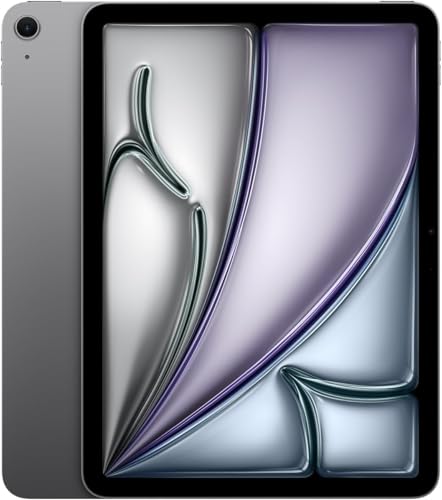
- Apple M3 chip for fast multitasking
- 13-inch Liquid Retina display with True Tone
- Wi-Fi + Cellular 5G support
Best For: Mobile professionals and creative users who need a large-screen iPad
Fusion5 Helios 12
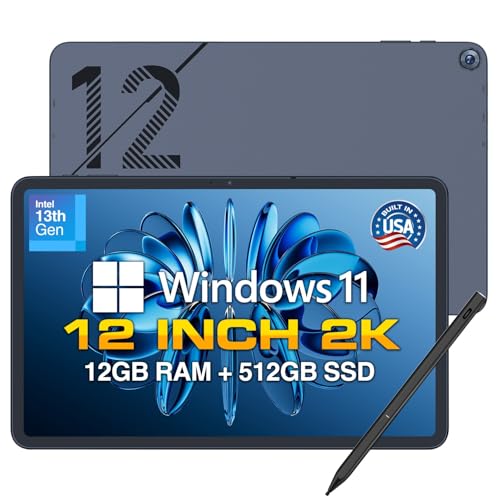
- 12GB DDR5 RAM plus 512GB SSD
- Built-in fan for sustained workloads
- 12-inch 2K display with stylus included
Best For: Productivity users who need Windows app support and desktop-style flexibility
Galaxy Tab A11+

- 8GB RAM and 256GB storage
- 11-inch 90Hz display for smooth use
- Quad speakers with Dolby Atmos
Best For: Families and everyday users who want a responsive Android tablet
Elite AI Gaming Convertible

- Ryzen AI Max+ 395 with up to 50 TOPS NPU
- 64GB LPDDR5X RAM and 2TB SSD storage
- 13.4-inch 180Hz 2.5K touchscreen
Best For: Power users needing gaming, AI, and multitasking in one device
Large Screen Android Productivity Tablet

- Android 16 with Gemini AI features
- 12-inch 2K 90Hz display with Widevine L1
- 24GB RAM, 256GB storage, expandable to 2TB
Best For: Entertainment, schoolwork, and light productivity
Portable Windows 2-in-1 Work Tablet

- 12-inch 2K IPS touchscreen with anti-glare touch
- 12GB RAM and 512GB SSD for daily tasks
- Detachable keyboard and Windows 11 Home
Best For: Students and office users who want laptop-style flexibility
AI-Ready Android Powerhouse

- Android 16 with Gemini AI support
- 12.2" 2.5K display, 99% sRGB
- Keyboard, mouse, stylus, and case included
Best For: portable productivity, art, and gaming
Premium Windows 2-in-1
Surface Pro 13-inch Copilot+ PC

- Snapdragon X2 Plus with AI acceleration
- 13" 2880 x 1920 touchscreen, 120Hz
- Up to 15.5 hours of video playback
Best For: Windows productivity and creative multitasking
Galaxy Tab S10 FE – 10.9" Android Tablet with S Pen
For shoppers comparing high-performance tablet computers, the Samsung Galaxy Tab S10 FE stands out as a well-rounded Android option with a big 10.9-inch display, 90Hz refresh rate, and 12GB of RAM. It is built to handle entertainment, note-taking, and everyday multitasking while staying practical with IP68 water resistance and long battery life.
Best For: Students, entertainment, and note-takers who want a durable Android tablet with S Pen support.
Pros:
- 10.9-inch display with 90Hz refresh rate for smooth viewing and gaming
- Includes S Pen plus handwriting assist and Math Solver for productivity
- 12GB RAM and Exynos 1580 processor for responsive multitasking
- IP68 water resistance adds extra durability for everyday use
Cons:
- LCD panel, not an OLED display
- Large-screen design may feel less compact for one-handed use
The Tab S10 FE is a smart pick if you want a feature-rich Android tablet that balances performance, durability, and note-taking tools without overcomplicating the buying decision.
IPad Air M3 Renewed – 13-inch Renewed Premium 5G Tablet
2025 Apple iPad Air with Apple M3 (13-inch, Wi-Fi + Cellular, 256GB) - Space Gray (Renewed Premium)
Check Price On AmazonIf you want one of the more capable high-performance tablet computers for work, travel, and creative apps, this 2025 iPad Air pairs Apple’s M3 chip with a large 13-inch Liquid Retina display. The renewed premium configuration adds Wi‑Fi + Cellular support, so it is designed for users who need fast performance and flexible connectivity on the move.
Best For: Mobile professionals and creative users who want a large-screen iPad with cellular connectivity.
Pros:
- Apple M3 chip delivers strong CPU and GPU performance for multitasking
- 13-inch Liquid Retina display with True Tone and wide P3 color
- Wi-Fi + Cellular 5G support for use away from Wi-Fi
- 12MP front and rear cameras with Center Stage for video calls
Cons:
- Battery life is listed at 9 hours, which is shorter than some rivals
- Renewed Premium listing means it is not a brand-new unit
This iPad Air is a strong option if you value performance, a larger screen, and always-on connectivity more than you value the longest battery life or a new-in-box purchase.
Fusion5 Helios 12 – 12-inch Windows 11 Tablet PC
For buyers looking at high-performance tablet computers with a Windows desktop-style experience, the Fusion5 Helios 12 is built around a 12-inch 2K touchscreen, 12GB of DDR5 RAM, and a 512GB SSD. The built-in fan, full Windows 11 Home setup, and broad port selection make it a practical pick for productivity-heavy use.
Best For: Users who want a Windows tablet for productivity, multitasking, and desktop app compatibility.
Pros:
- 12GB DDR5 RAM and 512GB SSD support smooth multitasking and fast storage access
- Built-in cooling fan helps maintain performance under heavier workloads
- 12-inch 2K display offers sharp detail and a productive 16:10 aspect ratio
- Includes stylus pen and multiple ports for flexible workflows
Cons:
- Battery is 4500mAh, so long unplugged sessions may be limited
- Thicker, more work-focused design may be less tablet-like than slimmer models
This Fusion5 model makes sense when Windows compatibility, storage, and workstation-style practicality matter more than thinness or pure media-first design.
Galaxy Tab A11+ – Slim 11-inch Android Tablet
The Samsung Galaxy Tab A11+ is a straightforward choice among high-performance tablet computers for families, streaming, and everyday tasks. It combines an 11-inch 90Hz display, 8GB of RAM, and 256GB of storage with a slim, lightweight build that is easy to carry around the house or on the go.
Best For: Families and casual users who want a responsive Android tablet for daily use.
Pros:
- 8GB RAM and upgraded chipset keep common tasks responsive
- 11-inch display with up to 90Hz refresh rate for smooth scrolling and media
- 256GB storage gives plenty of room for apps and files
- Quad speakers with Dolby Atmos enhance movies and music
Cons:
- Uses an LCD panel instead of a higher-end display type
- Designed more for everyday use than advanced creative work
If you want a balanced Android tablet that emphasizes speed, storage, and family-friendly media features, the Tab A11+ is an easy model to shortlist.
Elite AI Gaming Convertible – ASUS ROG Flow Z13 2025
If you want high-performance tablet computers that can also behave like a serious gaming machine, the ASUS ROG Flow Z13 (2025) stands out for its top-tier internals and fast 13.4-inch 2.5K 180Hz touchscreen. It is built for buyers who care about smooth visuals, strong local AI capability, and real Windows productivity in a compact 2-in-1 form.
Best For: Power users who want a premium Windows tablet for gaming, AI workloads, and heavy multitasking.
Pros:
- AMD Ryzen AI Max+ 395 with 16 cores, 32 threads, and up to 50 TOPS NPU for local AI tasks
- 64GB LPDDR5X RAM and 2TB SSD provide ample headroom for demanding apps and large files
- 13.4-inch 2560 x 1600 display with 180Hz refresh rate, 500 nits brightness, and 100% DCI-P3 color
- Strong connectivity includes two USB4 Type-C ports, HDMI 2.1, Wi-Fi 7, and Bluetooth 5.4
Cons:
- Integrated Radeon 8060S graphics are powerful for an iGPU, but still not the same as a discrete GPU
- Its premium hardware focus may be more than casual tablet users need
This is a highly specialized Windows 2-in-1 that leans hard into performance and display quality. For shoppers comparing high-performance tablet computers, it is the most capable option here by a wide margin.
Large Screen Android Productivity Tablet – Android 16 12 Inch Tablet
For shoppers comparing high-performance tablet computers on a budget-friendly Android platform, this 12-inch model focuses on a large 2K display, generous memory, and productivity-friendly extras. It is built for streaming, split-screen multitasking, travel use, and everyday work with the included keyboard.
Best For: Users who want a large Android tablet for entertainment, schoolwork, and light productivity.
Pros:
- Android 16 with Gemini AI support for streamlined interface and productivity assistance
- 12-inch 2K 90Hz display with Widevine L1 for HD streaming on major apps
- 24GB RAM and 256GB storage, plus TF expansion up to 2TB
- 8000mAh battery, GPS, and a keyboard bundle make it practical for on-the-go use
Cons:
- Unisoc T615 is aimed at everyday performance rather than flagship-class speed
- Best suited to light-to-moderate workloads instead of demanding creative apps or gaming
This tablet offers a broad feature set for the price-conscious buyer who wants a big screen and flexible Android experience. It is a good fit when portability, media use, and basic productivity matter more than raw power.
Portable Windows 2-in-1 Work Tablet – Jumper EZpad V12Pro
If you need high-performance tablet computers for everyday work rather than heavy gaming, this 12-inch Windows 11 2-in-1 is a practical pick. It combines a detachable keyboard, a lightweight metal body, and a 2K touchscreen with enough storage and memory for school, office tasks, and travel-friendly use.
Best For: Students and office users who want a lightweight Windows tablet with laptop-style flexibility.
Pros:
- 2-in-1 design with detachable keyboard and adjustable stand for flexible use
- 12-inch 2K IPS touchscreen with anti-glare treatment and 10-point touch
- 12GB RAM and 512GB SSD support multitasking and everyday productivity
- Dual Type-C ports, Wi-Fi, Bluetooth 5.0, and Windows 11 Home add convenience
Cons:
- Intel Pentium Gold 6500Y is suited to basic productivity, not demanding performance
- 4300mAh battery is smaller than some larger tablets and may limit longer sessions
This model is best viewed as a portable Windows work device with tablet convenience. It delivers the essentials for notes, browsing, video calls, and light office software without pushing into premium performance territory.
AI-Ready Android Powerhouse – 12.2" Android 16 Tablet
If you want high-performance tablet computers for gaming, art, and everyday productivity, this 12.2-inch Android model is built around speed, storage flexibility, and a sharp 2.5K display. It stands out with Android 16, Gemini AI support, and a bundled keyboard, mouse, stylus, and case, making it a practical all-in-one option for users who want a tablet that can double as a lightweight work setup.
Best For: Students, remote workers, and creative users who want a large Android tablet with laptop-style accessories.
Pros:
- Android 16 with Gemini AI and a clean, bloat-free interface
- 12.2-inch 2.5K display with 99% sRGB color coverage
- Large 48GB RAM configuration and expandable storage up to 2TB TF
- Includes keyboard, mouse, stylus, and protective case
Cons:
- Virtual RAM is part of the advertised memory total, not all physical RAM
- Android tablet apps may not match a full desktop workstation for every task
- Large feature set may be more than casual users need
Overall, this is a feature-packed Android tablet for buyers who value a big screen, strong multitasking claims, and a ready-to-use accessory bundle. If you want one device that can cover entertainment, light creation, and portable work, it offers a compelling mix of value and versatility.
Premium Windows 2-in-1 – Surface Pro 13-inch Copilot+ PC
For buyers comparing high-performance tablet computers that feel closest to a premium laptop, the Microsoft Surface Pro brings Windows 11, a Snapdragon X2 Plus chip, and a sharp 13-inch touch display into a lightweight 2-in-1 design. It is aimed at people who need real multitasking, long battery life, and the flexibility to switch between tablet, laptop, and studio modes.
Best For: Professionals, students, and creatives who want a premium Windows tablet with strong AI features.
Pros:
- Snapdragon X2 Plus processor with built-in AI features
- 13-inch touchscreen with 2880 x 1920 resolution and 120Hz scrolling
- Up to 15.5 hours of video playback for all-day use
- Lightweight 2-in-1 design with tablet, laptop, and studio flexibility
Cons:
- Keyboard and Surface Slim Pen are sold separately
- More expensive, premium-focused option than basic Android tablets
- Best suited to users who want Windows rather than a simpler tablet OS
This Surface Pro is the strongest choice here if you want a tablet that can handle desktop-style work without giving up portability. It is especially attractive for people who already live in the Windows ecosystem and want a polished device that can do more than media consumption.
Large-Screen Android Workhorse – 14" Android 16 Tablet Bundle
This URAO model is a practical pick for shoppers seeking high-performance tablet computers with a bigger display and a full accessory bundle. Its Android 16 software, octa-core processor, 30GB RAM configuration, and 14-inch FHD screen are geared toward multitasking, streaming, reading, and everyday school or work use.
Best For: Users who want a large Android tablet for entertainment, study, and light productivity.
Pros:
- 14-inch 1920 x 1200 IPS display for a roomy viewing area
- Android 16 with an octa-core processor for smoother multitasking
- 30GB RAM and 256GB storage with TF expansion support
- Includes keyboard, stylus, case, and headphone accessories
Cons:
- No GPS, despite the large-screen mobility focus
- Large size may be less convenient for one-handed portability
- Android tablet software may not replace a full laptop for demanding desktop workflows
In practice, this tablet is best viewed as a versatile big-screen Android bundle rather than a pure performance machine. It makes the most sense for buyers who want a comfortable display, strong battery life, and ready-made accessories without jumping to a full laptop.
How We Picked These High-Performance Tablet Computers
We prioritized tablets that deliver meaningful performance for demanding everyday use: smooth multitasking, responsive touch input, solid storage options, and displays suited to long sessions. We also weighed ecosystem, portability, accessory support, and value so the list covers both premium and budget-conscious buyers.
Quick Comparison: What Matters Most
Not every fast tablet is built for the same job. Some are better as laptop replacements with full desktop software support, while others shine as lightweight media and note-taking devices. If you need a workstation-style experience, look at Windows-based 2-in-1 models. If you want the best app ecosystem and tablet-first polish, iPad and Android options remain strong.
Key Buying Factors for High-Performance Tablet Computers
Processor and Memory
For High-Performance Tablet Computers, the processor is the main driver of speed, but RAM matters just as much for keeping multiple apps open. Power users should look for at least 8GB of RAM, with 12GB or more preferred for demanding multitasking, creative work, or gaming.
Display Quality
Resolution, refresh rate, brightness, and panel size affect everything from reading to drawing to video playback. A higher-resolution display is especially useful for art, spreadsheets, and split-screen productivity.
Storage and Expandability
Choose enough storage for apps, files, and offline media. 256GB is a practical baseline for premium buyers, while 512GB or more makes sense if you store large projects, games, or video files locally.
Software and Compatibility
The operating system should match your workflow. iPadOS is ideal for optimized creative apps, Android offers flexibility, and Windows is the strongest choice when you need full desktop software and better accessory compatibility.
Battery Life and Accessories
Battery life, keyboard support, stylus quality, and port selection can matter as much as raw speed. If you plan to type, sketch, or travel often, make sure the tablet is paired with the right accessories and enough endurance for a full day away from a charger.
Who Should Buy Which High-Performance Tablet Computers?
Choose an iPad if you want the most polished tablet experience for creative apps and media. Pick a Windows 2-in-1 if you need real productivity tools, file flexibility, or PC-like workflows. Go with Android if you want broad customization, multitasking, and strong value. Among High-Performance Tablet Computers, the best choice is the one that matches your software needs first and specs second.
