
When it comes to gaming, maintaining ideal temperatures for your PC is essential. You need a cooling system that balances performance and efficiency, especially during intense sessions. With many options available, selecting the right one can be overwhelming. From liquid coolers to air coolers, each system has its strengths. Let’s explore the top contenders that can enhance your setup and keep your hardware running smoothly.
XSPC EC6 High Performance Premix PC Coolant Bundle (1L, Blue UV)

If you’re a serious gamer looking to enhance your PC’s cooling efficiency, the XSPC EC6 High Performance Premix PC Coolant Bundle (1L, Blue UV) is an excellent choice. This eco-friendly coolant offers high thermal conductivity and low electrical conductivity, ensuring your components stay cool without risk. It’s pre-mixed, so you won’t need any additional additives, saving you time and hassle. The foldable filling bottle and telescopic tube simplify the filling process, even in hard-to-reach ports. Plus, it’s safe for various materials and can be recolored with EC6 ReColour Dye, giving you both performance and style in one package.
Best For: Gamers and PC enthusiasts looking for an efficient, eco-friendly coolant solution for their water cooling systems.
Pros:
- High thermal conductivity for effective cooling performance.
- Pre-mixed formula saves time and eliminates the need for additional additives.
- Foldable filling bottle with a telescopic tube makes filling easy, even in tight spaces.
Cons:
- Limited to a single color option (Blue UV) without additional dye.
- May not be suitable for users who prefer a DIY coolant mixing approach.
- Requires careful handling to avoid spills due to the narrow filling tube.
CORSAIR Nautilus 360 RS ARGB Liquid CPU Cooler

The CORSAIR Nautilus 360 RS ARGB Liquid CPU Cooler is an excellent choice for gamers seeking high-performance cooling without the noise. With its 360mm AIO design, it delivers efficient cooling thanks to a convex cold plate that maximizes CPU contact. The low-noise pump operates at just 20 dBA, ensuring a whisper-quiet experience. You’ll appreciate the three RS120 ARGB fans that provide strong airflow, complemented by CORSAIR AirGuide technology. Installation is a breeze with pre-applied thermal paste and daisy-chain connections for easy wiring. Compatible with both Intel and AMD sockets, it’s perfect for any high-performance build.
Best For: Gamers and PC enthusiasts seeking high-performance cooling solutions with low noise levels.
Pros:
- Efficient cooling performance with a convex cold plate for maximum CPU contact.
- Whisper-quiet operation at just 20 dBA, ideal for noise-sensitive environments.
- Easy installation with pre-applied thermal paste and daisy-chain connectivity for simplified wiring.
Cons:
- Requires a case that supports 360mm radiator installation, which may limit compatibility with some builds.
- Slightly heavier than standard air coolers, which could affect case balance.
- ARGB features may require a compatible motherboard for full functionality, limiting options for some users.
CORSAIR Hydro X Series, XL8, Performance Coolant, 1L, Clear
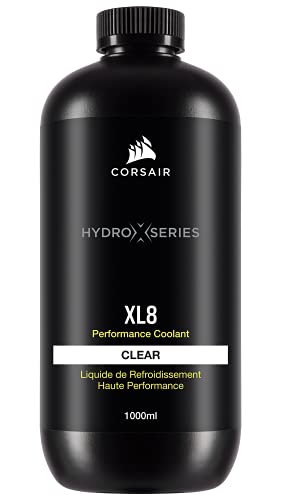
For gamers seeking exceptional performance in custom cooling systems, the CORSAIR Hydro X Series, XL8, Performance Coolant is an excellent choice. This pre-mixed coolant is ready to use, enhancing your setup with vibrant colors while providing long-lasting protection. It features advanced anti-corrosion and anti-bacterial inhibitors, ensuring your copper, brass, and nickel components stay safe. The liquid-based heat transfer method is compatible with radiators, desktops, and graphics cards, making it versatile for your build. With a stellar 4.8 out of 5 stars from nearly 1,600 reviews, it’s a trusted option for gamers aiming for peak efficiency.
Best For: Gamers and PC builders looking for a reliable and vibrant coolant to enhance their custom cooling systems.
Pros:
- Long-lasting performance with no additives required.
- Advanced anti-corrosion and anti-bacterial protection for key components.
- Compatible with various cooling setups, including radiators and graphics cards.
Cons:
- Limited to a clear color option, which may not suit all aesthetic preferences.
- Pre-mixed nature may not appeal to users who prefer DIY coolant mixing.
- Availability may vary, potentially affecting stock levels.
CORSAIR iCUE Link Titan 360 RX RGB Liquid CPU Cooler

Designed for gamers seeking superior thermal performance, the CORSAIR iCUE Link Titan 360 RX RGB Liquid CPU Cooler stands out with its advanced FlowDrive Cooling Engine. This 360mm AIO cooler features three high-performance RX120 RGB fans, ensuring ideal airflow and low noise at just 36 decibels. With PWM control, you can ramp up fan speeds to 2,100 RPM, and the Zero RPM mode eliminates noise at lower temperatures. Its iCUE LINK technology simplifies connectivity, while the precision-engineered cold plate and pre-applied XTM70 thermal paste guarantee excellent thermal contact. Enjoy a clutter-free setup with a sleek design that complements any gaming rig.
Best For: Gamers and PC enthusiasts seeking high-performance cooling solutions for their systems.
Pros:
- High-performance cooling: The FlowDrive Cooling Engine and precision-engineered cold plate provide optimal thermal performance.
- Low noise operation: With a noise level of only 36 decibels, it ensures a quiet gaming experience.
- Easy connectivity: The iCUE LINK technology simplifies installation and reduces cable clutter.
Cons:
- Size limitations: The 360mm radiator may not fit in smaller cases, restricting compatibility.
- Potential overkill for casual users: Advanced features may be unnecessary for users with lower performance needs.
- Limited to specific socket types: Compatibility is restricted to Intel LGA 1851/1700 and AMD AM5/AM4.
CORSAIR iCUE Link Titan 360 RX LCD Liquid CPU Cooler

Gamers seeking exceptional cooling performance and eye-catching aesthetics will appreciate the CORSAIR iCUE Link Titan 360 RX LCD Liquid CPU Cooler. This 360mm AIO cooler features a powerful FlowDrive Cooling Engine, ensuring ideal thermal contact with minimal noise at just 36 dB. Its stunning 2.1” IPS LCD screen displays real-time CPU temperatures and can animate GIFs or logos in vibrant colors. With three RX120 RGB fans designed for high airflow and efficient operation, setup is a breeze thanks to the iCUE LINK technology. Plus, enjoy peace of mind with a 6-year warranty, making it a solid investment for your gaming rig.
Best For: Gamers and PC enthusiasts seeking high-performance cooling solutions with customizable aesthetics.
Pros:
- Exceptional cooling performance with a FlowDrive Cooling Engine and high airflow from RX120 RGB fans.
- Vibrant LCD screen that displays real-time CPU temperatures and supports animations for a personalized look.
- Easy installation with iCUE LINK technology and pre-applied thermal paste, reducing cable clutter.
Cons:
- Noise level of 36 dB may be noticeable in very quiet environments.
- Larger form factor may not fit in smaller cases or setups easily.
- Higher price point compared to standard air coolers or lower-end AIO options.
Minorsonic AIO CPU Cooler (360mm)

The Minorsonic AIO CPU Cooler (360mm) stands out with its high-speed ceramic bearing pump, making it an ideal choice for those who demand exceptional cooling performance during intense gaming sessions. Operating at 3000 RPM, this cooler guarantees maximum cooling efficiency and longevity. Its industrial-grade, 3-phase motor minimizes noise and vibration, enhancing heat transfer. With smart PWM fan control, the 120mm ARGB fans adjust speed based on system temperature, achieving high airflow at low noise levels. The exclusive 12-channel radiator design optimizes heat transfer, assuring your CPU stays cool even under pressure. Upgrade to Minorsonic for peak performance!
Best For: Gamers and PC enthusiasts seeking high-performance cooling solutions for intense workloads.
Pros:
- High-Speed Pump: Operates at 3000 RPM for maximum cooling efficiency and longevity.
- Low Noise Levels: Industrial-grade motor minimizes vibration and noise, providing a quieter experience.
- Smart Fan Control: PWM technology allows fans to adjust speed based on system temperature, balancing airflow and noise.
Cons:
- Size Compatibility: The 360mm design may not fit in smaller cases, limiting installation options.
- Initial Cost: Higher price point compared to standard air coolers may deter budget-conscious buyers.
- Maintenance Needs: AIO coolers may require occasional maintenance, such as checking for leaks or cleaning the radiator.
Thermalright Peerless Assassin 120 Vision MAX ARGB White CPU Air Cooler

If you’re seeking a powerful cooling solution for your gaming rig, the Thermalright Peerless Assassin 120 Vision MAX ARGB White CPU Air Cooler stands out with its impressive dual-tower design. With a cooling performance of 2150 RPM and six pure copper heat pipes, it efficiently keeps your CPU cool. You’ll enjoy the vibrant 5-inch IPS LCD screen for real-time monitoring, customizable backgrounds, and video playback. Its dimensions fit perfectly in mainstream ATX cases, while the dual fans guarantee peak airflow at 69 CFM with minimal noise. Plus, it’s compatible with both Intel and AMD platforms, making installation a breeze.
Best For: Gamers and PC enthusiasts seeking efficient cooling performance and customizable monitoring features in their builds.
Pros:
- Dual-tower design and high RPM fans provide superior cooling efficiency.
- 5-inch IPS LCD screen allows for real-time system monitoring and customization.
- Compatible with a wide range of Intel and AMD platforms, simplifying installation.
Cons:
- Installation on AMD requires an original motherboard backplate, which is not included.
- Height of 164mm may limit compatibility with some smaller cases.
- Noise levels, while low, may still be noticeable under heavy load.
Thermalright Aqua Elite 120 V3 AIO CPU Cooler

Designed for enthusiasts seeking ideal cooling solutions, the Thermalright Aqua Elite 120 V3 AIO CPU Cooler stands out with its fourth-generation pump head and efficient 120mm black aluminum fin heat sink. You’ll appreciate the low vibration and high heat dissipation, ensuring your CPU stays cool under pressure. The dual-fan TL-C12B-S V2 operates at 1500 RPM with a noise level below 25.6 dBA, providing 66.17 CFM airflow. Plus, the adjustable ARGB lighting syncs with your motherboard for a customizable look. Installation is a breeze, thanks to pre-installed fans and included accessories, making it perfect for Intel and AMD setups.
Best For: Enthusiasts looking for efficient and customizable cooling solutions for their Intel or AMD CPU setups.
Pros:
- High cooling performance with a fourth-generation pump and efficient heat sink design.
- Quiet operation with noise levels below 25.6 dBA, making it suitable for silent builds.
- Customizable ARGB lighting that syncs with the motherboard for a personalized aesthetic.
Cons:
- Limited to 120mm size, which may not provide as much cooling as larger AIO coolers.
- Installation may require careful handling of the pre-installed components and accessories.
- Compatibility exclusions for some older CPU sockets not listed.
Thermalright Stream Vision 360 AIO CPU Liquid Cooler

Looking for a powerful cooling solution that stands out? The Thermalright Stream Vision 360 AIO CPU Liquid Cooler is your answer. With its impressive 360mm size and 3.5-inch LCD display, it supports various Intel and AMD platforms. The magnetic cold head pump guarantees efficient heat dissipation, while the full-color IPS display lets you customize visuals. Featuring three high-performance fans with PWM control, it delivers 95.4 CFM airflow at a quiet 31.4 dB. Installation’s a breeze with included mounting fasteners, making it a top choice for gamers seeking both performance and aesthetics. Upgrade your setup with this stellar cooler today!
Best For: Gamers and PC enthusiasts seeking a high-performance cooling solution with customizable visuals and quiet operation.
Pros:
- High cooling performance with 360mm size and three efficient fans delivering 95.4 CFM airflow.
- Customizable LCD display allows for personalized aesthetics and monitoring.
- Easy installation with included mounting fasteners for various CPU platforms.
Cons:
- Larger size may not fit in smaller cases or setups.
- Higher noise level at maximum fan speed compared to some other coolers.
- Price point may be higher than basic cooling solutions.
Cooler Master V4 Alpha 3DHP CPU Air Cooler
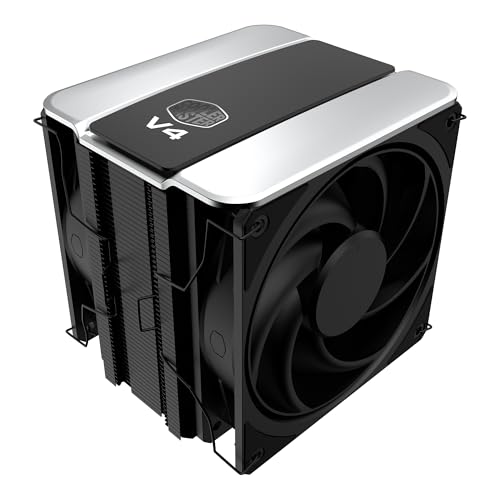
The Cooler Master V4 Alpha 3DHP CPU Air Cooler stands out for its innovative 3D Heat Pipe Technology, making it an ideal choice for gamers who demand top-tier cooling efficiency. With dual 120mm PWM fans, it delivers exceptional airflow while keeping noise levels low at just 2.05 decibels. This cooler’s compatibility with AMD AM5/AM4 and Intel LGA 1851/1700 CPUs guarantees it suits a range of high-performance processors, including Ryzen 9 and Intel Ultra 9. Installation is straightforward, and the included CryoFuze thermal paste simplifies setup. With a 4.7-star rating and a 5-year warranty, it’s a reliable cooling solution for your rig.
Best For: Gamers and high-performance PC builders seeking efficient cooling solutions for AMD and Intel processors.
Pros:
- High Cooling Efficiency: Patented 3D Heat Pipe Technology enhances heat transfer and cooling performance.
- Quiet Operation: Dual 120mm PWM fans maintain low noise levels at just 2.05 decibels.
- Easy Installation: Compatible with various sockets and includes CryoFuze thermal paste for straightforward setup.
Cons:
- Size: Its dimensions may limit compatibility with smaller cases.
- Weight: The cooler’s weight could require careful consideration for motherboard support.
- Price Point: It may be more expensive compared to basic CPU coolers on the market.
Factors to Consider When Choosing High Performance PC Cooling Systems
When choosing a high-performance PC cooling system, you need to evaluate several key factors. Think about the types of cooling technology available, how well it fits with your components, and the noise level it produces. Don’t forget to assess the installation process and the performance metrics to guarantee you get the best cooling solution for your gaming setup.
Cooling Technology Types
Choosing the right cooling technology for your high-performance PC can greatly impact its overall performance and longevity. You have two main types to examine: air cooling and liquid cooling. Air cooling utilizes fans and heatsinks to dissipate heat, while liquid cooling employs a pump, radiator, and water block for more efficient heat transfer. For easier installation, All-in-One (AIO) liquid coolers come pre-assembled, offering enhanced cooling performance. Active cooling technologies, like fans and pumps, work alongside passive methods—such as heatsinks—to maximize thermal dissipation. When evaluating these technologies, pay attention to thermal conductivity, noise levels, and airflow capacity. Generally, liquid cooling systems provide lower noise and superior cooling efficiency compared to traditional air-based systems, making them a popular choice for gamers.
Compatibility With Components
Selecting the right cooling solution goes beyond just understanding cooling technologies; it’s also about guaranteeing compatibility with your components. First, check if the cooling system matches your CPU socket type, as different models like LGA 1851 or AM4 support specific systems. Next, consider the physical dimensions to confirm it fits within your PC case, especially for larger AIO liquid coolers or dual-tower air coolers. Pay attention to your CPU’s thermal design power (TDP); choose a cooler rated to handle that heat output. Also, verify compatibility with other parts, such as RAM height and GPU length, to avoid installation issues. Finally, ascertain the mounting hardware aligns with your motherboard layout for a hassle-free setup.
Noise Level Considerations
While you might prioritize cooling performance in your PC build, don’t overlook the importance of noise levels. Noise is typically measured in decibels (dB), where lower values mean quieter operation, essential for a peaceful computing environment. High-performance solutions, like liquid coolers, can operate as quietly as 20 dBA, markedly quieter than traditional air coolers. Look for fans designed with magnetic bearings, enhancing quiet operation while ensuring effective airflow. Some cooling systems even feature a Zero RPM mode, stopping fans entirely at low temperatures, eliminating noise when demand is minimal. Additionally, advanced PWM (Pulse Width Modulation) technology allows fans to adjust speeds based on system temperature, further reducing noise during less demanding tasks.
Installation Ease
When you’re upgrading your gaming PC, installation ease can markedly impact your overall experience. Look for cooling systems that come with pre-applied thermal paste, which can save you time and guarantee ideal thermal contact. AIO (All-in-One) coolers are perfect due to their simplified mounting mechanisms and universal compatibility, avoiding complicated installation processes. Choose products with a daisy-chain fan connection system; this minimizes cable clutter and simplifies wiring. Clear and detailed installation instructions or video guides can facilitate a smoother setup, so evaluate these resources before purchasing. Finally, opt for coolers that allow for tool-free installation or include all necessary mounting hardware—this makes it easier to set up your system without needing extra tools.
Performance Metrics
How do you gauge the effectiveness of a high-performance PC cooling system? Start by considering thermal conductivity; higher numbers indicate better heat dissipation, essential for keeping your components cool. Next, check the noise levels in decibels (dBA); quieter systems enhance your gaming experience, so aim for lower values. Fan speed, measured in RPM, markedly affects airflow—higher RPMs usually translate to better cooling capacity. Additionally, evaluate airflow capacity in cubic feet per minute (CFM); effective air circulation is key to removing heat efficiently. Finally, verify compatibility with your CPU socket types and materials; specialized designs can optimize performance for your unique configuration. By focusing on these metrics, you can choose a cooling system that meets your gaming needs.
Maintenance Requirements
Choosing a high-performance PC cooling system goes beyond just evaluating performance metrics; maintenance requirements play a significant role in guaranteeing long-lasting efficiency. Regularly checking coolant levels and quality is essential for peak thermal performance, especially in liquid cooling systems. Periodically clean fans and radiators to remove dust and debris that obstruct airflow. Keep an eye out for any signs of leakage, as even minor leaks can cause severe damage. Don’t forget to replace coolant as recommended—typically every 6 to 12 months—to maintain anti-corrosion properties and thermal conductivity. Finally, make sure you reapply thermal paste between the CPU/GPU and cooler every few years to keep heat transfer effective. This proactive approach will keep your system running smoothly.
Aesthetic and Design
While performance is essential, the aesthetic appeal of a high-performance PC cooling system can dramatically enhance your build’s overall look. Consider options like RGB lighting and sleek designs that reflect your personal style. The choice of colors and materials, such as aluminum or plastic, can seamlessly integrate the cooling system with other components. Customizable lighting effects, especially in ARGB fans and coolers, let you create dynamic themes that shift based on performance or your preferences. Also, the size and shape—whether dual-tower air coolers or liquid coolers with LCD displays—affect both aesthetics and compatibility with your hardware. A well-designed cooling system not only manages heat efficiently but also becomes a striking focal point in your high-performance setup.
Budget Constraints
When setting a budget for high-performance PC cooling systems, you’ll want to carefully weigh your options to guarantee you get the best value for your investment. Prices can vary widely—from affordable air coolers to pricey liquid setups—so establishing a clear budget is essential. Don’t forget to factor in the total cost of ownership, which includes expenses for compatible components, maintenance, and replacement parts. Sometimes, spending more upfront on a quality cooling solution can save you money in the long run by enhancing performance and longevity. Research and compare cooling benchmarks within your budget to maximize efficiency. Finally, keep an eye out for seasonal discounts or sales to snag high-quality systems at a better price.
