
The best high-performance electronic writing tablets make handwritten notes easier to organize, search, edit, and carry than traditional notebooks. This roundup covers focused e-ink devices, versatile Android tablets, and drawing-focused models.
Whether you prioritize paper-like writing, color sketches, strong app support, or a lightweight study setup, the right tablet depends on how you capture and use information every day.
Best 10 High-Performance Electronic Writing Tablets Picks for 2026
Color Note-Taking Powerhouse

- 10.95-inch 90Hz AG-etched LCD with three color modes
- X3 Pro Pencil 2 with 16,384 pressure levels
- Android note app with PDF, audio, and handwriting tools
Best For: Color note-taking, studying, meetings, and Android productivity
Study-and-Stream All-Rounder

- 11-inch 2.5K 90Hz IPS touchscreen
- 8GB memory, 256GB storage, and Dimensity 6300 processor
- Includes Tab Pen, folio case, and learning apps
Best For: College study, handwritten assignments, multitasking, and streaming
Premium Paper-Like Notebook

- 11.8-inch color e-ink display with reading light
- Marker Plus includes an integrated eraser and spare tips
- Low-glare design supports writing, reading, and PDF markup
Best For: Focused writing, reading, sketching, and paper-replacement workflows
Mobile Creative Studio

- 12.2-inch AG-etched display with 97% sRGB coverage
- X3 Pro stylus offers 16,384 pressure levels and tilt support
- Standalone Android 14 tablet with 8GB RAM and 256GB storage
Best For: Portable drawing, illustration, animation, and color-sensitive creative work
Most Portable

- Compact 7.3-inch color E Ink display
- Includes Marker Plus and leather folio
- Up to two weeks of battery life
Best For: Portable, distraction-free note-taking
Most Versatile

- 10.3-inch 300 PPI E Ink display
- Android 14 with third-party app support
- Includes two pens and spare nibs
Best For: Document-heavy work and flexible digital note-taking
Best Focused Workflow

- 10.3-inch high-contrast black-and-white display
- Stated 21 ms digital-ink response
- Lightweight 360 g design with folio
Best For: Focused writing, meetings, and document review
Best Large-Screen Pick

- 14.3-inch 2.4K paper-like display
- Included 4096-level T-PEN stylus
- 256GB storage and 10,000mAh battery
Best For: Students, creators, and musicians needing a large all-purpose writing tablet
Best Paper-to-Phone Notebook

- Writes on real A5 paper with instant phone sync
- 8192-level pressure sensitivity
- Offline storage and replaceable A5 notebook cores
Best For: Paper-first note-takers who want searchable digital copies
Best E-Ink Meeting Notebook
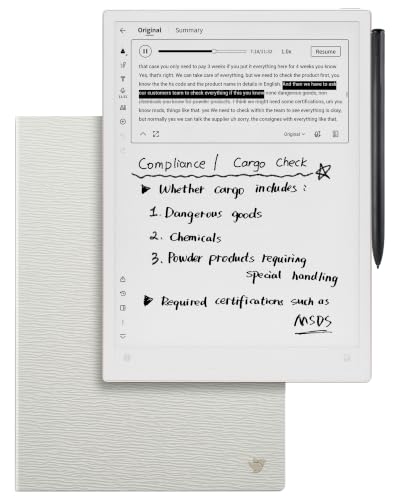
- Frontlight-free E Ink with low-latency handwriting
- 18-language transcription and AI note tools
- Slim design with folio case and long standby time
Best For: Students and professionals taking notes in meetings or lectures
Color Note-Taking Powerhouse – XPPen Magic Note Pad
For shoppers seeking high-performance electronic writing tablets, the XPPen Magic Note Pad combines a full Android tablet with specialized note-taking tools. Its 10.95-inch 90Hz LCD uses an AG nano-etched surface, while the included X3 Pro Pencil 2 offers 16,384 pressure levels for detailed handwriting and annotations. Note that this is a standard Android LCD tablet, not an e-ink device.
Best For: Students, meeting participants, and readers who want color display modes, handwriting conversion, PDF tools, and Android app access.
Pros:
- Three display modes, including monochrome, light color, and nature color.
- X3 Pro Pencil 2 provides 16,384 pressure levels and a soft nib.
- Native note app supports handwriting-to-text conversion, audio recording, PDF editing, and cloud uploads.
- 6GB RAM and 128GB storage support everyday Android tablet use.
Cons:
- It uses a conventional LCD rather than an e-ink display.
- AG etched glass may look different from a true paper-like e-ink screen.
- Some newer AI note features require a system upgrade.
The Magic Note Pad is a versatile choice when color, app compatibility, and responsive pen input matter more than e-ink characteristics. Its dedicated note software and included folio make it particularly practical for organized study and work.
Study-and-Stream All-Rounder – Lenovo Idea Tab
The Lenovo Idea Tab is a practical high-performance electronic writing tablet for students who need one device for handwritten work, research, and entertainment. Its 11-inch 2.5K IPS touchscreen runs at 90Hz and pairs with a Lenovo Tab Pen, while the Dimensity 6300 processor, 8GB of memory, and 256GB of storage support multitasking.
Best For: College students who want a pen-equipped Android tablet for notes, assignments, streaming, and everyday campus use.
Pros:
- Sharp 11-inch 2.5K IPS display with a smooth 90Hz refresh rate.
- Includes the Lenovo Tab Pen and folio case.
- Four learning-focused apps include Lenovo AI Note, Squid, Nebo, and MyScript Calculator.
- Up to 12 hours of YouTube playback and 20W charging support mobile use.
Cons:
- The display is an IPS LCD, not an e-ink writing screen.
- Its included USB-C cable is specified as USB 2.0.
- Pen pressure-level specifications are not provided in the supplied details.
With Android 15, a capable midrange processor, and student-oriented software, the Idea Tab offers broader everyday functionality than a dedicated digital notebook. It is a strong fit for buyers who want handwriting support without giving up streaming and general tablet apps.
Premium Paper-Like Notebook – reMarkable Paper Pro
For buyers prioritizing a focused writing experience, the reMarkable Paper Pro is one of the more specialized high-performance electronic writing tablets. Its 11.8-inch color e-ink display is designed for paper-like writing and includes an adjustable reading light, while the bundled Marker Plus adds a built-in eraser and six spare tips.
Best For: Writers, researchers, and professionals who want a low-glare digital notebook for handwriting, sketching, reading, and PDF markup.
Pros:
- Color e-ink Canvas display with adjustable reading light.
- Marker Plus is included and has a built-in eraser.
- Low-glare screen is designed for comfortable reading, including outdoors and at night.
- Organizes documents with folders and tags and converts handwriting to typed text.
Cons:
- Its Linux-based platform is more focused than a general Android tablet.
- Storage is listed at 64GB, with 2GB of RAM.
- The supplied details do not specify a refresh rate or pressure-level rating.
The Paper Pro stands out for distraction-free writing and reading rather than broad app-based productivity. Choose it when natural pen feel, low glare, color e-ink, and document organization are more important than cameras or a conventional tablet ecosystem.
Mobile Creative Studio – XPPen Magic Drawing Pad
The XPPen Magic Drawing Pad is a strong option among high-performance electronic writing tablets for artists who need a standalone creative workstation. Its 12.2-inch AG-etched display supports 16,384 pressure levels, 60-degree tilt recognition, 97% sRGB coverage, and a 3:2 aspect ratio, so it is built for nuanced drawing without a computer.
Best For: Digital artists, illustrators, animation students, and creators who want portable Android-based drawing with a high-sensitivity stylus.
Pros:
- Battery-free X3 Pro stylus offers 16,384 pressure levels and tilt support.
- 12.2-inch 2160×1440 AG-etched display provides 97% sRGB color coverage.
- Android 14 and Google Play enable standalone app access.
- 8GB RAM, 256GB storage, microSD expansion up to 1TB, and an 8000mAh battery support mobile creation.
Cons:
- It is optimized for drawing and creative apps rather than dedicated note-taking.
- Its LCD display is not e-ink.
- The supplied details do not identify a refresh rate.
This is the best match here for pressure-sensitive illustration and color-focused creative work. The cameras, expandable storage, dual-window support, and roughly 13-hour stated battery life also make it more flexible than a conventional pen display.
Most Portable – reMarkable Paper Pro Move
For shoppers seeking high-performance electronic writing tablets in a compact format, the reMarkable Paper Pro Move emphasizes distraction-free note-taking. Its 7.3-inch color E Ink display, adjustable reading light, handwriting recognition, and included leather folio make it suited to capturing ideas while traveling or during face-to-face meetings.
Best For: Portable note-taking, focused meetings, travel, and organizing handwritten ideas.
Pros:
- Compact 7.3-inch color display with up to 20,000 colors and 264 PPI.
- Includes Marker Plus, six spare tips, and a premium leather folio.
- Handwriting can be converted to typed text, with cloud syncing through the companion apps.
- Advertised battery life reaches up to two weeks.
Cons:
- The smaller display may feel restrictive for extensive PDF markup or larger documents.
- Searching handwritten notes requires a Connect subscription.
- Its reMarkable OS is more focused on writing and reading than general-purpose tablet apps.
The Paper Pro Move is a strong fit when portability and concentration matter more than screen size or broad app support. The color display and paper-focused workflow add flexibility, while the bundled folio makes it ready for mobile use.
Most Versatile – Penstar eNote 2
The Penstar eNote 2 is a versatile option among high-performance electronic writing tablets, pairing a 10.3-inch 300 PPI E Ink screen with Android 14 and support for third-party apps. It is designed for users who want paper-like writing alongside document handling, voice-to-text tools, and expanded storage.
Best For: Reading and annotating documents, multitasking, voice notes, and users who want Android app support.
Pros:
- 10.3-inch 2480 x 1860 display with a stated 300 PPI resolution.
- 8,192 pressure levels and low-lag writing support precise stylus input.
- Android 14, 4GB RAM, 128GB storage, and support for third-party apps.
- Includes two B5 pens, spare nibs, a folio cover, and charging cable.
Cons:
- At about 0.97 kg, it is substantially heavier than the listed reMarkable models.
- Battery-life information varies in the supplied notes, which cite up to four weeks in one section and two weeks in the specifications.
- The larger feature set may be less distraction-free than a dedicated paper tablet.
The eNote 2 stands out for breadth: its large display, split-screen reading workflow, AI transcription features, Android platform, and generous storage make it suitable for more than simple handwriting. Choose it if flexibility is a higher priority than minimum weight.
Best Focused Workflow – reMarkable Paper Pure
The reMarkable Paper Pure is a focused choice for shoppers comparing high-performance electronic writing tablets for work, study, and meetings. Its third-generation 10.3-inch black-and-white E Ink display is designed for handwriting, document markup, and distraction-free organization, with stated ink latency of 21 ms.
Best For: Focused writing, meeting notes, document review, remote work, and black-and-white reading.
Pros:
- 10.3-inch display with improved whiteness and contrast over earlier black-and-white models.
- Stated 21 ms digital-ink response supports responsive handwriting.
- Lightweight at 360 g and supplied with a Marker Plus and mist green sleeve folio.
- Supports templates, folders, tags, handwriting-to-text conversion, and integrations with services such as Google Drive and Dropbox.
Cons:
- The display is black and white, so it is not intended for color notes or illustrations.
- Some advanced cloud and search features require a Connect subscription.
- It runs reMarkable OS rather than a general-purpose tablet operating system.
Paper Pure is the better match for a clean, paper-like workflow on a full-size writing surface. Its low weight, fast stated response, and work-focused integrations make it appealing for users who want fewer digital distractions while still sharing and organizing notes.
Best Large-Screen Pick – TCL NXTPAPER 14
The TCL NXTPAPER 14 is a versatile choice among high-performance electronic writing tablets, combining a spacious 14.3-inch paper-like display, included T-PEN stylus, and Android multitasking tools. Its 2.4K screen, 256GB storage, and 10,000mAh battery suit users who want one device for notes, drawing, reading, sheet music, and media.
Best For: Students, creators, musicians, and users who prefer a large display for writing, drawing, and split-screen work.
Pros:
- Large 14.3-inch 2.4K NXTPAPER display with Standard, Color Paper, and Ink Paper modes
- Included 4096-level T-PEN stylus supports drawing and note-taking
- 8GB RAM, 256GB storage, Android 15, and split-screen or floating-window support
- 10,000mAh battery with 33W fast charging and reverse charging
Cons:
- MicroSD expansion is not supported
- Charger is not included
- Its large display may be less convenient for highly portable use
The TCL stands out when screen size and flexibility matter most. It is more capable as a general-purpose tablet than a dedicated e-ink notebook, while the paper-like display modes and stylus make extended writing and creative work more comfortable.
Best Paper-to-Phone Notebook – XPPen Note Plus
The XPPen Note Plus takes a different approach to high-performance electronic writing tablets: you write on real A5 paper with the included ink pen while Bluetooth 5.3 transfers your handwriting to a phone. It is designed for natural note-taking, sketching, and offline writing without requiring a built-in screen.
Best For: Students, teachers, professionals, and artists who want handwritten notes digitized automatically while retaining a familiar paper experience.
Pros:
- Captures handwriting on real A5 paper and syncs it to Android or iOS devices
- 8192 levels of pressure sensitivity support detailed writing and sketches
- Works offline, then syncs when reconnected through Bluetooth 5.3
- Compatible with replaceable A5 notebook cores up to 8mm thick
Cons:
- Requires the matching included ink pen for writing capture
- Does not have an electronic display for directly viewing notes
- Phone compatibility is limited to Android 10 or later and iOS 14 or later
Choose the Note Plus if the tactile feel of paper matters more than an on-device screen. Its flexible notebook-core design and automatic phone syncing make it especially practical for meetings, lectures, and sketches that need quick digital sharing.
Best E-Ink Meeting Notebook – iFLYTEK AINOTE 2
The iFLYTEK AINOTE 2 is a focused option among high-performance electronic writing tablets, pairing a frontlight-free E Ink display with low-latency handwriting, transcription, and organization tools. Its slim design and included folio make it well suited to portable study, meeting, and planning workflows.
Best For: Meeting attendees, students, and professionals who want paper-like handwriting with transcription, calendar access, and cross-device note management.
Pros:
- Frontlight-free E Ink screen provides a paper-like writing experience in suitable lighting
- Supports eight brush styles and 18-language transcription
- AI tools can assist with selected text, summaries, and organization when connected to Wi-Fi
- Approximately 4.2mm thin with up to 14 days of usage under specified conditions
Cons:
- Frontlight-free display needs external lighting in dark rooms
- AI tools and transcription require an internet connection
- Transcription accuracy depends on audio quality, accents, and the surrounding environment
The AINOTE 2 is a strong fit for users prioritizing distraction-light handwriting and meeting capture. Its internet-dependent AI and transcription features add convenience, but buyers who need fully offline advanced tools or low-light writing should consider those limitations.
How We Picked These High-Performance Electronic Writing Tablets
We selected these tablets for their writing experience, display quality, portability, pen support, storage, and overall usefulness for real-world note-taking. The list includes dedicated digital notebooks such as reMarkable, Penstar, and iFLYTEK models, as well as multipurpose Android and drawing tablets from Lenovo, TCL, and XPPen.
We also considered important differences between e-ink and LCD-style screens. E-ink generally favors reading comfort, battery life, and concentration, while conventional displays offer color, faster app performance, video, and broader creative flexibility.
Quick Comparison
- Best for distraction-free writing: reMarkable Paper Pro and Paper Pure
- Best for color creativity: XPPen Magic Drawing Pad
- Best for Android versatility: Lenovo Idea Tab and TCL NXTPAPER 14
- Best for phone-synced notes: XPPen Note Plus
- Best for AI-assisted digital notes: Penstar eNote 2 and iFLYTEK AINOTE 2
- Best for portable paper replacement: XPPen 3 in 1 Color Digital Notebook
Key Buying Factors for High-Performance Electronic Writing Tablets
Writing Feel and Pen Technology
Look for low-latency pen input, reliable palm rejection, pressure sensitivity, and a surface that matches your preference. A textured screen can feel more like paper, while a smoother surface may be better for quick handwriting or detailed drawing.
Display Type and Size
E-ink screens are well suited to long reading and focused writing, but they typically have slower refresh rates and limited color. LCD and paper-like Android displays are more flexible for apps, media, and bright color work. Screen sizes around 10 to 11 inches balance portability and writing room; larger models are better for diagrams and split-screen work.
Software, Sync, and Storage
Check whether the tablet supports your preferred note formats, cloud services, Android apps, handwriting conversion, and phone or computer syncing. Storage matters if you keep large PDFs, illustrated notebooks, or offline reference files.
Battery Life and Accessories
Dedicated e-ink notebooks usually deliver longer runtimes, while brighter multipurpose tablets may require more frequent charging. Confirm what is included, especially the pen, keyboard or folio, charging accessories, and replacement nibs.
Who Should Buy Which High-Performance Electronic Writing Tablets?
Choose a reMarkable or another dedicated e-ink notebook if focused handwriting and reading are more important than entertainment apps. Pick an XPPen drawing tablet if pressure-sensitive illustration and color are central to your workflow. Lenovo and TCL are stronger choices for buyers who want one device for notes, streaming, browsing, and productivity.
For students, compare screen comfort, file handling, battery life, and the ease of moving notes between devices. Professionals should prioritize synchronization, PDF markup, handwriting search, and accessory support. If you want a simple digital notebook that works alongside a phone rather than replacing a full tablet, the compact XPPen and AI-focused options may be the better fit.
