
If you need sharper live demos, faster classroom sharing, or a more reliable remote presentation setup, the right document camera makes a big difference.
These high-performance document cameras were chosen for image quality, connectivity, ease of use, and real-world teaching and conferencing flexibility.
Best 10 High-Performance Document Cameras Picks for 2026
Editor Pick
IPEVO V4K 8MP USB Document Camera

- 8MP capture up to 3264 x 2448
- 30 fps at full HD for smooth streaming
- Compatible with Mac, Windows, and Chromebook
Best For: Classrooms and remote demos needing reliable UHD capture
Pro Presenter
Elmo TT-12F 4K Document Camera
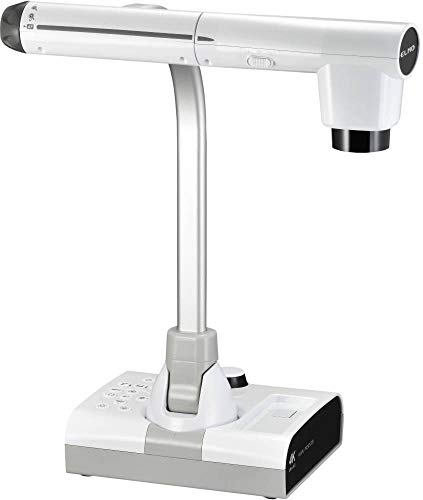
- 4K-capable output support
- USB 3.0 plus HDMI and RGB/VGA
- Autofocus with optical and digital zoom
Best For: Fixed presentation spaces needing flexible video outputs
Compact Classroom Favorite
INSWAN INS-1 8MP Document Camera

- 8MP capture up to 3264 x 2448
- 30 fps streaming with autofocus
- LED light, mic, and Documate software included
Best For: Teachers wanting a compact, software-rich USB camera
AI Tracking Upgrade
OKIOCAM S2-4K 8MP Document Camera

- 8MP Sony sensor with 30 fps streaming
- OKIOPoint AI-tracking follows your pointer
- Works with Windows, Mac, iOS, Chromebook, and displays
Best For: Hybrid classrooms and presenters wanting AI tracking
Wide-Angle Classroom Pick

- 120-degree lens covers tabloid-size originals and more.
- 4K capture with Sony CMOS sensor and autofocus.
- AI noise reduction and USB plug-and-play support.
Best For: Teachers and presenters who need wide framing for larger documents.
Interactive Demo Choice

- 13MP sensor captures true 4K with low-light support.
- OKIOPoint smart pointer adds interactive tracking.
- Built-in light, mic, and broad software support.
Best For: Remote teaching and live demos that benefit from interactive pointing.
Wireless Presentation Pick

- Wi-Fi, HDMI, and USB modes for flexible setups.
- Up to 33-foot wireless range with 9-12 hour battery life.
- Sony sensor and Ambarella processing improve focus and color.
Best For: Presenters who need wireless mobility and multiple connection modes.
Classroom-Ready Flexibility
4K 8MP USB Visualiser with Manual Image Invert

- 8MP output with 2448P live transmission
- Manual image inversion and brightness control
- Foldable design covers A3-size documents
Best For: Teachers and presenters needing compact USB flexibility
High-Detail Portable Pick
IPEVO V4K 13MP USB Document Camera

- 13MP capture up to 3840 x 3104
- Autofocus with enhanced LED illumination
- Lightweight 578g body for portability
Best For: Educators needing sharp USB imaging on the move
Direct-Connect Classroom Power
IPEVO VZ-R Ultra HDMI/USB 13MP

- HDMI and USB dual-mode operation
- 13MP capture with up to 4K output
- Tactile controls for quick image adjustments
Best For: Rooms that need computer-free display flexibility
Editor Pick – IPEVO V4K 8MP USB Document Camera
For buyers comparing high-performance document cameras, the IPEVO V4K stands out for its 8MP sensor, UHD capture, and fast autofocus. It is built for live demos, distance learning, and remote teaching, with broad compatibility across Mac, Windows, and Chromebook setups.
Best For: Teachers, presenters, and remote workers who want a sharp, plug-and-play USB document camera with strong cross-platform support.
Pros:
- 8MP sensor captures up to 3264 x 2448 ultra high definition images.
- Streams up to 30 fps at full HD for smoother live viewing.
- Fast autofocus helps reduce interruptions when switching materials.
- Sony CMOS sensor is designed for better noise reduction and color reproduction in dim light.
Cons:
- Highest-resolution streaming drops to 15 fps.
- Requires more capable computer specs for lag-free 1080p use.
- Does not include zoom.
If you want a capable everyday document camera with solid image quality and wide software compatibility, this model is an easy fit. Its strength is practical performance rather than extra hardware features, which keeps it focused on classroom and conferencing use.
Pro Presenter – Elmo TT-12F 4K Document Camera
The Elmo TT-12F is built for users who need a higher-end document camera setup with 4K output support and flexible connection options. Its USB 3.0, HDMI, and RGB/VGA outputs make it suitable for presentation environments where compatibility and connectivity matter most.
Best For: Presenters and institutions that want a document camera with versatile outputs and 4K-capable workflow support.
Pros:
- Supports up to 4K resolution for detailed presentation output.
- Offers USB, HDMI, and RGB/VGA connectivity.
- Includes autofocus and both optical and digital zoom.
- USB 3.0 interface supports faster data transfer.
Cons:
- Bulkier and heavier than compact USB-only models.
- Notes list 480p video capture resolution in the product details.
- Less portable for on-the-go use.
This model makes more sense when your setup benefits from multiple video outputs and a more installation-friendly design. It is a stronger fit for fixed classrooms, lecture rooms, or conference spaces than for travel.
Compact Classroom Favorite – INSWAN INS-1 8MP Document Camera
The INSWAN INS-1 is a practical choice in high-performance document cameras thanks to its 8MP sensor, smooth 30 fps streaming, and classroom-friendly software bundle. It is designed for plug-and-play use across Windows, Mac, Chromebook, and even supported iPad setups.
Best For: Teachers and presenters who want a compact USB document camera with built-in lighting support and included presentation software.
Pros:
- 8MP Sony camera captures up to 3264 x 2448 resolution.
- Streams at 30 fps for lag-free live viewing.
- Built-in LED light, anti-glare sheet, and mic help in challenging setups.
- Documate software adds zoom, annotation, recording, and snapshots.
Cons:
- Best with software features, so plain plug-and-play use is less feature-rich.
- Mac support requires OS 13.5 or higher per the notes.
- Not designed as a large-format capture solution.
For buyers who want a small desktop footprint without giving up useful teaching tools, the INS-1 is well balanced. Its biggest advantage is the combination of image quality, included software, and broad platform support.
AI Tracking Upgrade – OKIOCAM S2-4K 8MP Document Camera
The OKIOCAM S2-4K is aimed at users who want high-performance document cameras with extra classroom intelligence. It combines an 8MP Sony Exmor R sensor, smooth 30 fps streaming, and OKIOPoint AI-tracking for pointer-following presentations in a compact, durable design.
Best For: Teachers and hybrid presenters who want AI-assisted tracking, strong low-light performance, and wide device compatibility.
Pros:
- 8MP sensor captures up to 3264 x 2448 with 30 fps streaming.
- OKIOPoint AI-tracking follows your pointer in real time.
- Back-illuminated sensor is designed for better low-light clarity without extra LEDs.
- Supports Windows, Mac, iOS, Chromebook, and interactive displays.
Cons:
- AI-tracking features depend on OKIOCAM Live software.
- USB-C iPad support requires the included adapter.
- Advanced features may be more than casual users need.
This model is strongest when you want the camera to do more than simply show documents. The combination of AI tracking, low-light handling, and broad platform support makes it especially appealing for modern classrooms and hybrid teaching setups.
Wide-Angle Classroom Pick – IPEVO V4K PRO 120
If you want a high-performance document camera that can cover larger originals without constant repositioning, the IPEVO V4K PRO 120 is built for that job. Its 120-degree lens, 4K capture, and fast autofocus make it a practical fit for lessons, demos, and video calls where clarity and framing matter.
Best For: Presenters and teachers who need a wide viewing area for tabloid-size documents or larger objects.
Pros:
- 120-degree wide-angle lens captures tabloid-size documents and larger objects more easily.
- 4K resolution, Sony CMOS sensor, built-in LED light, and swift autofocus support crisp detail.
- AI noise reduction is useful for cleaner video calls and presentations.
- Plug-and-play USB compatibility works with Mac, Windows, Chromebooks, Zoom, Google Meet, Skype, and Teams.
Cons:
- Not wireless, so it needs a USB connection for use.
- Digital zoom is listed, but there is no emphasis on advanced optical zoom flexibility.
Overall, this is a strong choice if your priority is broad coverage rather than a tiny desktop footprint. It combines easy setup with the kind of image quality and conferencing compatibility that makes daily use straightforward.
Interactive Demo Choice – OKIOCAM S2 Pro
The OKIOCAM S2 Pro is a high-performance document camera for users who want 4K detail and more interactive presentations. Its 13MP sensor, built-in light and mic, and OKIOPoint smart pointer make it especially useful when you need to show, explain, and annotate material smoothly in live sessions.
Best For: Remote teachers and presenters who want interactive features and true 4K capture.
Pros:
- 13MP sensor delivers true 4K capture with minimal graininess in low light.
- OKIOPoint smart pointer adds interactive tracking through OKIOCAM Live software.
- Integrated LED light helps in dimly lit spaces.
- Plug-and-play compatibility covers Windows, Mac, Chrome, Google Meet, Zoom, Teams, and Canvas.
Cons:
- Requires the OKIOCAM software to use the OKIOPoint experience.
- Wireless operation is not part of the feature set.
For users who value engagement as much as image quality, this model stands out with its presentation-focused tools. The metal base, reinforced arm, and tested hinges also suggest a design made for repeated classroom or office use.
Wireless Presentation Pick – IPEVO VZ-X Wireless
If flexibility matters most, the IPEVO VZ-X is a high-performance document camera that stands out for wireless use and versatile connectivity. With Wi-Fi, HDMI, and USB modes, plus strong battery life and a 33-foot wireless range, it is designed for presenters who need to move around without being tied to a desk.
Best For: Teachers and presenters who want wireless freedom and multiple connection options.
Pros:
- Three connectivity modes: Wi-Fi, HDMI, and USB for broad setup flexibility.
- 8MP Sony sensor with Ambarella processing supports fast focusing, noise reduction, and color reproduction.
- Battery life lasts 9-12 hours, which suits full class or presentation sessions.
- Wireless range reaches up to 33 feet, and onboard buttons let you adjust feed settings directly.
Cons:
- Best image performance varies by mode, with near 4K quality only in USB mode.
- Wireless and HDMI modes capture at 1920 x 1080 rather than full 4K.
This is a smart pick when mobility is part of the workflow. It keeps setup options broad and presentation control close at hand, making it well suited to classrooms, conference rooms, and multi-device environments.
Classroom-Ready Flexibility – 4K 8MP USB Visualiser with Manual Image Invert
If you want high-performance document cameras that are built for teaching and live demos, this 8MP USB visualiser focuses on practical control. It offers 4K-class output, manual image reversal, adjustable brightness, and a foldable multi-joint design that makes it easier to present paper documents, 2D materials, and small 3D objects in real time.
Best For: Teachers, presenters, and remote workers who need a compact USB document camera with strong image control.
Pros:
- 8MP sensor with up to 2448P output and 30fps live transmission
- Manual left/right and up/down image inversion for flexible setup
- 3-level adjustable LED brightness for dim or bright rooms
- Foldable, multi-angle body that covers up to A3-size documents
Cons:
- USB-only design, so it does not offer HDMI output
- Macro capture works best when subjects are positioned carefully
- More focused on classroom-style use than premium studio workflows
Overall, this model stands out when you want straightforward classroom performance with useful manual controls. Its combination of brightness adjustment, image inversion, and plug-and-play compatibility makes it a strong value pick for everyday teaching and conferencing.
High-Detail Portable Pick – IPEVO V4K 13MP USB Document Camera
Among high-performance document cameras, the IPEVO V4K-13MP is built for users who care about image detail and easy portability. Its 13MP sensor delivers up to 3840 x 3104 resolution, while autofocus, brighter LED illumination, and lightweight construction make it well suited for classrooms, online learning, and web conferencing.
Best For: Educators and presenters who need high-resolution imaging in a lightweight USB camera.
Pros:
- 13MP capture with up to 3840 x 3104 resolution for fine text and graphics
- Autofocus and enhanced LED lighting help in low-light conditions
- Lightweight 578g build makes it easy to move between spaces
- Free IPEVO Visualizer software adds teaching and image adjustment tools
Cons:
- USB connection only, so it is not intended for direct HDMI display
- Optional scanner upgrade module is a separate purchase
- Designed for portability, so it may not feel as rugged as heavier fixed units
This is a strong choice if your priority is sharp image capture without adding complexity. It combines high resolution, software support, and easy portability in a form factor that fits modern teaching and collaboration needs.
Direct-Connect Classroom Power – IPEVO VZ-R Ultra HDMI/USB 13MP
If you need high-performance document cameras that can work with or without a computer, the IPEVO VZ-R Ultra is built for flexibility. Its HDMI and USB dual-mode design lets you connect directly to TVs, monitors, projectors, or interactive flat panels, while the 13MP sensor and built-in LED light provide the clarity needed for teaching and live presentation.
Best For: Classrooms and meeting spaces that need direct HDMI sharing plus USB connectivity.
Pros:
- HDMI and USB dual mode for computer-free or computer-based use
- 13MP sensor with up to 4K HDMI and 4096 x 3072 USB output
- Built-in LED light and Sony CMOS sensor support clear, vibrant imaging
- Tactile buttons make it easy to adjust rotation, exposure, filters, and focus
Cons:
- Heavier than some portable USB-only document cameras
- No zoom feature is listed in the supplied specs
- Best value depends on whether you will use the HDMI mode regularly
This model is especially compelling for classrooms where instant display matters. The ability to plug straight into presentation hardware without a computer sets it apart from simpler USB-only options.
How We Picked These High-Performance Document Cameras
We focused on models that balance image clarity, frame rate, autofocus performance, and everyday usability. For buyers comparing High-Performance Document Cameras, the most important factors are not just megapixels on the box, but how well the camera performs during live annotation, close-up teaching, and video meetings.
We also favored options with practical features such as built-in lights, microphone support, plug-and-play setup, and broad compatibility with Mac, Windows, and Chromebook systems.
Quick Comparison: What Matters Most
Not every buyer needs the same feature set. A teacher may want flexible mounting and strong overhead capture, while a remote trainer may care more about autofocus speed and noise reduction. Buyers who switch between classroom displays and conferencing tools should look closely at connectivity choices like USB, HDMI, and wireless modes.
If you’re comparing High-Performance Document Cameras side by side, prioritize how they handle real documents, textbooks, hands-on demonstrations, and low-light rooms rather than focusing only on resolution numbers.
Key Buying Factors for High-Performance Document Cameras
Image Quality and Sensor Performance
Resolution matters, but sensor quality and lens performance matter just as much. Look for clear text rendering, accurate color, and stable focus when the camera is pointed at pages, objects, or whiteboard notes.
Lighting, Zoom, and Capture Area
Built-in LED lighting helps in dim rooms, while zoom and capture-size support determine whether the camera can handle larger materials like worksheets, A4 pages, or ledger and A3-sized documents.
Connectivity and Setup
USB is the easiest path for most users, but HDMI and wireless options can be better for classrooms, interactive flat panels, or setups where a direct display feed is preferred. Compatibility with common conferencing software is essential for hybrid teaching and remote demos.
Controls, Audio, and Automation
Features such as autofocus, AI tracking, pointer tools, image inversion, and built-in microphones can save time and reduce setup friction. These extras are especially useful for users who move quickly between explanation, close-up display, and screen sharing.
Who Should Buy Which High-Performance Document Cameras?
If you need a simple, dependable choice for everyday office or classroom use, a USB model with good autofocus and built-in light is usually enough. If you present to larger rooms, need display flexibility, or want less cable dependence, consider wireless or HDMI-capable models.
For educators and trainers who frequently show books, worksheets, small objects, or lab demos, High-Performance Document Cameras with strong zoom, smart tracking, and wide compatibility deliver the most value. Choose the model that best matches your display environment, room lighting, and the kind of material you present most often.
