
An Intel Core i9 can push a cooler hard during sustained rendering, compiling, and unrestricted turbo workloads. A premium all-in-one liquid cooler can help manage those loads, but the best choice depends on your case, motherboard, noise priorities, and budget.
These ten picks span 360mm and 420mm radiators, from understated designs to models with LCD screens and extensive RGB. Start with fit and cooling needs; treat the extras as tie-breakers.
Best 10 High End Aio Coolers for I9 Cpus Picks for 2026
High-TDP Value Pick
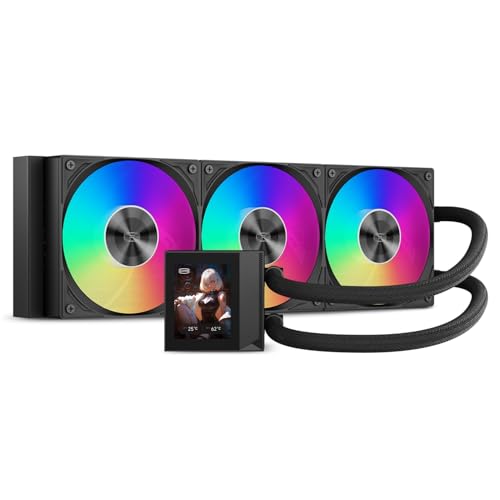
- Rated for up to 310W
- 2.4-inch IPS display
- LGA1700 and LGA1851 support
Best For: i9 builds needing stated 310W capacity and a compact LCD
VRM-Cooling Pick
ASUS ROG Ryujin III ARGB Extreme 360mm

- Embedded VRM fan
- 3.5-inch 640×480 LCD
- Magnetically connecting ARGB fans
Best For: i9 systems prioritizing VRM airflow and on-screen monitoring
Showcase Display Pick
LIAN LI HydroShift II OLED Curved 360 TL Flex

- 6.67-inch curved 2K OLED
- Motorized screen adjustment
- Three TL FLEX fans
Best For: white i9 showcase builds centered on screen customization
Easy-Build AMOLED Pick
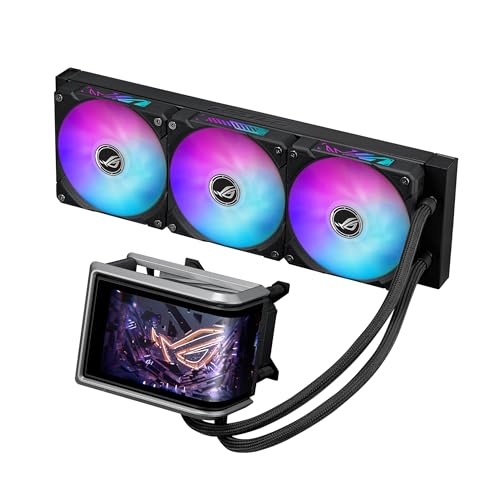
- 6.67-inch curved AMOLED
- Pre-installed daisy-chained fans
- Pre-applied thermal paste
Best For: i9 builds seeking a large display and simpler fan wiring
Best Black 420mm Showpiece

- 420mm radiator and Turbine pump
- 2.72-inch IPS LCD
- Single-frame RGB radiator fan
Best For: Black builds with 420mm radiator clearance
Best Minimalist 360mm Option

- 360mm radiator with three-phase motor
- Three fans rated up to 3000 RPM
- Live load, temperature, and fan-speed meter
Best For: Minimalist LGA 1700 i9 builds
Best White 420mm Showpiece

- 420mm radiator and Turbine pump
- 2.72-inch, 60 Hz IPS LCD
- White finish with RGB Core fan
Best For: White builds with 420mm radiator clearance
Quiet-Cooling Pick

- 360mm radiator and three NF-A12x25 G2 fans
- Pump noise absorber reduces vibration
- NT-H2 paste and six-year warranty
Best For: Quiet, premium Intel desktop builds
Display-and-Style Pick
Lian Li HydroShift II LCD-C 360TL Wireless

- 2.1-inch round IPS display
- Three TL120 Wireless ARGB fans
- Slim radiator and concealed wiring
Best For: White-themed builds with an LCD centerpiece
Easy-Setup LCD Pick

- 1.54-inch CAM-customizable LCD
- Zero RPM fan mode at low loads
- Pre-applied paste and tool-free brackets
Best For: Simple installation with a customizable LCD
High-TDP Value Pick – PCCOOLER DC360 Pro 360mm
Among high end aio coolers for i9 cpus, the PCCOOLER DC360 Pro is worth considering if you want a stated 310W cooling capacity and a customizable display. Its 360mm radiator and three PWM fans are designed for demanding workloads, though actual temperatures will depend on your CPU settings and case airflow.
Best For: An i9 build that needs LGA1700 or LGA1851 support, a 360mm radiator, and an LCD without making the screen the centerpiece.
Pros:
- Rated for up to 310W of CPU cooling.
- 2.4-inch IPS display shows monitoring data, images, or animations.
- Three 120mm PWM fluid-dynamic-bearing fans run from 500 to 2500 RPM.
Cons:
- Requires space for a roughly 394mm-long radiator.
- The 240×320 display is smaller and lower-resolution than the larger screens in this roundup.
The DC360 Pro puts its emphasis on a stated high heat capacity and useful display features. Check radiator clearance and your motherboard’s ARGB compatibility before buying.
VRM-Cooling Pick – ASUS ROG Ryujin III ARGB Extreme 360mm
For buyers comparing high end aio coolers for i9 cpus, the ROG Ryujin III ARGB Extreme adds a feature that matters beyond the CPU: an embedded fan aimed at motherboard VRMs. It pairs a 360mm radiator with an Asetek Emma Gen8 V2 pump and magnetic ARGB fans.
Best For: A high-power i9 setup where VRM airflow, a monitoring display, and simplified fan installation are priorities.
Pros:
- Embedded pump-housing fan provides airflow to motherboard VRMs.
- 3.5-inch, 640×480 LCD supports animated GIFs and live hardware readouts.
- Magnetically connecting ARGB fans simplify assembly.
- Supports Intel LGA1700 and LGA1851 and carries a stated six-year warranty.
Cons:
- Its 360mm radiator requires a case with suitable mounting clearance.
- Getting the most from the screen and speed controls requires using the accompanying software.
This is the practical choice if extra motherboard-component airflow is more valuable to you than the largest possible display. Verify case fit and software preferences before committing.
Showcase Display Pick – LIAN LI HydroShift II OLED Curved 360 TL Flex
The white HydroShift II is one of the most display-focused high end aio coolers for i9 cpus: its 6.67-inch curved OLED and motorized viewing adjustments are meant to be seen. The 360mm-class radiator, three TL FLEX fans, and stated Intel LGA1700/LGA1851 support make it relevant to a compatible i9 build.
Best For: A white showcase PC where screen presentation and adjustable viewing angle matter as much as the cooling layout.
Pros:
- Large 6.67-inch curved 2K OLED provides a prominent visual centerpiece.
- Motorized pump-head movement adjusts the screen through L-Connect 3.
- Magnetic, hot-swappable display module simplifies attachment and removal.
- Includes three TL FLEX fans rated for speeds up to 2600 RPM.
Cons:
- The approximately 400mm-long radiator still needs a careful case-fit check.
- The supplied listing states no warranty.
Choose this cooler for its unusual display experience, not on an unverified promise of lower i9 temperatures. Confirm radiator clearance and warranty terms with the seller before ordering.
Easy-Build AMOLED Pick – ASUS ROG Ryuo IV ARGB 360mm
Among high end aio coolers for i9 cpus, the ROG Ryuo IV ARGB combines an oversized curved AMOLED with installation-minded details. Its Asetek Emma Gen8 V2 pump, pre-applied thermal paste, Precision Mount System, and pre-installed daisy-chained fans make it a compelling option for a display-led LGA1700 or LGA1851 build.
Best For: An i9 gaming PC that calls for a large customizable screen without individually wiring three radiator fans.
Pros:
- Movable 6.67-inch, 2240×1080 AMOLED supports custom visuals and system information.
- Pre-installed daisy-chained fans reduce the fan cabling to one connection, according to the supplied notes.
- Pre-applied paste and Precision Mount System streamline CPU installation.
- Stated warranty coverage is six years for the AIO and two years for the display.
Cons:
- The large screen and pump housing call for a careful clearance check.
- Custom screen content and monitoring rely on the cooler’s software.
The Ryuo IV is strongest as a screen-forward cooler that also simplifies assembly. Confirm both radiator and pump-area clearance in your case before choosing it.
Best Black 420mm Showpiece – NZXT Kraken Elite 420 RGB
Among high end aio coolers for i9 cpus, the black Kraken Elite 420 RGB pairs a 420mm radiator with NZXT’s high-flow Turbine pump. It is a strong fit for a build that puts cooling hardware and on-screen customization on display.
Best For: Black builds with room for a 420mm radiator and a prominent LCD.
Pros:
- Custom-designed Turbine pump targets heat-prone CPUs.
- 2.72-inch, 640 × 640 IPS LCD supports system monitoring, images, and GIFs.
- Single-frame RGB fan, pre-applied thermal paste, and tool-free brackets simplify the setup.
Cons:
- A 420mm radiator requires a compatible case.
- Display and lighting controls rely on NZXT CAM.
Choose this model if its large display and black RGB presentation justify making space for a 420mm AIO. Check your case’s radiator support before ordering.
Best Minimalist 360mm Option – ASUS ProArt LC 360
If you are comparing high end aio coolers for i9 cpus but prefer restrained styling, the ASUS ProArt LC 360 offers a 360mm radiator, a three-phase motor, and three matte-black fans rated up to 3000 RPM. Its illuminated meter shows system load, temperatures, and fan speeds without a large screen.
Best For: ProArt-inspired builds that favor a minimalist look and live status readouts.
Pros:
- Three Alphacool Apex Stealth Metal Power fans support daisy-chain installation.
- Illuminated meter displays live system information.
- Supports Intel LGA 1700, 1200, and 115X sockets.
Cons:
- Its listed Intel compatibility does not include LGA 1851.
- Fans rated up to 3000 RPM may not suit buyers who prioritize low-speed operation.
This is the understated choice of the three: it trades a customizable LCD for a compact status display and matte-black presentation. Match the listed socket support to your i9 platform before buying.
Best White 420mm Showpiece – NZXT Kraken Elite 420 RGB
For white builds shopping high end aio coolers for i9 cpus, the Kraken Elite 420 RGB combines a 420mm radiator, NZXT’s Turbine pump, and an RGB Core single-frame fan. Its 2.72-inch IPS LCD adds room for performance readouts, images, and GIFs.
Best For: White-themed i9 builds with space for a 420mm radiator and a customizable display.
Pros:
- High-flow Turbine pump is designed for heat-prone CPUs.
- 640 × 640, 60 Hz IPS LCD and RGB ring offer extensive visual customization.
- Includes pre-applied thermal paste and tool-free brackets for Intel LGA 1851 and 1700.
Cons:
- Requires a case that supports a 420mm radiator.
- NZXT CAM is needed for its advertised display and lighting controls.
Its cooling hardware and features match the black version’s stated design; the main buying decision here is whether the white finish fits your build. Confirm radiator clearance before committing.
Quiet-Cooling Pick – Noctua NL-LC1-36 360mm AIO
Among high end aio coolers for i9 cpus, the Noctua NL-LC1-36 is a strong fit if low noise matters as much as cooling capacity. Its 360mm radiator, three NF-A12x25 G2 fans, and pump noise absorber are designed for demanding systems without unnecessary acoustic distraction.
Best For: Builders seeking a quiet, premium 360mm cooler for a compatible Intel desktop.
Pros:
- Three NF-A12x25 G2 PWM fans with speed offsets for acoustic optimization.
- Three-layer pump noise absorber helps reduce pump sound and vibration.
- Includes NT-H2 thermal paste, SecuFirm2 mounting, and a six-year manufacturer’s warranty.
Cons:
- Requires space for a 360mm radiator.
- Optional auxiliary fan for nearby components is sold separately.
Choose this model when a restrained, near-silent build takes priority over a pump-mounted display. Check your case’s radiator clearance and your exact CPU socket before ordering.
Display-and-Style Pick – Lian Li HydroShift II LCD-C 360TL Wireless
If you’re comparing high end aio coolers for i9 cpus and want a showpiece build, the white HydroShift II combines a 360mm radiator with three TL120 Wireless ARGB fans and a 2.1-inch round IPS screen. Its side-mounted tubes and concealed wiring aim for a cleaner-looking installation.
Best For: White-themed LGA 1700 or LGA 1851 builds where screen customization and tidy routing matter.
Pros:
- Bright 480 × 480 LCD supports Offline, L-Wireless, and USB Streaming control modes.
- Three TL120 Wireless fans are specified for up to 90.1 CFM airflow and 3.97 mmH2O static pressure.
- Slim 24mm radiator and adjustable sliding tube clamp help with installation planning.
Cons:
- Uses TL Wireless fans, not TL FLEX fans.
- Full media customization requires USB Streaming Mode and L-Connect 3.
This is the appearance-first choice of the three, without giving up a 360mm cooling layout. The supplied notes conflict on warranty length—six years for the AIO in the bullets versus one year in the details—so confirm coverage with the seller.
Easy-Setup LCD Pick – NZXT Kraken Plus 360
The NZXT Kraken Plus 360 is worth considering among high end aio coolers for i9 cpus if you want an LCD without a complicated installation. It pairs a 360mm radiator and NZXT Turbine pump with pre-applied thermal paste, tool-free brackets, and a single breakout cable from the pump cap.
Best For: Builders who want straightforward installation and CAM-controlled screen customization on a compatible Intel system.
Pros:
- 1.54-inch LCD displays temperatures, images, GIFs, and supported web integrations through NZXT CAM.
- High-static-pressure fans support Zero RPM Mode at low loads.
- Includes mounting support for LGA 1851 and a six-year manufacturer warranty.
Cons:
- Screen is smaller than the Lian Li model’s 2.1-inch display.
- Display customization relies on NZXT CAM software.
Its practical advantage is the combination of display features and installation conveniences. Confirm your particular i9 socket and case clearance before choosing this 360mm model.
How We Picked the Best High End Aio Coolers for I9 Cpus
We focused on large-radiator AIOs that make sense for a premium Core i9 build, then considered installation space, fan and pump features, appearance, and the usefulness of extras such as displays. This is a buying shortlist, not a claim that every model has been tested head-to-head. Published cooling-capacity figures are not directly comparable across brands; independent thermal and noise measurements are more useful when available.
Quick Comparison: Which Type Fits Your Build?
Need maximum radiator area? The NZXT Kraken Elite 420 RGB comes in black and white, but requires a case with confirmed 420mm radiator support. Want a more widely compatible size? The remaining picks use 360mm radiators, though case clearance still varies. Prioritize a screen? Consider the PCCOOLER DC360 Pro, ASUS ROG Ryujin III ARGB Extreme, LIAN LI HydroShift II OLED Curved, Lian Li HydroShift II LCD-C, or an NZXT Kraken model. Prefer a restrained workstation look? Start with the ASUS ProArt LC or Noctua NL-LC1-36.
Key Buying Factors for High-End AIO Coolers for I9 CPUs
Radiator Fit and Socket Support
Check your case’s radiator mounting positions, supported radiator thickness, and clearance around the motherboard, memory, and graphics card. A case listing that says “360mm supported” does not guarantee every radiator-and-fan combination will fit. Verify that the cooler includes mounting hardware for your specific Intel socket; do not assume all i9 generations share the same mount.
Cooling, Noise, and Power Limits
A 420mm radiator offers more surface area than a 360mm model, but its advantage depends on airflow, fan speeds, and the room available in your case. For an i9 running extended all-core workloads, pay attention to independent tests under sustained load rather than short gaming benchmarks alone. Motherboard power settings also matter: a cooler cannot guarantee a particular temperature if the CPU is allowed to draw more power. Compare noise at similar cooling performance, not just advertised maximum fan speeds.
Controls and Long-Term Ownership
LCDs, OLEDs, ARGB, and wireless fan controls can simplify a themed build or add useful monitoring, but they may require software or extra internal connections. Confirm how the pump and fans are controlled, whether the display needs a USB header, and what warranty coverage applies. Plan tube routing before purchase, especially in compact cases.
Who Should Buy Which High End Aio Coolers for I9 Cpus?
Choose a Kraken Elite 420 RGB if your case fits a 420mm radiator and you want the larger format with a display; pick black or white to suit the build. Choose a 360mm model when fit is tighter or you want more case options. The ROG, HydroShift, and Kraken display-equipped options suit showcase PCs; compare their screen layout and control requirements before paying extra. The ProArt LC and Noctua are sensible starting points if visual restraint matters more than lighting. If value is the priority, compare the PCCOOLER DC360 Pro and Kraken Plus 360 against current prices, then confirm socket support and fit before ordering.
