
A curved ultrawide can free up desk space when mounted, but its size and weight make compatibility especially important. The right arm must support your monitor securely while leaving enough room to position it comfortably.
These nine options cover single, dual, vertical, and wall-mounted setups. Use the guide below to narrow your choice by load capacity, fit, and mounting location.
Best 9 Heavy Duty Monitor Mounts for Curved Monitors Picks for 2026
Best Single-Arm Desk Mount

- One screen up to 49 inches and 44 pounds
- 22.5-inch reach; up to 19.6-inch mounting height
- Requires a compatible wooden desk
Best For: Heavy single ultrawides on compatible wooden desks
Best Dual Wall Mount

- Two screens up to 49 inches and 44 pounds each
- Independent tilt and swivel for curved pairs
- Requires concrete, brick, or wood-stud mounting
Best For: Dual curved ultrawides with a suitable load-bearing wall
Best Stacked Dual Mount
WALI Vertical Dual Monitor Arm

- Stacks two 17–49-inch displays
- Stated capacity up to 33 pounds
- C-clamp or grommet installation
Best For: Stacked dual curved monitors on a desk
Best Vertical Stack
Putilsen Mount Dual Ultrawide Monitor Mount

- Stacks two 24–57-inch screens
- 48.4 lb limit per curved screen
- Clamp or grommet installation
Best For: Two curved ultrawides on a compact desk
Best Single-Arm Reach
monTEK Heavy Duty Ultrawide Monitor Arm

- Fits 17–57-inch screens
- Supports up to 59.4 lb
- Extends up to 19.7 inches
Best For: One large ultrawide needing frequent adjustment
Best for Deep Desks
WALI Heavy Duty 1000R Monitor Arm

- 21.57-inch maximum extension
- 44 lb stated load capacity
- Conflicting 35- and 49-inch size figures
Best For: Compatible 1000R screens on deeper wooden desks
Best for Flexible Positioning
WALI 49-Inch Ultrawide Monitor Arm

- Supports compatible 17–49-inch screens up to 33 lb
- 21.14-inch extension and 20.59-inch arm height
- Clamp or grommet mount; built-in cable management
Best For: Repositioning a compatible 1800R curved ultrawide
Highest Weight Capacity
ErGear 49-Inch Heavy Duty Monitor Arm
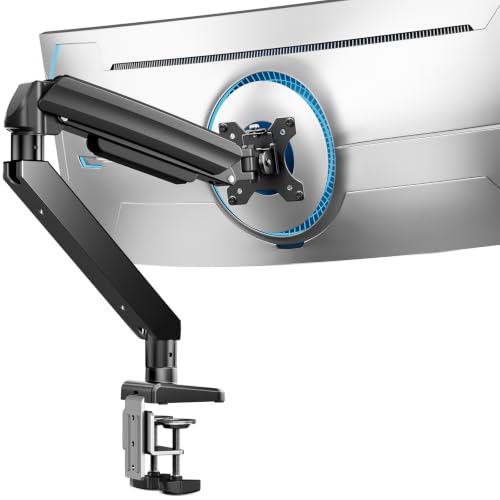
- Supports 13–49-inch screens up to 37.4 lb
- Dual C-clamp and thickened steel arm
- 21.2-inch reach; up to 22.2-inch height
Best For: Heavier compatible curved ultrawides
Best for Easy Height Changes
VIVO 40-Inch Tension Monitor Arm

- Supports screens up to 40 inches and 26.4 lb
- Spring-assisted 10.8-inch height adjustment
- Detachable VESA plate and cable covers
Best For: Frequent height changes on a compatible ultrawide
Best Single-Arm Desk Mount – HUANUO TitanLift
Among heavy duty monitor mounts for curved monitors, the HUANUO TitanLift is a practical single-screen choice if your display is 17–49 inches, weighs 6.6–44 pounds, and has a 75x75mm or 100x100mm VESA pattern. Its reinforced aluminum arm offers a 22.5-inch reach and up to 19.6 inches of mounting height.
Best For: A heavy ultrawide on a compatible wooden desk, especially if you want generous positioning range without a dual-arm setup.
Pros:
- Supports monitors up to 49 inches and 44 pounds.
- Offers ±50° tilt, 180° swivel in either direction, and easy-access tension adjustment.
- Quick-install VESA head and built-in cable management simplify setup.
Cons:
- Requires a wooden desk 0.8–3.5 inches thick with no obstructing underside crossbeam or panel.
- 360° rotation is specified only for screens up to 35 inches.
Check your monitor’s weight and VESA holes alongside the desk requirements before buying. For a compatible setup, this arm provides substantial reach and adjustment for a large single display.
Best Dual Wall Mount – PEGZONE Dual Ultrawide Arm
If you want heavy duty monitor mounts for curved monitors without using desk space, this PEGZONE wall-mounted system holds two 17–49-inch displays, up to 44 pounds per arm. Its mounting plates provide clearance for deep-arc curved screens, while independent arms help you position the pair.
Best For: Two compatible curved ultrawides on a wall suitable for a heavy dual-monitor installation.
Pros:
- Supports up to 44 pounds per arm with 75x75mm or 100x100mm VESA mounting.
- Independent +90°/-20° tilt and ±90° swivel help align curved displays.
- Wall installation frees desk space; integrated cable management routes cords through the arms.
Cons:
- Must be installed into solid concrete, brick, or wood studs—not drywall alone.
- Wall mounting demands more installation planning than a desk clamp.
The appeal is a clear desktop and independently adjustable screens. Confirm that your wall and its fasteners can support the complete setup before choosing this over a desk-mounted alternative.
Best Stacked Dual Mount – WALI Vertical Dual Monitor Arm
For buyers comparing heavy duty monitor mounts for curved monitors in a vertical arrangement, this WALI arm is designed to stack two 17–49-inch displays above one desk base. It supports curved and flat monitors with 75x75mm or 100x100mm VESA patterns and offers C-clamp or grommet installation.
Best For: A stacked dual-monitor desk setup when side-by-side ultrawides would take up too much horizontal space.
Pros:
- Supports monitors up to 49 inches and a stated 33-pound weight capacity.
- Offers up to 19.8 inches of height adjustment and 21.14 inches of arm extension.
- Quick-release VESA plates, two mounting options, and cable management aid setup and organization.
Cons:
- Its stated 33-pound capacity is lower than the 44-pound-per-arm options in this roundup.
- A vertical stack may not suit users who prefer both displays at the same eye level.
This is the space-conscious choice for a stacked layout rather than a wide panoramic pair. Verify each display’s weight and mounting pattern before committing to the arrangement.
Best Vertical Stack – Putilsen Mount Dual Ultrawide Monitor Mount
Among heavy duty monitor mounts for curved monitors, this Putilsen Mount model stands out when you need to stack two ultrawides rather than place them side by side. Each arm supports curved screens from 24 to 57 inches weighing up to 48.4 pounds; the higher 59.4-pound rating applies to flat screens.
Best For: Two curved ultrawides on a compact desk or a desk positioned against a wall.
Pros:
- Vertical stacking preserves horizontal desk space.
- Swivel, tilt, and rotation help position both screens.
- Top-side clamp or grommet installation and quick-release VESA plates simplify setup.
- Integrated cable management helps contain wires.
Cons:
- Curved-screen capacity is 48.4 pounds per arm, not 59.4 pounds.
- Some 49-, 55-, and 57-inch monitors need a separate VESA adapter; adapter weight counts toward the limit.
- Clamp fits desks up to 1.97 inches thick; grommet mounting fits up to 1.77 inches.
Choose it for a stacked layout, but check each monitor’s weight, 75 × 75 or 100 × 100 mm VESA compatibility, and any adapter requirement before ordering.
Best Single-Arm Reach – monTEK Heavy Duty Ultrawide Monitor Arm
If you’re comparing heavy duty monitor mounts for curved monitors and want one repositionable arm, the monTEK supports compatible 17- to 57-inch flat or curved screens up to 59.4 pounds. Its gas-spring design offers an 11.3- to 22-inch height range and extends up to 19.7 inches.
Best For: A single large ultrawide that needs frequent height, reach, and angle adjustments.
Pros:
- Supports screens up to 57 inches and 59.4 pounds.
- Offers ±75° tilt, 180° swivel, and ±90° screen rotation.
- Includes clamp and grommet mounting options plus a quick-release VESA plate.
- Built-in cable management keeps cords along the arm.
Cons:
- Holds only one monitor.
- Requires 75 × 75 or 100 × 100 mm VESA compatibility; an adapter, if needed, is not included.
This is the flexible single-screen pick for a substantial curved display. Confirm your monitor’s weight and mounting holes before committing, especially if it requires an adapter.
Best for Deep Desks – WALI Heavy Duty 1000R Monitor Arm
The WALI is a practical option among heavy duty monitor mounts for curved monitors if you need extra reach across a deep desk. Its stated compatibility includes 1000R curved screens up to 49 inches and 44 pounds, though the supplied product details separately list a 35-inch maximum supported size—worth confirming before buying for a larger display.
Best For: A compatible 1000R curved monitor that needs long reach and flexible desk placement.
Pros:
- Extends up to 21.57 inches and raises the arm up to 20.35 inches above the desk.
- Provides ±45° tilt, ±90° swivel, and 360° rotation.
- Clamp and grommet options fit desks 0.39 to 3.15 inches thick.
- Built-in cable management helps free up desk space.
Cons:
- The stated 49-inch compatibility conflicts with the 35-inch maximum in the supplied details.
- Installation is recommended only on a wooden desk, ideally without an obstructing underside crossbeam.
- Limited to 44 pounds and 75 × 75 or 100 × 100 mm VESA patterns.
Its reach and desk-thickness range are useful, but verify fit directly for any screen over 35 inches rather than relying on the headline size alone.
Best for Flexible Positioning – WALI 49-Inch Ultrawide Monitor Arm
Among heavy duty monitor mounts for curved monitors, this WALI arm is a practical choice when you need to move a large screen around your desk. It supports compatible flat or 1800R curved screens from 17 to 49 inches, weighing up to 33 pounds.
Best For: A compatible curved ultrawide that needs generous reach and height adjustment.
Pros:
- Extends 21.14 inches and raises the arm up to 20.59 inches above the desktop.
- Offers swivel, tilt, and rotation adjustments, plus built-in cable management.
- Includes C-clamp and grommet installation options for desks 0.39 to 1.96 inches thick.
Cons:
- Limited to 75×75 mm or 100×100 mm VESA patterns and 1800R curved screens as specified.
- WALI recommends a wooden desk without an underside crossbeam.
The reach makes this arm appealing for repositioning a wide display, but check your monitor’s weight, curve, and VESA pattern—and the underside of your desk—before ordering.
Highest Weight Capacity – ErGear 49-Inch Heavy Duty Monitor Arm
If weight capacity tops your checklist for heavy duty monitor mounts for curved monitors, the ErGear arm supports up to 37.4 pounds—the highest rating of these three picks. It accommodates compatible 13- to 49-inch screens with 75×75 mm or 100×100 mm VESA mounts.
Best For: A heavier curved ultrawide that fits the stated size, weight, and VESA limits.
Pros:
- 37.4-pound capacity, with a dual C-clamp and thickened steel arm designed for stability.
- Extends up to 21.2 inches and raises the monitor up to 22.2 inches high.
- Provides tilt, swivel, and rotation adjustments; includes clamp and grommet mounting options.
Cons:
- Grommet mounting accommodates desks only up to 2 inches thick, versus 3.15 inches for the clamp.
- VESA compatibility is limited to 75×75 mm and 100×100 mm.
This is the capacity-focused option if your screen meets its specifications. Measure desk thickness for your preferred installation method before choosing it.
Best for Easy Height Changes – VIVO 40-Inch Tension Monitor Arm
The VIVO tension arm is worth considering among heavy duty monitor mounts for curved monitors if your display is no larger than 40 inches and weighs no more than 26.4 pounds. Its spring-assist mechanism counterbalances a compatible monitor for smooth, hand-operated height changes.
Best For: A compatible ultrawide setup where frequent height adjustments matter more than maximum screen capacity.
Pros:
- Spring-assisted lift provides 10.8 inches of height adjustment.
- Offers +90° to −90° tilt, 180° swivel, and 360° rotation.
- Detachable VESA plate simplifies mounting; cable covers help keep cords tidy.
Cons:
- 40-inch and 26.4-pound limits are lower than those of the other two arms here.
- Optional grommet mounting fits desks only up to 1.7 inches thick.
Choose this arm for its adjustable spring lift, not for the largest or heaviest screen. Confirm your monitor’s 75×75 mm or 100×100 mm VESA pattern and desk fit first.
How We Picked the Best Heavy Duty Monitor Mounts for Curved Monitors
We focused on mounts advertised for larger curved or ultrawide displays and compared their stated screen-size ranges, weight limits, and mounting styles. The selection includes single arms, side-by-side and vertical dual mounts, and a wall-mounted option so different workspaces are represented. Published capacities are a starting point, not a guarantee of fit: check the complete monitor’s weight and mounting specifications before ordering.
Quick Comparison
For the heaviest listed single-screen loads, the monTEK arm and the dual ultrawide mount each advertise support up to 59.4 pounds per arm. The HUANUO TitanLift and WALI 1000R arm list 44-pound limits; the ErGear dual mount lists 37.4 pounds, and the WALI vertical dual and WALI ultrawide single options list 33 pounds. VIVO’s STAND-V100O is rated for 26.4 pounds and screens up to 40 inches. Compare those figures with your monitor’s specifications, and confirm whether a dual mount’s rating applies to each arm rather than the entire assembly. The wall-mounted dual option is worth considering when desk clamping is impractical, but verify its capacity and installation requirements separately.
Key Buying Factors for Heavy Duty Monitor Mounts for Curved Monitors
Weight, Size, and VESA Fit
Start with the monitor’s weight without its original stand, then leave room below the arm’s maximum rating rather than buying at the limit. A diagonal size rating does not prove that an arm can balance a deep, front-heavy curved panel. Check supported VESA hole patterns, any required adapter, and whether a recessed mounting area needs spacers. For a dual setup, verify the weight and size of each display.
Desk or Wall Installation
For desk mounts, check desktop thickness, clamp or grommet compatibility, and whether the desk material can bear the concentrated load. Make sure the arm has enough clearance behind the desk to move without striking a wall. Wall arms require a suitable structural mounting point and appropriate hardware; drywall alone is not a secure mounting surface for a heavy display.
Reach and Adjustability
Measure where the screen needs to sit, not just where the base attaches. Compare arm reach, height range, tilt, swivel, and rotation with your desired viewing position. On a deep curved monitor, limited tilt or a weak tension adjustment can make the screen difficult to position. A vertical dual arrangement also needs enough height and clearance for both panels.
Who Should Buy Which Heavy Duty Monitor Mounts for Curved Monitors?
Choose a high-capacity single arm if you use one particularly large ultrawide and want flexible positioning. A lighter-rated single arm may suit a smaller curved display when its actual weight is comfortably within the limit. Pick a dual ultrawide mount for two substantial side-by-side screens, or a vertical dual mount when horizontal desk space is scarce. Consider the wall-mounted option if your desk cannot accept a clamp or grommet mount and you have a suitable wall installation point. Whatever the layout, confirm VESA fit, monitor weight, and physical clearance before deciding.
