
When it comes to color grading, having the right HDR reference monitor can make a significant difference in your workflow. You’ll want to prioritize features like color accuracy, resolution, and connectivity. In this guide, we’ll explore top choices like the ASUS ProArt Display and BenQ SW272Q, each offering unique strengths. But what should you really consider before making a decision? Let’s find out which monitors could enhance your color grading experience.
ASUS ProArt Display 27” 4K HDR Professional Monitor (PA279CRV)

If you’re a creative professional seeking unparalleled color accuracy, the ASUS ProArt Display 27” 4K HDR Professional Monitor (PA279CRV) is an exceptional choice. With its stunning 27-inch 4K resolution and IPS panel, you’ll enjoy vibrant visuals from wide angles. It boasts 99% DCI-P3 and Adobe RGB coverage, ensuring your colors are true to life. Plus, it’s factory pre-calibrated to a Delta E of less than 2, so you can trust its precision. Connectivity options like USB-C with 96W power delivery add convenience. With ergonomic design and a three-year warranty, this monitor is built for long-lasting comfort and reliability.
Best For: Creative professionals who demand exceptional color accuracy and resolution in their visual work.
Pros:
- 99% DCI-P3 and Adobe RGB coverage for true-to-life colors.
- Factory pre-calibrated to a Delta E of less than 2 for precise color accuracy.
- Ergonomic design ensures user comfort during long hours of use.
Cons:
- Higher price point compared to standard monitors may not fit all budgets.
- Limited built-in speakers, which may require external audio solutions.
- No integrated webcam, which could be a drawback for video conferencing needs.
ASUS ProArt Display PA278QV 27” WQHD Monitor

The ASUS ProArt Display PA278QV 27” WQHD Monitor is an exceptional choice for creative professionals seeking accurate color representation in their work. With a resolution of 2560 x 1440 pixels and 100% sRGB and Rec. 709 color gamut coverage, you’ll enjoy stunning visuals. Its IPS display offers a wide 178-degree viewing angle, ensuring consistent colors. The monitor features ergonomic adjustments and eye care technology to reduce fatigue during long editing sessions. Connectivity options are extensive, including HDMI and USB ports. Plus, it comes with a 3-year warranty and a complimentary Adobe Creative Cloud subscription to enhance your creative toolkit.
Best For: Creative professionals and designers seeking precise color accuracy and ergonomic features in a high-quality monitor.
Pros:
- High resolution of 2560 x 1440 pixels for sharp visuals and detailed work.
- 100% sRGB and Rec. 709 color gamut coverage ensures accurate color representation.
- Ergonomic stand with multiple adjustments and eye care technology minimizes fatigue during extended use.
Cons:
- Limited refresh rate of 75 Hz may not satisfy gamers or those seeking ultra-smooth performance.
- Response time of 5 milliseconds may not be ideal for fast-paced gaming.
- Higher price point compared to standard monitors may not suit budget-conscious consumers.
BenQ SW272Q 27-inch 2K Photographer Monitor

Designed for photographers and color grading professionals, the BenQ SW272Q 27-inch 2K Photographer Monitor stands out with its impressive 99% Adobe RGB and 98% DCI-P3 color gamut coverage. With a resolution of 2560 x 1440 pixels, you’ll enjoy stunning visuals and enhanced color accuracy. The Nano Matte Panel reduces glare, simulating a paper-like texture for a more immersive experience. Ergonomically designed, it allows for height, pivot, and swivel adjustments, ensuring comfort during long editing sessions. Plus, with a three-year warranty and a 30-day return policy, you can invest in this monitor with confidence.
Best For: Professional photographers and color grading experts seeking high color accuracy and immersive visual experiences.
Pros:
- Exceptional color gamut coverage with 99% Adobe RGB and 98% DCI-P3, ensuring vibrant and accurate color representation.
- Ergonomic design with adjustable height, pivot, and swivel for comfortable viewing during extended editing sessions.
- Nano Matte Panel enhances picture quality and reduces glare, simulating a paper-like texture for a more immersive experience.
Cons:
- The 27-inch size may feel limited for users who prefer larger displays for extensive workspaces.
- Moderate brightness level at 300 nits may not be sufficient for bright environments.
- Higher weight at 18.29 pounds might make it less portable compared to lighter monitors.
LG 27UP850K-W 27-inch Ultrafine 4K UHD Computer Monitor

For professionals in color grading and video editing, the LG 27UP850K-W 27-inch Ultrafine 4K UHD Monitor stands out with its impressive 4K resolution and 95% DCI-P3 color gamut support. With a refresh rate of 60Hz and a response time of 5ms, it delivers smooth visuals. The DisplayHDR 400 compatibility enhances brightness and color levels, ensuring vibrant images. Plus, its ergonomic stand allows for height, tilt, and pivot adjustments for ideal comfort. Connectivity is seamless with USB Type-C, HDMI, and DisplayPort options, eliminating the need for extra adapters. This monitor elevates your editing experience with exceptional clarity and color accuracy.
Best For: Professionals in color grading and video editing seeking a monitor with exceptional clarity and color accuracy.
Pros:
- Impressive 4K UHD resolution (3840 x 2160) providing vibrant and clear images.
- 95% DCI-P3 color gamut support for enhanced color accuracy, ideal for creative professionals.
- Ergonomic stand with tilt, height, and pivot adjustments for personalized comfort.
Cons:
- Refresh rate limited to 60Hz, which may not satisfy hardcore gamers seeking higher refresh rates.
- HDR compatibility is only DisplayHDR 400, which may not meet the expectations of users wanting top-tier HDR performance.
- Built-in speakers may not provide the best audio quality for those needing superior sound for editing or gaming.
ASUS ProArt Display 32” 4K HDR Monitor (PA329CV)

Ideal for professional colorists and graphic designers, the ASUS ProArt Display 32” 4K HDR Monitor (PA329CV) offers exceptional color accuracy with a ΔE < 2 rating, ensuring your projects reflect true-to-life colors. With a stunning 4K UHD resolution and a wide 178° viewing angle, you’ll enjoy vibrant visuals from any position. The monitor supports 100% sRGB and Rec.709 color gamuts, making it perfect for your color grading tasks. Connectivity is versatile, featuring multiple HDMI, USB, and DisplayPort options. Plus, its ergonomic adjustments and TÜV certifications for eye care enhance your comfort during long editing sessions.
Best For: Professionals in color grading, graphic design, and photography who require high color accuracy and a large display for detailed work.
Pros:
- Excellent color accuracy with ΔE < 2, ideal for precise editing.
- Versatile connectivity options including HDMI, USB, and DisplayPort.
- Ergonomic adjustments and TÜV certifications enhance comfort during extended use.
Cons:
- Limited refresh rate of 60 Hz may not satisfy gamers.
- Higher price point compared to standard monitors.
- Weight and size may require more desk space and sturdy support.
ASUS ProArt Display 32” 4K HDR Professional Monitor (PA32UCE)
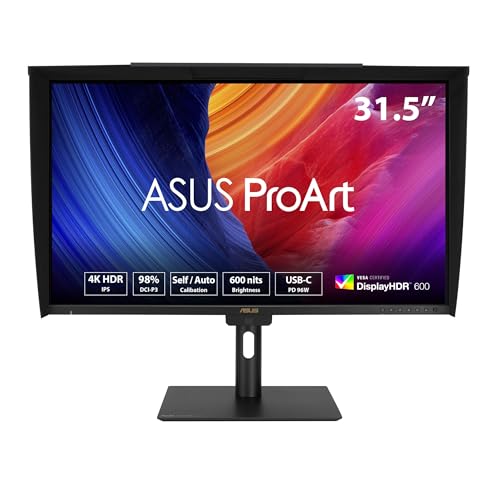
The ASUS ProArt Display 32” 4K HDR Professional Monitor (PA32UCE) stands out as an exceptional choice for professional colorists and graphic designers who demand superior color accuracy. With a UHD resolution of 3840 x 2160 and a stunning brightness of 600 nits, it delivers exceptional detail and vibrant colors. You’ll appreciate the built-in motorized colorimeter for effortless calibration, ensuring ΔE<1 accuracy. Its extensive connectivity options, including USB-C and DisplayPort, make it versatile for various setups. Plus, with adjustable ergonomic features, you can optimize your workspace for comfort. Enjoy three years of warranty and a bonus three-month Adobe Creative Cloud access too!
Best For: Professionals in color grading, graphic design, and video editing who require high color accuracy and advanced calibration features.
Pros:
- Exceptional color accuracy with ΔE<1 and 98% DCI-P3 coverage.
- Built-in motorized colorimeter for easy self-calibration.
- Extensive connectivity options, including USB-C and DisplayPort, with built-in Auto KVM for multi-device management.
Cons:
- Higher price point compared to standard monitors.
- Bulky design may require ample desk space.
- Limited refresh rate of 60 Hz may not suit high-frame-rate gaming needs.
BenQ PD3205U 32″ 4K UHD Monitor

Professionals and designers seeking a reliable monitor for color grading will find the BenQ PD3205U 32″ 4K UHD Monitor particularly appealing. With a factory-calibrated IPS display, it guarantees exceptional color accuracy, boasting 99% sRGB and Rec. 709 coverage and an average Delta E ≤3. Its AQCOLOR technology enhances color reproduction, validated by CalMan and Pantone SkinTone. Connectivity is seamless with USB-C, HDMI, and DisplayPort options, while the HotKey Puck and KVM switch simplify workspace management. This monitor is specifically designed for tasks demanding high fidelity, making it a standout choice for any color-critical project.
Best For: Professionals and designers seeking a monitor that delivers exceptional color accuracy for color grading and other color-critical projects.
Pros:
- Factory calibrated for high color accuracy with 99% sRGB and Rec. 709 coverage.
- Multiple connectivity options including USB-C with 90W power delivery for seamless integration.
- Ergonomic features like HotKey Puck and KVM switch enhance workspace management.
Cons:
- Higher price point compared to standard monitors.
- Limited built-in speakers may not meet audio needs for some users.
- Larger screen size may not be suitable for smaller workspaces.
LG 27US500-W Ultrafine Monitor 27-Inch 4K UHD

For those seeking precise color accuracy in their projects, the LG 27US500-W Ultrafine Monitor offers a stunning 4K UHD resolution that brings your visuals to life. With a 1000:1 contrast ratio and HDR10 support, you’ll experience deeper blacks and vibrant colors, making it a perfect choice for color grading. The monitor’s wide viewing angles cater to creative professionals, ensuring you see true colors from any position. Plus, its ergonomic stand lets you adjust the tilt for ideal comfort. With onscreen control features, customizing your workspace becomes effortless, enhancing your overall productivity during those long editing sessions.
Best For: Creative professionals and color enthusiasts seeking precise color accuracy and high-resolution displays for their projects.
Pros:
- Excellent 4K UHD resolution with vibrant color expression and HDR10 support.
- Wide viewing angles that maintain color accuracy from different positions.
- Ergonomic stand for customizable tilt adjustments and comfortable viewing.
Cons:
- Limited connectivity options may not suit all users.
- The borderless design, while sleek, may not provide sufficient physical protection.
- Some users may find the onscreen control features less intuitive than traditional buttons.
ViewSonic VP3276T-4K 32 Inch ColorPro Monitor

Designed for creatives who demand precision, the ViewSonic VP3276T-4K 32 Inch ColorPro Monitor stands out with its impressive color accuracy, covering 100% of sRGB and Adobe RGB, along with 98% DCI-P3. Its UHD display (3840x2160p) delivers stunning visuals with a brightness of 400 nits and a contrast ratio of 2000:1. With HDR400 support, you’ll enjoy enhanced realism in your projects. The monitor offers versatile connectivity options, including Thunderbolt 4 and multiple USB ports. Plus, its ergonomic design allows for easy adjustments, making it a perfect fit for any workspace.
Best For: Creatives and professionals who require high color accuracy and detailed visuals for design work and content creation.
Pros:
- Exceptional Color Accuracy: Covers 100% sRGB, 100% Adobe RGB, and 98% DCI-P3 for true-to-life color reproduction.
- Versatile Connectivity: Equipped with Thunderbolt 4 and multiple ports, allowing for easy connection to various devices.
- Ergonomic Design: Features adjustable stand options for tilt, swivel, and height, ensuring comfortable viewing angles.
Cons:
- Weight: At 17.2 pounds, it may be cumbersome to move or mount.
- Price Point: Higher price compared to standard monitors may not suit all budgets.
- Limited HDR Capability: Only HDR400 support, which may not satisfy all HDR content enthusiasts.
ASUS ProArt 27” 4K HDR Professional Monitor (PA27UCGE)
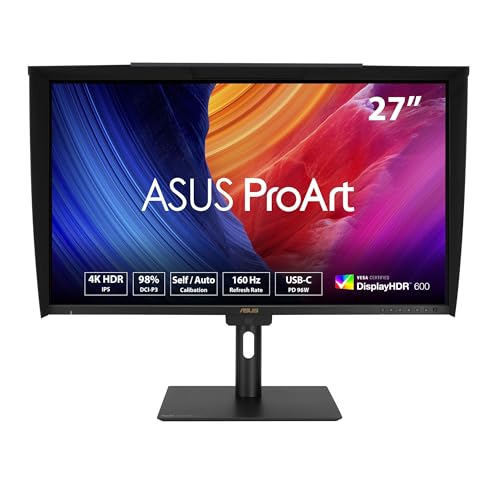
The ASUS ProArt 27” 4K HDR Professional Monitor (PA27UCGE) stands out as an exceptional choice for creatives who demand precision in color grading. With a stunning 4K UHD resolution and impressive color accuracy (Delta E < 1), you'll see true-to-life visuals. The monitor covers 98% of the DCI-P3 color gamut and offers a brightness of 600 nits, ensuring vibrant images. Its ergonomic design allows for customizable viewing angles, while connectivity options like USB-C and HDMI enhance versatility. Plus, the built-in motorized colorimeter supports calibration, making it easier for you to maintain color fidelity throughout your projects.
Best For: Creatives and professionals who require high color accuracy and detailed visuals for tasks such as video editing, graphic design, and photography.
Pros:
- Exceptional color accuracy with Delta E < 1 and 98% DCI-P3 coverage for true-to-life visuals.
- Versatile connectivity options including USB-C, HDMI, and DisplayPort, making it compatible with a range of devices.
- Ergonomic design with adjustable height, tilt, swivel, and pivot capabilities for comfortable viewing.
Cons:
- Higher price point compared to standard monitors may not be suitable for casual users.
- Built-in speakers are not very powerful, which may require external speakers for better audio quality.
- The weight and size may make it less portable for users who need to move their setup frequently.
Factors to Consider When Choosing HDR Reference Monitors for Color Grading
When choosing HDR reference monitors for color grading, you should focus on several key factors. Color accuracy standards, resolution, and display size all play an essential role in achieving the best results. Additionally, consider connectivity options, calibration features, and the overall ergonomics of the monitor to guarantee it meets your needs.
Color Accuracy Standards
Choosing an HDR reference monitor for color grading involves understanding color accuracy standards, as these directly impact your work’s quality. Look for monitors with a Delta E value of less than 2, which guarantees minimal color deviation from the original source. Ideally, you want monitors that achieve a Delta E of less than 1, often factory calibrated for precise output. Additionally, check for color gamut coverage, aiming for 99% Adobe RGB and 100% sRGB to accurately represent colors in your projects. It’s crucial that your monitor supports color spaces like DCI-P3 and Rec. 709. Finally, verify compatibility with calibration tools like Calman or Light Illusion ColourSpace to maintain peak color reproduction throughout your grading process.
Resolution and Display Size
Selecting the right resolution and display size is key for effective HDR color grading. Higher resolutions like 4K (3840 x 2160) or 2K (2560 x 1440) deliver more detailed images, essential for precise editing. A larger display, typically 27 inches or more, expands your workspace, letting you view detailed images and color palettes side by side without needing multiple monitors. Opt for monitors with IPS panels for wide viewing angles and consistent color reproduction, ensuring accuracy from different positions. Combining high resolution with a large display enhances your ability to detect subtle color variations and artifacts, ultimately improving your color grading process. Standard 16:9 aspect ratios offer compatibility with most video formats, creating a familiar workspace for colorists.
Connectivity Options Available
Connectivity is a crucial factor in optimizing your HDR color grading setup. Look for monitors equipped with multiple input ports like HDMI, DisplayPort, and USB-C to guarantee compatibility with various devices and workflows. USB-C connectivity simplifies your setup by providing both data transfer and power delivery, reducing cable clutter. Monitors with DisplayPort support also allow for daisy-chaining multiple displays, which can enhance your workspace efficiency. Additionally, make certain the monitor includes USB hubs for easy connection of peripherals, streamlining your workstation. If you’re handling demanding video editing tasks, consider models with Thunderbolt connectivity for high-speed data transfer and power delivery. This can greatly improve your workflow and productivity during color grading.
Calibration and Adjustment Features
When you’re diving into HDR color grading, having a monitor with robust calibration and adjustment features is vital for achieving accurate results. Look for a monitor with a Delta E value of less than 2, as this indicates high color fidelity. Built-in calibration tools, like motorized colorimeters, allow for self or auto calibration, ensuring your monitor maintains color accuracy over time. Choose monitors with extensive color gamut coverage, such as 100% sRGB, 99% Adobe RGB, and 98% DCI-P3, for a broader color range. Adjustable color parameters via dedicated software, like ProArt Palette, let you fine-tune settings to meet specific project needs. Regular calibration is important—many professional monitors support advanced options like Calman and Light Illusion software.
Ergonomics and Design
Ergonomics and design play an essential role in your HDR reference monitor choice, especially for long color grading sessions. Look for monitors with adjustable stands that let you tilt, heighten, pivot, and swivel for maximum comfort. A matte screen finish is vital; it reduces glare and helps you see accurate colors without distractions. Additionally, features like built-in blue light filters and flicker-free technology minimize eye strain, allowing you to work longer without discomfort. Consider the weight and dimensions of the monitor, ensuring it’s stable and easy to reposition in your workspace. Finally, a borderless design can enhance aesthetics and create a more immersive experience, particularly when using multiple monitors side by side.
Warranty and Support Services
A solid warranty and reliable support services are vital factors to evaluate when choosing HDR reference monitors for color grading. Typically, a three-year warranty covers manufacturing defects, guaranteeing your investment lasts. Look for brands that offer a 30-day return policy, allowing you to return a monitor if it arrives defective or damaged. Some manufacturers enhance your experience with complimentary access to software tools like Adobe Creative Cloud, which can be invaluable for your projects. Additionally, responsive customer support for warranty inquiries guarantees you receive help with any issues. Finally, consider brands that provide detailed calibration reports, as they highlight a commitment to color accuracy and professional standards, essential for your color grading work.
