
If you’re serious about streaming, having the right HDMI capture card is essential. These devices can greatly enhance your video quality and overall performance on OBS. With options that support 4K resolutions and low latency, you’ll want to explore which capture card fits your specific needs. Let’s break down the top 10 choices that can elevate your streaming setup and give you the edge you need.
Capture Card for Nintendo Switch, 4K HDMI Video Capture Card

If you’re a gamer looking to stream your Nintendo Switch gameplay in stunning detail, the Capture Card for Nintendo Switch, 4K HDMI Video Capture Card is an excellent choice. With 1080p resolution at 60FPS, it captures crisp visuals from your Switch and other HDMI devices. Its plug-and-play functionality means you won’t need extra drivers or power supplies; just connect and start streaming. Compatible with both Windows and Mac, it guarantees low latency with USB 3.0 technology. Plus, the HDMI Loop-Out feature lets you play without delays, and you can even add commentary using a standard 3.5mm microphone headset.
Best For: Gamers who want to stream their Nintendo Switch gameplay with high-quality visuals and minimal setup hassle.
Pros:
- Plug-and-play functionality allows for easy setup without the need for drivers or external power.
- Supports 1080p resolution at 60FPS, providing crisp and smooth video quality for streaming.
- HDMI Loop-Out feature enables real-time gameplay without latency, perfect for uninterrupted gaming sessions.
Cons:
- Limited to 1080p resolution, which may not satisfy users seeking 4K streaming capabilities.
- Requires USB 3.0 ports, which may not be available on older devices.
- Microphone input limited to 3.5mm TRS standard, potentially restricting compatibility with some headsets.
Guermok 4K USB3.0 HDMI to USB C Capture Card for Streaming

The Guermok 4K USB3.0 HDMI to USB C Capture Card is an ideal choice for gamers and content creators seeking high-quality streaming at 1080P 60FPS. With ultra-low latency, you’ll enjoy smooth live gaming and video recording. This capture card supports devices like PS5, Xbox, and cameras, making it versatile for all your streaming needs. Its lightweight aluminum design guarantees portability, while the plug-and-play functionality eliminates setup hassles. Compatible with multiple operating systems, you can easily stream to platforms like Twitch and YouTube. Just remember to restart OBS after audio setup for peak performance. Level up your streaming game today!
Best For: Gamers and content creators who need a reliable and high-performance capture card for streaming and recording.
Pros:
- Supports up to 4K input resolution and 1080P 60FPS output for high-quality video.
- Lightweight and portable design with aluminum alloy construction for durability.
- Plug-and-play functionality allows for easy setup without additional drivers.
Cons:
- Limited to 30Hz output for 4K, which may not satisfy users wanting higher refresh rates.
- Requires a restart of OBS Studio after audio setup, which could be inconvenient.
- If recognized as USB 2.0, users may need to troubleshoot by flipping the capture card or trying the other side of the adapter.
4K HDMI Capture Card for Streaming

For gamers and content creators seeking high-quality streaming, the 4K HDMI Capture Card stands out with its ability to support 4K 60fps input and record in Full HD 1080p at 60fps. It’s perfect for streaming, video conferencing, and game broadcasting, compatible with devices like the PS5, Xbox, and DSLRs. With a straightforward plug-and-play setup, you won’t need extra drivers or power. You’ll enjoy excellent video quality, sharp images, and low latency, although some users mention minor audio delays. Rated 4.4 out of 5 stars, it’s an affordable option that delivers solid performance for your streaming needs.
Best For: Gamers and content creators looking for an affordable and easy-to-use capture card that supports high-quality streaming and recording.
Pros:
- Excellent video quality with 4K 60fps input and 1080p 60fps recording.
- Plug-and-play setup with no need for drivers or external power.
- Compatible with a variety of devices including gaming consoles and DSLR cameras.
Cons:
- Some users reported minor audio delays during streaming and recording.
- Compatibility issues may arise with newer consoles like the Nintendo Switch 2.
- A few defective units have been reported, leading to performance concerns.
Elgato Cam Link 4K – External Capture Card for DSLR & Camcorder

Transform your streaming experience with the Elgato Cam Link 4K, perfect for anyone looking to elevate their content creation using DSLR or mirrorless cameras. This external capture card lets you stream and record in stunning 1080p60 or 4K at 60 fps, depending on your camera’s capabilities. It connects easily to camcorders, action cams, or even iPhones via HDMI input and USB 3.0 output. Compatible with PC and Mac, it works seamlessly with OBS Studio, Zoom, and Discord. With a solid 4.6-star rating from over 13,000 reviews, it’s a reliable choice for serious streamers.
Best For: Content creators and streamers looking to enhance their video quality by using DSLR or mirrorless cameras for streaming and recording.
Pros:
- High-quality streaming and recording: Supports resolutions up to 4K at 60 fps, providing excellent video clarity.
- Wide compatibility: Works with a variety of devices including DSLR cameras, camcorders, action cams, and iPhones.
- User-friendly integration: Seamlessly connects with popular streaming applications like OBS Studio, Zoom, and Discord.
Cons:
- Requires compatible cameras: 4K streaming is only available with specific camera models and the latest Cam Link 4K version.
- Dependency on USB 3.0: Must have a USB 3.x port for optimal performance, which may not be available on older systems.
- Limited to HDMI input: Users are restricted to devices that support HDMI output, which may exclude certain cameras or devices.
ByteWave USB 3.0 HDMI Capture Card for Streaming
![ByteWave USB 3.0 HDMI Capture Card, [Metalshell, 4K Loop Out, No Latency] Full HD 1080P60 HDMI to USB C Audio Video Game Capture Device for Streaming, Cam Link Compatible with Switch2/PS5/Xbox/PC/OBS](https://m.media-amazon.com/images/I/41KThE8MknL._SL500_.jpg)
Looking for a reliable capture card that delivers smooth streaming without latency? The ByteWave USB 3.0 HDMI Capture Card is your go-to choice. It captures in stunning Full HD 1080P60 and supports 4K passthrough, making it perfect for your gaming setup. Compatible with major consoles like the PS5 and Switch, it also works seamlessly with OBS and other streaming software. Its compact design and plug-and-play functionality mean you can set it up in no time. Plus, with ultra-low latency and a microphone input for commentary, you’re all set to elevate your streaming game! Enjoy 12+12 months warranty for peace of mind.
Best For: Gamers and content creators seeking a high-quality, low-latency capture card for streaming on platforms like Twitch and YouTube.
Pros:
- Ultra-low latency ensures smooth streaming experience.
- Easy plug-and-play setup with no additional software required.
- Compatible with multiple devices and operating systems for versatile use.
Cons:
- Limited to 1080P60 capture, may not meet needs for 4K streaming.
- Requires a USB 3.0 port for optimal performance.
- May not support all features on non-gaming devices.
VIXLW 4K HDMI Video Capture Card

The VIXLW 4K HDMI Video Capture Card stands out as an excellent choice for streamers and gamers who need high-quality video output without lag. With the ability to capture 4K@60Hz video input and 1920×1080@30Hz output, it guarantees a smooth experience. Its upgraded chip and nano-metal HDMI interface eliminate delay, while simultaneous video and audio capture enhances your content creation process. Plug-and-play functionality means you can start streaming in no time, and its compact design makes it portable. Compatible with major operating systems and third-party software, this capture card is perfect for all your broadcasting needs.
Best For: Streamers, gamers, and educators seeking a reliable and high-quality video capture solution with low latency.
Pros:
- Upgraded chip ensures full-speed video capture with no lag or delay.
- Compact and lightweight design makes it highly portable for use in various settings.
- Wide compatibility with multiple operating systems and third-party software for versatile use.
Cons:
- Limited output resolution at 1920×1080@30Hz may not meet the needs of all professional users.
- USB 2.0 interface could be a bottleneck for very high-speed data transfer compared to USB 3.0 options.
- No external power supply means it relies solely on USB power, which may limit its usage with certain devices.
Video Capture Card for Streaming (USB 3.0, 1080P 60FPS)

For those seeking a reliable solution for streaming, the Video Capture Card, USB 3.0 model, stands out with its impressive capability to deliver 1080P at 60FPS. This compact device, weighing just 5.1 ounces, offers versatile compatibility across platforms like OBS Studio, Twitch, and YouTube. Its 4K HDMI loop-out feature guarantees minimal lag while streaming, and the 3.5mm mic-in allows you to add external audio for a professional touch. Users appreciate its ease of setup and picture quality, making it an excellent choice for gamers and content creators alike. Enhance your streaming experience with this powerful capture card.
Best For: Content creators and gamers looking for a reliable and high-quality streaming solution with versatile compatibility.
Pros:
- Easy setup with minimal lag during streaming.
- Supports 4K HDMI loop-out for enhanced video quality.
- Compatible with various platforms and software, including OBS Studio and Twitch.
Cons:
- Some users report audio issues during use.
- Instructions may be unclear for first-time users.
- Challenges with HDR passthrough noted by certain customers.
Elgato HD60 X Game Capture Card for 1080p60 and 4K30

If you’re a gamer seeking exceptional streaming quality, the Elgato HD60 X Game Capture Card is an excellent choice, capturing and streaming in both 1080p60 HDR10 and 4K30 resolutions. It’s compatible with a range of devices including PS5, Xbox Series X/S, and Nintendo Switch 2. The driverless plug-and-play setup makes it easy to use on Windows and Mac. Plus, you can stream to multiple platforms like YouTube and Twitch without any limitations. With ultra-low latency under 100ms and no watermarks or subscriptions, you’ll enjoy seamless audio/video syncing while elevating your streaming experience.
Best For: Gamers looking for high-quality streaming and recording capabilities across various platforms and devices.
Pros:
- Supports stunning video quality with 1080p60 HDR10 and 4K30 resolutions.
- Driverless plug-and-play setup makes it user-friendly on both Windows and Mac.
- Ultra-low latency of under 100ms ensures seamless audio/video syncing.
Cons:
- Limited to 4K30 for the highest resolution, which may not meet the needs of some users aiming for 4K60.
- Potential compatibility issues with some older devices or software applications.
- Price point may be higher compared to basic capture cards, which could deter budget-conscious gamers.
Guermok HDMI Capture Card 4K@60FPS for Streaming
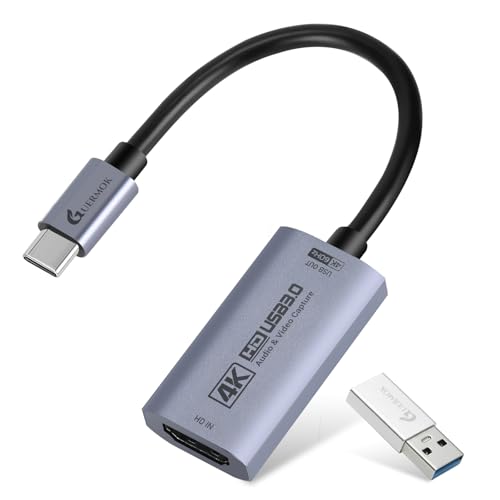
Streamers and content creators looking for high-quality performance will find the Guermok HDMI Capture Card 4K@60FPS an excellent choice. This card supports stunning 4K at 60FPS and 1080P at 240FPS, connecting effortlessly via USB 3.0. It’s compatible with various devices, including gaming consoles, DSLRs, and iPads, making it versatile for any setup. With plug-and-play functionality across multiple operating systems, you won’t need additional drivers. Plus, it works seamlessly with popular apps like OBS Studio and Twitch, ensuring ultra-low latency for smooth streaming. Elevate your content creation and engage your audience with this powerful capture card.
Best For: Streamers and content creators seeking high-quality video capture for professional streaming and recording.
Pros:
- Supports high-resolution video capture up to 4K@60FPS and 1080P@240FPS, ensuring excellent video quality.
- Plug-and-play design with no drivers required, making it easy to use across multiple operating systems.
- Compatible with a wide range of devices and popular streaming applications, enhancing versatility for various content creation needs.
Cons:
- Limited to USB 3.0 connectivity, which may not be optimal for all users depending on their hardware setup.
- Some users may require additional adapters for specific devices, which could add to overall setup complexity.
- The card may not support certain advanced video formats or resolutions beyond the specified limits, potentially limiting future-proofing.
4K HDMI Capture Card for Streaming & Gaming

The 4K HDMI Capture Card is an excellent choice for gamers and content creators who want to elevate their streaming experience with stunning visuals. Supporting 4K at 60Hz input, it guarantees your gameplay looks sharp and vibrant. You’ll appreciate the 1080P output at 60FPS via USB 3.0, providing low latency for real-time interaction. Its plug-and-play functionality means you can start streaming without hassle, and it’s compatible with various devices, including PS5 and Nintendo Switch. Weighing just 6.7 ounces, the solid aluminum build aids in heat dissipation, making it a reliable choice for long streaming sessions.
Best For: Gamers and content creators looking for high-quality streaming capabilities with minimal latency and vibrant visuals.
Pros:
- Plug-and-play functionality eliminates the need for drivers, making setup quick and easy.
- Supports 4K@60Hz input and 1080P@60FPS output, ensuring high-quality video capture.
- Solid aluminum build enhances durability and aids in heat dissipation during extended use.
Cons:
- Does not record party chats, limiting live commentary options for multiplayer games.
- Maximum input resolution drops to 30Hz when HDMI out is connected, which may affect performance.
- Some users may find the weight (6.7 ounces) slightly heavier compared to other capture cards.
Factors to Consider When Choosing HDMI Capture Cards for OBS
When you’re choosing an HDMI capture card for OBS, several key factors come into play. You’ll want to evaluate video quality standards, compatibility with your devices, and the input and output resolutions. Additionally, think about plug-and-play convenience and how latency might impact your performance.
Video Quality Standards
Choosing the right HDMI capture card for OBS involves considering several key video quality standards to guarantee your streams and recordings meet your expectations. First, make sure it supports at least 1080p resolution at 60 frames per second (FPS) for smooth video quality. If you need higher quality, opt for cards that can handle 4K input at 30 or 60 FPS for enhanced detail. Pay attention to the supported video formats like MJPEG, YUY2, or NV12, ensuring they align with your streaming needs. Low latency is essential for real-time applications, so look for capture cards that offer ultra-low latency. Additionally, consider options with HDMI loop-out capabilities for real-time monitoring without added delays during your gameplay or streams.
Compatibility With Devices
Finding an HDMI capture card that works with your devices is essential for a seamless streaming experience. Make sure the card is compatible with your gaming consoles, cameras, or computers to avoid connectivity issues. Check for support across different operating systems like Windows, Mac OS, and Linux, ensuring it functions on your preferred platform. It’s vital to choose a capture card that can handle the required resolutions and frame rates, such as 4K at 60FPS or 1080P at 60FPS. If you want to display your gameplay on a separate monitor while streaming, confirm that the capture card supports HDMI loop-out functionality. Finally, verify compatibility with popular streaming software like OBS, Streamlabs, or Zoom for smooth integration during live broadcasts.
Input and Output Resolutions
Input and output resolutions are vital factors that can make or break your streaming experience with an HDMI capture card. The input resolution refers to the maximum video quality the card can accept, often reaching up to 4K@60Hz. This is essential for high-definition gaming and streaming. Meanwhile, the output resolution defines the video quality sent to your streaming software, typically supporting formats like 1080p@60fps for smooth playback. Many capture cards also offer flexibility with lower resolutions, such as 720p, ensuring compatibility across various platforms. Additionally, having the ability to loop out HDMI allows for real-time monitoring of gameplay without latency, which is pivotal for live scenarios. Make sure both resolutions align with your recording needs to maintain quality.
Plug and Play Convenience
When it comes to streaming with HDMI capture cards, plug and play convenience can greatly enhance your experience. These devices allow for easy setup without needing additional drivers or external power supplies, making them perfect for beginners. Many capture cards automatically identify as webcams, simplifying integration with OBS. You can connect your device and start streaming or recording almost immediately, which is essential for live scenarios where every second counts. Plus, plug and play designs typically reduce CPU usage, ensuring your system resources focus on streaming tasks rather than technical setups. This level of convenience means you can concentrate on creating great content without getting bogged down in setup hassles.
Latency and Performance
To guarantee a smooth streaming experience, latency and performance are critical factors to take into account when selecting HDMI capture cards for OBS. You’ll want to look for ultra-low latency options that deliver delays of less than 100ms to keep your audio and video in sync. Many capture cards support 1080p at 60FPS, which is ideal for high-frame-rate content but can strain performance if not managed well. Opt for plug-and-play models to avoid lengthy setups that could introduce latency. High-quality capture cards often use USB 3.0 technology, ensuring faster data transfer and minimizing lag. Remember, reliable performance in low-latency scenarios is key to avoiding frustrating audio delays or sync issues during your streams.
Audio Input Options
Choosing the right audio input options can greatly enhance your streaming experience with OBS. Look for HDMI capture cards that feature a 3.5mm microphone input, letting you add external audio commentary easily. Some models even support simultaneous audio capture, allowing you to record both game sound and your commentary without needing extra gear. Compatibility with various audio formats, like MJPEG and YUY2, can also improve the quality of your audio alongside the video. Low-latency audio processing is essential to keep your audio and video in sync during live broadcasts. Additionally, certain capture cards come with built-in audio mixing features, enabling you to balance game audio and microphone levels in real-time for a more polished stream.
Build Quality and Design
The build quality and design of an HDMI capture card are vital factors that can impact your streaming success. A durable card made from materials like aluminum alloy helps with heat dissipation, guaranteeing it performs well during long sessions. Opt for a compact and lightweight design to enhance portability, making it easier to set up wherever you stream. A plug-and-play feature simplifies the experience, eliminating the need for extra drivers or power supplies. Look for a model with a 3.5mm microphone input for easy audio integration, allowing seamless commentary. Proper cable management and anti-tangle designs are also important, as they minimize clutter and secure reliable connections, so you can focus on delivering great content without distractions.
Streaming Software Support
When selecting an HDMI capture card for OBS, verifying compatibility with popular streaming software is vital for a smooth experience. Look for capture cards that support various platforms, allowing seamless integration with Twitch, YouTube, and Facebook. This versatility enhances your streaming options and audience reach.
Make certain the capture card offers plug-and-play functionality with OBS to minimize setup time and technical headaches. Additionally, choose a card that supports the latest audio and video formats to guarantee high-quality streams. Low latency performance is essential too; it guarantees real-time syncing of audio and video, keeping your broadcasts engaging and professional. Prioritizing these factors will greatly elevate your streaming game.
