
If you’re looking to enhance your data storage capabilities, 8-bay hardware RAID enclosures are a solid choice. They offer robust protection and impressive performance for managing large volumes of data. With various models on the market, from the Highpoint RocketStor 6628A to the OWC ThunderBay 8, each has unique features that cater to different needs. Let’s explore what makes these enclosures stand out and how they can benefit your setup.
8 Bay Hard Drive RAID Enclosure with Cooling Fan

If you’re looking for a reliable storage solution that combines efficiency with flexibility, the CENMATE 8 Bay Hard Drive RAID Enclosure with Cooling Fan is an excellent choice for both personal and enterprise use. This enclosure supports both 2.5 and 3.5-inch SATA HDDs/SSDs, offering a massive capacity of up to 160TB. With various RAID modes, you can tailor your setup to your needs. The built-in cooling fans guarantee peak performance, keeping temperatures low while maintaining manageable noise levels. Plus, its tool-less installation makes setup a breeze, letting you focus on what really matters: your data.
Best For: Users seeking a robust and flexible storage solution for both personal and enterprise applications that require high-capacity RAID configurations.
Pros:
- Tool-less installation for 3.5-inch drives makes it easy to set up and use.
- Supports a variety of RAID modes for tailored data redundancy and performance.
- Built-in cooling fans help maintain optimal operating temperatures with low noise levels.
Cons:
- Some users have reported issues with RAID recognition and configuration.
- Requires adapters for 2.5-inch drives, which may complicate setup for some users.
- Documentation and firmware updates may be unclear or challenging for initial setup.
Syba 8 Bay Tool Less SATA External USB Enclosure

The Syba 8 Bay Tool Less SATA External USB Enclosure is an ideal choice for users who require a simple and efficient storage solution without the complexities of RAID configurations. This enclosure supports both 2.5-inch and 3.5-inch SATA drives, accommodating up to 24TB per drive. With Super Speed USB 3.0 connectivity, you’ll enjoy fast transfer rates of up to 5Gbps. Its tool-less tray design allows for quick drive installation, while hot-swappable capabilities enable seamless replacements. Plus, the smart fan system guarantees peak cooling, making it a reliable option for maintaining performance and longevity in your data storage needs.
Best For: Users seeking a straightforward and efficient external storage solution for SATA drives without RAID requirements.
Pros:
- Tool-less design allows for easy installation and removal of drives.
- Hot-swappable capability enables seamless drive replacements without downtime.
- Smart cooling system ensures optimal performance and longevity of drives.
Cons:
- No RAID or NAS support limits advanced data management options.
- Dependent on USB 3.0 speeds, which may not meet the needs of users requiring higher transfer rates.
- Limited to SATA drives, excluding compatibility with other drive types.
OWC ThunderBay 8 RAID 5 Edition 8-Bay External Drive

Designed for creative professionals and businesses needing substantial storage, the OWC ThunderBay 8 RAID 5 Edition 8-Bay External Drive stands out with its eight universal drive bays that accommodate both 2.5 and 3.5-inch SSDs or HDDs. With dual Thunderbolt 3 ports, you can daisy-chain up to six units, achieving an impressive 960TB storage. Though it offers plug-and-play convenience, some users report issues with data transfers and RAID reliability. The included SoftRAID XT supports RAID 5 but lacks RAID 6. Despite the mixed reviews, its build quality and customer service are often praised, making it a worthy consideration.
Best For: Creative professionals and businesses seeking substantial and expandable storage solutions.
Pros:
- High storage capacity with eight drive bays accommodating both SSDs and HDDs.
- Daisy-chain capability allows connection of up to six units for a total of 960TB storage.
- Excellent build quality and plug-and-play setup with positive customer service experiences.
Cons:
- Reported issues with disconnections during data transfers and mixed reliability with RAID functionality.
- Cooling fan noise at 42dB has led to complaints about operational sound levels.
- Limited RAID options with no support for RAID 6 and outdated file systems causing concern among users.
8 Bay Tool Less Hot Swappable SATA Hard Drive Enclosure

For those seeking a reliable solution to manage multiple hard drives, the 8-Bay Tool Less Hot Swappable SATA Hard Drive Enclosure stands out with its exceptional ease of use. You can effortlessly swap out 2.5 and 3.5-inch SATA drives without any tools, making upgrades a breeze. With support for up to 8 drives, each up to 22TB, you’ll enjoy ample storage space. The USB-C 3.2 connection guarantees lightning-fast data transfers at 10Gbps. Plus, the smart fan function and independent power management keep your drives cool and efficient. While it lacks RAID and NAS features, it’s perfect for straightforward storage needs.
Best For: Users looking for a user-friendly and efficient way to manage multiple SATA hard drives without complex setup.
Pros:
- Easy tool-less swapping of 2.5 and 3.5-inch SATA drives.
- High-speed USB-C 3.2 connection enables fast data transfers at 10Gbps.
- Independent power management for each drive enhances energy efficiency.
Cons:
- Does not support RAID configurations.
- Lacks NAS functionality for network storage.
- Limited to SATA drives only, excluding other drive interfaces.
ORICO RAID 5 Bay HDD Enclosure (USB 3.0, 9858RU3)

If you’re a professional or enthusiast dealing with large-scale data storage needs, the ORICO RAID 5 Bay HDD Enclosure (USB 3.0, 9858RU3) proves to be an exceptional choice. Supporting up to 110TB with 3.5-inch SATA disks, it offers versatile RAID configurations, including RAID 5 for data protection. With a USB 3.0 interface, you’ll enjoy data transfer rates up to 235MB/s. The aluminum build guarantees durability while the 80mm cooling fan maintains peak performance. Plus, tool-less installation makes setup a breeze. Just be mindful of occasional disconnects, and always back up your data for added peace of mind.
Best For: Professionals and enthusiasts requiring a high-capacity storage solution for large-scale data management and protection.
Pros:
- Versatile RAID Configurations: Offers multiple RAID modes, including RAID 5 for enhanced data protection.
- High Data Transfer Rates: Utilizes USB 3.0, providing speeds up to 235MB/s for efficient data access.
- Durable Design: Constructed from aluminum with an effective cooling system to ensure reliable performance.
Cons:
- Occasional Disconnects: Some users report temporary disconnections during operation.
- Flimsy Drive Cages: Tool-less installation may result in a perception of less sturdy drive cages.
- Setup Time for RAID: Initial setup for certain RAID configurations, particularly RAID 5, can be time-consuming.
QNAP TL-D800C 8 Bay Desktop JBOD Storage Enclosure
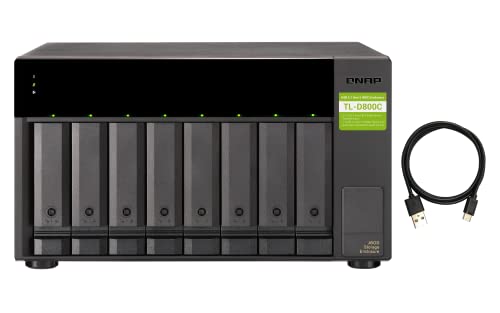
The QNAP TL-D800C 8 Bay Desktop JBOD Storage Enclosure is an excellent choice for those needing reliable and high-capacity storage solutions without the complexities of RAID configurations. With support for up to eight 3.5-inch SATA drives, you can connect via USB 3.2 Gen 2 Type-C for impressive speeds up to 10 Gbps. Users appreciate its seamless compatibility with various operating systems, including QNAP NAS, Windows, and Mac. The hot-swappable drives guarantee quick maintenance, while SMART monitoring helps keep track of drive health. Despite some concerns about the plastic build, overall performance and reliability shine, making it a worthy investment.
Best For: Users seeking a reliable and high-capacity storage solution without the complications of RAID configurations.
Pros:
- Hot-swappable drives allow for easy maintenance and upgrades.
- Seamless compatibility with multiple operating systems, including NAS, Windows, and Mac.
- Reliable performance with no reported data corruption or disconnections.
Cons:
- Some users have expressed concerns about the plastic build quality.
- Occasional connectivity issues with Type-C to Type-C connections reported.
- Lack of dedicated QNAP JBOD Manager for MacOS may limit functionality for some users.
Highpoint RocketStor 6628A 8-Bay Thunderbolt 3 RAID Enclosure

Designed for professionals in media editing and post-production, the Highpoint RocketStor 6628A 8-Bay Thunderbolt 3 RAID Enclosure delivers blazing-fast performance with speeds up to 2,700MB/s. Its 3rd Gen Thunderbolt 3 technology offers dual USB-C ports, providing an impressive 40Gb/s bandwidth. You can easily support up to eight 10TB or larger spindle HDDs, making it compatible with desktops, laptops, and servers. The integrated SAS/SATA hardware RAID technology guarantees robust data protection with RAID 5 and 6 options. Crafted from aluminum, it weighs only 12 pounds, making it a reliable yet portable solution for your intensive workflows.
Best For: Professionals in media editing and post-production who require high-speed data storage solutions.
Pros:
- Blazing-fast performance with speeds reaching up to 2,700MB/s.
- Supports large storage capacity with up to 8x 10TB or larger HDDs.
- Robust data protection with integrated RAID 5 and 6 options.
Cons:
- Relatively heavy at 12 pounds, which may affect portability.
- Limited to 3.5-inch HDDs, restricting options for users with other form factors.
- Higher price point compared to basic storage solutions, which may not be suitable for all budgets.
OWC Mercury Elite Pro 8TB 2 Bay RAID Enclosure

For high-demand production studios and home offices, the OWC Mercury Elite Pro 8TB 2 Bay RAID Enclosure stands out with its impressive capacity and versatile RAID configurations. With support for two 3.5-inch SATA 7200 RPM drives, you can set it up in RAID 0 for maximum speed or in RAID 1 for data redundancy. You’ll enjoy fast transfer speeds up to 407MB/s in RAID 0, perfect for HD workflows. Its aluminum design features a quiet cooling fan and energy-saving power management. Plus, it includes essential cables and a one-year warranty for peace of mind.
Best For: High-demand production studios and home offices seeking reliable and high-speed external storage solutions.
Pros:
- High-speed performance with RAID 0 mode offering up to 407MB/s transfer speeds, ideal for HD video workflows.
- Versatile RAID configurations allow users to choose between RAID 0, RAID 1, SPAN, and JBOD based on their needs.
- Quiet operation due to a low-decibel cooling fan and energy-saving power management features.
Cons:
- Non-hot-swappable drives require manual intervention for installation and replacement, which can be inconvenient.
- Some users have reported drive failure issues and concerns regarding RAID configuration stability.
- Limited warranty period of just one year may not be sufficient for long-term reliability expectations.
MAIWO 8 Bay Hard Drive RAID Enclosure

If you’re looking for a robust storage solution that can handle massive data needs, the MAIWO 8 Bay Hard Drive RAID Enclosure stands out with its impressive capacity of up to 128TB. This Direct Attached Storage (DAS) device works seamlessly with both 2.5 and 3.5-inch SATA SSDs and HDDs. It offers eight RAID modes for flexible performance and supports a data transfer rate of 5Gbps via USB 3.0. With a durable ABS plastic build and intelligent cooling system, it guarantees your drives stay protected. Plus, the intuitive clock touchpad keeps you informed about the working conditions.
Best For: Those needing extensive storage capacity and flexible RAID configurations for data-intensive applications like video editing or large-scale backups.
Pros:
- Supports up to 128TB of storage with compatibility for both 2.5 and 3.5-inch SATA drives.
- Multiple RAID modes provide flexibility for performance and data redundancy.
- Intelligent cooling system ensures optimal temperature management for drives.
Cons:
- Heavier design at 8.17 kg (17.96 lbs) may make it less portable.
- Customer ratings of 3.6 out of 5 suggest mixed feedback and potential concerns about performance or reliability.
- Limited warranty information available upon request may raise uncertainty for buyers.
4 Bay Hard Drive RAID Enclosure with Cooling Fan

The 4 Bay Hard Drive RAID Enclosure with Cooling Fan is an ideal choice for users needing reliable and efficient storage solutions, especially those who prioritize drive performance and data integrity. Supporting up to 80TB, it accommodates both 2.5 and 3.5-inch HDDs and SSDs. With eight RAID modes, including RAID 5, you can easily customize your setup. The built-in aluminum alloy and dual cooling fans enhance performance, though you’ll want to take into account noise levels in quiet environments. Tool-less drive installation simplifies setup, and the responsive customer service guarantees you get help when needed. It’s perfect for substantial, standalone storage solutions.
Best For: Users needing substantial, reliable storage solutions without network connectivity.
Pros:
- Tool-less drive installation allows for quick and easy setup.
- Supports up to 80TB of storage with multiple RAID configurations for data integrity.
- Built-in cooling fans help maintain optimal drive performance.
Cons:
- Noise levels may be too high for noise-sensitive environments.
- RAID mode switching can lead to data loss if not done carefully.
- Initial setup instructions may be vague, requiring patience for configuration.
Factors to Consider When Choosing Hardware Raid Enclosures 8 Bay
When you’re choosing an 8-bay hardware RAID enclosure, several factors come into play. You’ll want to take into account RAID configuration options, drive compatibility, and cooling system efficiency, among other things. Each of these elements can greatly impact your storage performance and reliability.
RAID Configuration Options Available
Choosing the right RAID configuration for your 8-bay hardware enclosure can greatly impact your system’s performance, data redundancy, and storage capacity. You’ll find options like RAID 0, which boosts performance through data striping but lacks redundancy, making it risky for critical data. RAID 1, on the other hand, mirrors data across two drives, ensuring redundancy but cutting your usable capacity in half. If you need a balance of performance and fault tolerance, consider RAID 5, which allows one drive failure without data loss while maximizing efficiency. For even more performance and redundancy, configurations like RAID 10 or RAID 50 combine striping and mirroring, catering to demanding applications and providing robust data protection across your drives.
Drive Compatibility and Capacity
Selecting the right drives for your 8-bay hardware RAID enclosure is essential for maximizing performance and ensuring compatibility. First, verify that the enclosure supports the hard drive form factors you plan to use, like 2.5-inch and 3.5-inch SATA HDDs or SSDs. Next, check the maximum supported capacity per drive; many enclosures can handle up to 20TB or even 24TB, which greatly influences your total storage capacity. Be cautious of compatibility limitations, especially with high-capacity drives like specific WD 20TB models that may not fit all enclosures. Finally, consider the overall capacity limit, which can range from 128TB to 160TB, and make sure the enclosure supports your desired RAID configurations for ideal data management.
Cooling System Efficiency
Efficient cooling systems are essential for the performance and longevity of your 8-bay hardware RAID enclosure. These enclosures often utilize multiple fans and thermal sensors to manage heat dissipation effectively. Look for models with noise levels between 40-50 decibels, which are generally acceptable for most environments, though they may be too loud for noise-sensitive settings. Choosing enclosures made from aluminum alloy enhances heat dissipation and guarantees durability. Some units come with smart fan functions that adjust speed based on temperature, providing efficient cooling during varying workloads. Finally, proper airflow design, featuring front and rear vents, greatly boosts cooling effectiveness, preventing overheating during extended operation and safeguarding your valuable data.
Data Transfer Rates
Data transfer rates are essential when evaluating 8-bay hardware RAID enclosures, as they directly impact your data management efficiency. You’ll notice considerable variations, with speeds from 5Gbps to 10Gbps based on the interface and RAID configuration. For instance, enclosures using USB 3.0 max out at 5Gbps, while USB 3.2 can reach 10Gbps. If you want enhanced performance, look for enclosures that support UASP (USB Attached SCSI Protocol), which can noticeably improve transfer rates. Additionally, RAID configurations like RAID 0 can boost throughput by striping data across multiple drives, potentially exceeding 400MB/s under ideal conditions. Don’t forget to take into account the drive type and capacity, as they can also affect read/write speeds considerably.
Build Quality and Design
When considering an 8-bay hardware RAID enclosure, the build quality and design play an important role in guaranteeing reliability and performance. Opt for enclosures made from durable materials like aluminum, which provide better heat dissipation than plastic. Keep in mind the dimensions; some models are tailored for standard racks, while others cater to compact desktop setups. Effective cooling systems, including adjustable-speed fans, are vital for maintaining ideal temperatures during heavy workloads. Look for tool-less drive installation features, which make upgrades and replacements quicker and easier. Finally, confirm the design incorporates adequate ventilation and airflow management to prevent overheating, as this can lead to decreased performance and potential data loss.
Power Supply Requirements
The performance and reliability of your 8-bay hardware RAID enclosure heavily depend on its power supply requirements. When selecting one, consider the wattage needed to support multiple high-performance drives effectively. Many enclosures come with dedicated power adapters, typically rated at DC 12V 20A, which guarantee stable operation during high data transfer rates. If you’re opting for higher storage capacities, like up to 160TB, be aware that these enclosures may require more robust power supplies to maintain performance without degradation. Additionally, evaluate whether the power supply is internal or external, as this affects both design and portability. Finally, confirm the power supply aligns with the enclosure’s specifications to prevent overheating, instability, and potential data loss.
User Interface and Setup
Choosing an 8-bay hardware RAID enclosure involves considering the user interface and setup process, as these can greatly impact your experience. Look for enclosures with plug-and-play functionality that quickly recognize your operating system, whether it’s Windows or Linux. Tool-less installation designs are a bonus, allowing you to set up and replace drives easily without extra tools. However, be cautious—some models require power disconnection to switch RAID modes, which can risk data loss if mishandled. Initial setups can vary in complexity, so don’t be surprised if documentation isn’t crystal clear. Patience may be necessary, and you might need firmware updates. Responsive customer support can be invaluable for troubleshooting during your setup process.
