
A lost USB drive should not mean lost control of your files. Hardware encryption helps protect stored data, but the right drive also needs to fit your devices, workflow, and security requirements.
These 10 options cover keypad-unlocked and computer-unlocked models, USB-A and USB-C connections, and capacities from 16GB to 256GB.
Best 10 Hardware Encrypted USB Drives Picks for 2026
Best High-Capacity Pick
Kingston IronKey Locker+ 50 G2 256GB
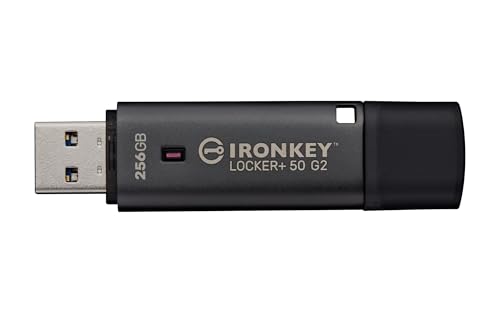
- 256GB capacity
- FIPS 197-certified XTS-AES encryption
- Admin and User password options
Best For: Larger password-protected file collections
Best Mid-Capacity Pick
Kingston IronKey Locker+ 50 G2 64GB

- 64GB capacity
- FIPS 197-certified XTS-AES encryption
- Rated up to 145MB/s read
Best For: Moderate storage needs with password protection
Best Compact-Capacity Pick
Kingston IronKey Locker+ 50 G2 32GB

- 32GB capacity
- FIPS 197-certified XTS-AES encryption
- Admin and User password options
Best For: Smaller encrypted file sets
Best Keypad Access
Kingston IronKey Keypad 200 32GB

- Onboard alphanumeric keypad
- Optional Admin and User PINs
- XTS-AES 256-bit hardware encryption
Best For: PIN-based access across USB mass-storage devices
Best for High-Capacity Storage
Kingston IronKey Vault Privacy 50 256GB

- 256GB with XTS-AES 256-bit encryption
- Passphrase and complex-password modes
- Read-only options and BadUSB protection
Best For: Large sensitive-file collections
Best for Admin Controls
Apricorn Aegis Secure Key 3 NX 32GB

- Separate admin and user modes
- Data-recovery PINs and two read-only modes
- FIPS validation status needs verification
Best For: Managed access on a 32GB drive
Best for Comfort
Kingston IronKey Keypad 200 16GB
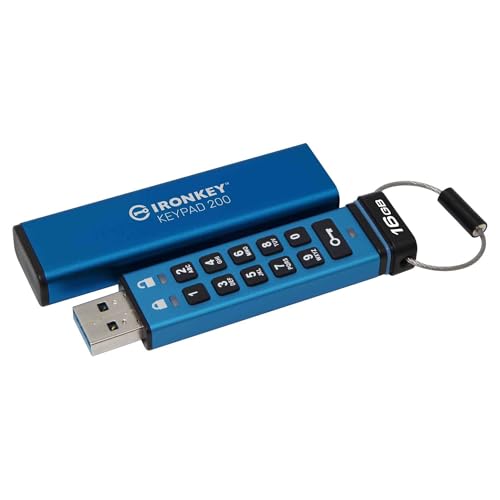
- Onboard alphanumeric keypad
- Optional admin and user PINs
- Verify conflicting FIPS status claims
Best For: On-drive PIN entry for smaller files
Best for USB-C Capacity
Apricorn Aegis Secure Key 3 NXC 128GB

- 128GB USB-C storage
- FIPS 140-2 Level 3 validated
- Separate admin and user modes
Best For: 128GB encrypted storage on USB-C devices
Compact Multi-PIN Pick
Kingston IronKey Keypad 200 USB-C 32GB

- 32GB USB-C capacity
- Admin and user PIN options
- FIPS 140-3 Level 3 pending
Best For: Smaller file sets needing multi-PIN access
Higher-Capacity Keypad Pick
Kingston IronKey Keypad 200 USB-C 64GB

- 64GB capacity
- Admin and user PIN options
- Confirm connector; specifications conflict
Best For: 64GB storage with multi-PIN access
Best High-Capacity Pick – Kingston IronKey Locker+ 50 G2 256GB
For shoppers comparing hardware encrypted usb drives, this 256GB IronKey Locker+ 50 G2 offers the most storage of the four options here while retaining XTS-AES 256-bit hardware encryption.
Best For: Carrying larger collections of files with password-protected access.
Pros:
- 256GB capacity.
- FIPS 197-certified XTS-AES 256-bit hardware encryption.
- Admin and User password options with complex or passphrase modes.
- Rated up to 145MB/s read and 115MB/s write.
Cons:
- USB Type-A connection may require an adapter for devices without a Type-A port.
- Its listed speeds are the same as the lower-capacity Locker+ 50 G2 models.
Choose this version when capacity matters more than minimizing the amount of storage you carry; its security features and stated speeds match the other Locker+ 50 G2 capacities listed here.
Best Mid-Capacity Pick – Kingston IronKey Locker+ 50 G2 64GB
Among these hardware encrypted usb drives, the 64GB IronKey Locker+ 50 G2 sits between the 32GB and 256GB versions for capacity, with the same stated XTS-AES 256-bit hardware encryption.
Best For: Buyers who want more room than the 32GB model without choosing the 256GB version.
Pros:
- 64GB capacity.
- FIPS 197-certified XTS-AES 256-bit hardware encryption.
- Supports separate Admin and User passwords in complex or passphrase modes.
- Rated up to 145MB/s read and 115MB/s write.
Cons:
- Less capacity than the 256GB version.
- USB Type-A connection may require an adapter on devices without a Type-A port.
This is the middle-capacity choice in the Locker+ 50 G2 group. Select it based on how much space you need, since the supplied security features and speed ratings are shared across all three capacities.
Best Compact-Capacity Pick – Kingston IronKey Locker+ 50 G2 32GB
If 32GB is enough for your files, this Locker+ 50 G2 brings the same stated encryption and password options as its larger siblings to the smallest-capacity option among these hardware encrypted usb drives.
Best For: Smaller file sets that still need hardware encryption and Admin/User password options.
Pros:
- FIPS 197-certified XTS-AES 256-bit hardware encryption.
- Admin and User password options with complex or passphrase modes.
- Rated up to 145MB/s read and 115MB/s write.
Cons:
- 32GB is the lowest capacity of the Locker+ 50 G2 models listed here.
- USB Type-A connection may require an adapter for devices without a Type-A port.
The reason to pick this model over the other Locker+ 50 G2 versions is its 32GB capacity, not a difference in their listed encryption features or speed ratings.
Best Keypad Access – Kingston IronKey Keypad 200 32GB
The 32GB IronKey Keypad 200 stands out among these hardware encrypted usb drives with an onboard alphanumeric keypad for PIN entry rather than the Locker+ 50 G2’s listed password options.
Best For: PIN-based access across devices that support USB mass storage.
Pros:
- Onboard alphanumeric keypad with enforced PIN access.
- Optional separate Admin and User PINs.
- XTS-AES 256-bit hardware encryption.
- Listed compatibility includes Windows, macOS, Linux, Chrome OS, Android, and other systems supporting USB mass storage.
Cons:
- 32GB capacity may be limiting for larger file collections.
- The supplied notes conflict on FIPS 140-3 Level 3 status, describing it as both certified and pending; confirm its current status before relying on it for compliance.
Pick this one when keypad-based, device-independent access is the priority. Its FIPS certification status needs independent confirmation because the supplied product information is inconsistent.
Best for High-Capacity Storage – Kingston IronKey Vault Privacy 50 256GB
Among hardware encrypted usb drives, the Kingston IronKey Vault Privacy 50 stands out when you need 256GB of protected storage. It combines hardware-based XTS-AES 256-bit encryption with flexible password options and USB-A connectivity.
Best For: Users carrying larger collections of sensitive files who want password flexibility and write protection.
Pros:
- 256GB capacity and listed read and write speeds of 230 MB/s.
- Complex-password and passphrase modes, plus dual read-only settings.
- Digitally signed firmware for BadUSB protection and brute-force attack protection.
Cons:
- USB-A connector may require an adapter for devices with only USB-C ports.
- FIPS 197 encryption listing should not be confused with FIPS 140-2 or 140-3 Level 3 validation.
Choose this model if storage space and configurable access matter more to you than an onboard keypad.
Best for Admin Controls – Apricorn Aegis Secure Key 3 NX 32GB
The Apricorn Aegis Secure Key 3 NX is a 32GB option among hardware encrypted usb drives for buyers who prioritize access-management features. Separate admin and user modes, data-recovery PINs, and two read-only modes give it a practical set of controls.
Best For: Teams or individuals who need separate admin and user access on a 32GB USB-A drive.
Pros:
- Separate admin and user modes with data-recovery PINs.
- Two read-only modes and Aegis Configurator compatibility.
- Listed compatibility with Windows, iOS, Linux, Android, and Chrome.
Cons:
- 32GB offers less space than higher-capacity options.
- The supplied notes call FIPS 140-2 Level 3 validation pending; verify current status if certification is required.
This is a sensible pick for managed access, but confirm its current validation status before buying for a compliance-driven deployment.
Best for Comfort – Kingston IronKey Keypad 200 16GB
If you prefer entering a PIN on the drive itself, the Kingston IronKey Keypad 200 brings an alphanumeric keypad to the hardware encrypted usb drives category. Its 16GB capacity, XTS-AES 256-bit hardware encryption, and multi-PIN option suit smaller sensitive-file transfers.
Best For: Users who want onboard PIN entry across devices that support USB mass storage.
Pros:
- Enforced alphanumeric PIN with optional admin and user PINs.
- OS- and device-independent operation for compatible USB mass-storage systems.
- Listed read speed of 145 MB/s and write speed of 115 MB/s.
Cons:
- 16GB capacity is limiting for larger file collections.
- The supplied notes conflict on FIPS 140-3 Level 3 status, describing it as both certified and pending; verify status if required.
The keypad is the main reason to choose this model; check its current certification documentation before relying on a specific validation claim.
Best for USB-C Capacity – Apricorn Aegis Secure Key 3 NXC 128GB
Among hardware encrypted usb drives, the Apricorn Aegis Secure Key 3 NXC offers 128GB of storage, a USB-C connector, and software-free authentication. Its FIPS 140-2 Level 3 validation makes it a strong option when a validated drive is required.
Best For: Buyers who need 128GB of hardware-encrypted storage on USB-C devices.
Pros:
- FIPS 140-2 Level 3 validated with 256-bit AES-XTS hardware encryption.
- Separate admin and user modes.
- Software-free operation and support for compatible USB-C computers, tablets, and smartphones.
Cons:
- Its USB-C connector is not a direct fit for USB-A-only ports.
Choose this drive if USB-C compatibility and higher capacity matter; check your devices’ ports before buying.
Compact Multi-PIN Pick – Kingston IronKey Keypad 200 USB-C 32GB
If you’re comparing hardware encrypted usb drives for modest files, this 32GB Kingston IronKey Keypad 200 combines a USB-C connector with OS-independent operation. It offers XTS-AES 256-bit encryption and separate admin and user PIN options.
Best For: Buyers who want a 32GB USB-C drive with keypad-based, multi-PIN access.
Pros:
- Admin and user PIN options, plus global or session read-only settings.
- Listed protection against brute-force and BadUSB attacks.
- OS-independent operation and a five-year warranty.
Cons:
- 32GB capacity may be limiting for larger file collections.
- FIPS 140-3 Level 3 status is listed as pending, not validated.
This is the smaller-capacity Keypad 200 choice when its access controls matter more than storage space. Verify certification status if validation is a purchasing requirement.
Higher-Capacity Keypad Pick – Kingston IronKey Keypad 200 USB-C 64GB
The 64GB Kingston IronKey Keypad 200 is a middle-capacity option among hardware encrypted usb drives, pairing XTS-AES 256-bit encryption with OS-independent operation. Its multi-PIN and read-only options give buyers several ways to manage access.
Best For: Buyers who need 64GB and separate admin and user PINs.
Pros:
- 64GB capacity and listed read/write speeds of 280/200 MB/s.
- Admin and user PIN options, with global or session read-only settings.
- Listed BadUSB and brute-force protection, plus a five-year warranty.
Cons:
- FIPS 140-3 Level 3 status is listed as pending.
- Supplied specifications conflict on connector type: the title says USB-C, while one detail says USB Type-A.
Consider this model for its capacity and access settings, but confirm the physical connector and certification status before ordering.
How We Picked the Best Hardware Encrypted USB Drives
We focused on drives with stated hardware-encryption features and compared their unlock methods, listed security certifications, connector types, capacities, and day-to-day convenience. The selection includes multiple capacities of the same model because storage needs and prices can change the best choice. Treat each certification claim as model-specific: check the exact part number and current validation status against your organization’s requirements before buying.
Quick Comparison: Choose by Workflow
For unlocking without installing software, start with a keypad model: the Kingston IronKey Keypad 200 family offers USB-A and USB-C choices, while Apricorn’s Aegis Secure Key 3 NX and 3 NXC cover USB-A and USB-C respectively. If you are comfortable unlocking through a connected computer, compare the IronKey Locker+ 50 G2 and Vault Privacy 50. For capacity, 16GB or 32GB suits smaller document sets; 64GB, 128GB, or 256GB leaves more room for large files. Match the connector to the ports you actually use rather than relying on an adapter.
Key Buying Factors
Security Standard and Certification
Encryption specifications and certifications answer different questions. Look at the stated cipher and mode, such as XTS-AES 256-bit, but do not treat an AES specification or FIPS 197 claim as equivalent to FIPS 140-2 or FIPS 140-3 validation. If policy calls for a particular FIPS level, confirm that the exact model and configuration meet it.
Unlock Method and Compatibility
A built-in keypad can be useful across shared, restricted, or mixed-operating-system computers because the PIN is entered on the drive. A computer-unlocked drive may feel more familiar, but you should confirm its supported operating systems and any required software permissions. Also check whether you need USB-A or USB-C; the connector alone does not establish transfer speed.
Capacity, Recovery, and Practical Controls
Buy enough space for your files plus reasonable growth, but avoid paying for unused capacity. Review PIN or password rules, administrator and user access, retry limits, and what happens after too many failed attempts. A locked drive protects data from casual access; it does not replace a separate backup. Keep recovery information and backup copies in approved, separate locations.
Who Should Buy Which Hardware Encrypted USB Drives?
Choose a Keypad 200 in USB-A or USB-C if you want on-device PIN entry and its listed FIPS 140-3 Level 3 certification matches your needs. Consider the Aegis Secure Key 3 NX or USB-C 3 NXC if your purchasing requirements specify their listed FIPS 140-2 Level 3 validation. Compare Locker+ 50 G2 capacities if a computer-unlocked drive fits your workflow; include Vault Privacy 50 when evaluating higher-capacity Kingston options. Whichever you choose, verify the exact certification, device compatibility, and recovery process before storing irreplaceable data.
