
When it comes to protecting your sensitive information on a Mac, choosing the right hardware encrypted SSD is essential. With so many options available, it can be overwhelming to find the perfect fit for your needs. In this guide, we’ll explore ten top choices that offer robust security features and impressive performance. You’ll want to take into account factors like speed and durability before making a decision, so let’s take a closer look at what these SSDs have to offer.
Lexar ES3 1TB External SSD, USB 3.2 Gen2 Portable SSD

If you’re looking for a reliable, high-speed storage solution for your Mac, the Lexar ES3 1TB External SSD stands out with its impressive read speeds of up to 1050MB/s and write speeds reaching 1000MB/s. This USB 3.2 Gen 2 Portable SSD guarantees fast file transfers, but performance may dip if you’re not using the supported USB standard. Its sleek, durable design makes it easy to carry, weighing just 42g and measuring 10.5mm thick. Plus, it includes Lexar DataShield™ 256-bit AES encryption software for robust data protection, keeping your files secure while you work or play on various devices.
Best For: Users seeking a high-speed, portable storage solution compatible with modern devices like the iPhone 15 series, gaming consoles, and laptops.
Pros:
- Fast read speeds of up to 1050MB/s and write speeds of up to 1000MB/s for quick file transfers.
- Lightweight and compact design makes it easy to carry and store in pockets.
- Includes advanced data protection with Lexar DataShield™ 256-bit AES encryption software.
Cons:
- Performance may decrease if not using USB 3.2 Gen 2 on certain systems, including Macs.
- Not compatible with iPhone 14 and older models, limiting its usability for those devices.
- Slightly higher price point compared to traditional external hard drives.
SANDISK 1TB Extreme Portable SSD

The SanDisk 1TB Extreme Portable SSD stands out as an ideal choice for creative professionals and on-the-go users who need reliable and fast storage. With read speeds up to 1050MB/s and write speeds reaching 1000MB/s, it guarantees your files transfer quickly. Its durable design offers drop protection from up to 3 meters and an IP65 rating against water and dust. Plus, you can secure your data with 256-bit AES hardware encryption. Compatible with Mac and backed by a 5-year warranty, this SSD is a top pick, boasting a 4.6-star rating from over 89,000 satisfied customers.
Best For: Creative professionals and on-the-go users who require fast, reliable, and durable storage solutions.
Pros:
- High performance: Offers read speeds up to 1050MB/s and write speeds up to 1000MB/s for quick file transfers.
- Durable design: Features drop protection up to 3 meters and an IP65 rating for water and dust resistance.
- Strong security: Includes 256-bit AES hardware encryption for data protection.
Cons:
- Software requirements for Mac: Requires a software download for full compatibility with macOS.
- Performance variability: Actual performance may vary based on the host device and usage conditions.
- Limited return policy: The 30-day return policy may have conditions that could complicate returns.
Samsung T7 Portable SSD, 1TB External Solid State Drive

Looking for a reliable and high-speed storage solution? The Samsung T7 Portable SSD is your answer. With a 1TB capacity and USB 3.2 Gen 2 interface, it boasts impressive read/write speeds of up to 1,050/1,000 MB/s, nearly doubling the performance of its predecessor, the T5. Its compact design and extensive compatibility make it perfect for gaming, video editing, and photography. Plus, it’s shock-resistant with fall protection up to 6 feet, thanks to its durable aluminum unibody. Trust the world’s #1 flash memory brand to secure your data efficiently and reliably.
Best For: Those in need of a reliable, high-speed external storage solution for gaming, video editing, and photography.
Pros:
- Impressive speed: Achieves read/write speeds of up to 1,050/1,000 MB/s, significantly faster than previous models.
- Durable design: Shock-resistant with fall protection up to 6 feet, ensuring data safety during transport.
- Wide compatibility: Works seamlessly with PCs and mobile devices, making it versatile for various applications.
Cons:
- Price: Higher cost compared to traditional external hard drives.
- Limited capacity options: While 1TB is available, some users may need larger capacities for extensive data storage.
- No built-in encryption: Lacks hardware encryption for added security features compared to some competitors.
SANDISK 1TB Extreme PRO Portable SSD

For creative professionals and tech enthusiasts seeking a reliable storage solution, the SANDISK 1TB Extreme PRO Portable SSD stands out with its impressive read/write speeds of up to 2000MB/s. Its forged aluminum chassis not only enhances durability but also acts as a heatsink, maintaining performance even during intense tasks. With an IP65 rating for water and dust resistance and up to 3-meter drop protection, you can take it anywhere without worry. Plus, it features 256-bit AES hardware encryption for secure data storage. Don’t forget to utilize the SanDisk Memory Zone app for efficient file management and optimization.
Best For: Creative professionals and tech enthusiasts looking for a high-performance, portable storage solution.
Pros:
- Exceptional read/write speeds of up to 2000MB/s for efficient data transfer.
- Robust design with IP65 rating for water and dust resistance and 3-meter drop protection.
- Built-in 256-bit AES hardware encryption for enhanced data security.
Cons:
- Actual performance may vary based on host device and usage conditions.
- Requires download and installation of the SanDisk Memory Zone app for optimal file management.
- Higher price point compared to standard portable SSDs.
Samsung T9 Portable SSD 1TB

With AES 256-bit hardware encryption, the Samsung T9 Portable SSD 1TB stands out as an ideal choice for anyone needing secure data storage on their Mac. Weighing just 4.32 ounces, it’s compact and easy to carry. With read and write speeds up to 2,000MB/s, you’ll experience lightning-fast performance. Its rugged design can withstand drops from up to 9.8 feet, ensuring durability during heavy use. Plus, the Magician Software helps you monitor drive health effortlessly. Compatible with multiple devices, including your iPhone 15, this SSD offers versatility for gaming, multimedia, and professional tasks, backed by a 5-year limited warranty.
Best For: The Samsung T9 Portable SSD 1TB is best for professionals, gamers, and multimedia creators seeking secure, high-speed external storage for diverse devices.
Pros:
- Lightning-fast performance with read and write speeds up to 2,000MB/s.
- Rugged durability that withstands drops from up to 9.8 feet.
- AES 256-bit hardware encryption for enhanced data security.
Cons:
- Higher price point compared to traditional external hard drives.
- Limited compatibility with some older devices not supporting USB 3.2 Gen 2×2.
- May require additional software installation for optimal performance monitoring.
Corsair EX400U 2TB USB4 Portable External SSD

The Corsair EX400U 2TB USB4 Portable External SSD stands out for its remarkable read speed of up to 4,000MB/s, making it an ideal choice for creative professionals who need rapid data access on their Mac devices. Weighing only 0.2 pounds and featuring a compact 2.5-inch form factor, it’s easy to carry around. With a write speed of 3,600MB/s, you can efficiently transfer large files. Connectivity options include USB4 and Thunderbolt 4, ensuring compatibility with modern systems. Plus, the included Corsair SSD Toolbox gives you in-depth control, while the 3-year warranty provides peace of mind for your investment.
Best For: Creative professionals and users who require high-speed data transfer and portability in a compact external SSD.
Pros:
- High Read and Write Speeds: Achieves up to 4,000MB/s read and 3,600MB/s write speeds for fast file transfers.
- Lightweight and Compact Design: Weighs only 0.2 pounds and has a 2.5-inch form factor, making it easy to carry.
- Versatile Connectivity: Compatible with USB4, Thunderbolt 4, and backward compatible with older USB standards.
Cons:
- Limited to Specific Operating Systems: Only supports macOS 13 or later and Windows 10 or later, which may exclude some users.
- Price Point: May be more expensive compared to standard external SSDs with lower performance specs.
- Dependence on USB-C Ports: Requires devices with USB-C or Thunderbolt ports, limiting compatibility with older systems.
Lexar 1TB ES5 Magnetic External SSD
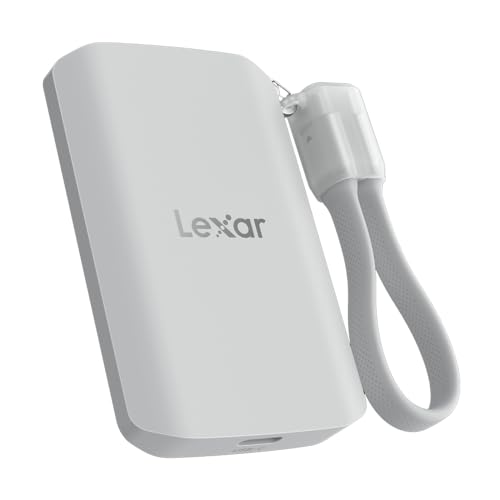
Offering impressive read and write speeds of up to 2000MB/s, the Lexar 1TB ES5 Magnetic External SSD is an excellent choice for creative professionals who need quick data access and transfer. It’s compatible with MagSafe, USB-C smartphones, and both Mac and PC, ensuring versatility. The thin design features a liquid silicone build and a magnetic attachment, perfect for on-the-go use. With an IP65 rating for dust and water resistance and a drop resistance of up to 3 meters, your data stays protected. Plus, you get free access to the Lexar App for easy backup and storage expansion.
Best For: Creative professionals and content creators who require fast and reliable data access and transfer in a portable format.
Pros:
- Up to 2000MB/s read and write speeds allow for quick data transfers, optimizing workflow.
- IP65 rating for dust and water resistance ensures durability and protection in various environments.
- Thin and stylish design with a magnetic attachment feature makes it convenient for on-the-go use.
Cons:
- Performance may be lower on non-USB 3.2 Gen 2×2 systems, potentially affecting speed for some users.
- Requires additional metal ring accessory for magnetic attachment, which is not included.
- Limited storage capacity of 1TB may not be sufficient for users with extensive data needs.
SANDISK 1TB Portable SSD – External Solid State Drive

If you’re looking for a reliable and portable storage solution, the SanDisk 1TB Portable SSD is an excellent choice for Mac users. Weighing just 1.44 ounces and featuring a durable rubber enclosure, this compact drive offers impressive read speeds of up to 800MB/s. Its USB 3.2 Gen 2 and USB Type-C connectivity guarantee compatibility with most devices. Plus, with two-meter drop protection, you can trust it to withstand daily use. A 3-year limited warranty further underscores its reliability. With a 4.6 out of 5-star rating from nearly 10,000 reviews, you can confidently secure your data with this SSD.
Best For: The SanDisk 1TB Portable SSD is best for users seeking a lightweight, durable, and high-speed storage solution for their laptops and other USB-enabled devices.
Pros:
- Compact and lightweight design, making it easy to carry around.
- Fast read speeds of up to 800MB/s enhance data transfer efficiency.
- Durable rubber enclosure with drop protection up to two meters ensures reliability during everyday use.
Cons:
- Write speeds are lower than read speeds, though specifics are not provided.
- Limited to USB 3.2 Gen 2 and USB Type-C connectivity, which may not suit all devices.
- The 30-day return policy may have specific conditions that could complicate refunds.
WD_Black SN7100 1TB NVMe SSD

Designed for serious on-the-go gamers, the WD_Black SN7100 1TB NVMe SSD stands out with its impressive read speeds of up to 7,250 MB/s and write speeds reaching 6,900 MB/s. This M.2 2280 drive, utilizing PCIe Gen4 NVMe technology, is up to 35% faster than previous generations. With next-gen TLC 3D NAND, it offers enhanced power efficiency—double that of earlier models. Compatible with laptops, gaming consoles, and handheld devices, it’s perfect for those who demand performance. Plus, the WD_BLACK Dashboard guarantees you can optimize your experience. With a 3-year warranty, it’s a reliable choice for any serious gamer.
Best For: Serious on-the-go gamers who demand high performance and fast data access.
Pros:
- Impressive speed: Read speeds up to 7,250 MB/s and write speeds up to 6,900 MB/s for rapid data transfer.
- Power efficiency: Up to 100% more efficient compared to previous models, extending battery life in portable devices.
- Broad compatibility: Works seamlessly with laptops, gaming consoles, and handheld devices, making it versatile for various setups.
Cons:
- Price point: May be more expensive compared to traditional SSDs or lower-capacity options.
- Windows exclusive software: WD_BLACK Dashboard for optimization is only available for Windows users, limiting functionality for others.
- Limited warranty period: A 3-year warranty may be shorter than some competitors offering longer coverage.
Samsung T7 Shield 2TB Portable SSD

The Samsung T7 Shield 2TB Portable SSD stands out for its impressive durability and performance, making it the perfect choice for photographers and content creators who need reliable, high-speed storage on the go. With read speeds up to 1050MB/s and write speeds of 1000MB/s, it handles heavy file transfers effortlessly. Its IP65 rating provides protection against water and dust, while its drop resistance from nearly 10 feet guarantees peace of mind. Compatible with various devices, including Mac and iPhone 15 Pro, you’ll enjoy seamless 4K video storage. Plus, Samsung Magician software helps you monitor drive health and optimize performance.
Best For: The Samsung T7 Shield 2TB Portable SSD is best for photographers, content creators, and gamers who require fast, durable, and portable storage solutions.
Pros:
- High-speed performance with read speeds up to 1050MB/s and write speeds of 1000MB/s, ideal for heavy file transfers.
- Rugged design with IP65 water and dust resistance and drop protection from heights up to 9.8 feet, perfect for adventurous use.
- Wide compatibility with various devices including PC, Mac, Android devices, and gaming consoles, ensuring versatility.
Cons:
- Higher price point compared to standard external hard drives, which may deter budget-conscious consumers.
- Limited storage options at 1TB to 4TB may not meet the needs of users requiring larger capacities.
- Potential for heat generation during heavy usage, which may require monitoring for optimal performance.
Factors to Consider When Choosing Hardware Encrypted SSDs for Mac
When choosing a hardware encrypted SSD for your Mac, you should consider several key factors. Look at the encryption standards and types to guarantee your data is secure, and check compatibility with macOS for seamless integration. Speed, durability, and connectivity options also play essential roles in your overall experience and performance.
Encryption Standards and Types
Choosing the right hardware encrypted SSD for your Mac involves understanding the various encryption standards and types available. Most SSDs utilize the Advanced Encryption Standard (AES), particularly with 256-bit keys, guaranteeing strong security. You’ll find that symmetric encryption is the most common method, using the same key for both encrypting and decrypting your data. Some models even offer password protection features, adding an extra layer of security against unauthorized access. Performance can vary depending on the encryption algorithms used, with some SSDs managing to maintain high speeds while encrypting data in real-time. So, it’s crucial to evaluate these factors to make sure you choose an SSD that meets your security and performance needs.
Compatibility With Macos
Finding a hardware encrypted SSD that works seamlessly with macOS is vital for ensuring you get the most out of your device. First, check that the SSD is compatible with macOS versions 10.9 and later for best performance. Look for SSDs supporting USB 3.2 Gen 2 to achieve maximum data transfer rates, as older USB standards can slow down performance. It’s important to verify that the SSD includes macOS-compatible software or drivers for features like password protection and encryption management. Additionally, confirm compatibility with your specific Mac model, especially if you’re using a newer device. Finally, consider SSDs that offer plug-and-play convenience, making installation a breeze without needing extra software.
Speed and Performance Metrics
Speed and performance are essential factors in selecting a hardware encrypted SSD for your Mac. Look for SSDs with high read and write speeds, ideally around 1,000MB/s, to guarantee fast file transfers and efficient data access. The interface type matters too—SSDs using USB 3.2 Gen 2 typically outperform those with older standards. Performance can vary based on your Mac’s compatibility, so check if the SSD is optimized for your system. If you frequently handle large files or video editing, aim for higher sequential speeds exceeding 2,000MB/s. Remember that while hardware encryption enhances security, it might introduce slight overhead, potentially affecting speed. Balancing these factors is key to a satisfying experience.
Durability and Resistance Features
When selecting a hardware encrypted SSD for your Mac, durability and resistance features play an essential role in ensuring your data remains safe. Look for SSDs with an IP65 rating or higher, which indicates resistance to dust and water, making them suitable for various environments. Consider options with drop protection that can withstand falls from heights of up to 9.8 feet, safeguarding your data during accidents. Evaluate construction materials; SSDs with forged aluminum chassis or solid aluminum designs offer superior durability and thermal management. Also, check for temperature resistance specifications, as some SSDs operate efficiently between 0°C to 60°C. Finally, assess shock resistance features to minimize the risk of data loss during physical impacts.
Connectivity Options Available
Connectivity options are essential when choosing a hardware encrypted SSD for your Mac. Most SSDs utilize USB 3.2 Gen 2, offering impressive data transfer speeds of up to 10Gbps, which is great for efficient file management. Look for models that support USB-C connectivity, guaranteeing compatibility with your latest Mac devices and making plug-and-play a breeze. If you’re into demanding applications like video editing, consider external SSDs with Thunderbolt 3 or 4 interfaces for even faster data rates. Don’t forget to check for backward compatibility with older USB versions to maximize versatility across devices. Finally, verify the SSD’s encryption software is compatible with macOS to keep your data secure while using your Mac.
Storage Capacity Choices
Choosing the right storage capacity for your hardware encrypted SSD is essential, especially since it directly impacts your ability to manage files efficiently. You’ll find options ranging from 1TB to 4TB, catering to casual users and professionals alike. If you’re into video editing or gaming, consider SSDs with 2TB or more to handle large file transfers seamlessly. Make sure the SSD capacity aligns with your usage patterns to prevent running out of space, which can slow down performance. Many SSDs offer various capacities, so you can pick one that meets your needs without overspending. Remember, larger drives often provide better sustained write speeds, enhancing your overall experience. Choose wisely to secure your data effectively!
