
When it comes to protecting your sensitive information, choosing the right hardware encrypted external drive is vital. You want a balance of security, speed, and reliability. With options like the SanDisk Extreme Portable SSD and Kingston IronKey Vault series, you’ll find models that cater to various needs. But what factors should you consider before making your choice? Let’s explore the top contenders and the essential features that can help safeguard your data effectively.
SANDISK 1TB Extreme Portable SSD (SDSSDE61-1T00-G25)

If you’re looking for a reliable and high-performance external drive, the SanDisk 1TB Extreme Portable SSD (SDSSDE61-1T00-G25) is an excellent choice. With read speeds up to 1050MB/s and write speeds of 1000MB/s, it’s designed for your active lifestyle. Its durable construction features IP65 water and dust resistance and can withstand drops from up to 3 meters. Plus, you’ll appreciate its 256-bit AES hardware encryption for added security. Compatible with Windows and macOS, it also includes the SanDisk Memory Zone app for easy file management. With a 5-year warranty, it’s a solid investment for your data storage needs.
Best For: Those seeking a high-performance, portable storage solution that can withstand tough conditions and offers robust security features.
Pros:
- Fast Performance: Achieves read speeds up to 1050MB/s and write speeds of 1000MB/s for quick data transfers.
- Durable Design: IP65 rated for water and dust resistance, and can survive drops from up to 3 meters.
- Security Features: Includes 256-bit AES hardware encryption and password protection for secure data storage.
Cons:
- Price Point: May be more expensive compared to traditional external hard drives.
- Limited Compatibility: Requires software download for full functionality on macOS.
- Performance Variability: Speeds may vary based on the host device and specific usage conditions.
Kingston Ironkey Locker+ 50 Encrypted USB Flash Drive (32GB)

The Kingston Ironkey Locker+ 50 Encrypted USB Flash Drive (32GB) is an ideal choice for professionals who prioritize data security. With XTS-AES encryption and protection against brute force and BadUSB attacks, your data remains safe. It offers multi-password options, including complex and passphrase modes, ensuring only authorized access. You’ll appreciate the automatic personal cloud backup feature and the virtual keyboard that guards your password entry from keyloggers. Plus, with read speeds up to 145MB/s and write speeds reaching 115MB/s, it delivers impressive performance. Its durable metal casing adds a touch of style, making it a reliable companion for your sensitive information.
Best For: Professionals who prioritize data security and need reliable encrypted storage for sensitive information.
Pros:
- High-level XTS-AES encryption ensures data protection against unauthorized access.
- Durable metal casing adds style while protecting the drive from physical damage.
- Fast performance with read speeds up to 145MB/s and write speeds up to 115MB/s.
Cons:
- Limited storage capacity of 32GB may not be sufficient for users with large data needs.
- Higher price point compared to standard USB flash drives without encryption.
- Requires software for certain features, which may complicate use for some users.
Kingston IronKey Vault Privacy 80 1.92TB External SSD
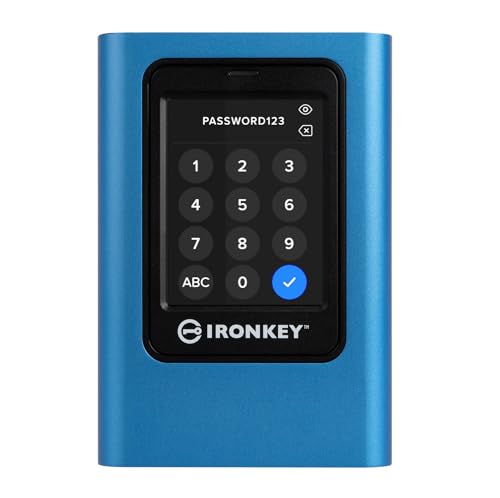
For professionals who prioritize data security, the Kingston IronKey Vault Privacy 80 1.92TB External SSD stands out with its FIPS 197 certification and robust XTS-AES 256-bit encryption. This SSD offers intuitive touch-screen access, making it easy to navigate through its multi-password options, including admin and user modes. You can set configurable password rules to enhance security further. With dual read-only modes and malware protection, your data remains safe from unauthorized access. Plus, the generous 1.92TB capacity guarantees you have ample space for all your important files, making it an excellent choice for secure data storage on the go.
Best For: Professionals who require high-level data security and portable storage solutions.
Pros:
- FIPS 197 Certified for enhanced security compliance.
- Intuitive touch-screen interface simplifies navigation and usability.
- Dual read-only modes provide additional protection against unauthorized data alterations.
Cons:
- Higher price point compared to standard external SSDs.
- May require some initial setup for password configurations.
- Touch-screen may not be as durable as traditional physical buttons.
Apricorn 2TB Aegis Padlock Encrypted Portable External Hard Drive

Looking for a reliable external drive that prioritizes security? The Apricorn 2TB Aegis Padlock is your answer. With hardware AES XTS 256-bit encryption and a simple PIN for access, your data stays safe. It supports up to five user PINs and one admin PIN, plus features like a brute force self-destruct option. Weighing just 0.5 pounds, this portable 2.5-inch drive offers fast read speeds of 625 MB/s through USB 3.0 connectivity. Its rugged, wear-resistant design guarantees durability, while a three-year warranty adds peace of mind. Trust the Aegis Padlock to keep your sensitive data secure on the go.
Best For: Individuals and businesses looking for a portable external hard drive that offers robust security features and fast data transfer speeds.
Pros:
- Strong Security: Features AES XTS 256-bit hardware encryption and a brute force self-destruct option for maximum data protection.
- High Performance: Delivers read speeds of up to 625 MB/s and data transfer rates significantly faster than USB 2.0.
- Portability: Compact, rugged design and lightweight at 0.5 pounds make it easy to carry and use on the go.
Cons:
- Limited Storage Capacity: At 2TB, it may not meet the needs of users requiring larger storage options.
- No Software Management: The software-free design may limit advanced management features some users prefer.
- PIN Access Requirement: The need for a PIN can be inconvenient for quick access, especially if forgotten.
Kingston IronKey Vault Privacy 50 256GB Encrypted USB

Security-conscious users seeking robust data protection will find the Kingston IronKey Vault Privacy 50, with its FIPS 197 certification and AES 256-bit hardware encryption, an excellent choice. This 256GB USB drive offers impressive read speeds of up to 250MB/s and write speeds of up to 180MB/s. It features multiple password options, including a new passphrase mode, and dual read-only settings to prevent unauthorized access. Plus, you can enjoy peace of mind with brute force and BadUSB attack protection. With a 5-year warranty and a compact design, this drive is perfect for safeguarding your sensitive data on the go.
Best For: Security-conscious users seeking robust data protection for sensitive information.
Pros:
- FIPS 197 Certified and features AES 256-bit hardware encryption for enhanced security.
- Fast performance with read speeds up to 250MB/s and write speeds up to 180MB/s.
- Multiple password options and dual read-only settings for flexible access control.
Cons:
- Higher price point compared to standard USB drives without encryption.
- Limited capacity of 256GB may not be sufficient for users with extensive data storage needs.
- Potential learning curve for users unfamiliar with advanced security features and settings.
Samsung T7 Shield 1TB Portable External Solid State Drive

The Samsung T7 Shield 1TB Portable External Solid State Drive stands out as an excellent choice for photographers and content creators who need reliable and speedy storage. With read speeds up to 1050MB/s and write speeds up to 1000MB/s, you can easily edit directly from the drive. Its rugged design is IP65 rated for water and dust resistance, plus it’s drop resistant up to 9.8 feet. Compatible with PCs, Macs, and consoles, it offers versatile use. You’ll also appreciate the built-in hardware encryption for data protection and the Samsung Magician software for optimization. Enjoy peace of mind with this durable drive!
Best For: The Samsung T7 Shield 1TB Portable External Solid State Drive is best for photographers, content creators, and gamers needing fast, durable, and reliable storage solutions.
Pros:
- High read speeds of up to 1050MB/s and write speeds of up to 1000MB/s for efficient file management.
- Rugged design with IP65 water and dust resistance and drop resistance up to 9.8 feet, ensuring durability in various environments.
- Compatibility with multiple devices including PCs, Macs, Android devices, and gaming consoles for versatile use.
Cons:
- The performance may vary depending on host configuration and whether UASP mode is enabled.
- Limited to a maximum storage capacity of 4TB, which may not be sufficient for users with extensive data needs.
- While durable, the rugged design may add slight bulk compared to non-rugged alternatives.
Kingston IronKey Vault Privacy 80 480GB External SSD

For professionals who prioritize data protection, the Kingston IronKey Vault Privacy 80 480GB External SSD stands out with its robust security features. It boasts FIPS 197 certification and XTS-AES 256-bit encryption, ensuring your data’s safety. The touch-screen interface allows for multi-password options and configurable password rules, while dual read-only modes protect against malware. With a read speed of 250 MB/s and USB 3.2 Gen 1 connectivity, transferring files is quick and efficient. Plus, the device includes a neoprene travel case and cables for convenience. A limited three-year warranty adds extra peace of mind for your investment.
Best For: Professionals and businesses that require high levels of data security and protection for sensitive information.
Pros:
- FIPS 197 certified and features XTS-AES 256-bit encryption for enhanced data security.
- Touch-screen interface with multi-password options and configurable password rules for user convenience.
- Includes a neoprene travel case and multiple USB cables for easy portability and connection.
Cons:
- Limited capacity of 480 GB may not meet the needs of users requiring larger storage options.
- Read speed of 250 MB/s may be slower compared to some high-end SSDs on the market.
- The warranty period of three years may be shorter than some competing products.
SanDisk Professional 4TB G-Drive ArmorLock SSD

If you need a reliable and secure way to store sensitive data, the SanDisk Professional 4TB G-Drive ArmorLock SSD stands out with its innovative ArmorLock security technology. This encrypted NVMe SSD offers pro-grade speeds of up to 1000MB/s for both reading and writing, ensuring fast access to your files. Its ultra-rugged design protects your data from physical damage, while the simple access feature lets you retrieve it with just your phone—no password needed! Plus, the auto access function works with pre-authorized devices, making multi-user and multi-drive management a breeze. With 4TB of storage, it’s perfect for all your important files.
Best For: Professionals and creatives who need a secure, high-capacity SSD for storing sensitive data on-the-go.
Pros:
- Pro-grade speeds of up to 1000MB/s for fast data access.
- ArmorLock security technology allows simple unlocking with a phone, eliminating the need for passwords.
- Ultra-rugged design provides excellent protection against physical damage.
Cons:
- Higher price point compared to standard SSDs without security features.
- Limited compatibility with older USB devices without a USB-C adapter.
- May require initial setup for multi-user management features.
Seagate One Touch Portable External Hard Drive (2TB)

With password-activated hardware encryption, the Seagate One Touch Portable External Hard Drive (2TB) is perfect for those who prioritize data security. This sleek, space gray drive is compatible with PCs, notebooks, and Macs (though reformatting may be needed for Time Machine). Weighing only 148 grams, it’s incredibly portable. Enjoy fast performance with USB 3.0, achieving read speeds of up to 120 MB/s. Backup options let you choose between single-click or scheduled backups. Plus, it includes a one-year subscription to Mylio Create and a four-month Adobe Creative Cloud Photography plan, making it a fantastic choice for creative professionals.
Best For: Those seeking a portable, secure, and high-performance external hard drive for data storage and backup.
Pros:
- Password-activated hardware encryption ensures data security.
- Fast read speeds of up to 120 MB/s with USB 3.0 connectivity for efficient data transfer.
- Includes a subscription to Mylio Create and Adobe Creative Cloud, providing additional value for creative professionals.
Cons:
- Reformatting may be required for Mac users to use Time Machine.
- Limited compatibility with USB 2.0 may result in slower performance for some users.
- Two-year limited warranty may be shorter than some competitors offer.
iStorage diskAshur2 2TB Portable Hard Drive
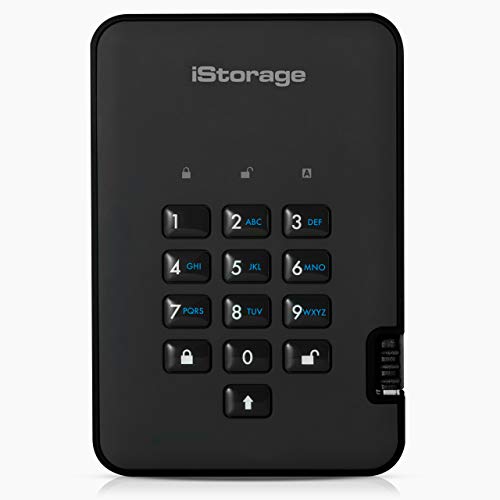
The iStorage diskAshur2 2TB Portable Hard Drive stands out as an ideal choice for professionals who prioritize data security while on the go. With its robust hardware encryption and 7-15 digit PIN authentication, your data is always protected. It’s IP56 certified, making it dust and water-resistant, perfect for travel. Plus, it offers lightning-fast USB 3.2 transfer speeds, guaranteeing quick access to your files. You won’t need any software; just enter your PIN, and you’re good to go. Compatible with various devices, this drive guarantees your sensitive information remains safe, even if it’s lost or stolen.
Best For: Professionals and individuals who require secure and portable data storage while traveling.
Pros:
- Robust security features with AES-XTS 256-bit hardware encryption and PIN authentication ensure data protection.
- IP56 certified for dust and water resistance, making it suitable for various environments.
- Fast data transfer speeds of up to 160MB/s read and 143MB/s write enhance user experience.
Cons:
- Limited storage capacity of 2TB may not meet the needs of users with extensive data requirements.
- PIN authentication may be inconvenient for users who prefer automatic access without a password.
- Higher price point compared to standard portable hard drives without advanced security features.
Factors to Consider When Choosing Hardware Encrypted External Drives
When choosing a hardware encrypted external drive, you should consider several key factors. Look at the encryption standards and types, as they play an essential role in your data’s security. Additionally, think about storage capacity, durability, read and write speeds, and compatibility with your devices to find the best fit for your needs.
Encryption Standards and Types
Choosing the right encryption standards and types for your hardware encrypted external drive is essential, especially if you want to guarantee your data remains secure. Look for drives that use AES (Advanced Encryption Standard) with 256-bit encryption, as it provides the highest level of security. Some devices also utilize XTS mode, which offers enhanced protection against attacks compared to traditional CBC mode. Consider products with FIPS 197 certification, ensuring they meet strict U.S. government security standards. Multi-password options can further enhance security by allowing separate admin and user access. Additionally, features like brute force protection can automatically erase your data after a set number of incorrect password attempts, adding another layer of defense against unauthorized access.
Storage Capacity Options
Selecting the right storage capacity for your hardware encrypted external drive is essential to meet your specific data needs. These drives typically range from 256GB to 4TB, catering to various users. If you often handle large files, consider 1TB or 2TB options; they provide ample space for photos, videos, and documents. On the other hand, if you only need portable storage for smaller files or backups, compact drives like 256GB or 512GB will suffice. Your choice should also reflect the intended use—higher capacities are perfect for professionals in media production or data-intensive tasks. With increasing availability of drives over 2TB, you can easily consolidate large amounts of data into one secure device.
Durability and Resistance
Durability is an essential factor to evaluate in hardware encrypted external drives, especially if you plan to use them in demanding environments. Look for drives that feature drop protection ratings, ideally those that can survive falls from heights up to 3 meters. An IP65 rating is also significant, as it indicates resistance to dust and water jets, making the drive suitable for outdoor use. Consider the materials and design; rugged drives often use advanced materials for enhanced durability. Some may include a tough epoxy coating to prevent physical damage and unauthorized access. Additionally, assess the weight and form factor—lighter, compact designs can be easier to transport without sacrificing durability, ensuring your data stays safe wherever you go.
Read and Write Speeds
When evaluating hardware encrypted external drives, read and write speeds play a pivotal role in your overall experience. Drives with read speeds reaching up to 1050 MB/s enable quicker access to your stored files, enhancing efficiency. Similarly, high-performance drives that boast write speeds of up to 1000 MB/s allow for rapid data transfers, especially during backups or large file transfers. It’s essential to take into account the interface type, as USB 3.2 Gen 2 supports these higher speeds compared to older USB standards. However, remember that real-world performance can vary based on your host device and specific usage conditions. Choosing a drive with faster read and write speeds can greatly boost your productivity, particularly for tasks like video editing and data analysis.
Compatibility With Devices
Guaranteeing compatibility with your devices is essential for getting the most out of a hardware encrypted external drive. First, check if the drive works with your operating system, as some may need specific software for macOS or Windows. Look for drives that support USB interfaces like USB 3.2 Gen 1 or Gen 2 to enhance data transfer speeds. It’s also important to verify compatibility with various devices, including PCs, laptops, tablets, and even gaming consoles. Opt for drives with dual connectivity options, such as USB Type A and Type C, to accommodate both modern and older devices. Finally, make sure the encryption features operate seamlessly across different platforms to guarantee your data remains secure wherever you use it.
Security Features Overview
Security features play an essential role in the effectiveness of hardware encrypted external drives. Look for drives that utilize advanced encryption algorithms like AES-256, which safeguard your data against unauthorized access. Many drives offer multi-password options, letting you set different access levels for administrators and standard users. Additionally, consider models with brute force protection that can delete or lock down data after several incorrect password attempts. Compliance with data regulations such as GDPR and HIPAA is vital if you’re handling sensitive information. Finally, real-time encryption capabilities guarantee your data is encrypted as you write it, providing ongoing protection against theft. Prioritize these features to keep your data secure and compliant.
Design and Portability
Choosing a hardware encrypted external drive involves considering its design and portability, especially since you’ll likely be taking it on the go. Look for a compact 2.5-inch form factor that fits easily in your bag or pocket. Durability matters too; many models feature rugged designs with dust and water resistance ratings like IP65 or IP56, perfect for outdoor adventures. Weighing between 0.5 to 0.9 pounds, these drives add minimal bulk to your gear. Some even come with integrated security features such as a carabiner loop, allowing you to attach them to backpacks or belts. Plus, modern USB-C and USB 3.2 interfaces provide faster data transfer speeds, enhancing your efficiency when handling large encrypted files.
Warranty and Support Services
When you’re investing in hardware encrypted external drives, it’s essential to pay attention to the warranty and support services offered by manufacturers. Look for warranties that span 3 to 5 years; these can provide peace of mind about reliability. Evaluate the support services too, as some brands offer extensive assistance, including troubleshooting and replacement options for defective products. Understanding the return policy is vital; many manufacturers allow refunds within 30 days for defective items, reducing your risk. Some drives even come with additional perks like data recovery plans or software subscriptions. Finally, check customer feedback on warranty claims and support experiences, as this can give you valuable insights into the manufacturer’s responsiveness and service quality.
