
A good hard drive docking station can turn loose SATA drives into convenient external storage without adding a bulky enclosure to your workspace. For small desks, the best models balance a compact footprint with stable connections, easy drive access, and practical features such as dual bays or offline cloning.
This roundup compares 10 options for different setups, from simple single-drive docks to dual-bay stations designed for backups, drive transfers, and multi-drive workflows.
Best 10 Hard Drive Docking Stations for Small Desks Picks for 2026
Low-Profile Cooling Pick

- Horizontal design suits limited desk space
- Supports SATA drives up to 24TB
- Includes power adapter and USB 3.0 cable
Best For: Tool-free single-drive access with a low profile
Two-Drive Cloning Choice

- Supports two bare SATA drives
- Offline cloning needs no computer
- USB-C connection and separate drive access
Best For: Drive migration and two-disk workflows
Connectivity-Heavy Pick

- Adds SD, TF, and two USB 3.0 ports
- Supports SATA drives and offline cloning
- Compatible with Windows, macOS, and Linux
Best For: Small desks needing drive, card, and USB access
Best Dual-Bay Value
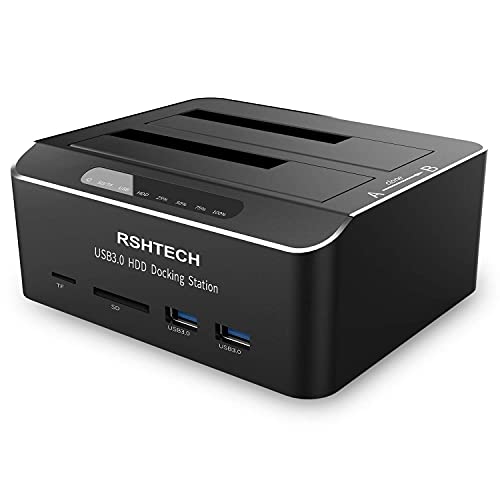
- Dual bays for 2.5- and 3.5-inch SATA drives
- Offline cloning plus USB and SD/TF readers
- Compact 5.2-by-4.3-inch footprint
Best For: Small desks needing dual-drive access and media-reader extras
Best Space-Saving Single Bay

- Compact one-bay design for limited desk space
- One-touch backup and hot-swappable drive access
- Supports 2.5- and 3.5-inch SATA drives up to 18TB
Best For: Single-drive backups and quick swaps in compact work areas
Best USB-C Dual-Bay Upgrade

- Dual bays support capacities up to 22TB
- Detachable USB-A/USB-C cable included
- Offline cloning with aluminum housing
Best For: USB-C-equipped small desks needing high-capacity dual-drive access
Best High-Capacity Pick

- Supports two SATA drives up to 32TB each
- Offline cloning without a computer
- USB 3.0, cooling, dust cover, and anti-slip pads
Best For: High-capacity storage access and offline cloning
Best Protected-Bay Design

- Fixed bezels help stabilize inserted drives
- Offline cloning and UASP support
- Works with two 2.5-inch or 3.5-inch SATA drives
Best For: Stable, tool-free dual-drive access on a small desk
Best Warranty Coverage

- USB-C dual-bay access for 2.5-inch and 3.5-inch drives
- Offline cloning and UASP up to 5Gbps
- 18-month warranty and dedicated power switch
Best For: USB-C workflows, backups, and drive migrations
Compact SATA Starter – Sabrent Single-Bay Dock
For shoppers seeking hard drive docking stations for small desks, this single-bay Sabrent model offers a straightforward way to access one bare 2.5-inch or 3.5-inch SATA drive without installing it inside a computer. Its relatively compact footprint and included accessories make it practical for occasional drive access, backups, or storage expansion.
Best For: Users who need a simple, one-drive SATA dock for Windows or macOS workflows.
Pros:
- Supports both 2.5-inch and 3.5-inch SATA HDDs and SSDs.
- USB 3.0 with UASP provides transfer rates up to 5Gbps.
- Includes the required AC adapter and USB 3.0 cable.
- Auto-sleep after 30 minutes of idle time and status LEDs help with everyday use.
Cons:
- Supports SATA drives only, not SAS, M.2, or NVMe drives.
- Requires external power; it does not run from USB bus power.
- New or blank drives must be initialized in Disk Management or Disk Utility before they appear.
This is a sensible small-desk choice when you want uncomplicated access to a single SATA drive. It is less suitable for multi-drive work or newer NVMe storage, but its included power supply and simple controls keep setup clear.
Low-Profile Cooling Pick – ORICO Lay-Flat Dock
The ORICO lay-flat dock is a practical fit for hard drive docking stations for small desks because its low-profile design sits horizontally while leaving a drive easy to insert and remove. It supports one 2.5-inch or 3.5-inch SATA drive and includes the power adapter, cable, and converter needed to get started.
Best For: Small-desk users who want a horizontal, tool-free dock with broad operating-system compatibility.
Pros:
- Supports SATA I/II/III 2.5-inch and 3.5-inch HDDs and SSDs up to 24TB per drive.
- Lay-flat design promotes natural convection cooling during extended use.
- USB 3.0 with UASP supports speeds up to 5Gbps.
- Works with Windows, macOS, and Linux and supports tool-free hot-swapping.
Cons:
- Only supports one drive at a time.
- Requires the included 12V power adapter rather than USB power alone.
- SATA-only compatibility excludes M.2 and NVMe drives.
Its flat profile and broad compatibility make this ORICO a useful option where desk height and cable organization matter. Choose it for convenient single-drive access and cooling-conscious placement, rather than for multi-drive cloning.
Two-Drive Cloning Choice – Sabrent Dual-Bay Dock
For hard drive docking stations for small desks that need more than one drive bay, this Sabrent dual-bay model combines simultaneous computer access with offline cloning. Its upright two-drive layout supports bare 2.5-inch and 3.5-inch SATA drives, while the USB-C connection helps keep the desk setup current.
Best For: Users who regularly copy, compare, or work with two SATA drives at once.
Pros:
- Holds two 2.5-inch or 3.5-inch SATA HDDs or SSDs.
- Offline cloning works without a computer when the target drive is the same size or larger.
- Both bays appear as separate drives over USB, enabling simultaneous read and write access.
- Tool-free hot-swapping, bay access LEDs, and a USB-C cable are included.
Cons:
- Does not support IDE/PATA, Molex-powered, M.2, or NVMe drives.
- The included cable uses USB-C at the dock end; a USB-C computer port or separate adapter may be needed.
- Offline cloning is limited to up to 60MBps by design.
This dock is the most capable choice here for two-drive workflows, especially migration and backups. Its vertical dual-bay format saves some horizontal space, but confirm your computer connection and SATA-drive requirements before buying.
Connectivity-Heavy Pick – FIDECO Dock with Card Readers
The FIDECO dock adds more connectivity than a basic drive reader, making it a strong candidate among hard drive docking stations for small desks that also need card and USB access. It supports one 2.5-inch or 3.5-inch SATA drive, offline cloning, two USB 3.0 ports, and SD and TF card slots.
Best For: Users who want a single compact station for SATA drives, memory cards, and USB peripherals.
Pros:
- Supports 2.5-inch and 3.5-inch SATA HDDs and SSDs.
- Offline cloning works without a computer when the target capacity is equal to or greater than the source.
- Includes two USB 3.0 ports plus SD and TF card readers.
- Works with Windows, macOS, and Linux and uses UASP for speeds up to 5Gbps.
Cons:
- Supports one hard drive at a time.
- Compatibility is limited to SATA storage, not M.2 or NVMe drives.
- Requires the included 12V power adapter.
FIDECO is a useful space-saving hub when a small desk needs more than drive access alone. Its card readers and USB ports add flexibility, while the single-bay design keeps it better suited to individual-drive tasks than simultaneous two-drive work.
Best Dual-Bay Value – RSHTECH RSH-DS02
For shoppers comparing hard drive docking stations for small desks, the RSHTECH RSH-DS02 combines two drive bays with a compact 5.2-by-4.3-inch footprint. It supports 2.5-inch and 3.5-inch SATA drives, offline cloning, front-facing USB ports, and SD/TF card readers.
Best For: Small workspaces that need dual-drive access, offline cloning, and extra card or USB connectivity.
Pros:
- Dual bays support 2.5-inch and 3.5-inch SATA HDDs and SSDs up to 16TB.
- Offline cloning works without a computer when the target drive is at least as large as the source.
- Includes two USB 3.0 ports plus SD, MicroSD, and TF card readers.
- Aluminum construction, a 36W power supply, and automatic sleep after 10 minutes support steady operation.
Cons:
- Its two-bay design takes more desk space than a single-drive dock.
- Offline cloning is limited to copying from the A drive to the B drive.
The RSH-DS02 is a versatile choice when one compact station needs to handle drive access, cloning, and removable-media transfers. Its dual-bay layout is especially useful for backups, though single-drive users may prefer a smaller one-bay model.
Best Space-Saving Single Bay – GODO USB 3.0 Dock
The GODO one-bay dock is a practical pick among hard drive docking stations for small desks when you usually work with one drive at a time. Its mini compact design supports 2.5-inch and 3.5-inch SATA HDDs and SSDs, with tool-free installation and a single-button backup feature.
Best For: Users who want a compact, single-drive dock for backups, quick swaps, and everyday file transfers.
Pros:
- One-bay layout helps conserve desk space and supports 2.5-inch and 3.5-inch SATA drives.
- Tool-free installation and hot swapping make drive changes straightforward.
- UASP support can improve transfer performance on compatible systems, with USB 3.0 speeds up to 5Gbps.
- Includes a one-touch backup button, LED status indicator, anti-slip mats, and a 12V/2A power supply.
Cons:
- Only one drive can be connected at a time.
- It provides one USB 3.0 connection and does not include built-in card readers.
With its single-bay footprint and hot-swappable design, the GODO keeps a small desk less crowded while still supporting common SATA drive sizes. It is best suited to routine backups and drive access rather than multi-drive cloning workflows.
Best USB-C Dual-Bay Upgrade – RSHTECH RSH-DS01C
The RSHTECH RSH-DS01C is a strong option for hard drive docking stations for small desks where flexible host connectivity matters. Its dual-bay aluminum design supports two 2.5-inch or 3.5-inch SATA drives, includes a detachable USB-A/USB-C cable, and supports offline cloning.
Best For: Compact workstations using USB-C, USB-A, or Thunderbolt hosts that need dual-drive capacity and cloning.
Pros:
- Dual bays support drives up to 22TB each, according to the supplied specifications.
- Included 2-in-1 cable supports USB-A and USB-C host connections, including Thunderbolt ports.
- Offline cloning works without connecting the dock to a computer.
- Aluminum housing, dust caps, semi-open cooling, a 36W power adapter, and automatic hibernation add practical protection and efficiency.
Cons:
- The two-bay enclosure occupies more room than a one-bay dock.
- USB transfer performance depends on the connected host and whether it supports UASP.
The RSH-DS01C balances a compact dual-bay form with modern USB-C flexibility, making it useful for laptops and mixed-port desktops. Its higher stated capacity and cloning support make it the most capable choice here for expanding storage workflows on a small desk.
Best High-Capacity Pick – UGREEN Dual-Bay SATA Dock
For shoppers comparing hard drive docking stations for small desks, the UGREEN CM198 offers a compact way to access two 2.5-inch or 3.5-inch SATA drives without installing them in an enclosure. It supports up to 32TB per bay, USB 3.0 transfers up to 5Gbps, and offline cloning when the target drive is at least as large as the source.
Best For: Users who need high-capacity dual-drive access, offline cloning, and broad SATA compatibility in a small workspace.
Pros:
- Supports two 2.5-inch or 3.5-inch SATA I/II/III drives, up to 32TB each.
- Offline cloning works without connecting to a computer.
- Includes USB-C connectivity, a 1-meter cable, cooling, dust protection, and anti-slip pads.
Cons:
- Cloning requires the target drive to have capacity equal to or greater than the source.
- USB 3.0 transfer speeds top out at 5Gbps.
The UGREEN is a strong fit when capacity and flexible drive support matter most. Its cooling features and longer cable also help keep a small desk setup more manageable.
Best Protected-Bay Design – WAVLINK Dual-Bay Dock
The WAVLINK ST341UA is a practical choice among hard drive docking stations for small desks, especially if you want two-drive access with added physical support. Its fixed bezel design helps stabilize and protect inserted drives, while USB 3.0 with UASP supports transfers up to 5Gbps and offline cloning without a computer.
Best For: Small-desk users who want stable drive placement, tool-free operation, and compatibility across Windows, Mac, Chrome OS, Linux, and Android devices with OTG support.
Pros:
- Accepts two 2.5-inch or 3.5-inch SATA I/II/III HDDs or SSDs.
- Fixed bezels provide added drive stability and protection.
- Offers offline cloning, UASP, hot-swapping, and plug-and-play setup.
Cons:
- Offline cloning requires the target disk to be at least as large as the source.
- Designed for SATA-interface drives only.
Choose the WAVLINK if drive stability and easy everyday access are priorities. Its stated 5.6-by-4.7-inch footprint is also relatively easy to accommodate beside a monitor or laptop.
Best Warranty Coverage – BENFEI USB-C Dual-Bay Dock
For a straightforward desktop storage workflow, the BENFEI dual-bay dock combines USB-C connectivity with tool-free access to two 2.5-inch or 3.5-inch drives. It supports offline cloning, UASP-assisted transfers up to 5Gbps, and a dedicated power adapter designed to support both bays.
Best For: Users who want a USB-C dual-bay dock with offline cloning, a power switch, and extended warranty coverage.
Pros:
- Reads, writes, and transfers data between two drives simultaneously.
- One-button offline cloning works without a PC when the target is equal to or larger than the source.
- Includes a 12V/2.5A adapter, power switch, UASP support, and an 18-month warranty.
Cons:
- Maximum listed transfer speed is 5Gbps.
- Users should switch off the dock before connecting or disconnecting drives.
The BENFEI stands out for its practical USB-C connection and reassuring warranty. It is a sensible small-desk option for backups, drive migrations, and routine two-drive transfers.
How We Picked the Best Hard Drive Docking Stations for Small Desks
We focused on SATA docking stations that suit space-constrained work areas and support common 2.5-inch and 3.5-inch HDDs or SSDs. The selection includes compact single-bay designs, dual-bay models, USB 3.0 and USB-C connectivity, tool-free drive access, and offline cloning where available.
We also considered desk footprint, bay layout, advertised drive-capacity support, UASP compatibility, cooling and stability, and useful extras such as SD or TF card readers. Because specifications and bundled accessories can vary, confirm the current listing before purchase.
Quick Comparison
| Best For | Recommended Type | Why It Matters |
|---|---|---|
| Minimal desk space | Single-bay dock | Uses less room and keeps the setup simple |
| Two-drive workflows | Dual-bay dock | Useful for copying, comparing, or accessing two drives |
| Newer laptops | USB-C model | Provides a more convenient connection for modern computers |
| Drive-to-drive transfers | Offline cloner | Can copy compatible drives without a computer |
| Photography or media work | Dock with card readers | Reduces the number of adapters on a crowded desk |
Key Buying Factors for Hard Drive Docking Stations for Small Desks
Footprint and Bay Design
Measure the available depth and width before buying. A lay-flat or single-bay design may fit better beside a laptop, while a vertical dual-bay station can provide more capacity without taking up much horizontal space. Check whether installed drives block nearby ports or cables.
Drive Compatibility
Most models here accept SATA drives, but verify support for both 2.5-inch and 3.5-inch formats if you use desktop hard drives and laptop drives. SSDs generally work well, but the dock still needs a compatible SATA interface and adequate power for larger 3.5-inch HDDs.
Connection Speed and Computer Compatibility
USB 3.0 and USB 3.1-class connections are suitable for many backup tasks, while USB-C can simplify connection to newer laptops. USB-C describes the connector, not necessarily the transfer speed, so check the actual supported standard. UASP support may improve performance with compatible computers and operating systems.
Cloning and Everyday Convenience
Offline cloning is useful when duplicating a drive without running cloning software, but source and target requirements must be followed carefully. Look for independent power, tool-free bays, clear activity indicators, and a stable base—small details that make frequent use easier.
Who Should Buy Which Hard Drive Docking Stations for Small Desks?
Choose a compact single-bay model if you occasionally access one spare drive and want the smallest setup. A dual-bay station is better for backups, drive comparisons, or moving data between two SATA drives. Pick a USB-C model when your computer has limited USB-A ports or you want a cleaner modern connection.
If you regularly replace drives, prioritize offline cloning and clear source-to-target controls. If your desk also handles cameras or removable media, a model with SD and TF readers can replace separate accessories. For the most demanding setups, confirm the advertised maximum capacity, power requirements, and whether the included cable matches your computer before ordering.
