
If you’re building a showcase PC, the right gpu support bracket for vertical cases does more than hold a graphics card in place. It can improve stability, reduce sag, and help you achieve a cleaner, more premium-looking layout.
In this roundup, we focused on options that balance fit, riser compatibility, build quality, and airflow so you can choose a bracket that matches both your case and your GPU.
Best 10 GPU Support Bracket for Vertical Cases Picks for 2026
Modular Vertical Mount Pick
Cooler Master Vertical GPU Card Holder Kit V3

- PCIe 4.0/5.0 riser compatibility
- Adjustable fit for ATX and some micro-ATX cases
- Toolless positioning up to 65mm horizontally
Best For: Builders who want a modular vertical GPU mount for ATX or micro-ATX cases.
Simple Anti-Sag Pick
EZDIY-FAB GPU Holder Aluminum Brace

- 3mm aluminum construction for rigidity
- Adjustable for different card sizes and weights
- Low-profile matte black finish
Best For: Users who want a minimal aluminum brace to support a graphics card and reduce sag.
Heavy-Duty Showcase Pick
BTBcoin Vertical GPU Mount Kit with 200mm Riser
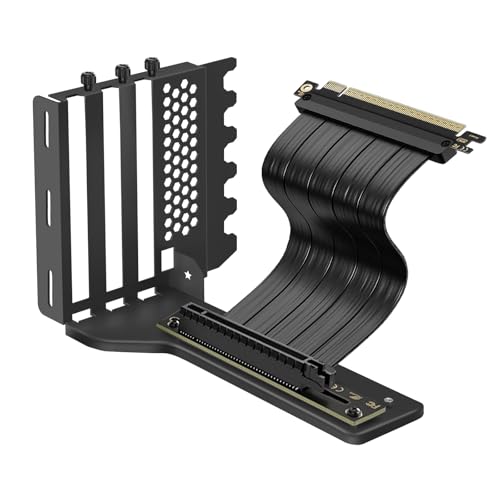
- 200mm PCIe 4.0 riser cable included
- Supports ATX, MATX, and EATX cases
- Holds GPUs up to 5kg with 2-slot/3-slot support
Best For: Builders with large modern GPUs who want a vertical mount with included riser cable and strong support.
Fan-Friendly Support Pick
OwlTree Adjustable GPU Sag Bracket

- All-metal construction for rigid support
- 0.24 to 4.92 inch height adjustment
- Fits 120mm/140mm fans without interference
Best For: PC builders who need adjustable GPU sag support without blocking bottom fans.
Budget GPU Fan Bracket

- Fits 80mm to 140mm fans
- Adjustable support helps reduce sag
- Metal build with corrosion-resistant finish
Best For: Custom builders wanting a simple adjustable GPU support mount
Adjustable Vertical Holder

- Fits E-ATX, ATX, and mATX cases
- Tool-free front and side adjustment
- Thick steel bracket with PCIe 4.0 riser
Best For: Users wanting a sturdy, widely compatible vertical GPU kit
Rigid Aluminum Mount
Vertical GPU Mount Bracket, Adjustable Support

- Fits PCIe riser cables for vertical installs
- Supports 2-slot and 3-slot GPUs
- Adjustable arm helps prevent GPU sag
Best For: Custom builds needing rigid vertical GPU support and fan clearance
Gen 5 Riser Kit
PCIe 5.0 Vertical GPU Mount Bracket Kit

- PCIe 5.0 cable for Gen 5 GPU support
- Includes matching bracket for easier setup
- Needs 6 slots and careful case checking
Best For: High-end Gen 5 builds with enough case space
Simple Steel Holder
JEYI Vertical GPU Bracket for PCIe Riser

- Supports 2-slot GPUs in vertical position
- Works with many ATX, MATX, and E-ATX cases
- Riser cable not included
Best For: Budget-minded builders with an existing compatible riser cable
Modular Vertical Mount Pick – Cooler Master Vertical GPU Card Holder Kit V3
If you want a gpu support bracket for vertical cases that can also handle a more flexible layout, this Cooler Master kit is built around an adjustable vertical mount with a PCIe 4.0/5.0 riser. It is designed for standard ATX cases and can also be adapted for micro-ATX setups, making it a practical option for builders who want a cleaner GPU display without giving up compatibility.
Best For: Builders who want a modular vertical GPU mount for ATX or micro-ATX cases with modern PCIe support.
Pros:
- PCIe 4.0 riser cable is compatible with PCIe 4.0 and 5.0 motherboards and GPUs.
- Fits most 7-slot ATX cases and includes a removable bracket for many 4-slot micro-ATX cases.
- Toolless adjustment allows up to 65mm horizontal and 30mm side-panel movement.
- Flexible installation lets you secure the holder first, then install the GPU.
Cons:
- May block a rear fan in some cases.
- Best suited to cases that match the included slot and clearance layout.
Overall, this is a strong choice if your priority is adaptability: it combines modern riser support, broad case compatibility, and tool-free positioning. It is less about universal simplicity and more about giving you a configurable vertical GPU setup that can fit different builds.
Simple Anti-Sag Pick – EZDIY-FAB GPU Holder Aluminum Brace
For a straightforward gpu support bracket for vertical cases or standard desktop layouts, this EZDIY-FAB holder focuses on preventing sag without adding bulk. Its 3mm aluminum construction is meant to reduce stress on the motherboard while keeping airflow open, which makes it a practical add-on for builders who want simple support and a cleaner-looking interior.
Best For: Users who want a minimal aluminum brace to support a graphics card and reduce sag.
Pros:
- 3mm aluminum construction adds rigidity and helps prevent GPU sag.
- Adjustable design is meant to work with different card weights and sizes.
- Low-key matte black finish blends into many PC builds.
- Designed not to restrict airflow.
Cons:
- Does not include a riser cable or a full vertical-mount system.
- More of a support brace than a display-oriented bracket.
This is the most basic option in the group, and that is its strength: it delivers focused anti-sag support without extra complexity. If you simply want to brace a heavy GPU and keep the build looking clean, it is a sensible, low-profile choice.
Heavy-Duty Showcase Pick – BTBcoin Vertical GPU Mount Kit with 200mm Riser
If you are shopping for a gpu support bracket for vertical cases and want the full vertical-mount experience, this BTBcoin kit is built around a 200mm PCIe 4.0 riser cable and a heavy-duty aluminum bracket. It is aimed at modern ATX, MATX, and EATX builds, and it emphasizes both display value and cooling performance for high-end cards.
Best For: Builders with large modern GPUs who want a vertical mount with included riser cable and strong support.
Pros:
- Includes a 200mm PCIe 4.0 riser cable with a 90-degree connector.
- Supports ATX, MATX, and EATX cases with full-break PCIe expansion slots.
- Rated to hold GPUs up to 5kg and supports 2-slot and 3-slot cards.
- Designed to improve GPU cooling by 10-15°C compared with a traditional horizontal layout.
Cons:
- Requires a compatible case with full-break PCIe expansion slots.
- Best suited to builders who specifically want vertical GPU mounting.
For a showcase build, this is the most feature-rich option here because it combines support, cable length, and thermal claims in one kit. If your goal is to mount a flagship GPU vertically and make it the visual centerpiece, this package is built for that job.
Fan-Friendly Support Pick – OwlTree Adjustable GPU Sag Bracket
This OwlTree gpu support bracket for vertical cases is really a fan-compatible anti-sag stand rather than a full vertical mount. It uses all-metal construction and a height range from 0.24 to 4.92 inches, so it is aimed at builders who want to stabilize a card while keeping room for 120mm or 140mm bottom fans.
Best For: PC builders who need adjustable GPU sag support without blocking bottom fans.
Pros:
- All-metal build adds rigidity and long-term durability.
- Height adjusts from 0.24 to 4.92 inches for flexible positioning.
- Supports 120mm and 140mm fans without blade interference.
- Includes screws, a bubble level, and non-slip pads for easier setup.
Cons:
- Not a full vertical GPU mounting kit with riser cable.
- Primarily supports the card from below rather than changing its display orientation.
If your case already has the layout you want and you just need a stable, adjustable brace, this model keeps things simple. Its fan-friendly design makes it especially useful in builds where clearance around the bottom of the case matters.
Premium Vertical GPU Kit – Lian Li VG4v4 Black
If you want a gpu support bracket for vertical cases that also improves tuning options, the Lian Li VG4v4 Black is built around adjustability. It includes three height settings, a dual-angle tilt design, and a 200mm PCIe 5.0 riser cable, so it suits builds where clearance, cable fit, and airflow all matter.
Best For: ATX builders who want vertical GPU mounting with anti-sag support, tilt options, and PCIe 5.0-ready connectivity.
Pros:
- Three height adjustments help improve GPU clearance and cable positioning.
- Dual-angle tilt can improve airflow or create a more showcase-style presentation.
- Includes a 200mm PCIe 5.0 riser cable with PCIe 3.0/4.0 compatibility.
- Anti-sag support arm adds stability and helps prevent GPU droop.
Cons:
- Requires ATX cases with enough PCIe slot space for standard or tilted mounting.
- Some GPUs with overclocking buttons may conflict with the adjustable structure.
- Three full-size DisplayPorts may contact the mount when installed at an angle.
Overall, this is a flexible vertical GPU kit for builders who want more control over fit and airflow than a basic fixed bracket provides. The updated design adds compatibility improvements and a more polished install experience, but it works best when you verify case and GPU clearance first.
Budget GPU Fan Bracket – PCI Slot Fan Holder
This gpu support bracket for vertical cases is a simple metal holder focused on fan compatibility and sag reduction. It supports 80mm, 90mm, 120mm, or 140mm fans, and the adjustable structure is meant to match different GPU weights and sizes while keeping airflow open.
Best For: DIY users who want a basic metal GPU support bracket with fan mounting flexibility.
Pros:
- Supports multiple fan sizes from 80mm through 140mm.
- Adjustable to help reduce sag and motherboard stress.
- Metal construction with a black finish for durability and corrosion resistance.
- Rigid layout is designed not to block airflow.
Cons:
- Installation may be difficult for users without strong PC-building experience.
- No included riser cable or advanced vertical mounting system.
- More of a utility bracket than a polished showcase accessory.
In practice, this is a straightforward support bracket for builders who mainly want a sturdy, adaptable metal mount. It makes the most sense in custom setups where fan placement and GPU stabilization matter more than premium features.
Adjustable Vertical Holder – Cooler Master V3
For shoppers comparing a gpu support bracket for vertical cases, the Cooler Master Vertical GPU Holder Kit V3 stands out for broad case support and straightforward adjustability. It fits E-ATX, ATX, and mATX cases with at least four free PCI slots, includes a PCIe 4.0 riser cable, and uses a thick steel bracket to support larger graphics cards.
Best For: Builders who want a sturdy vertical GPU holder with broad case compatibility and easy positioning adjustments.
Pros:
- Fits E-ATX, ATX, and mATX cases with at least four PCI slots.
- Modular design allows tool-free adjustment up to 65 mm frontward and 30 mm sideways.
- Thick SGCC steel construction is designed to reduce sag and deformation.
- Includes a 165 mm PCIe 4.0 riser cable with backwards compatibility.
Cons:
- GPU support is limited to cards up to 3 slots wide.
- mATX use requires checking CPU cooler height clearance.
- Not as angle-adjustable as more specialized vertical mounting kits.
This kit is a practical middle-ground option: it is sturdy, compatible with many case types, and easier to position than fixed mounts. If you want vertical mounting without a lot of guesswork, it offers a solid balance of support and convenience.
Rigid Aluminum Mount – Vertical GPU Mount Bracket, Adjustable Support
If you want a gpu support bracket for vertical cases that focuses on stability and a clean layout, this aluminum mount is built for custom PC builds with vertical GPU placement. It supports PCIe riser cables, fits standard 2-slot and 3-slot GPUs, and adds an adjustable support arm to help prevent sagging.
Best For: Custom PC builders who want a rigid vertical GPU mount with adjustable support and fan clearance.
Pros:
- Compatible with PCIe riser cables for vertical GPU positioning
- Supports both 2-slot and 3-slot graphics cards
- Adjustable multi-angle support arm helps reduce sagging
- Expandable base supports a 120mm bottom fan and open-frame airflow
Cons:
- Designed for vertical builds, so case fit still depends on available space
- Specific riser cable and chassis compatibility may vary by build
This is a practical choice if you want a sturdier vertical mounting solution rather than a simple display bracket. The CNC-machined aluminum construction and modular base make it especially appealing for builders who care about both rigidity and airflow.
Gen 5 Riser Kit – PCIe 5.0 Vertical GPU Mount Bracket Kit
This gpu support bracket for vertical cases is really a riser-cable kit built for Gen 5 performance and tricky chassis layouts. It combines a PCIe 5.0 extension cable with a matching bracket, and the notes stress checking case space before buying because the setup needs at least 6 slots and may work best with water-cooling.
Best For: Builders who want a PCIe 5.0 vertical GPU kit for high-end cards and compatible cases.
Pros:
- PCIe 5.0 x16 cable supports current and future GPUs
- Includes a matching bracket to simplify installation
- Designed for vertical GPU display without giving up Gen 5 performance
- Works across many use cases, including tight-space ITX and water-cooled systems
Cons:
- Requires at least 6 slots of case space
- May conflict with air-cooled radiators in some cases
- Rear slot ribs can block GPU cable connections
For a high-bandwidth build, this kit stands out because it solves both the riser and bracket side of the installation. Just treat it as a compatibility-first purchase: case depth, rear slot layout, and cooler type matter a lot here.
Simple Steel Holder – JEYI Vertical GPU Bracket for PCIe Riser
If you need a gpu support bracket for vertical cases that stays simple, this JEYI holder is a straightforward metal bracket for 2-slot cards. It is intended for use with a PCIe 4.0 riser cable, fits a range of ATX, MATX, and E-ATX cases, and emphasizes space saving plus reduced GPU sag.
Best For: Builders looking for a basic, durable 2-slot vertical GPU holder without an included riser cable.
Pros:
- Supports 2-slot GPUs for vertical display
- Compatible with many ATX, MATX, and E-ATX cases
- Sturdy metal construction helps support heavy cards
- Designed to improve airflow and save space
Cons:
- Riser cable is not included
- Case must have at least 4 PCIe expansion slots
- Some 4-slot rear brackets may require water cooling instead of air cooling
This is a no-frills bracket for builders who already have a compatible riser cable and want a reliable vertical mount. The fixed hole spacing is a useful detail, but it also means checking your cable specs before ordering is smart.
How We Picked the Best GPU Support Bracket for Vertical Cases
We prioritized vertical GPU mounting solutions that offer broad case compatibility, strong materials, and clear riser-cable support. Since a GPU Support Bracket for Vertical Cases has to work within tight clearances, we also looked at slot spacing, GPU thickness limits, and whether the design supports modern PCIe 4.0 or PCIe 5.0 hardware.
We favored products that make sense for real-world builds: secure mounting hardware, enough adjustability for different card sizes, and layouts that avoid unnecessary strain on the GPU or motherboard connection.
Quick Comparison
Some options are best for premium showcase builds with Gen 5 risers, while others are simpler support brackets for stabilizing a heavy card without fully switching to a vertical mount. If you already have a compatible case and want the cleanest look, choose a full vertical kit. If your goal is mainly anti-sag support, a simpler brace may be the better fit.
Key Buying Factors for GPU Support Bracket for Vertical Cases
Case and Slot Compatibility
Check whether the bracket is designed for ATX, microATX, or E-ATX cases, and confirm how many expansion slots it uses. A mismatch here can turn an otherwise good product into a frustrating install.
Riser Cable Version
For newer GPUs and motherboards, PCIe 4.0 is the safe baseline, while PCIe 5.0 is the better future-proof choice. If the bracket includes a riser, confirm both length and version before buying.
GPU Size and Clearance
Large cards need enough space for width, height, and cable bends. Measure your card and case interior before choosing a GPU Support Bracket for Vertical Cases, especially if your cooler shroud is thick or your fans sit close to the mount.
Airflow and Cooling
Vertical mounting can look great, but it may place the GPU closer to the side panel. Look for brackets that leave adequate breathing room, or designs that support fan placement and help prevent heat buildup.
Material and Stability
Aluminum alloy, steel, and thick SGCC builds typically hold up better than lightweight plastic-heavy designs. A sturdy frame matters most if you’re mounting a heavy high-end card.
Who Should Buy Which GPU Support Bracket for Vertical Cases?
If you want a premium showcase build with the latest connectivity, choose a full vertical kit with a PCIe 5.0 riser. If you want a dependable, lower-cost way to support a heavy card, a simpler bracket or brace is often enough.
For builders focused on airflow, prioritize designs with extra clearance and fan-friendly layouts. For first-time builders, pick the most straightforward kit that matches your case size and GPU thickness, even if it costs a bit more upfront.
