
Choosing a gaming PC case with quiet fans is one of the easiest ways to reduce noise without sacrificing cooling. The best picks balance fan quality, airflow, and build-friendly layouts.
Below, we focus on cases that suit quieter gaming setups, from understated airflow-focused towers to more premium showcase designs.
Best 10 Gaming PC Case with Quiet Fans Picks for 2026
Quiet Airflow ATX Case

- 2 pre-installed Pure Wings 2 fans
- Supports up to 360mm radiators
- Repositionable HDD slots and removable ODD cage
Best For: Quiet ATX builds with flexible storage and cooling
Budget Airflow Mid-Tower

- 2 included 120mm quiet fans
- Optimized bezel design for airflow
- Supports 315mm GPU and 240mm AIO
Best For: Affordable builds that want quiet included cooling
High-Airflow Modular Case

- 3 pre-installed RS ARGB PWM fans
- Zero RPM mode for near-silent low-load operation
- Modular FRAME system with flexible fan mounting
Best For: Enthusiasts wanting airflow, modularity, and quieter low-load operation
Showcase Dual-Chamber Case
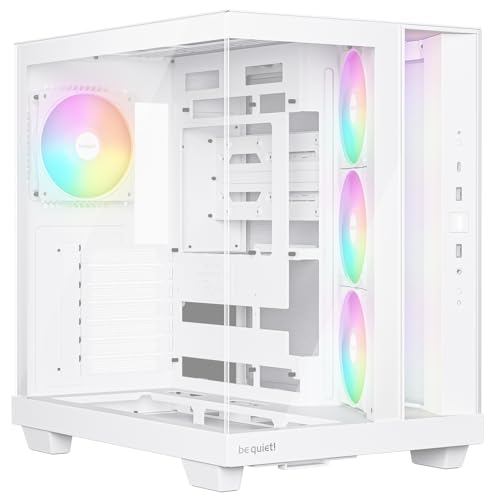
- 4 preinstalled Light Wings LX fans
- Angled side intake directs air toward the GPU
- Supports backside-connector motherboards and 400mm GPUs
Best For: Showcase builds that want tidy cable management and strong cooling
Quiet-Optimized Airflow Pick

- 4 PWM 120mm ARGB fans included
- Fan noise rated 26.5–30.8 dBA
- Fits GPUs up to 420mm
Best For: builders wanting quiet-leaning airflow with high-component clearance
Budget Mesh Airflow Option

- 4 pre-installed RGB 120mm fans
- Diamond mesh front for airflow
- Supports GPUs up to 300mm
Best For: budget builds needing strong airflow and a tempered glass side panel
Ultra-Quiet Fan Count Pick

- 7 PWM ARGB fans pre-installed
- Fan noise listed at 20.819 dB(A)
- Supports GPUs up to 400mm
Best For: users who want the quietest listed fans and a high-cooling showcase case
Quiet-Airflow Glass Showpiece
RUIX OV303 ATX Mid-Tower PC Case

- 4 pre-installed 120mm ARGB PWM fans
- Supports up to 10 fans or a 360mm AIO
- Magnetic dust filters and GPU support bracket
Best For: ATX builders who want a roomy, glass-heavy case with built-in cooling
Quiet-Cooling Side-Access Builder

- 6 pre-installed PWM ARGB fans
- Side-opening tempered-glass door for easy access
- Supports ATX, Micro-ATX, and Mini-ITX boards
Best For: Builders who want adjustable fan control and easy maintenance
High-Flow Mirror Showcase

- 7 pre-installed Infinity Mirror ARGB fans
- Speed-adjustable fans with anti-vortex blades
- Supports up to 410mm GPUs and a 360mm radiator
Best For: Builders who want a full-view ATX case with strong included cooling
Quiet Airflow ATX Case – be quiet! Pure Base 600
If you want a gaming pc case with quiet fans and a more restrained, practical layout, the be quiet! Pure Base 600 is built around low-noise airflow. It ships with two pre-installed Pure Wings 2 fans and adds flexible storage and cooling options, making it a sensible pick for builders who want quiet operation without giving up radiator support.
Best For: Builders who want a quiet ATX mid-tower with flexible drive layout and water-cooling support.
Pros:
- 2 pre-installed be quiet! Pure Wings 2 fans for whisper-quiet operation
- Supports radiators up to 360mm on the front, top, and rear
- Repositionable HDD slots and removable ODD cage for customization
- Adjustable top cover vent adds cooling flexibility
Cons:
- Design is more functional than flashy
- Only 2 fans included out of the box
Overall, the Pure Base 600 leans hard into quiet performance and flexible build options. It is a straightforward choice if you care more about low-noise cooling and configurability than RGB-heavy styling.
Budget Airflow Mid-Tower – Zalman S4 Quiet Fans
The Zalman S4 is a practical gaming pc case with quiet fans if you want a simple mid-tower that focuses on airflow and everyday usability. It includes two 120mm quiet fans, an optimized bezel design for airflow, and support for a 315mm GPU and 240mm AIO radiator, making it a capable entry-level option for a clean build.
Best For: Budget-minded builders who want basic airflow, quiet included fans, and simple modern styling.
Pros:
- 2 included 120mm quiet fans
- Optimized bezel design improves airflow
- Supports up to a 315mm GPU and 240mm AIO radiator
- Full acrylic tinted side panel for a modern look
Cons:
- Acrylic side panel is less premium than glass
- Feature set is fairly basic compared with higher-end cases
In short, the S4 delivers the essentials well: airflow, quiet fans, and broad compatibility for a standard gaming build. It makes sense if you want an affordable case that is easy to live with and does not overcomplicate the build process.
High-Airflow Modular Case – CORSAIR 4000D RS ARGB
If you want a gaming pc case with quiet fans but also strong airflow and upgrade flexibility, the CORSAIR 4000D RS ARGB FRAME is a standout option. It comes with three pre-installed RS ARGB PWM fans, supports Zero RPM mode for near-silent operation at low loads, and uses a modular FRAME system that lets you adapt the case over time.
Best For: Enthusiasts who want a modular airflow case with quiet fan behavior at low loads and easy customization.
Pros:
- 3 pre-installed RS ARGB PWM fans with Zero RPM mode
- High-airflow front panel with low obstruction
- InfiniRail mounting system for flexible fan placement
- Modular FRAME system supports future upgrades and customization
Cons:
- ARGB lighting may not suit minimal setups
- Feature-rich design may be more than basic builders need
This case is best viewed as a performance-focused platform that still offers quiet behavior when the load is light. If you want strong cooling, modularity, and modern fan control in one build, it checks a lot of boxes.
Showcase Dual-Chamber Case – be quiet! Light Base 500 LX
The be quiet! Light Base 500 LX is a gaming pc case with quiet fans for builders who want a showcase look without giving up practical airflow support. It includes four preinstalled Light Wings LX fans, a dual-chamber layout, and an angled side fan frame that directs more air toward the GPU, while still keeping cable management clean and organized.
Best For: Builders who want a clean showcase case with strong included cooling and support for modern backside-connector boards.
Pros:
- 4 preinstalled Light Wings LX fans
- Angled side fan frame helps direct airflow toward the GPU
- Supports ATX boards, 360mm radiators, and GPUs up to 400mm
- Fully supports backside connector designs like Asus BTF, MSI Project Zero, and Gigabyte Project Stealth
Cons:
- Showcase styling may not fit understated builds
- ARGB features may be unnecessary for no-light setups
For builders who want a visually clean system with serious cooling support, this case is well thought out. The combination of four fans, dual-chamber layout, and backside-connector compatibility makes it especially appealing for tidy, modern builds.
Quiet-Optimized Airflow Pick – Lian Li V100 ATX Case
If you want a gaming pc case with quiet fans that still delivers strong airflow, the Lian Li V100 is a polished mid-tower option to consider. It ships with four PWM-controlled 120mm ARGB fans, so you get adaptable cooling without having to source fan upgrades right away. The case also supports larger hardware and cleaner cable routing thanks to back-connect motherboard compatibility.
Best For: Builders who want pre-installed PWM fans, broad hardware support, and a clean-looking tempered glass setup.
Pros:
- 4 pre-installed 120mm PWM ARGB fans for adjustable cooling control
- Fan noise is rated at 26.5–30.8 dBA, which helps it fit quiet-focused builds better than louder RGB cases
- Supports ATX, Micro-ATX, Mini-ITX, and back-connect ATX or Micro-ATX motherboards
- Fits GPUs up to 420mm and CPU coolers up to 178mm
Cons:
- ARGB lighting may be unnecessary if you prefer a plain, low-key build
- Top-tier airflow is tied to the included fan setup, so heavy upgrades may still need tuning
The V100 balances visual appeal, flexible compatibility, and controlled fan operation in a way that suits modern gaming builds. It is a strong fit if you want a case that looks premium while staying practical for everyday cooling needs.
Budget Mesh Airflow Option – Morovol 621 Gaming Case
The MOROVOL 621 is a practical gaming pc case with quiet fans potential if you value airflow-first design over premium extras. It comes with four pre-installed RGB 120mm fans and a diamond mesh front panel, which is built to push air effectively through the mid-tower layout. For budget builds, it covers the basics with useful front I/O and straightforward hardware support.
Best For: Budget-minded builders who want a ventilated ATX case with pre-installed fans and a tempered glass side panel.
Pros:
- Includes 4 pre-installed RGB 120mm fans
- Diamond mesh front panel is designed for strong airflow
- Supports ATX, Micro-ATX, and Mini-ITX motherboards
- Holds GPUs up to 300mm and CPU coolers up to 155mm
Cons:
- Lighting is fixed RGB rather than addressable
- Fan noise information is not specified in the provided details
- GPU and cooler clearance are more limited than larger mid-towers
Overall, this case is about affordability and airflow rather than premium refinement. It makes sense if you want a simple, ventilated gaming chassis and do not need the largest component clearance.
Ultra-Quiet Fan Count Pick – MUSETEX K2 ATX Case
If your priority is a gaming pc case with quiet fans and lots of built-in cooling, the MUSETEX K2 stands out with seven pre-installed PWM ARGB fans. The fans are adjustable-speed and listed at a low 20.819 dB(A), making this case appealing for users who want a calmer acoustic profile while still feeding a high-end build. Its 270° dual tempered glass layout also gives the system a showcase-style look.
Best For: Builders who want very low fan noise, lots of included cooling, and a panoramic tempered glass presentation.
Pros:
- 7 pre-installed PWM ARGB fans, expandable to 10 total
- Low listed fan noise at 20.819 dB(A)
- Supports GPUs up to 400mm, CPU coolers up to 165mm, and top radiators up to 360mm
- Includes a Type-C front panel with 2 USB 3.0 ports
Cons:
- High fan count may be more lighting-heavy than minimalists want
- PSU clearance is tighter when the hard drive cage is installed
The K2 is the most cooling-dense option here and the one most directly aligned with quieter operation. If you want a case that can handle strong hardware while keeping fan noise low on paper, it is the most compelling pick in this group.
Quiet-Airflow Glass Showpiece – RUIX OV303 ATX Mid-Tower PC Case
If you want a gaming pc case with quiet fans that still emphasizes airflow and display appeal, the RUIX OV303 is built around four pre-installed 120mm PWM ARGB fans and a high-airflow mid-tower layout. The tempered-glass front and side panels make it more of a showcase case, while the large dust filters and support for up to 10 fans help keep the cooling setup practical for everyday use.
Best For: Builders who want a spacious ATX case with pre-installed fans, strong airflow potential, and a tempered-glass showcase look.
Pros:
- Comes with 4 pre-installed 120mm ARGB PWM fans.
- Supports up to 10 fans or a 360mm AIO liquid cooler.
- Includes large magnetic dust filters on the top and bottom.
- Built-in GPU support bracket helps support heavy graphics cards.
Cons:
- Panoramic tempered glass design may prioritize looks over pure acoustics.
- Only 1 USB 3.0 port is listed in the details.
The OV303 is a strong pick if you want a roomy ATX chassis with plenty of cooling flexibility and a built-in fan setup already in place. It leans toward visual flair and expansion headroom, making it a good fit for builders who want a polished, air-focused gaming case without starting from scratch.
Quiet-Cooling Side-Access Builder – MUSETEX NN8 ATX PC Case
For shoppers comparing a gaming pc case with quiet fans, the MUSETEX NN8 stands out because its six pre-installed PWM ARGB fans are speed-adjustable, so you can tune cooling and noise to the load. The side-opening tempered-glass door also makes access easier when cleaning dust or installing hardware, which is a practical perk for a busy gaming setup.
Best For: Builders who want an ATX mid-tower with easy access, flexible fan control, and lots of pre-installed cooling.
Pros:
- Includes 6 pre-installed PWM ARGB fans with adjustable speeds.
- Side-opening tempered-glass door makes cleaning and assembly easier.
- Supports ATX, Micro-ATX, and Mini-ITX motherboards.
- Offers strong storage flexibility with multiple HDD and SSD mounting options.
Cons:
- ARGB control depends on having the right motherboard RGB interface.
- Large glass and mesh design may not be the most subdued aesthetic.
The NN8 is a practical choice if you want an easier-to-work-in case with a lot of built-in cooling right out of the box. Its adjustable PWM fans make it better suited to users who want to balance airflow and noise rather than lock into a fixed fan speed.
High-Flow Mirror Showcase – MUSETEX Y6 PC Case
The MUSETEX Y6 is a strong option if you want a gaming pc case with quiet fans that also looks dramatic on a desk. It ships with seven pre-installed 120mm Infinity Mirror ARGB fans, and the speed-adjustable setup gives you more flexibility to prioritize airflow or lower noise depending on your build and workload.
Best For: PC builders who want a full-view ATX case with lots of included cooling and room for larger components.
Pros:
- Includes 7 pre-installed PWM ARGB fans.
- Uses speed-adjustable fans with anti-vortex blades for airflow.
- Supports ATX, Micro-ATX, and Mini-ITX motherboards.
- Offers wide compatibility for long GPUs and a 360mm top radiator.
Cons:
- Dual tempered-glass layout is more about showcasing hardware than reducing noise.
- Large fan count may be more than needed for simpler builds.
The Y6 is best for builders who want a feature-rich case with extensive pre-installed cooling and a premium full-view presentation. If you like the idea of flexible fan control and a clean internal layout, it delivers a lot of value in one box.
How We Picked the Best Gaming PC Case with Quiet Fans
For this roundup, we prioritized cases with pre-installed fans, sensible airflow paths, and features that help keep noise down in real-world use. That means looking beyond raw fan count and checking for mesh intake, PWM support, case layout, and room for modern GPUs and radiators.
We also considered build quality, cable management, and value. A good Gaming PC Case with Quiet Fans should be easy to assemble, run efficiently, and avoid unnecessary vibration or restriction.
Quick Comparison
For quieter builds, the main trade-off is usually between stealthy airflow cases and more decorative RGB showcase models. Simple mesh-front cases tend to be easier to cool quietly, while glass-heavy dual-chamber cases can look cleaner but may rely more on fan tuning.
If you want the least hassle, choose a case with PWM fans already installed. If you want the most control, look for strong intake options, ample clearance, and motherboard fan-header support so you can fine-tune fan curves.
Key Buying Factors for a Gaming PC Case with Quiet Fans
Fan Type and Control
PWM fans are a big plus because they respond more precisely to temperature changes. That helps keep idle noise low while still ramping up when gaming or rendering. More fans are not always better if they spin too fast or face restrictive panels.
Airflow Design
Mesh front panels, unobstructed intakes, and sensible exhaust paths matter more than flashy lighting when quiet operation is the goal. A well-designed airflow case can move the same amount of air at lower RPMs.
Component Clearance
Check GPU length, CPU cooler height, and radiator support before buying. Tight internal spaces can force fans to work harder and create extra turbulence. A roomy interior usually makes it easier to build a quieter system.
Noise-Reducing Details
Look for features like rubberized mounts, sturdy panels, and fewer vibration-prone parts. Even small design choices can make a noticeable difference in perceived noise during everyday use.
Who Should Buy Which Gaming PC Case with Quiet Fans?
If you want a simple, lower-noise build, a mesh-front mid-tower with a few quality PWM fans is usually the best starting point. If your priority is aesthetics and lighting, choose a showcase-style case but plan to tune fan curves carefully.
Heavy GPU users, first-time builders, and anyone running long gaming sessions should favor models with better airflow and more internal space. In short, the best Gaming PC Case with Quiet Fans is the one that lets you cool components efficiently at the lowest practical fan speed.
