
The best gaming desktop computers for remote work combine smooth video calls, responsive productivity, generous storage, and enough graphics power for modern games. A well-chosen tower can serve as both a dependable home-office workstation and an entertaining gaming system.
This roundup compares 10 options across performance levels and budgets, including current gaming PCs and refurbished business desktops. Pay close attention to memory, storage, connectivity, monitor requirements, and upgrade potential before buying.
Best 10 Gaming Desktop Computers for Remote Work Picks for 2026
High-End Hybrid

- Ryzen 7 8700F with 32GB DDR5
- RTX 5070 and 2TB SSD
- Includes keyboard and mouse
Best For: Remote workers who want high-end gaming and multitasking
Budget Work-and-Play Pick

- 16GB RAM for everyday multitasking
- 512GB NVMe SSD and Wi-Fi 6
- Dedicated 1080p gaming graphics
Best For: Budget remote work and casual 1080p gaming
Premium Office-and-Gaming Tower
Alienware Aurora RTX 5070 Desktop

- Core Ultra 7 processor and 32GB DDR5
- RTX 5070 with 12GB GDDR7
- Includes peripherals and onsite service
Best For: Premium remote work, gaming, and photo editing
Creator-Friendly Workstation
ZOTAC MEK Ryzen 7 Gaming Desktop

- Ryzen 7 9700X with 32GB DDR5
- RTX 5060 Ti with 16GB GDDR7
- 1TB SSD and up to four displays
Best For: Remote workers, creators, and multi-display gamers
Best Budget Office Bundle

- Complete setup with monitor, keyboard, and mouse
- Core i5 processor and 256GB SSD for everyday work
- Windows 11 Pro with Wi-Fi and Bluetooth
Best For: Affordable remote-work setups and light gaming
Best Overall Performance

- Ryzen 7 and RTX 5060 Ti for gaming and creative work
- 32GB DDR5 RAM plus a 1TB Gen4 NVMe SSD
- Wi-Fi 7 and multiple upgrade paths
Best For: Performance-focused remote workers who also game
Best Value Starter Gaming PC
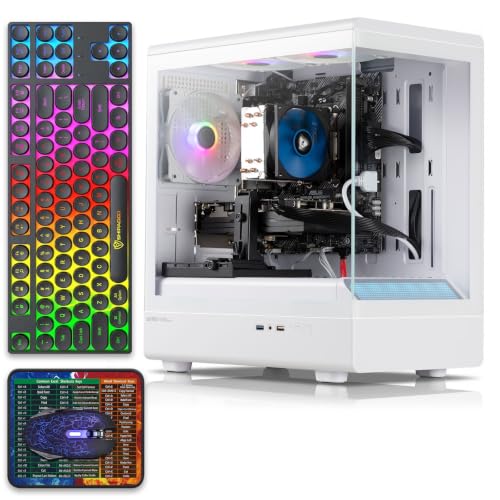
- 16GB RAM and 512GB SSD for everyday use
- Dedicated RX 590 8GB graphics
- Includes gaming keyboard, mouse, and mouse pad
Best For: Budget buyers wanting gaming capability and included accessories
Best Performance Pick

- Ryzen 7 5700X and 32GB RAM
- RTX 5060 8GB GDDR7 graphics
- 1TB NVMe SSD with Wi-Fi and Bluetooth
Best For: Remote workers who also want strong modern gaming performance
Best Ready-to-Use Bundle
Refurbished Dell RGB Desktop Set

- Includes 24-inch monitor and peripherals
- 16GB RAM with 512GB SSD
- Integrated graphics for beginner gaming
Best For: Home offices needing a complete, affordable desktop setup
Best Compact Office Pick

- Compact small-form-factor design
- 4K and dual-display support
- 16GB DDR4 RAM with Windows 11 Pro
Best For: Remote workers needing a compact dual-monitor office PC
High-End Hybrid – MSI Codex Z2 RTX 5070 Desktop
The MSI Codex Z2 is a strong option among gaming desktop computers for remote work when you want serious gaming performance alongside smooth multitasking. Its Ryzen 7 processor, 32GB of DDR5 memory, and 2TB SSD provide ample capacity for video calls, productivity apps, large files, streaming, and demanding games.
Best For: Remote workers who also want high-end gaming, streaming, and everyday multitasking performance.
Pros:
- Eight-core, 16-thread Ryzen 7 8700F processor boosts up to 5.0GHz.
- RTX 5070 graphics support demanding games and ray tracing.
- 32GB DDR5 RAM and a spacious 2TB SSD suit work and game libraries.
- Wi-Fi, Bluetooth, multiple USB ports, and included keyboard and mouse.
Cons:
- Windows 11 Home is installed; MSI recommends Windows 11 Pro for business use.
- The tower is relatively large at 16 x 8.38 x 19 inches.
With its high-end graphics card and generous storage, the Codex Z2 is more powerful than many work-focused desktops. It makes the most sense if remote work and gaming are equally important.
Budget Work-and-Play Pick – Ryzen 5 4500 Gaming Desktop
This Ryzen-based system is an approachable choice among gaming desktop computers for remote work, offering enough hardware for Zoom calls, online classes, spreadsheets, coding, and everyday apps while also supporting entry-level 1080p gaming. Its NVMe SSD and built-in Wi-Fi 6 help keep common tasks responsive.
Best For: Budget-conscious remote workers, students, and casual gamers focused on 1080p play.
Pros:
- Six-core Ryzen 5 4500 processor and 16GB DDR4 RAM support everyday multitasking.
- 512GB NVMe SSD provides faster startup and application loading than a traditional hard drive.
- Dedicated Radeon RX 6500 XT graphics handle games such as Fortnite, Valorant, and Minecraft.
- Wi-Fi 6 and a fully assembled, pre-installed system simplify setup.
Cons:
- Only 512GB of storage may fill quickly with large games and work files.
- RX 6500 XT graphics are aimed at 1080p gaming rather than demanding high-resolution play.
- The notes contain an included cable described as serving no function.
This desktop prioritizes value and practical everyday performance. It is a sensible fit for remote work and lighter gaming, but users with large software libraries or higher-resolution gaming goals may want a more capable system.
Premium Office-and-Gaming Tower – Alienware Aurora RTX 5070 Desktop
The Alienware Aurora combines a modern tower design with hardware suited to gaming, multimedia, photo editing, and remote-work multitasking. Its Intel Core Ultra 7 processor, 32GB of DDR5 memory, and RTX 5070 make it a capable choice among gaming desktop computers for remote work, especially when creative or graphics-heavy tasks are part of the day.
Best For: Remote professionals who want premium gaming, photo-editing, and multimedia capability.
Pros:
- Core Ultra 7 265F processor supports gaming, livestreaming, and multitasking.
- RTX 5070 graphics use Blackwell architecture and include 12GB of GDDR7 memory.
- 32GB DDR5 RAM and SSD storage provide a strong general-purpose foundation.
- Includes keyboard, mouse, and one-year onsite service.
Cons:
- Windows 11 Home is installed rather than a business-focused Pro edition.
- The 33.9-pound tower is heavier than the other listed options.
- The supplied specifications do not state the SSD capacity.
Alienware’s included onsite service may appeal to home-office users who value support, while the RTX 5070 adds substantial gaming and creation headroom. Verify the storage configuration before buying if your work involves large local files.
Creator-Friendly Workstation – ZOTAC MEK Ryzen 7 Gaming Desktop
The ZOTAC MEK is a versatile pick among gaming desktop computers for remote work, pairing an eight-core Ryzen 7 9700X with 32GB of DDR5 memory, a 1TB NVMe SSD, and broad connectivity. It is well suited to professionals who switch between office applications, content creation, and 1080p or 1440p gaming.
Best For: Remote workers and creators who need strong multitasking, modern connectivity, and gaming performance.
Pros:
- Ryzen 7 9700X offers eight cores, 16 threads, and speeds up to 5.5GHz.
- 32GB DDR5-6000 memory and a 1TB NVMe SSD support demanding workflows.
- RTX 5060 Ti includes 16GB of GDDR7 memory and supports up to four displays.
- Wi-Fi 6E, Bluetooth 5.3, and a 360mm AIO cooler add convenience and cooling capacity.
Cons:
- Windows 11 Home may be less suitable than Pro for some business environments.
- The 850W power supply and liquid cooling may be more than basic office work requires.
- A keyboard is not included according to the supplied specifications.
The MEK offers a particularly balanced mix of work capability, graphics memory, storage, and connectivity. Its feature set is best justified by users who will also create content, run multiple displays, or play demanding games.
Best Budget Office Bundle – HP EliteDesk 800 G3 SFF
For shoppers seeking gaming desktop computers for remote work on a budget, this renewed HP bundle emphasizes straightforward setup and everyday productivity. It includes the compact EliteDesk tower, a 21.5-inch Full HD monitor, keyboard, and mouse, so the core workstation components arrive together.
Best For: Home-office users who need an affordable, ready-to-connect setup for office applications, web browsing, video, and light multitasking.
Pros:
- Complete bundle includes a 21.5-inch 1920×1080 monitor, keyboard, and mouse.
- Quad-core Intel Core i5-6500 supports office productivity, browsing, and multimedia use.
- 256GB SSD should provide faster boot and file access than a traditional hard drive.
- Windows 11 Pro, Wi-Fi, Bluetooth, and multiple USB ports support a practical home-office setup.
Cons:
- 8GB of RAM and integrated Intel HD Graphics 530 are modest for demanding games or heavy creative workloads.
- The 256GB storage capacity may fill quickly with large games and media files.
- As a renewed system, it includes a 90-day warranty rather than a longer coverage period.
This is best viewed as a remote-work computer with basic gaming potential rather than a performance gaming rig. Its included monitor and peripherals make it convenient for buyers who want a simple workstation package.
Best Overall Performance – KOTIN Ryzen 7 Gaming Desktop
Among gaming desktop computers for remote work, the KOTIN combines strong multitasking hardware with dedicated graphics for gaming, streaming, and creative applications. Its 32GB of DDR5 memory, 1TB Gen4 NVMe SSD, and modern connectivity give it more headroom than a basic office PC.
Best For: Remote professionals who also want high-performance 1080p or 1440p gaming, streaming, and room for future upgrades.
Pros:
- Ryzen 7 8700F and GeForce RTX 5060 Ti 8GB target 1080p and 1440p gaming.
- 32GB DDR5 memory supports multitasking with browser tabs, launchers, streaming apps, and work software.
- 1TB PCIe Gen4 NVMe SSD offers quick boot times and useful space for games, files, and media.
- Wi-Fi 7, a 650W 80 PLUS Gold power supply, four memory slots, and three M.2 slots support a flexible setup.
Cons:
- Windows 11 Home is less business-focused than Windows 11 Pro.
- The system does not include a monitor, keyboard, or mouse.
- Displays must be connected to the graphics card ports; VGA or DVI monitors require an adapter.
This is the strongest fit for buyers who want one desktop for demanding remote work and current gaming. Its upgrade-ready design and generous memory make it a more versatile long-term option, provided you already have compatible peripherals.
Best Value Starter Gaming PC – Prebuilt RX 590 Tower
This prebuilt tower offers a middle ground for shoppers comparing gaming desktop computers for remote work. It pairs 16GB of RAM and a 512GB SSD with a dedicated Radeon RX 590 graphics card, while including gaming peripherals and Windows 11 Home.
Best For: Users who want an affordable desktop for general business tasks, streaming, learning, and accessible PC gaming without buying separate input devices.
Pros:
- 16GB of RAM and a 512GB SSD provide a practical baseline for multitasking and file storage.
- Dedicated Radeon RX 590 8GB graphics support gaming and GPU-accelerated entertainment use.
- Includes an RGB gaming keyboard, mouse, and mouse pad.
- Offers HDMI, DisplayPort, and DVI outputs, plus Wi-Fi and multiple USB ports.
Cons:
- The supplied details identify DDR3 memory, which is an older platform than the DDR5 system in this roundup.
- Windows 11 Home lacks the additional business-management focus of Windows 11 Pro.
- The listing has inconsistent processor wording, describing the system as both Core i7 and Core i5 in different details, so buyers should verify the exact configuration.
This tower is appealing when included accessories and a dedicated graphics card matter more than having the newest platform. However, the processor-description inconsistency makes configuration verification especially important before purchase.
Best Performance Pick – Ryzen 7 RTX 5060 Gaming PC
For shoppers seeking gaming desktop computers for remote work, this YAWYORE tower offers a strong multitasking setup with an eight-core Ryzen 7 processor, 32GB of RAM, and a 1TB NVMe SSD. Its dedicated RTX 5060 graphics card also makes it the most capable gaming-focused option in this roundup.
Best For: Remote workers who want substantial multitasking headroom alongside modern PC gaming performance.
Pros:
- Ryzen 7 5700X with 8 cores and 16 threads supports demanding multitasking.
- 32GB DDR4 RAM and a 1TB PCIe NVMe SSD provide generous memory and fast storage.
- RTX 5060 8GB GDDR7 graphics supports ray tracing, DLSS 4, and Reflex 2 features.
- Built-in Wi-Fi and Bluetooth simplify wireless networking and peripheral connections.
Cons:
- Uses the older AM4 platform and DDR4 memory.
- Graphics-card brand may vary.
- The listed maximum display resolution is 1920×1080.
With its dedicated GPU, high memory capacity, and large NVMe drive, this is the strongest all-around choice here for buyers who want one desktop for work and gaming. The included Windows 11 installation and wireless connectivity help it fit readily into a home office.
Best Ready-to-Use Bundle – Refurbished Dell RGB Desktop Set
This refurbished Dell bundle is a practical entry point for gaming desktop computers for remote work, especially if you need the basic workstation setup in one package. It includes a 24-inch HDMI monitor, keyboard, mouse, headset, Wi-Fi, Windows, and a 512GB SSD.
Best For: Home-office users who want a complete, budget-oriented desktop bundle for everyday multitasking and beginner gaming.
Pros:
- Includes a 24-inch monitor plus keyboard, mouse, and gaming headset.
- 16GB RAM and a 512GB SSD support everyday applications and browser multitasking.
- Built-in RGB front lighting includes remote-controlled patterns and modes.
- Professionally inspected and tested as a refurbished product.
Cons:
- Integrated graphics mean there is no dedicated gaming GPU out of the box.
- The supplied specifications list an older quad-core Intel Core i5 and DDR3 memory.
- Operating-system details conflict in the supplied notes: the title says Windows 11 Pro, while the bullet describes Windows 10 Pro.
This Dell is better suited to office work, web use, and beginner-level gaming than demanding modern games. Its included display and accessories can make setup convenient, but buyers should verify the exact operating-system version and understand the limitations of integrated graphics.
Best Compact Office Pick – Dell OptiPlex 3050 SFF
For buyers prioritizing a small footprint, this refurbished Dell OptiPlex 3050 SFF is one of the more practical gaming desktop computers for remote work. Its quad-core Intel processor, 16GB of DDR4 RAM, Windows 11 Pro, and multiple display outputs are geared toward office productivity rather than demanding gaming.
Best For: Remote workers who need a compact business desktop with dual-monitor and 4K display support.
Pros:
- Small-form-factor design measures approximately 11.2 by 3.75 by 11.5 inches.
- Supports 4K output and dual displays through its HDMI and DisplayPort connections.
- 16GB DDR4 RAM and a 256GB SSD cover basic office multitasking.
- Includes a USB keyboard, mouse, and USB Wi-Fi adapter.
Cons:
- Integrated Intel HD Graphics 530 is not intended for demanding gaming.
- 256GB storage is limited compared with the other listed desktops.
- The refurbished unit uses an older i5-6500 platform.
This OptiPlex makes the most sense as a compact remote-work machine for documents, browsers, video output, and dual-screen workflows. It can handle light gaming, but its integrated graphics and older processor make it a poor fit for buyers seeking a primary modern gaming system.
How We Picked These Gaming Desktop Computers for Remote Work
We prioritized the features that matter in both work and gaming: processor performance, RAM capacity, SSD storage, graphics capability, connectivity, operating-system compatibility, and overall value. Systems with 16GB or more of memory and an SSD are generally better suited to multitasking, video conferencing, browser-heavy workflows, and modern games. We also included lower-cost refurbished desktops for buyers who already own a monitor or need a basic work computer first.
Because configurations and seller bundles can vary, verify the exact specifications, warranty, included accessories, and condition before placing an order.
Quick Comparison
| Best For | What to Look For |
|---|---|
| High-end gaming and demanding work | Modern Core Ultra or Ryzen 7 CPU, RTX 5070-class graphics, 32GB RAM, 1TB or 2TB SSD |
| Balanced gaming and productivity | Ryzen 7 processor, RTX 5060 Ti-class GPU, 16GB or 32GB RAM, NVMe SSD |
| Entry-level gaming | Ryzen 5 or comparable CPU, dedicated graphics, 16GB RAM if possible |
| Budget remote work | Quad-core processor, 8GB to 16GB RAM, SSD, Wi-Fi, and included monitor if needed |
Key Buying Factors for Gaming Desktop Computers for Remote Work
Processor and Memory
Remote work often involves a browser with many tabs, office applications, messaging tools, and video meetings running together. A modern six-core or eight-core processor provides smoother multitasking. Choose 16GB of RAM as a practical baseline; 32GB is preferable for heavy multitasking, content creation, virtual machines, or long-term flexibility.
Graphics and Gaming Performance
A dedicated GPU is useful for gaming, creative applications, multiple high-resolution displays, and hardware-accelerated video features. RTX 5060-class systems offer a strong middle ground, while RTX 5070-class desktops are better for higher refresh rates and demanding resolutions. Older GPUs can still handle lighter games, but check expected performance before buying.
Storage, Ports, and Connectivity
Prioritize an SSD for fast startup and application loading. A 1TB drive is more comfortable for games and work files than a 256GB model. Check for Wi-Fi, Ethernet, USB ports, DisplayPort or HDMI outputs, and enough monitor connections for your setup. A desktop may require a separate webcam, speakers, or monitor.
Thermals, Noise, and Upgrades
For a home office, cooling and fan noise matter during long meetings. Confirm that the case has adequate airflow and that the power supply can support future upgrades. Compact and refurbished business desktops may have limited upgrade space or proprietary components.
Who Should Buy Which Gaming Desktop Computers for Remote Work?
Choose a high-end RTX 5070 desktop if gaming performance, demanding creative work, or longevity is the priority. A Ryzen 7 and RTX 5060 Ti configuration is a sensible choice for buyers who want strong all-around performance without moving to the highest price tier.
Entry-level gaming PCs suit lighter gaming, schoolwork, and everyday remote tasks. Refurbished Dell and HP desktops are worth considering for budget-conscious buyers who mainly need office productivity, especially when a monitor bundle is included. However, confirm the Windows license, cosmetic condition, warranty, and upgrade limitations before purchase.
