
A controller can make iPad games more comfortable and precise, but fit and connection matter as much as the buttons. A handheld grip needs to accommodate your tablet; a separate gamepad needs to work with the games you actually play.
These eight picks span USB-C tablet grips, Bluetooth controllers, and versatile gamepads for use across multiple devices.
Best 8 Gaming Controllers for Ipad Picks for 2026
Best Tablet-Mounted Pick

- Fits supported USB-C iPads up to 13 inches
- TMR sticks and four extra controls
- Passthrough charging and headphone jack
Best For: Handheld-style play on a compatible USB-C iPad
Best Feature-Rich Gamepad

- TMR joysticks and switchable triggers
- Back paddles and extra bumpers
- Charging dock included
Best For: Customizable play across supported Apple and other devices
Best Quiet-Button Pick

- Silicone-damped controls
- Hall Effect joysticks
- Bluetooth and rechargeable battery
Best For: Quieter gaming on a compatible iPad
Best Familiar Layout
Xbox Wireless Controller (Deep Pink)

- Bluetooth with listed iOS support
- Textured grips and hybrid D-pad
- Also works with supported Xbox consoles and PCs
Best For: Familiar Xbox-style controls on a compatible iPad
Best Standalone Gamepad
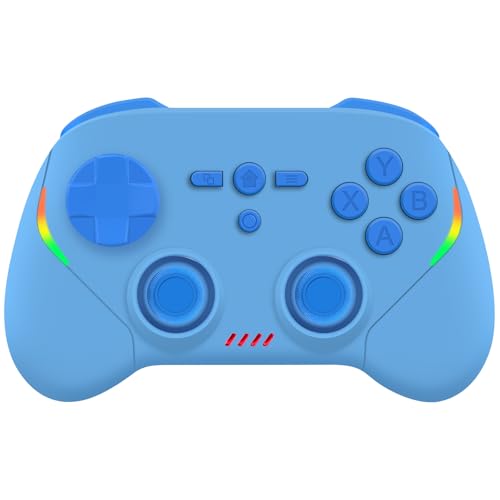
- Separate Bluetooth gamepad
- Hall effect sticks and triggers
- Supports iPad, Switch, and PC
Best For: One controller for iPad and other platforms
Best Compact Tablet Grip

- Fits supported tablets up to 11 inches
- Hall effect joystick
- Turbo and programmable rear buttons
Best For: Handheld play on compatible smaller iPads
Best for Customizable Feedback

- Hall effect sticks and triggers
- Adjustable vibration and RGB lighting
- Listed 15–18-hour battery life
Best For: Players who value feedback and lighting options
Best for Larger iPads

- Fits devices 155–295 mm long
- Supports listed 13-inch iPad Pro
- Hall effect controls and programmable back button
Best For: Handheld play on compatible larger iPads
Best Tablet-Mounted Pick – Razer Kishi V3 Pro XL
Among gaming controllers for iPad, the Razer Kishi V3 Pro XL stands out if you want the tablet mounted between full-size grips. Its telescopic bridge fits supported USB-C iPads up to 13 inches, while TMR thumbsticks and extra buttons give you more control options.
Best For: Players who want a handheld-style setup for a compatible USB-C iPad.
Pros:
- Full-size ergonomic grips and swappable TMR thumbstick caps.
- Two back buttons and two additional bumpers.
- USB-C passthrough charging and a 3.5mm audio jack.
- USB-C connector design accommodates many popular iPad cases.
Cons:
- Requires a compatible USB-C iPad; check your model and case fit.
- Sensa HD haptics are not currently supported on iOS.
Choose this for an integrated tablet-and-controller feel, but do not count on its advertised HD haptics when playing on an iPad.
Best Feature-Rich Gamepad – 8BitDo Ultimate 2 Wireless
The 8BitDo Ultimate 2 brings TMR joysticks, switchable trigger modes, extra controls, and a charging dock to a conventional gamepad. For shoppers comparing gaming controllers for iPad, its Apple support makes it worth considering, though the supplied notes do not specify which iPad models or connection methods are supported.
Best For: Players who want a customizable gamepad for Apple devices and other supported platforms.
Pros:
- TMR joysticks and a choice of Hall Effect or tactile trigger modes.
- Two back paddles plus extra R4/L4 bumpers.
- Includes a charging dock and USB-C adapter.
Cons:
- The advertised sub-1ms 2.4GHz connection and 1000Hz polling are not specified as iPad features.
- Exact iPad compatibility is not detailed in the supplied notes.
This is a strong option for control customization, but verify support for your iPad and preferred connection before buying it specifically for tablet play.
Best Quiet-Button Pick – EasySMX X05Pro
If you shop for gaming controllers for iPad with shared-room play in mind, the EasySMX X05Pro is notable for its silicone-damped buttons. Its listed iOS support, Bluetooth connectivity, Hall Effect sticks, and sweat-resistant grip make it a practical option to investigate for tablet gaming.
Best For: iPad players who prioritize quieter controls and a traditional wireless gamepad.
Pros:
- Silicone-damped face buttons, D-pad, triggers, and function keys.
- Hall Effect joysticks and two top-mounted programmable buttons.
- Bluetooth support and a 1000mAh rechargeable battery.
Cons:
- Bluetooth polling is listed at 125Hz; the advertised 1000Hz applies to wired and 2.4GHz modes.
- Specific iPad models and iOS connection steps are not detailed.
The quiet-button design is its clearest advantage. Confirm compatibility with your iPad before assuming every advertised connection mode will work with it.
Best Familiar Layout – Xbox Wireless Controller (Deep Pink)
The Deep Pink Xbox Wireless Controller is a straightforward choice among gaming controllers for iPad if you prefer a familiar full-size gamepad. The supplied notes list iOS compatibility and Bluetooth, alongside sculpted grips, a hybrid D-pad, and textured triggers and bumpers.
Best For: Players who want an Xbox-style controller for a compatible iPad and other supported devices.
Pros:
- Bluetooth support and listed iOS compatibility.
- Sculpted shape, textured grips, and hybrid D-pad.
- Can also connect to supported consoles and PCs.
Cons:
- No tablet mount or integrated iPad grip is listed.
- The notes do not establish whether the headset jack or Share button functions on iPad.
Pick it for familiar controls and flexibility across devices; unlike a telescopic controller, it leaves you to position the iPad separately.
Best Standalone Gamepad – Joso Wireless Controller
Among gaming controllers for iPad, this Joso model is a straightforward choice if you want a separate Bluetooth gamepad rather than a grip that stretches around the tablet. It also supports iPhone, Android, Switch models, and PC.
Best For: iPad players who want one standalone controller for mobile, cloud, and Switch gaming.
Pros:
- Hall effect sticks and triggers provide precise controls.
- Textured grip is designed for comfortable longer sessions.
- Supports controller-compatible games and services including Xbox Cloud Gaming and GeForce NOW.
Cons:
- Some games require you to enable controller mode in their settings.
- Switch 2 support excludes the C button.
Choose this if cross-device flexibility matters more than a tablet-mounted grip. Check that your favorite iPad games support controllers before buying.
Best Compact Tablet Grip – EP033AZ-L Stretch Controller
If you prefer gaming controllers for iPad that hold the screen between your hands, this expandable Bluetooth grip accommodates supported tablets up to 11 inches. Its Hall effect joystick, linear trigger, turbo function, and programmable rear buttons add options for compatible games.
Best For: Owners of supported 11-inch or smaller iPads who want a handheld-style grip.
Pros:
- Stretch design supports listed 11-inch iPad Pro and Air models, standard iPads, and iPad mini.
- Hall effect joystick and linear trigger offer responsive control.
- Turbo and programmable rear buttons allow control customization.
Cons:
- Not compatible with the 12.9-inch iPad Pro or 13-inch iPad Air.
- Bluetooth pairing requires selecting the appropriate mode for your device and game.
This is the more portable-feeling pick for a compatible smaller iPad; verify your tablet model and dimensions before choosing it.
Best for Customizable Feedback – RGB Wireless Gamepad
For shoppers comparing gaming controllers for iPad, this wireless gamepad stands out for its adjustable feedback: it pairs Hall effect sticks and triggers with selectable RGB lighting and three vibration settings. It also supports iPhone, Android, PC, MacBook, and Switch systems.
Best For: iPad players who want a separate controller with lighting, vibration, and motion controls.
Pros:
- Hall effect sticks and triggers are designed for smooth, durable input.
- Six-axis gyro, adjustable vibration, and switchable RGB modes add control options.
- Listed battery life is 15–18 hours per charge.
Cons:
- Switch 2 support does not include wake-up or C-button functions.
- Game-specific controller support still needs to be checked.
It is a good fit when feedback and visual settings matter to you; the listed game and cloud-service compatibility does not mean every iPad game will accept a controller.
Best for Larger iPads – arVin 13-Inch Tablet Grip
Large-tablet fit is the main reason to consider this model among gaming controllers for iPad. The arVin stretch grip accepts devices 155–295 mm long and up to 13 mm thick, with listed support for a 13-inch iPad Pro (M5).
Best For: Owners of compatible larger iPads who want a tablet-mounted controller for cloud gaming or remote play.
Pros:
- Wide stretch range supports phones and tablets, including the listed 13-inch iPad Pro.
- Hall effect sticks and triggers provide smooth control.
- Includes turbo, a programmable back button, vibration, and support for listed remote-play services.
Cons:
- Does not support the 12.9-inch iPad Pro 1st or 2nd generation.
- Devices with MediaTek chipsets are not supported.
Measure your iPad and check its generation before ordering. For a compatible larger model, this grip offers a handheld layout that smaller tablet grips may not accommodate.
How We Picked These Gaming Controllers for Ipad
We focused on the choices that change the playing experience: handheld grip versus separate gamepad, tablet fit, connection method, and usefulness with other devices. The selection includes a USB-C grip designed for larger tablets, familiar wireless gamepads, and mobile grips advertised for iPads or tablets. Product listings alone cannot establish how well every controller works with every iPad and game, so check the exact model and game before buying.
Quick Comparison: Grip or Separate Controller?
For a handheld setup, start with the Razer Kishi V3 Pro XL if its stated tablet size and USB-C design match your iPad. The Joso and arVin grips are other tablet-oriented options; arVin advertises support for tablets within 13 inches. Two additional Bluetooth mobile grips in this roundup list tablet support and Hall-effect components, but their generic product names make seller specifications especially important to verify.
For an iPad on a stand or desk, compare the Xbox Wireless Controller, 8BitDo Ultimate 2, and EasySMX X05Pro. These separate gamepads leave the tablet free of a grip and may suit buyers who also play on other listed platforms. Confirm the connection mode each controller uses with iPadOS rather than assuming every advertised wireless mode works across devices.
Key Buying Factors for Gaming Controllers for Ipad
Check IPad Fit and Port Access
For an attached grip, check your iPad’s dimensions—not just its screen-size label—against the controller’s fit range. Cases, camera bumps, and USB-C port placement can prevent a secure connection. If you use a Lightning iPad, do not assume a USB-C grip will connect to it.
Match the Connection to Your Setup
USB-C grips can make a compact, single-piece handheld setup when compatible. Bluetooth gamepads give you more freedom to position the iPad, but require pairing and battery management. Check the manufacturer’s current iPadOS compatibility information for the specific model and connection method you intend to use.
Check Game Support Before Features
A controller-compatible iPad does not make every game controller-compatible. Verify support in your favorite games, and check whether button mapping or platform-specific features matter to you. Hall-effect sticks or triggers may appeal to buyers concerned about conventional sensor wear, but they do not guarantee better compatibility or ergonomics.
Who Should Buy Which Gaming Controllers for Ipad?
Choose a tablet grip if you want to play while holding the iPad and can confirm a good physical fit. Pick a separate wireless gamepad if you usually prop up the tablet, want room to move, or plan to share a controller with other devices. If you switch between iPad, PC, and console gaming, prioritize verified compatibility with your actual platforms over the longest feature list. For any of these Gaming Controllers for Ipad, the safest final check is the pairing method, tablet fit where applicable, and controller support in the games you play most.
