
A foldable stand can raise your MacBook screen, free up desk space, and make it easier to work away from your usual setup. The right choice depends on whether you value a lighter bag, more height adjustment, or a sturdier desk base.
These six options cover stick-on, ultra-compact, adjustable, and rotating designs. Here’s how to decide which style suits the way you work.
Best 6 Foldable Stands for Macbook Picks for 2026
Best for Desk Adjustability
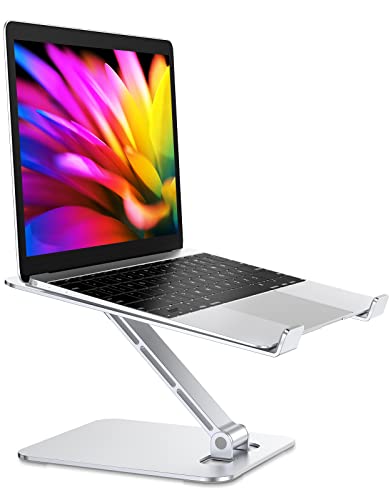
- Raises a laptop up to 7.48 inches
- Adjustable angle; folds for storage
- Open arms leave room for ventilation
Best For: Adjustable MacBook desk setups
Best Stick-On Option

- Stick-on design folds flat
- Weighs 3 ounces
- Offers 15° and 25° angles
Best For: Low-bulk mobile MacBook setups
Best Compact Freestanding Pick
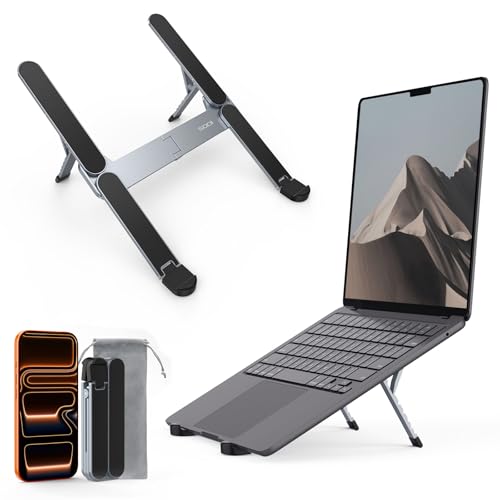
- Weighs 185 g and folds compactly
- Six adjustable height settings
- Includes a velvet storage bag
Best For: Travel with a separate adjustable stand
Best for Larger MacBooks
Nulaxy Adjustable Laptop Stand

- Fits 10- to 16-inch laptops
- Dual-rod support rated to 22 pounds
- Vented panel folds flat
Best For: Adjustable support for larger MacBooks
Best for Screen Sharing

- 360-degree rotating base
- Tool-free height and tilt adjustment
- Folds with a storage pouch
Best For: Turning a MacBook screen toward collaborators
Best Everyday Riser
Amazon Basics Adjustable Laptop Stand

- Fits laptops up to 15.6 inches
- Up to 7 inches of height adjustment
- Folds flat with an open, ventilated design
Best For: Everyday use with MacBooks under 15.6 inches
Best for Desk Adjustability – RIWUCT Aluminum Laptop Stand
Among foldable stands for MacBook, this RIWUCT aluminum riser suits a desk setup where you want to change screen height and angle. It raises a laptop up to 7.48 inches and folds for storage or carrying.
Best For: MacBook users who want a height-adjustable stand for a desk or shared workspace.
Pros:
- Adjustable height and incline accommodate different working positions.
- Open two-arm design leaves room for heat to vent.
- Non-slip contact points and base pads help keep the stand in place.
Cons:
- The maker recommends an external keyboard for intense typing.
- At 585 g, it is heavier than the other two stands in this roundup.
Its broad adjustment range is the draw if your laptop usually stays on a desk. Check that your MacBook falls within its stated 10- to 16-inch compatibility range.
Best Stick-On Option – MOFT Invisible Laptop Stand
If you want foldable stands for MacBook without a separate accessory to pack, the MOFT Invisible Stand attaches to the laptop and folds flat when not in use. It is approximately 0.1 inch thin, weighs 3 ounces, and offers two preset angles.
Best For: Mobile MacBook users who prioritize a thin, attached stand over a taller freestanding riser.
Pros:
- Stick-on, one-piece design stays with the laptop between workspaces.
- 15° and 25° settings provide two quick positioning choices.
- Rated to support up to 11 pounds.
Cons:
- Designed for laptops without bottom vents; check your device before attaching it.
- Only two fixed angles, rather than continuous height adjustment.
This is the low-bulk pick for commuting and mobile work. Its adhesive format is convenient when compatible, but less flexible than a separate stand if you switch between laptops.
Best Compact Freestanding Pick – SODI Bi-Foldable Laptop Stand
For shoppers comparing foldable stands for MacBook that can move between a desk, café, and library, the SODI stand is a compact freestanding option. It weighs 185 g, folds to 12.7 × 4.4 × 2 cm, and comes with a velvet storage bag.
Best For: Travelers who want a separate, lightweight stand with multiple height settings.
Pros:
- Six height settings provide more positioning choices than a fixed-angle stand.
- Spring-loaded arm is designed for quick adjustment.
- Open aluminum H-frame and silicone contact pads support ventilation and grip.
Cons:
- Its small support footprint may not suit users who prefer a broad platform under the laptop.
- The notes list both 10–16-inch and 10–15.6-inch compatibility ranges; verify fit for a 16-inch model.
It offers a useful middle ground: much lighter than the RIWUCT desk riser, without the MOFT’s stick-on installation. Its six settings are especially appealing if you frequently change workspaces.
Best for Larger MacBooks – Nulaxy Adjustable Laptop Stand
Among foldable stands for MacBook, the Nulaxy is a practical choice if you want an elevated screen and support for a 16-inch laptop. Its adjustable dual-rod design folds flat for storage or travel.
Best For: MacBook users who want an adjustable stand that accommodates 10- to 16-inch laptops.
Pros:
- Dual support rods and a stated 22-pound capacity accommodate heavier laptops.
- Ventilated upper panel leaves room for airflow.
- Silicone pads help grip and protect the laptop.
Cons:
- Adjusting to a comfortable screen height does not also raise a separate keyboard or mouse.
Choose this model for its broad size range and dual-rod support; its vented platform is a useful addition for desk setups.
Best for Screen Sharing – OMOTON LA10 Rotating Stand
If you frequently show your screen to someone nearby, the OMOTON LA10 offers a feature not found on every entry in the foldable stands for MacBook category: a 360-degree rotating base. Its height and tilt adjust without tools, and the open X-frame leaves space around the laptop for airflow.
Best For: Shared desks, presentations, and video calls where you may need to turn the screen.
Pros:
- Rotating base lets you redirect the screen without moving the whole stand.
- Tool-free height adjustment spans a stated 1.8 to 10.4 inches.
- Folds for transport and includes a storage pouch.
Cons:
- The manufacturer advises removing the laptop before changing its height or angle.
- Its stated travel weight of about 1.85 pounds may matter if you pack light.
The swivel is the main reason to pick this stand. If your laptop rarely faces anyone but you, a simpler adjustable riser may be enough.
Best Everyday Riser – Amazon Basics Adjustable Laptop Stand
The Amazon Basics stand covers the essentials for shoppers comparing foldable stands for MacBook: adjustable height, an open design for ventilation, and a frame that folds flat. It supports laptops from 10 to 15.6 inches, so check your MacBook’s size before choosing it.
Best For: Everyday desk or travel use with a MacBook that fits its 15.6-inch size limit.
Pros:
- Offers up to 7 inches of height adjustment.
- Open design promotes airflow beneath the laptop.
- Folds to a stated 10 x 8.7 x 1.8 inches and weighs 1.7 pounds.
Cons:
- Its 15.6-inch size limit excludes 16-inch MacBooks.
- Larger or heavier devices and excessive downward typing pressure may affect stability.
This is a straightforward option if your laptop fits the stated limits. Set it on a flat, solid surface and choose a balanced viewing angle.
How We Picked These Foldable Stands for Macbook
We chose six stands that represent different ways to use a MacBook: a low-profile stick-on riser, compact travel stands, adjustable desk risers, and a rotating option for shared workspaces. The comparison focuses on the practical trade-offs visible in each design rather than assuming that one stand is best for every laptop or desk. Check the seller’s current size, weight, and compatibility details before ordering, especially if you use a larger MacBook or a protective case.
Quick Comparison: Which Style Fits Your Setup?
For the smallest carry footprint, consider the MOFT stick-on stand or the ultra-compact six-level stand. The aluminum alloy foldable riser offers a straightforward portable desk setup. If you work at one desk most days, the Nulaxy and Amazon Basics adjustable risers are worth comparing for height range, stability, and ventilation. The OMOTON LA10 adds a rotating base that may be useful when you frequently turn your screen toward someone else. A stand that packs flat is not necessarily the lightest, so check its listed weight if you commute.
Key Buying Factors for Foldable Stands for Macbook
Height and Ergonomics
Choose a stand that puts the top of the screen near eye level without forcing an awkward viewing angle. A small lift may be enough for occasional use, while longer desk sessions often call for greater adjustability. If you raise the laptop substantially, plan on using an external keyboard and mouse; typing directly on a high stand can strain your wrists or make the laptop wobble.
Stability and Fit
Check the supported laptop size and weight, the width of the support points, and whether the stand has grippy pads. Wider, heavier bases generally suit permanent desks; slimmer stands are easier to carry but may feel less secure on uneven café tables. Make sure any front lip does not interfere with your MacBook’s palm rest or make opening the lid inconvenient.
Portability, Cooling, and Desk Space
Compare folded thickness as well as weight, and consider whether a stick-on design suits your laptop case and how often you want to remove the stand. Open-frame or ventilated designs leave more room around the laptop’s underside, but airflow alone is not a reason to expect better performance. Also check the stand’s footprint if your desk is shallow or you need space beneath the MacBook for accessories.
Who Should Buy Which Foldable Stands for Macbook?
Choose the MOFT if an attached, minimal travel setup matters most. Pick the ultra-compact six-level stand if you want portable height choices without attaching anything to your MacBook. The aluminum alloy riser is a simpler foldable option for moving between desks. Consider Nulaxy or Amazon Basics for an adjustable home-office setup, and compare their dimensions against your available space. Choose the OMOTON LA10 if rotating your screen is a regular part of meetings or collaborative work. Whichever you choose, prioritize a secure fit and a comfortable screen position over features you are unlikely to use.
