
A fanless mini PC can keep a media center quiet without taking up much space beside a TV. The right choice depends on more than its processor: video outputs, playback compatibility, storage, and what comes in the box all matter.
These 10 picks span ready-to-use Windows systems, barebones kits, and industrial-style PCs. Use the buying guide below to narrow the field to the setup you actually need.
Best 10 Fanless Mini PCs for Media Centers Picks for 2026
Ready-to-Use Pick

- Windows 11 Pro, 16GB RAM, 512GB SSD
- Silent fanless cooling
- Triple 4K output; expandable storage
Best For: A ready-to-use, quiet media center
Connectivity Pick

- Fanless Intel N100 barebones system
- Wi-Fi 6 and dual Gigabit LAN
- Multiple 4K-capable display outputs
Best For: DIY builds needing flexible connections
Behind-the-TV Pick

- Slim, fanless enclosure with VESA mount
- Windows 11 Pro, 16GB RAM, 512GB SSD
- Triple 4K display support
Best For: A discreet PC behind a TV or monitor
Compact Barebones Pick

- Fanless Intel N100 in a 0.6L chassis
- Dual 4K/60Hz display support
- VESA mount; RAM, SSD, and OS not included
Best For: A customized, compact dual-display setup
Best for Triple Displays

- Supports three 4K@60Hz displays
- Silent fanless design with VESA mount
- 8GB RAM and 128GB eMMC
Best For: Quiet, multi-display media setups
Best for Expandable Storage

- Eight-core Intel N300 processor
- 16GB RAM and 512GB NVMe SSD
- RAM and SSD upgrade options
Best For: Quiet setups needing expandable local storage
Best for Portable Viewing

- Dual 4K@60Hz HDMI output
- USB PD3.0 power input
- Compact, silent fanless design
Best For: Portable TV and dual-display setups
Best for Expanded Storage
KINGDEL Core i7 Fanless Mini PC

- 16GB RAM and 512GB NVMe SSD
- Fanless metal case
- HDMI and VGA dual-display outputs
Best For: Quiet setups with local media files and multiple peripherals
Best Heavy-Duty Pick
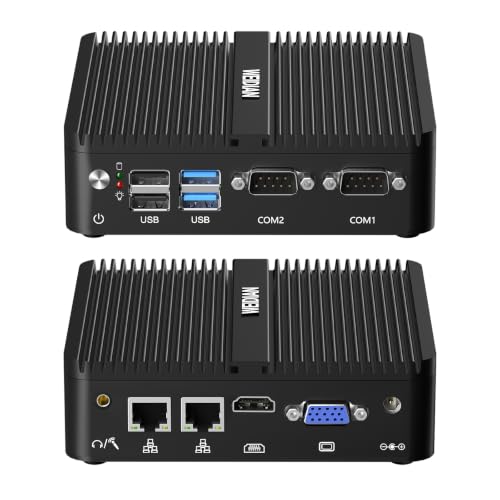
- Listed 4K at 60Hz output
- Included VESA mount
- Dual Gigabit Ethernet
Best For: A discreet, quiet media center mounted behind a display
Best for Basic Displays

- Fanless aluminum case
- Included VESA bracket
- Up to 1920 × 1080 output
Best For: Quiet, light-duty 1080p displays or digital signage
Ready-to-Use Pick – MeLE Quieter 4C N150 SE-Grade
Among fanless mini pcs for media centers, this MeLE Quieter 4C is a compact, ready-to-use option with Windows 11 Pro, 16GB of RAM, and a 512GB SSD. Its passively cooled N150 processor keeps operation silent beside a TV.
Best For: Buyers who want a small, silent media PC without adding memory or storage first.
Pros:
- Fanless design eliminates fan noise.
- Two HDMI 2.0 ports and a video-capable USB-C port support three independent 4K displays.
- Empty M.2 2280 NVMe slot and microSD slot provide storage expansion.
Cons:
- Wi-Fi 5 is older than the Wi-Fi 6 offered by some alternatives.
- The included SSD uses standard-grade TLC NAND.
The supplied hardware makes this the straightforward choice for quiet playback and everyday browsing, especially if you value an installed OS and room for more media storage.
Connectivity Pick – ZOTAC ZBOX CI337 Nano
If you are comparing fanless mini pcs for media centers and prefer to choose your own components, the ZOTAC ZBOX CI337 Nano offers a silent Intel N100 platform with plenty of display and network connections. It is a barebones system, so budget for memory, storage, and an operating system.
Best For: DIY media-center builds that need flexible display outputs and wired networking.
Pros:
- Passive cooling runs without a fan.
- Two HDMI 2.0 ports, DisplayPort 1.4, and video over USB-C support up to three displays.
- Wi-Fi 6, Bluetooth 5.2, and dual Gigabit LAN offer varied connection options.
- Accepts a 2.5-inch drive and an M.2 2242 SSD.
Cons:
- Memory, storage, and OS are not included.
- The M.2 storage slot takes 2242 drives, not longer 2280 models.
This is a strong fit when port flexibility matters more than out-of-box convenience. Its included VESA mount also helps keep a TV-area installation tidy.
Behind-the-TV Pick – MeLE Quieter4C N150
For shoppers looking at fanless mini pcs for media centers, this MeLE Quieter4C pairs silent N150 operation with a slim 5.2-by-3.2-by-0.7-inch enclosure. It includes Windows 11 Pro, 16GB of RAM, a 512GB SSD, and a VESA mount for hiding the PC behind a TV or monitor.
Best For: A discreet, ready-to-use media setup mounted behind a display.
Pros:
- Fanless design keeps the room free of fan noise.
- Included VESA mount and slim enclosure simplify concealed placement.
- Two HDMI 2.0 ports and USB-C can drive three independent 4K displays.
- Empty M.2 2280 NVMe and microSD slots allow additional storage.
Cons:
- Wi-Fi 5 is less current than Wi-Fi 6.
- Its thin form factor may not suit buyers who prefer a larger chassis.
Choose this version if an unobtrusive installation is the priority. Gigabit Ethernet provides a wired alternative to its Wi-Fi connection for the media-center location.
Compact Barebones Pick – Shuttle XPC Nano NE10N
The Shuttle XPC Nano NE10N is worth considering among fanless mini pcs for media centers if you want to select your own RAM, SSD, and OS. Its passively cooled Intel N100 sits in a 0.6-liter chassis and supports two independent 4K displays at 60Hz.
Best For: Buyers building a compact, silent dual-display media PC from their preferred components.
Pros:
- Fanless design avoids cooling-fan noise.
- HDMI 2.0 and DisplayPort 1.4 support two 4K displays at 60Hz.
- Included VESA mount allows placement behind a display.
- Six USB ports and Gigabit LAN accommodate wired peripherals and networking.
Cons:
- RAM, SSD, and operating system must be purchased separately.
- One SO-DIMM slot limits memory configuration options.
This compact barebones model makes sense when silent operation and a customized installation matter more than immediate plug-and-play use.
Best for Triple Displays – MeLE Quieter 4C N150
Among fanless mini pcs for media centers, the MeLE Quieter 4C stands out if your setup needs several screens without fan noise. Its N150 processor, dual HDMI 2.0 ports, and full-function USB-C support up to three 4K displays at 60Hz.
Best For: A silent, space-saving media setup with multiple displays.
Pros:
- Fanless design eliminates fan noise; an included VESA mount keeps the PC out of sight.
- Two HDMI ports and USB-C support three 4K@60Hz displays.
- Windows 11 Pro comes installed, with Gigabit Ethernet and Wi-Fi 5 for connectivity.
Cons:
- 8GB RAM and 128GB eMMC storage may feel limiting if you keep a large local media library.
- The enclosure can reach 55–70°C during normal fanless operation.
Choose this one for its flexible display connections and tiny footprint, rather than for generous built-in storage. The microSD slot offers an option for adding media space.
Best for Expandable Storage – MINIX NEO Z300-0dB
If you want more room for apps and media, the MINIX NEO Z300-0dB is a strong candidate among fanless mini pcs for media centers. It pairs an eight-core Intel N300 with 16GB DDR4 memory and a 512GB NVMe SSD, while its passive cooling avoids fan noise.
Best For: A quiet media-center PC with substantial built-in storage and an upgrade path.
Pros:
- 16GB RAM and a 512GB NVMe SSD provide a useful starting configuration.
- Memory is upgradeable to 32GB, and the M.2 2280 PCIe slot supports storage expansion up to 4TB.
- Includes Windows 11 Pro, a VESA mount, and an HDMI cable.
Cons:
- Its 4.84 x 4.72 x 1.81-inch case is thicker than the slim MeLE options in this roundup.
- The top cover can become warm during fanless operation.
This is the practical pick if local storage and multitasking matter more than an especially thin enclosure. Its listed HDMI output supports up to 4K resolution.
Best for Portable Viewing – MeLE Quieter3Q N5100
The MeLE Quieter3Q is an appealing option among fanless mini pcs for media centers when your viewing setup moves between rooms or travels with you. Its compact, silent design supports dual 4K@60Hz HDMI output, and USB PD3.0 input offers an alternative to the included power adapter.
Best For: A portable, fanless PC for a TV or dual-display viewing setup.
Pros:
- Dual HDMI outputs support 4K@60Hz HDR video.
- USB PD3.0 input can work with a suitable power bank, power station, or car power source.
- Includes 8GB RAM, 256GB storage, Gigabit Ethernet, and a monitor mount.
Cons:
- USB PD power sources must supply more than 24W at 12–23V.
- The surface can reach 55–70°C during normal fanless operation.
Pick the Quieter3Q for its flexible power options and dual-display support. Its microSD slot and M.2 2280 PCIe expansion provide options if you need more space for locally stored media.
Best for Expanded Storage – KINGDEL Core i7 Fanless Mini PC
Among fanless mini pcs for media centers, this KINGDEL is a practical pick if you want 16GB of RAM and a 512GB NVMe SSD ready to go. Its metal case runs without a cooling fan, while the HDMI and VGA outputs support two displays.
Best For: A quiet media setup that also needs room for local files and everyday multitasking.
Pros:
- 16GB DDR4 RAM and 512GB NVMe SSD come installed.
- Fanless metal case avoids cooling-fan noise.
- HDMI and VGA outputs support dual monitors; four USB 3.0 ports accommodate peripherals.
Cons:
- The listed 4096 × 2304 native output is at 24Hz, so check display requirements before buying.
- At 9.2 × 5.9 × 2 inches, it takes more room than the other models here.
The larger chassis is the trade-off for a well-equipped, silent desktop. It makes the most sense where installed storage and connectivity matter more than hiding the PC behind a TV.
Best Heavy-Duty Pick – WEIDIAN N100 Fanless Mini PC
For shoppers comparing fanless mini pcs for media centers, the WEIDIAN N100 combines a silent design with a VESA-compatible mount that can keep the box out of sight behind a TV or monitor. It comes with Windows 11 Pro, 8GB of RAM, and a 256GB SSD.
Best For: A compact, tucked-away media center with 4K display output and wired networking options.
Pros:
- Listed 4K at 60Hz output and dual displays via HDMI and VGA.
- VESA mount is included for placement behind a display.
- Dual Gigabit Ethernet, dual-band Wi-Fi, and Bluetooth offer flexible connections.
- Supports additional 2.5-inch SATA and M.2 NVMe storage.
Cons:
- The included 256GB SSD may be limiting for a large local media library.
- Only 8GB of RAM comes installed.
This is the easiest of the three to place discreetly near a display. Its mounting option, 4K output claim, and storage expansion make it a balanced choice for a quiet media-center build.
Best for Basic Displays – HKAIOT F12 Fanless Mini PC
If your search for fanless mini pcs for media centers is focused on a quiet, basic display rather than 4K playback, the HKAIOT F12 is worth a look. Its passive-cooled aluminum case, HDMI and VGA ports, and included VESA bracket suit simple screen setups.
Best For: Light-duty 1080p display or digital-signage tasks where silent operation matters.
Pros:
- Finned metal case dissipates heat without a cooling fan.
- Includes a VESA bracket for mounting.
- HDMI and VGA ports provide display connections; Gigabit LAN provides a wired network option.
Cons:
- Listed maximum resolution is 1920 × 1080, not 4K.
- AMD A4 Micro-6400T is described for light computing tasks.
- 128GB mSATA SSD is limited to 512GB expansion, with no 2.5-inch drive support.
Choose this one for a modest, quiet display station—not as a substitute for a higher-spec 4K media PC. Its mounting hardware and fanless case are useful, but the resolution and storage limits are important to plan around.
How We Picked the Best Fanless Mini PCs for Media Centers
We prioritized passively cooled models with specifications relevant to a living-room PC: display connections, stated 4K support, enough memory and storage for common media tasks, and a practical path to getting the system running. The selection includes ready-to-use PCs and barebones kits because their upfront prices do not cover the same things.
We treated manufacturer-listed display capability as a starting point, not a promise that every streaming service will play at 4K. App support, DRM, operating system, display configuration, and service rules can all affect playback. Check current listing details before buying, especially when similar model names have different memory or storage configurations.
Quick Comparison
For a straightforward Windows setup, compare the MeLE Quieter 4C N150 configurations: the listed 16GB/512GB versions offer more room for apps and local files than the 8GB/128GB version. The MINIX NEO Z300-0dB is another ready-configured option, with an i3-N300, 16GB of RAM, and a 512GB SSD.
If you want to choose your own components, the ZOTAC ZBOX CI337 Nano and Shuttle XPC Nano NE10N are N100 barebones systems; budget separately for RAM, storage, and an operating system. The MeLE Quieter3Q is an older N5100-based option. KINGDEL, WEIDIAN, and the 6400T-based industrial PC are worth comparing when legacy or specialized connections matter more than a conventional TV-first design.
Key Buying Factors for Fanless Mini PCs for Media Centers
Video Output and Playback
Match the PC’s actual HDMI or DisplayPort specification to your TV, receiver, and target resolution and refresh rate. A listing that says “4K” may not tell you whether it supports 4K at 60 Hz. For streaming, confirm that your preferred services and operating system support the resolution you want. For local files, check codec support in your chosen playback software and hardware.
Connections, Capacity, and Cost
Check for the ports your setup needs, including wired Ethernet, USB for drives or peripherals, and a suitable audio path through your display or receiver. Dual-display claims are useful for a TV-and-monitor setup but do not automatically mean both outputs have identical capabilities. An 8GB configuration may suit basic playback, while 16GB gives more headroom for multitasking. Allow for the cost of RAM, an SSD, and an OS with barebones models; also check whether a remote, wireless adapter, or mounting hardware is included.
Cooling and Placement
Fanless means no fan noise, not no heat. Leave ventilation space around the case rather than enclosing it tightly in a cabinet, particularly if it will run for long periods.
Who Should Buy Which Fanless Mini PCs for Media Centers?
Choose a configured MeLE Quieter 4C or MINIX NEO Z300-0dB if you want to avoid sourcing core components. Pick the ZOTAC or Shuttle barebones model if you prefer to choose RAM, storage, and OS yourself. Consider the industrial-style options only if their particular ports solve a real setup need. Before checkout, verify the exact configuration, display-output specifications, and compatibility with your primary media apps.
