
If you want a quiet, low-power system that runs Linux well, a fanless mini PC can be a smart buy. These compact machines are ideal for desktop basics, always-on services, home labs, and network tasks.
This roundup focuses on practical choices with the right mix of CPU support, storage, networking, and expandability for Linux users.
Best 9 Fanless Mini PC for Linux Picks for 2026
Best Fanless 24/7 Pick
MINIX NEO Z300-0dB N300 Mini PC

- Silent fanless passive cooling
- Intel N300 with 16GB/512GB specs
- 2.5G LAN and dual 4K display support
Best For: Users who want a quiet, always-on mini PC for everyday productivity and small-office use.
Best for 24/7 Silent Use
Fanless Mini PC Stick, Celeron J3455

- Silent fanless design for always-on use
- Ultra-compact stick form factor for hidden installs
- 4K@60Hz output with Gigabit Ethernet and WiFi 5
Best For: Quiet, space-saving setups for signage, office work, and basic 24/7 deployments.
Best Fanless Stick PC

- Silent fanless cooling for always-on use
- Intel N100 with 8GB RAM and 128GB storage
- USB-C, Gigabit Ethernet, and Linux support
Best For: People who want a tiny, silent Linux-capable PC for basic desktop, kiosk, or IoT use.
Best for Industrial I/O
msecore Fanless i7 Industrial PC

- Fanless metal case for silent, dust-resistant operation.
- Dual LAN plus RS232 ports suit industrial and embedded use.
- Linux-compatible with auto power-on and Wake-on-LAN.
Best For: Linux-based industrial deployments and automation setups that need lots of legacy ports.
Best Fanless Linux Pick

- Silent fanless design for 24/7 use
- Linux and Ubuntu support out of the box
- Triple 4K display output with USB-C
Best For: Linux users who want a quiet, low-power mini PC for everyday work or multi-display setups.
Best with Extra Features
Fanless Industrial Mini PC N2840, 2 LAN, 2 COM

- Fanless operation for quiet 24/7 use
- Dual Gigabit LAN and 2 serial ports
- Linux-friendly for firewall and router builds
Best For: Linux firewall, router, and industrial control users who need wired I/O over speed.
Best for Silent 24/7 Use
MeLE Cyber X1 N150 Fanless Mini PC
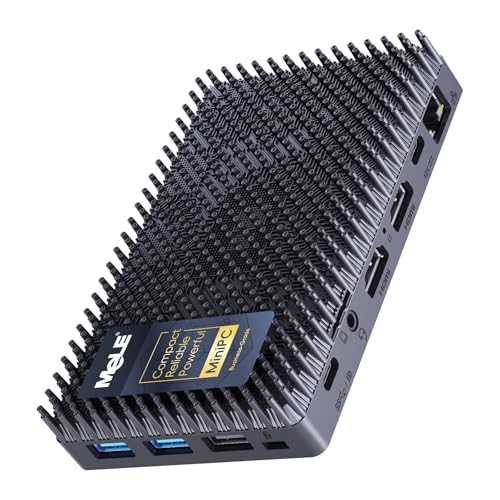
- 0dB fanless cooling for quiet 24/7 operation
- Linux-compatible hardware with 16GB RAM and 512GB SSD
- Triple 4K display support from a tiny footprint
Best For: Linux users who need a silent, low-power mini PC for office work, automation, or triple-monitor setups.
Best Fanless 24/7 Pick – MINIX NEO Z300-0dB N300 Mini PC
If you want a fanless mini pc for linux-style quiet computing, the MINIX NEO Z300-0dB is built for low-noise desks, small offices, and always-on tasks. Its Intel N300 chip, 16GB of RAM, and 512GB SSD give it enough headroom for browsing, office work, streaming, and light multitasking without taking up much space.
Best For: Buyers who need a silent, compact mini PC for 24/7 operation, basic productivity, and dual-display setups in quiet environments.
Pros:
- Fanless passive cooling keeps operation completely silent
- Intel N300, 16GB RAM, and 512GB SSD handle everyday multitasking well
- 2.5G LAN and 4K dual-display support suit office and home setups
- Designed for reliable 24/7 use
Cons:
- Passive cooling can make the top cover warm during use
- Not intended for heavy gaming or demanding creative workloads
- Windows 11 Pro is pre-installed, so Linux buyers may want to reinstall
Overall, this is a strong fanless mini pc for linux-minded users who value silence, compactness, and always-on reliability over raw performance. It fits best when you need a dependable micro desktop for routine work rather than a high-power workstation.
Best for Secure Networking – GEEKOM iX12 Fanless Mini PC
If you want a fanless mini pc for linux that prioritizes quiet operation, security, and multi-port networking, the GEEKOM iX12 is a strong fit. Its Intel N95 platform, AES-NI support, TPM 2.0, and four 2.5G Ethernet ports make it especially appealing for firewall, VPN, and edge tasks, while the fanless metal chassis helps keep it silent and dust-resistant.
Best For: Home labs, small offices, and edge deployments that need a compact, silent network box with strong wired connectivity.
Pros:
- Fanless metal design for silent, dust-proof 24/7 operation
- Intel N95 with AES-NI, TPM 2.0, and virtualization support for secure workloads
- Four 2.5G ports plus 5G failover support for multi-network setups
- DDR5 memory and upgradeable storage help it scale for heavier tasks
Cons:
- 8GB RAM may feel limiting for larger VM or container workloads
- Designed more for networking and edge use than general desktop performance
- Linux compatibility may require manual setup and driver validation
Overall, this is a practical fanless mini pc for linux users who care more about always-on networking, low noise, and security than raw CPU power. It stands out most as a compact firewall, VPN, or virtualization node rather than a general-purpose mini desktop.
Best for 24/7 Silent Use – Fanless Mini PC Stick, Celeron J3455
If you want a fanless mini pc for linux-style lightweight workloads, this tiny stick PC is a practical choice for quiet offices, digital signage, and simple industrial or kiosk deployments. It ships with Windows 10 Pro, but its fanless, low-power design and Ubuntu-ready positioning make it appealing for users who need a compact always-on system.
Best For: Silent, space-saving setups for signage, office tasks, presentations, and basic 24/7 edge or IoT use.
Pros:
- Completely fanless for silent operation and better reliability in always-on environments
- Very compact stick-style design that mounts easily behind a display
- 4K@60Hz output plus Gigabit Ethernet for smooth media and networked use
- Includes USB 3.0, TF card support, WiFi, and Bluetooth 5.0 for flexible connectivity
Cons:
- 4GB RAM and 64GB eMMC are modest for heavier multitasking
- Celeron J3455 is best suited to light-duty workloads, not demanding apps
- Storage and upgrade potential are limited compared with larger mini PCs
As a fanless mini pc for linux-minded buyers who value silence and small size over raw speed, this model makes more sense for signage, admin, and media playback than for power users. If your priority is a dependable, low-noise box that disappears behind a screen, it fits the job well.
Best for Firewall & 24/7 Networking – Fanless Intel J3710 Mini Firewall PC
If you want a practical fanless mini pc for linux that can also double as a small network gateway, this J3710-based box is built around low power draw, quiet operation, and dual-purpose networking. It’s not a performance monster, but it does bring four Intel i226 LAN ports, AES-NI support, and tested compatibility with pfSense, OPNsense, Ubuntu, and other open-source systems.
Best For: Home labs, small office firewalls, and always-on Linux network appliances where quiet operation and multiple Intel Ethernet ports matter more than raw CPU speed.
Pros:
- Fanless 6.5W design is quiet and suitable for 24/7 use
- Four Intel i226 LAN ports make it useful as a router or firewall
- Tested with pfSense, OPNsense, Ubuntu, and other Linux-based setups
- Compact VESA-mountable case saves desk or rack-adjacent space
Cons:
- Intel J3710 is fine for light duties, but not ideal for heavier workloads
- RAM is capped at 8GB, and storage is limited to mSATA
- No HDD support, so expandability is modest
As a fanless mini pc for linux, this model makes the most sense when your priority is quiet reliability and networking features rather than speed. It’s a focused appliance for firewall, router, and gateway tasks, with enough Linux support to fit neatly into a budget home lab or small office setup.
Best Fanless Stick PC – MeLE N100 Fanless PC Stick
If you want a compact fanless mini pc for linux that can disappear behind a monitor, the MeLE PCG02 is a practical stick-style option. The N100 chip, 8GB of RAM, 128GB of storage, and dual-band Wi‑Fi plus Gigabit Ethernet make it a capable little system for light desktop use, kiosks, and always-on deployments.
Best For: Users who want a tiny, silent Linux-capable PC for travel, signage, office basics, or industrial/IoT tasks.
Pros:
- Fanless design keeps operation silent and dust-resistant for 24/7 use
- Intel N100 is a solid step up from older low-power chips for everyday Linux tasks
- Includes both USB-C and Gigabit Ethernet for flexible connectivity
- Linux/Ubuntu support makes it a viable fanless mini pc for linux setups
Cons:
- 8GB RAM is fine for basics, but not ideal for heavy multitasking
- 128GB storage is modest if you plan to install many apps or files
- Stick format limits upgradeability versus a larger mini PC
For buyers prioritizing silence, low power draw, and a compact footprint, this MeLE model is a smart fanless mini pc for linux. It is especially appealing when you need wired networking and always-on reliability more than raw performance.
Best for Industrial I/O – msecore Fanless i7 Industrial PC
If you need a fanless mini pc for linux that favors ports and uptime over flashy specs, this msecore model is built for industrial and embedded tasks. The Core i7-5500U, dual LAN, multiple COM ports, and passive cooling make it a practical pick for kiosks, controllers, and always-on workstations.
Best For: Linux-based industrial setups, automation projects, and users who need a quiet, dust-resistant mini PC with legacy device support.
Pros:
- Fanless metal chassis helps with silent operation and dust protection.
- Strong connectivity: dual LAN, RS232 COM ports, HDMI, VGA, and multiple USB ports.
- Linux-compatible with Wake-on-LAN, auto power-on, and scheduled boot support.
- Includes 16GB RAM and 512GB SSD for ready-to-use everyday performance.
Cons:
- Older 5th-gen Core i7 platform is fine for control tasks, but not ideal for heavy workloads.
- Bulkier than ultra-compact fanless mini PCs, so it needs a little more space.
- Wi-Fi and 4G expansion options are more niche than on mainstream desktops.
This is a smart fanless mini pc for linux if your priority is stable 24/7 operation and broad hardware compatibility. It’s less about modern consumer polish and more about reliable industrial connectivity, which is exactly what many embedded and automation buyers need.
Best Fanless Linux Pick – MeLE Quieter 4C N150 Mini PC
If you want a fanless mini pc for linux that stays quiet, sips power, and still handles everyday desktop tasks, the MeLE Quieter 4C is a practical fit. Its N150 chip, 16GB RAM, and 512GB SSD make it better suited for lightweight productivity, media, and always-on use than most ultra-cheap mini PCs.
Best For: Buyers who want a silent, low-power mini PC for Linux, Ubuntu, office work, home servers, or a clean dual- or triple-display setup.
Pros:
- Fanless design keeps noise out of the room and supports 24/7 operation
- Linux and Ubuntu support makes it a strong fit for Linux-first users
- Triple 4K display output with dual HDMI plus full-function USB-C
- 16GB RAM and 512GB SSD offer a solid starting point for daily use
Cons:
- Passive cooling means the case can run warm under load
- Wi‑Fi 5 is fine, but not as modern as Wi‑Fi 6 or 6E
- Best for light-to-moderate workloads, not heavy computing
For a fanless mini pc for linux, this model stands out more for quiet reliability and flexible display support than raw speed. It makes the most sense if you value silence, low power draw, and a straightforward Linux-friendly mini desktop.
Best with Extra Features – Fanless Industrial Mini PC N2840, 2 LAN, 2 COM
If you need a fanless mini pc for linux that’s built more like a small appliance than a consumer desktop, this N2840 model is worth a look. It focuses on wired networking, serial ports, and always-on reliability, making it a practical fit for light routing, control, and server-style tasks rather than heavy workloads.
Best For: Linux-based firewall, router, and industrial control setups that need dual LAN and serial connectivity.
Pros:
- Fanless design is quiet and better suited to 24/7 operation.
- Dual Gigabit Ethernet plus 2 RS232 ports add strong industrial/network utility.
- Linux compatibility makes it flexible for OPNsense, OpenWrt, and similar builds.
- HDMI + VGA dual display support and multiple USB ports improve expandability.
Cons:
- Older Celeron N2840 hardware is only suitable for light-duty tasks.
- 8GB RAM and DDR3L storage platform are dated by modern mini PC standards.
- Best suited to wired, utility-focused setups rather than media or productivity work.
For buyers prioritizing ports, low noise, and long-running stability, this fanless mini pc for linux stands out more for function than raw speed. It’s a solid match when the job calls for networking or serial I/O first and desktop performance second.
Best for Silent 24/7 Use – MeLE Cyber X1 N150 Fanless Mini PC
If you want a fanless mini pc for linux that can stay quiet on a desk or tucked behind a monitor, the MeLE Cyber X1 is a practical option. Its N150 chip, 16GB RAM, and 512GB SSD make it a solid fit for light productivity, home lab tasks, digital signage, and always-on control setups.
Best For: Linux users who need a silent, low-power mini PC for office work, automation, or triple-monitor setups.
Pros:
- True fanless design with 0dB operation for quiet spaces
- Linux-compatible hardware with a capable N150 processor and 16GB RAM
- Triple-display output supports three 4K screens for multitasking
- Expandable storage and useful ports for business or lab use
Cons:
- Wi‑Fi 5 is fine, but not as current as Wi‑Fi 6 or 6E
- Not aimed at heavy compiling, gaming, or demanding media workloads
For buyers comparing a fanless mini pc for linux, this model stands out more for silence, stability, and connectivity than raw power. It makes the most sense when you want a compact system that can run all day without fan noise and still handle everyday Linux workloads well.
How We Picked the Best Fanless Mini PC for Linux
We prioritized models that make sense for Linux-friendly use cases: efficient Intel processors, solid-state storage, reliable networking, and cooling designs that avoid moving parts. For a Fanless Mini PC for Linux, those details matter more than raw benchmark claims because stability, compatibility, and low noise are usually the goal.
We also looked for options that fit different buyer needs, from lightweight desktop use to router, firewall, virtualization, and industrial deployments.
Quick Comparison
For basic Linux desktop use, newer N-series systems like the N100, N150, and N300 models offer the best balance of power and efficiency. If you need network-heavy roles, a firewall or gateway box with multiple Intel LAN ports is the better fit. For legacy industrial setups, older Core i7, J-series, or dual-core systems may still be useful when serial ports, dual LAN, or specialized I/O matter more than efficiency.
Key Buying Factors for Fanless Mini PC for Linux
CPU Generation and Workload
Choose the processor based on your workload. Intel N-series chips are usually the best starting point for everyday Linux use, media playback, light coding, and homelab servers. Older chips can still be fine for basic routing, kiosk use, or legacy device control.
Memory and Storage
Linux runs comfortably on 8GB in light-use scenarios, but 16GB is a safer choice if you plan to multitask, run containers, or keep several services active. SSD storage is strongly preferred over eMMC for better responsiveness and easier long-term use.
Networking and Ports
If your setup involves a router, firewall, or server appliance, pay close attention to Ethernet port count and controller type. Dual LAN or 2.5G networking can be valuable for throughput, while COM ports and extra USB connections matter for industrial and automation tasks.
Display and Expansion Needs
For desktop use, look for dual-display support or more if you want a flexible workstation. USB-C, HDMI, and extra M.2 support can make a Fanless Mini PC for Linux more useful over time, especially if you want to upgrade storage or connect multiple peripherals.
Who Should Buy Which Fanless Mini PC for Linux?
Choose a newer N150, N100, or N300 model if you want the best all-around Linux experience in a compact, quiet system. Pick a firewall-focused unit if you need routing, VPN, or security functions first. Go with an industrial model if you need serial ports, dual LAN, or legacy compatibility for control systems. If you mainly want the smallest possible footprint, a compute stick can work, but it is best for lighter workloads and simpler setups.
In short, the best choice depends on whether you want a quiet Linux desktop, a network appliance, or a specialty embedded system. Matching the hardware to the job will matter more than chasing the highest specs.
