
An external PC temperature monitoring display gives you real-time system data without cluttering your main monitor. It is a simple upgrade that can make a custom PC feel more polished and easier to manage.
Whether you want a compact sensor panel or a larger secondary screen, the best picks balance visibility, compatibility, and installation ease.
Best 10 External PC Temperature Monitoring Display Picks for 2026
Compact Dynamic Pick

- 5-inch IPS display with 800×480 resolution
- USB-C only, no HDMI or extra power needed
- Animated themes and custom layouts supported
Best For: compact builds needing a customizable stats screen
Simple Sensor Readout
coolerguys USB Thermal Monitor

- 4-segment LED temperature display
- Switchable Fahrenheit, Celsius, or off
- Includes a 24-inch thermal probe
Best For: basic fan or case temperature monitoring
Large Wide-Screen Choice

- 8.8-inch IPS panel with 1920×480 resolution
- USB-C or 9-pin connection, no HDMI required
- Shows CPU, GPU, RAM, FPS, and HDD data
Best For: wide dashboard-style monitoring in showcase builds
Basic Probe Meter

- Blue LED digital temperature display
- 0-167°F range with 0.1-degree resolution
- Waterproof NTC thermistor probe included
Best For: single-sensor temperature checks
English USB-C Case Display
- English software for CPU, GPU, RAM, and HDD data
- Single USB-C cable; no HDMI or extra power needed
- IPS screen with customizable layout and brightness control
Best For: compact internal monitoring with simple USB-C setup
Feature-Rich Sensor Panel

- Shows system data plus network, time, date, volume, and weather
- USB-only setup with no extra power or HDMI cable
- Custom themes and vertical or horizontal screen switching
Best For: a versatile status screen with lots of extra data
No-Install AIDA64 Screen

- No AIDA64 install needed; USB cable only
- Shows CPU, memory, hard disk, and other hardware data
- Includes stand, bracket, manual, and acrylic tape
Best For: simple USB monitoring with minimal software setup
Plug-and-Play 3.5" Sub-Screen
Flylin 3.5in IPS USB-C PC Monitor

- Displays CPU, GPU, RAM, HDD, time, and date.
- USB-only setup with no extra power or HDMI cable.
- Supports 360° rotation and built-in themes.
Best For: Users who want a compact Windows-only sub-screen with easy installation.
Feature-Rich Mini Monitor
WOWNOVA 3.5in IPS USB Case Screen

- English software monitors CPU, GPU, RAM, and HDD data.
- Includes three cable options for different interfaces.
- Offers brightness adjustment and drag-and-drop theme editing.
Best For: Windows builders who want a customizable mini screen with flexible cabling.
Budget-Friendly Host Display

- Shows CPU, GPU, temperature, network speed, time, and weather.
- USB-only setup with no extra power or HDMI cable.
- Supports rotation, theme editing, and stepless brightness.
Best For: Windows users who want a simple, low-cable status panel with extra metrics.
Compact Dynamic Pick – WOWNOVA 5" Temp Monitor
If you want an external pc temperature monitoring display that also acts like a small secondary screen, the WOWNOVA 5-inch model is built for that role. It can show CPU, GPU, RAM, FPS, and HDD data through the brand’s English software, while the dynamic video themes make it more customizable than a basic sensor readout.
Best For: Builders who want a compact, internally mounted display with animated themes and system stats.
Pros:
- 5-inch IPS panel with 800×480 resolution and 178-degree viewing angles
- Single USB-C cable setup with no HDMI or extra power required
- Supports dynamic video themes and custom layouts through self-developed software
- Includes a 16GB flash card for DIY theme content
Cons:
- Lower resolution than larger wide-format monitor options
- Requires compatible software to unlock the monitoring features
This is a strong choice if you value simple wiring and a tidy internal install over screen size. It leans more toward a customizable PC dashboard than a plain temperature meter, which makes it especially useful in gaming or showcase builds.
Simple Sensor Readout – coolerguys USB Thermal Monitor
coolerguys 5V USB Powered Thermal Monitor with Digital LED Display for USB-Powered Case Fan
Check Price On AmazonFor a straightforward external pc temperature monitoring display, this coolerguys unit keeps things simple with a blue LED readout and an included thermal probe. It is designed for USB-powered case fans and gives you a quick temperature check without software, menus, or a full screen panel.
Best For: Users who want a basic, easy-to-read probe-based temperature display for a fan or case setup.
Pros:
- Simple 4-segment LED display
- Switchable Fahrenheit/Celsius readout or display-off mode
- Includes a 24-inch thermal probe
- Pass-through USB plug keeps installation practical
Cons:
- Shows temperature only, not broader system data
- Far less visual customization than screen-based monitors
This is the most utilitarian option in the group, which is exactly the point. If you mainly need a small sensor display for quick temperature checks, it delivers that job with minimal fuss.
Large Wide-Screen Choice – WOWNOVA 8.8" Temp Monitor
If you want an external pc temperature monitoring display with more room for system stats, the WOWNOVA 8.8-inch model is the most expansive option here. It works as a second monitor for temperature, CPU, GPU, RAM, FPS, and HDD data, and the wider 1920×480 panel is well suited to a dashboard-style layout.
Best For: Users who want a wide internal display for detailed PC stats and animated themes.
Pros:
- Large 8.8-inch IPS display with 1920×480 resolution
- Can show CPU, GPU, RAM, FPS, and HDD data through the included software
- Single USB-C or 9-pin connection with no HDMI or extra power needed
- Supports custom dynamic video themes and screen layout editing
Cons:
- Larger size may be more than some compact builds need
- Software-based setup is required for the full feature set
This is the best fit when screen space matters and you want a more information-rich dashboard. It has the same convenience focus as the smaller WOWNOVA model, but the wider panel makes it better for multi-metric monitoring.
Basic Probe Meter – UCTRONICS Blue LED Temp Meter
If you only need a simple external pc temperature monitoring display for a single probe reading, the UCTRONICS meter is a compact low-frills option. It uses a blue LED screen, a 10K NTC thermistor sensor, and reverse polarity protection, making it better suited to basic temperature checks than full PC telemetry.
Best For: Builders who need a compact, wired temperature meter for a single sensor point.
Pros:
- Easy-to-read blue LED digital display
- 0-167°F temperature range with 0.1-degree resolution
- Includes reverse polarity protection for safer wiring
- Waterproof sensor design expands mounting flexibility
Cons:
- Displays temperature only, not CPU or GPU stats
- More of a sensor meter than a true PC dashboard
This is the straightforward pick for users who want a hardwired probe and a small display rather than software-driven visuals. It is simple, practical, and focused on reading one temperature point reliably.
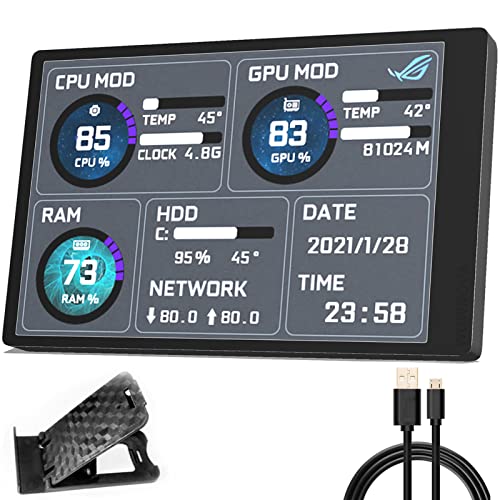
English USB-C Case Display – WOWNOVA 3.5" Temp Monitor
If you want an external pc temperature monitoring display that stays clean and simple, this WOWNOVA 3.5-inch screen is built around USB-C convenience and English software. It acts like a second monitor for CPU, GPU, RAM, and HDD data, while the IPS panel and customizable layout make it practical for everyday system checking inside a case.
Best For: Users who want a compact, internally mounted USB-C temperature display with English software.
Pros:
- English version software for monitoring temperature and usage data.
- Single USB-C connection; no HDMI or extra power required.
- IPS full-view panel with 170-degree viewing angle and brightness adjustment.
- Customizable layout plus horizontal/vertical screen switching.
Cons:
- 3.5-inch 320 x 480 resolution is modest by modern display standards.
- Designed around software use, so setup depends on the included program.
- Small screen size limits how much information can be shown at once.
Overall, this is a straightforward pick if you mainly care about easy USB-C installation and a readable internal status screen. It leans more toward practical monitoring than premium display quality, but the simplified cable setup is a real advantage.
Feature-Rich Sensor Panel – Dilwe 3.5in Temp Monitor
This external pc temperature monitoring display is a flexible option if you want more than just CPU and GPU stats. The Dilwe 3.5-inch panel can show temperature, usage, network speed, time, date, volume, and even weather forecast, and it supports both horizontal and vertical screen use with a customizable theme editor.
Best For: Users who want a versatile secondary display for system stats and extra on-screen information.
Pros:
- Displays CPU, GPU, network speed, date, time, volume, and weather forecast.
- USB data cable connection with no extra power supply or HDMI cable.
- Customizable layouts, built-in themes, and vertical/horizontal screen switching.
- IPS display with 170-degree viewing angle and 3.5-inch size.
Cons:
- Listed as support for system use, so compatibility is more limited than some alternatives.
- Resolution is only 320 x 480.
- Software setup is still required to use the customized display.
For buyers who want a multi-purpose status screen instead of a single-purpose temp readout, this model is strong on flexibility. It keeps the connection simple while offering a lot of customization for a compact monitor.
No-Install AIDA64 Screen – Ransanx 3.5" IPS Monitor
If you want an external pc temperature monitoring display with a simple hardware-focused setup, this Ransanx 3.5-inch IPS screen is designed to connect by USB and report key running parameters. The product notes emphasize that AIDA64 does not need to be installed, and the screen can show CPU, memory, hard drive, and other hardware data while supporting dynamic wallpaper and lightweight resource use.
Best For: Buyers who want a compact USB monitor with no AIDA64 installation required.
Pros:
- No AIDA64 installation required; USB cable is the only connection needed.
- Displays CPU, memory, hard disk, and other hardware data.
- IPS full-view screen with 178-degree viewing angle.
- Includes stand, USB cable, manual, acrylic tape, and adjustable bracket.
Cons:
- Resolution is limited to 320 x 480.
- The notes mention some theme hardware names may need manual editing.
- Setup may still involve decompressing files and following the included tutorial.
This model stands out for reducing software friction while still giving you a dedicated data screen. It is a practical choice if you value a simple USB connection and detailed system readouts over a larger or higher-resolution panel.
Plug-and-Play 3.5" Sub-Screen – Flylin 3.5in IPS USB-C PC Monitor
If you want an external pc temperature monitoring display that is easy to add to a build, the Flylin 3.5-inch IPS USB-C screen focuses on simple USB connection and real-time hardware readouts. It shows CPU, GPU, RAM, HDD, time, and date data, and it comes with built-in themes plus 360° rotation for horizontal or vertical mounting.
Best For: Builders who want a compact secondary display with automatic startup and no HDMI or extra power cable.
Pros:
- Shows CPU, GPU, RAM, HDD, time, and date data with multiple templates.
- USB-only setup; no extra power supply or HDMI cable required.
- Supports 360° rotation and horizontal/vertical screen switching.
- Includes built-in themes and one-click background/theme changes.
Cons:
- Brightness is not adjustable.
- Notes specify Windows support and no AIDA64 required, so it is not platform-agnostic.
Overall, this is a practical pick if you want a small monitoring screen that keeps setup lean and focuses on core system stats. Its appeal is convenience first, with enough customization to fit different case layouts.
Feature-Rich Mini Monitor – WOWNOVA 3.5in IPS USB Case Screen
The WOWNOVA external pc temperature monitoring display is built for users who want more control over layout and visuals. It works with English software, can act like a second monitor for CPU, GPU, RAM, and HDD data, and includes brightness adjustment, automatic screen-off behavior, and horizontal or vertical switching.
Best For: Windows users who want a customizable mini screen with multiple cable options and easy theme editing.
Pros:
- English software supports CPU, GPU, RAM, and HDD monitoring.
- Includes three cable options to cover different connection needs.
- Customizable layout with drag-and-drop visual theme editing.
- IPS panel offers full-view angles, plus brightness adjustment and auto-off.
Cons:
- Compatible with Windows only.
- Smaller 320 x 480 resolution is best suited to simple monitoring rather than dense dashboards.
If you want a compact monitoring screen with more layout control, this model is a strong fit. The metal shell and flexible connection package make it especially appealing for tidy case builds.
Budget-Friendly Host Display – 3.5in USB Mini PC Temp Screen
This external pc temperature monitoring display is aimed at users who want a straightforward USB mini screen for host status. The 3.5-inch IPS panel can show CPU, GPU, usage, temperature, network speed, date, time, volume, and weather forecast, and it supports both horizontal and vertical orientation with built-in themes and a visual theme editor.
Best For: Windows PC owners who want a USB-connected secondary display with broad status readouts.
Pros:
- Displays a wide range of info, including temperatures, network speed, time, and weather.
- USB connection with no extra power supply or HDMI cable required.
- Supports 360° rotation and horizontal/vertical screen switching.
- Stepless brightness adjustment and automatic shutdown after the PC turns off.
Cons:
- Notes indicate support is for Windows only.
- Resolution is 320 x 480, which keeps it focused on monitoring rather than high-detail visuals.
For a practical case-mounted display, this model covers the basics well and adds a few extra dashboard-style metrics. It is a sensible option if you want a simple, always-on status panel without extra cabling.
How We Picked the Best External PC Temperature Monitoring Display
We focused on displays that are practical for everyday PC builders: readable screens, straightforward installation, reliable sensor support, and good value. For this category, the best models are the ones that make monitoring easier without adding setup headaches.
Quick Comparison
Smaller USB mini screens are usually best if you want a clean, low-profile look and simple system stats. Larger panels are better if you want more space for temperatures, fan speeds, and custom layouts. If you prefer a basic temperature-only setup, standalone sensor meters can be a better fit than a full External PC Temperature Monitoring Display.
Key Buying Factors for External PC Temperature Monitoring Display
Screen Size and Visibility
Choose a size that fits your case and viewing distance. A 3.5-inch panel works well for tight builds, while larger displays are easier to read at a glance and often show more information at once.
Connection and Setup
Look for USB-powered models with clear software support and minimal cabling. Some displays are designed for quick plug-and-play use, while others depend on third-party monitoring software or custom setup.
Data You Actually Need
Not every user needs every metric. If you mainly care about CPU temperature, a simple sensor display may be enough. If you want broader system visibility, choose a screen that can also show GPU, RAM, storage, fan, and coolant data.
Mounting Style and Case Compatibility
Check whether the display includes a stand, magnetic mount, or internal case installation hardware. A good fit depends on your case layout, available USB headers, and whether you want the panel visible outside the chassis.
Who Should Buy Which External PC Temperature Monitoring Display?
Buy a compact External PC Temperature Monitoring Display if you want a neat desktop setup and essential system stats. Choose a larger panel if you enjoy live dashboards, themes, and at-a-glance monitoring. If your goal is only to track one or two temperatures, a simpler digital sensor display may be the smarter choice.
For most buyers, the best option is the one that combines clear readability, easy installation, and the right level of detail for your build.
