
An external GPU can give a compatible laptop access to a desktop graphics card or a portable graphics unit without replacing the whole computer. For AI work, though, the connection and software support matter as much as the GPU itself.
These 10 options span ready-to-use units, Thunderbolt and USB4 enclosures, OCuLink docks, and internal-adapter projects. Use the guide below to narrow the field before choosing a GPU.
Best 10 External GPU Setups for AI Laptops Picks for 2026
Compact Plug-and-Play Pick

- RX 7600M XT with 8GB VRAM included
- USB4 or OCuLink connection
- Built-in 240W PSU and 65W charging
Best For: Windows users wanting a compact, ready-to-connect eGPU
Full-Size GPU Enclosure
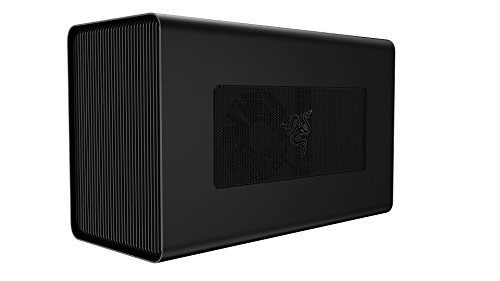
- Bring your own compatible desktop GPU
- 650W PSU; up to 100W laptop charging
- Thunderbolt 3 connection
Best For: Laptop owners who want to choose their own full-size GPU
Portable AI Starter

- Integrated 120W RX 7600M XT, 8GB
- USB4 and OCuLink options
- Built-in PSU and 65W charging
Best For: Portable entry-level local AI and creative workloads
Bring-Your-Own-GPU Dock

- PCIe 4.0 x4 OCuLink connection
- Supports NVIDIA, AMD, and Intel GPUs
- Cable included; GPU and PSU separate
Best For: OCuLink owners building with their own desktop GPU
Open-Frame Pick

- 40Gbps USB4/TB4 connection
- No stated GPU size restriction
- GPU and PSU not included
Best For: Full-spec USB4/TB4 laptops needing GPU-size flexibility
NVMe Riser Pick

- NVMe M.2 connection, not USB
- Up to PCIe 5.0 x4 transfer speed
- Needs GPU and 500W+ ATX PSU
Best For: Accessible NVMe M.2 slots and hands-on builds
Charging and Ports Pick

- Thunderbolt 3/4 and USB4 support
- 85W PD and extra ports
- Limited RTX 50-series support
Best For: Laptop setups needing charging and peripheral ports
OCuLink Performance Pick
VORZOKISPL PCIe 4.0 x4 eGPU Dock

- PCIe 4.0 x4 OCuLink link rated at 64Gbps
- Includes 39.4-inch cable and mounting screws
- Requires a separate GPU and ATX power supply
Best For: OCuLink-equipped laptops and mini PCs needing an open-frame GPU dock
Legacy Slot Option
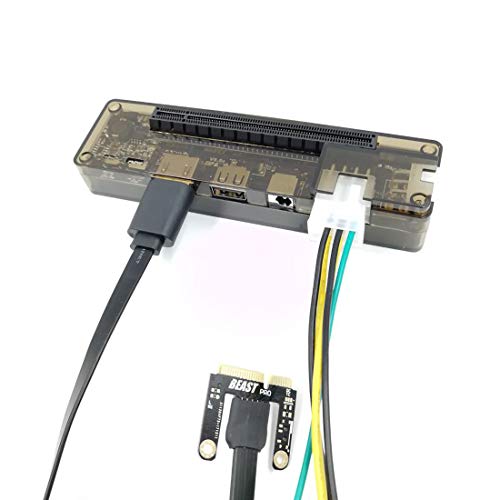
- Targets compatible Mini PCI-E laptop connections
- Listing mentions GPU computing applications
- Power arrangement needs separate planning
Best For: Compatible Mini PCI-E laptops and hands-on eGPU builds
Compact Adapter Option
MOLUCKFU PCIe x16 External GPU Adapter

- Compact PCI Express 3.0 adapter board
- Includes a 60 cm cable
- Laptop-side connector and GPU power details need verification
Best For: Parts-based builds with a verified compatible laptop connection
Compact Plug-and-Play Pick – NIMO RX 7600M XT eGPU
For external gpu setups for ai laptops, this NIMO unit offers a straightforward way to add an RX 7600M XT with 8GB of GDDR6 memory. The GPU and 240W power supply are built in, so there is no separate graphics card to source.
Best For: Windows laptop owners who want a compact, preassembled eGPU for entry-level local inference and creative work.
Pros:
- Preinstalled GPU and built-in power supply simplify setup.
- USB4 and OCuLink connection options.
- 65W laptop charging plus HDMI 2.1 and DisplayPort 2.0 outputs.
Cons:
- Requires a Windows device with USB4 or OCuLink.
- 8GB of VRAM limits the size of local models it can accommodate.
Choose this if convenience and a small footprint matter more than choosing your own GPU. Check your laptop’s port and charging needs before ordering.
Full-Size GPU Enclosure – Razer Core X
The Razer Core X suits external gpu setups for ai laptops when you want to select a desktop graphics card yourself. Its Thunderbolt 3 enclosure supports compatible full-size cards up to three slots wide, but the GPU is sold separately.
Best For: Thunderbolt 3 laptop owners who want a desktop-card enclosure and already have, or plan to buy, a compatible GPU.
Pros:
- Accommodates compatible NVIDIA or AMD desktop GPUs on Windows.
- Built-in 650W power supply and up to 100W laptop charging.
- Also supports compatible AMD cards on qualifying macOS systems.
Cons:
- Graphics card is not included.
- macOS does not support NVIDIA cards; laptop eGPU compatibility must be checked.
- At 14.3 pounds, it is less portable than compact integrated units.
This is the flexible choice if card selection is your priority. Confirm your laptop’s Thunderbolt 3 eGPU support and the card’s compatibility before building around it.
Portable AI Starter – Nimo 120W RX 7600M XT Dock
Among external gpu setups for ai laptops, this Nimo dock is a preconfigured option for modest local workloads. It pairs a 120W RX 7600M XT with 8GB of GDDR6 memory, and offers USB4 and OCuLink connections for compatible devices.
Best For: Laptop or mini PC users seeking a portable, ready-made GPU for entry-level image generation, quantized models, and creative tasks.
Pros:
- Integrated GPU and 240W power supply avoid a separate card or power brick.
- USB4 and OCuLink provide two connection options.
- 65W laptop charging and HDMI 2.1/DisplayPort 2.0 monitor outputs.
- Auto-power-on follows the connected computer.
Cons:
- 8GB VRAM is better suited to smaller or quantized models than large local models.
- The supplied notes do not establish compatibility with every laptop or AI software stack.
Its appeal is getting started without assembling an enclosure. Verify your host connection and the software support your intended AI tools require.
Bring-Your-Own-GPU Dock – UTLGAMENG OCuLink Dock
This open-frame dock is a build-it-yourself choice for external gpu setups for ai laptops equipped with OCuLink. It connects a desktop card through a PCIe 4.0 x4 OCuLink link and includes a 50cm cable; you supply the GPU and standard ATX power supply.
Best For: Laptop or mini PC owners with OCuLink who want to use a desktop GPU they already own.
Pros:
- Supports NVIDIA, AMD, and Intel cards without a stated card-length limit.
- PCIe 4.0 x4 OCuLink connection with an included shielded cable.
- Open-frame design allows flexible GPU selection.
Cons:
- GPU and ATX power supply are not included.
- OCuLink cannot be hot-plugged; shut down before connecting or disconnecting.
- Drivers must be installed for the chosen graphics card.
Pick this for hardware flexibility rather than a tidy, one-cable desk setup. Make sure your computer has OCuLink and budget for the remaining components.
Open-Frame Pick – RIITOP USB4/TB4 eGPU Dock
For external gpu setups for ai laptops, this RIITOP dock offers an open-frame way to connect a PCIe graphics card to a laptop with a full-function, 40Gbps USB4 or Thunderbolt 4 port. Its unrestricted card space is useful if you plan to choose your GPU separately.
Best For: Laptop owners with a verified full-spec USB4 or Thunderbolt 4 port who want flexibility in GPU size.
Pros:
- Open design has no stated graphics-card size restriction.
- Supports PCIe 4.0 x16 cards, including listed NVIDIA RTX 50-series and AMD RX 7000-series models.
- Includes a USB4 cable and mounting hardware.
Cons:
- GPU and ATX/SFX power supply are sold separately.
- Requires a full-function 40Gbps USB4 or Thunderbolt 4 port; Mac support is limited to AMD GPUs.
Check the laptop port specifications before buying, then budget for a power supply matched to your chosen card. The dock is a flexible starting point, not a complete GPU package.
NVMe Riser Pick – OwlTree PCIe 5.0 x4 eGPU Dock
Among external gpu setups for ai laptops, the OwlTree takes a different route: its 50cm riser connects a GPU dock to an NVMe-protocol M.2 slot rather than a USB4 port. It is worth considering when you can access a compatible slot and want the dock’s stated PCIe 5.0 x4 connection.
Best For: Users comfortable working with an accessible NVMe M.2 slot and a separate desktop power supply.
Pros:
- Supports up to PCIe 5.0 x4 transfer speed, with backward compatibility.
- Open dock accommodates full-size graphics cards without a stated length limit.
- Includes a flexible, shielded 50cm riser cable and status LEDs.
Cons:
- Does not work through USB, M.2 SATA, Wi-Fi, or WWAN interfaces.
- GPU and standard ATX power supply of at least 500W are not included.
Confirm both the slot’s NVMe protocol and its physical accessibility before ordering. This is an M.2-based build component, not a plug-in Thunderbolt enclosure.
Charging and Ports Pick – ANQ-L336 Mini eGPU Dock
For external gpu setups for ai laptops that also need charging and peripheral connections, the ANQ-L336 combines a Thunderbolt 3/4 or USB4 GPU dock with up to 85W Power Delivery. It also offers a 10Gbps USB-A port and two Thunderbolt 4 ports.
Best For: Users who want an eGPU connection, laptop charging, and extra ports in one dock.
Pros:
- Connects to compatible Thunderbolt 3/4 and USB4 laptops and mini PCs.
- Supports ATX, SFX, FLEX, and 12V DC power-supply options.
- Provides 85W Power Delivery plus additional USB-A and Thunderbolt ports.
Cons:
- Power supply is not included.
- NVIDIA RTX 50-series support is described as limited.
Its power and port options may simplify a desk setup, but check your intended GPU carefully—especially an RTX 50-series card—before choosing this model.
OCuLink Performance Pick – VORZOKISPL PCIe 4.0 x4 eGPU Dock
For external gpu setups for ai laptops with an OCuLink connection, this open-frame dock provides a PCIe x16 slot over a PCIe 4.0 x4 link rated at 64Gbps. It supports AMD, Intel, and NVIDIA graphics cards, including cards intended for AI workloads.
Best For: OCuLink-equipped laptops or mini PCs whose owners want to add their own GPU and ATX power supply.
Pros:
- Includes a 39.4-inch OCuLink cable and mounting screws.
- Open-frame design accommodates different GPU sizes, with a side bracket to support the GPU and ATX power supply.
- Offers automatic and manual start modes, plus status LEDs.
Cons:
- GPU and ATX power supply are not included.
- Hot-plugging is not supported; the computer must be off before connecting or disconnecting.
This is the most clearly specified high-bandwidth option here, but budget for the missing components and confirm your computer has the required OCuLink interface before buying.
Legacy Slot Option – JMT EXP GDC Mini PCI-E Dock
Among external gpu setups for ai laptops, the JMT EXP GDC is a niche option for a machine with a compatible Mini PCI-E connection. Its listing also mentions GPU computing, but this is a slot-specific adapter rather than a general-purpose plug-in enclosure.
Best For: Owners of compatible Mini PCI-E laptops who are comfortable assembling an external graphics setup.
Pros:
- Designed to connect external PCIe graphics hardware to a compatible laptop.
- Listing identifies GPU computing and other technical applications.
- Compact dock measures 3.15 by 1.97 by 1.18 inches.
Cons:
- Requires a compatible laptop interface; verify the selected Mini PCI-E variant before ordering.
- The product title specifies no power, so plan the power arrangement separately.
Check your laptop’s available slot and the dock’s cable and power requirements carefully. Those details matter more here than the broad promise of adding a desktop GPU.
Compact Adapter Option – MOLUCKFU PCIe x16 External GPU Adapter
For external gpu setups for ai laptops, this MOLUCKFU adapter offers a compact PCIe x16 connection rather than a full enclosure. The listing specifies a PCI Express 3.0 hardware interface and an included 60 cm cable, but does not clearly identify the laptop-side slot in its description.
Best For: Buyers who can verify the required laptop connection and want a small, cable-based external GPU adapter.
Pros:
- Compact board measures about 5.04 by 1 by 0.79 inches.
- Includes a 60 cm cable for positioning the adapter away from the laptop.
- Provides a PCIe x16 connection for an external graphics card setup.
Cons:
- The supplied description does not clearly specify the laptop-side connector.
- GPU power requirements and an included power supply are not specified.
Its small footprint is useful for a parts-based build, but confirm the connector, GPU compatibility, and power plan with the seller before treating it as a complete AI GPU solution.
How We Picked the Best External GPU Setups for AI Laptops
We organized these 10 products by the decisions that matter most for an AI laptop: whether a GPU is included, how the device connects, what power supply it needs, and how much installation work it demands. The list covers portable all-in-one units, conventional Thunderbolt or USB4 enclosures, OCuLink docks, and adapters that require access to an internal laptop slot. A faster-looking port specification alone does not establish better AI performance.
Quick Comparison of External GPU Setups for AI Laptops
- GPU included: The two NIMO Radeon RX 7600M XT products offer a more self-contained route. Check support for your specific AI applications before buying.
- Thunderbolt or USB4 enclosures: The Razer Core X, RIITOP dock, and ANQ-L336 are candidates for laptops with compatible external ports. Verify protocol support, not just connector shape; some enclosures also require a separately purchased GPU and power supply.
- OCuLink docks: The two PCIe 4.0 OCuLink docks suit laptops with a compatible OCuLink connection and buyers comfortable with exposed hardware and a separate GPU.
- Internal-slot projects: The OwlTree M.2 riser and JMT EXP GDC-style adapters are DIY choices that may involve opening the laptop, routing a cable, and sacrificing a slot.
Key Buying Factors for External GPU Setups for AI Laptops
Start with the AI Software and GPU
Check the framework, model, and operating system you intend to use before selecting an enclosure. Many local AI workflows have the most straightforward support on NVIDIA CUDA GPUs; AMD acceleration varies by application, OS, and driver stack. GPU memory is often a harder limit than connection speed: a model that will not fit in VRAM may need a smaller version, quantization, or slower CPU offloading.
Match the Laptop Connection
Confirm that your laptop supports eGPU operation over its specific Thunderbolt or USB4 port. A USB-C socket alone is not enough. OCuLink and M.2 adapters need their own compatible connection or accessible internal slot; they do not simply plug into USB-C. Advertised 40, 64, 80, or 128 Gbps figures are interface claims, not guaranteed application throughput. Laptop implementation, PCIe lane allocation, and overhead all affect results.
Check Power, Fit, and Practical Setup
For a dock without a built-in GPU, budget for the card, an appropriately rated power supply, and any required cables. For an enclosure, confirm GPU length, thickness, power connectors, and cooling clearance. Laptop charging over the same cable is convenient only if the device’s power-delivery rating meets your laptop’s needs. Also consider desk space, fan noise, and whether you can leave an exposed dock safely in place.
Who Should Buy Which External GPU Setups for AI Laptops?
Choose a GPU-included unit if you value a compact package and have confirmed that its AMD GPU supports your workload. Choose a Thunderbolt or USB4 enclosure if your laptop supports it and you want to select or upgrade a desktop GPU. Choose OCuLink if your laptop has a compatible connection and you prioritize a more direct PCIe link over plug-and-play convenience. Reserve M.2 and other internal-slot adapters for experienced tinkerers who can verify slot compatibility and accept a less portable setup. For any option, confirm laptop, OS, driver, and AI-software compatibility before purchasing.
