
A Thunderbolt 5 eGPU setup can give a compatible laptop access to a desktop graphics card without committing to a desktop PC. But the right enclosure depends on more than its advertised 80Gbps connection.
These 10 picks cover enclosed boxes, open docks, and compact options. Use the guide below to check GPU fit, power requirements, laptop compatibility, and desk setup before you buy.
Best 10 External GPU Enclosures Thunderbolt 5 Picks for 2026
Best Expandable Dock

- Dual Thunderbolt 5 ports; up to 140W host charging
- GPU slot, M.2 slot, and SD 4.0 reader
- Bring your own ATX or SFX power supply
Best For: Multi-purpose GPU and storage expansion
Best Ready-to-Power Enclosure

- Built-in 850W power supply
- Supports triple-wide GPUs
- 5GbE and three 10Gbps USB-A ports
Best For: Windows 11 GPU workflows with large cards
Best for Local AI

- 850W PSU; up to 600W for the GPU
- 96W charging and 2.5GbE dock
- Windows 11 only; GPU sold separately
Best For: Private, local AI on a compatible Windows 11 PC
Best Basic Open Dock
PELADN External GPU Dock Station

- Dual Thunderbolt 5 ports and PCIe 4.0 x4 slot
- USB-A, SD 4.0, and PCIe 3.0 expansion
- Check GPU, power, and driver requirements
Best For: Hands-on Thunderbolt 5 eGPU builds
High-Power Pick

- Built-in 800W Gold-rated PSU
- USB4 v2.0 and MCIO 8i connections
- USB-A, Ethernet, and M.2 expansion
Best For: High-power GPU setups needing connection flexibility
OCuLink-Only Pick

- OCuLink PCIe 4.0 x4 connection
- Supports ATX or SFX power supplies
- Requires an OCuLink-equipped host
Best For: OCuLink users who can verify power-supply needs
Single-Cable Pick
TREBLEET 80Gbps eGPU Enclosure

- Thunderbolt 5/USB4 v2-compatible 80Gbps connection
- 600W PSU and up to 140W laptop charging
- 5.5L chassis with downstream daisy-chain port
Best For: Windows laptop setups prioritizing charging and expansion
Best Enclosed Build

- Fits desktop GPUs up to four slots wide
- Up to 80 Gbps Thunderbolt 5; 140W PD
- GPU and ATX PSU sold separately
Best For: Windows 11 users seeking an enclosed, upgradeable eGPU
Compact Dock Pick

- Up to 100W device power delivery
- 16-pin GPU power output
- Verify Thunderbolt 5 support before purchase
Best For: DIY users wanting a GPU dock for a compatible portable device
Best for Flexible Power
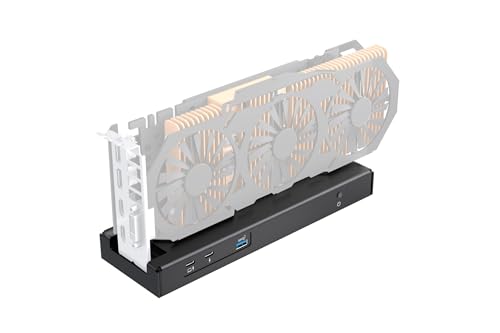
- Listed 80 Gbps controller and 140W PD
- Daisy-chain port for storage or displays
- Supports SFX, ATX, FLEX, or DC power
Best For: DIY users who want configurable GPU power and daisy-chaining
Best Expandable Dock – PELADN Link S-3
Among external gpu enclosures thunderbolt 5 shoppers might consider, the PELADN Link S-3 stands out for combining an eGPU connection with storage and peripheral ports. It is an open GPU dock, so plan for a separate graphics card and a compatible ATX or SFX power supply.
Best For: Windows laptop or mini PC users who want GPU, SSD, SD card, and wired-network connections in one dock.
Pros:
- Dual Thunderbolt 5 ports, including a host connection with up to 140W power delivery.
- PCIe 4.0 x4 GPU slot plus a PCIe 3.0 M.2 2280 slot and SD 4.0 reader.
- Includes 2.5GbE, USB-A, and a Thunderbolt 5 cable.
Cons:
- Requires a separate ATX or SFX power supply and graphics card.
- Check the 180mm maximum ATX power-supply length before buying.
Choose this dock when expansion matters as much as the GPU connection; its bring-your-own-power-supply design calls for more component planning than an enclosure with a built-in PSU.
Best Ready-to-Power Enclosure – Sonnet Breakaway Box 850 T5
For buyers comparing external gpu enclosures thunderbolt 5 options, the Sonnet Breakaway Box 850 T5 offers a built-in 850W power supply and room for triple-wide graphics cards. It targets Windows 11 systems and adds useful desktop-style connectivity alongside the GPU bay.
Best For: Windows 11 creators who want a powered enclosure for a large GPU and a dock for peripherals.
Pros:
- Built-in 850W power supply and variable-speed, temperature-controlled fan.
- Supports triple-wide cards from the listed NVIDIA GeForce and AMD Radeon families.
- Includes a downstream Thunderbolt 5 port, three 10Gbps USB-A ports, and 5GbE.
Cons:
- A graphics card is not listed as included.
- At 15.75 x 8.25 x 9.75 inches and 14.1 pounds, it needs substantial desk space.
This is the more self-contained choice if you do not want to source a separate PSU. Confirm your intended card fits and that your Windows computer supports an external GPU before ordering.
Best for Local AI – Plugable TBT5-AI
The Plugable TBT5-AI is a focused pick among external gpu enclosures thunderbolt 5 buyers can use to build a local AI workstation. Its included 850W ATX 3.1 power supply allocates up to 600W to a separately purchased GPU, while the dock provides networking, USB ports, and host charging.
Best For: Windows 11 users who want to run supported AI tools locally with their own high-end graphics card.
Pros:
- 850W 80+ Gold PSU, with 600W dedicated to the GPU.
- Fits cards up to 346 x 170 x 77mm and 3.5 slots wide.
- Provides 96W host charging, 2.5GbE, USB-A and USB-C ports, and downstream Thunderbolt 5.
- Includes a Thunderbolt 5 cable and is TAA compliant.
Cons:
- GPU is not included; verify its dimensions and power needs.
- Not compatible with macOS, Linux, ChromeOS, or Thunderbolt 3; USB4 hosts must support eGPUs.
Its clear compatibility limits are worth taking seriously. If your Windows 11 host qualifies, the included PSU and local-AI-oriented design make it a practical foundation for a bring-your-own-GPU setup.
Best Basic Open Dock – PELADN External GPU Dock Station
This PELADN model is a basic open-dock option in the external gpu enclosures thunderbolt 5 category. Its supplied listing highlights dual Thunderbolt 5 ports, a PCIe 4.0 x4 GPU slot, and support for ATX or SFX power, but buyers should verify their exact graphics card and host before purchase.
Best For: Hands-on users with a compatible Thunderbolt 5 computer who are comfortable assembling and configuring an eGPU setup.
Pros:
- Dual Thunderbolt 5 ports and a PCIe 4.0 x4 slot.
- Listing also identifies a PCIe 3.0 slot, USB 3.2 Gen 2 Type-A port, and SD 4.0 slot.
- Includes a Thunderbolt 5 cable and screwdriver.
Cons:
- Requires checking GPU compatibility before setup.
- Listing instructs users to install the Intel Thunderbolt controller and graphics-card drivers.
- Power-supply requirements should be confirmed before buying components.
This dock suits buyers who want the listed expansion features and do not mind setup work. The provided notes are less detailed than those for the other PELADN Link S-3 listing, so verify critical power and compatibility details with the seller.
High-Power Pick – GPD G2 80Gbps eGPU Enclosure
If you’re comparing external gpu enclosures thunderbolt 5 users can connect to, the GPD G2 offers a USB4 v2.0 80Gbps connection alongside an MCIO 8i option for compatible hosts. Its built-in 800W power supply makes it worth considering for a power-hungry desktop GPU.
Best For: Buyers who want substantial GPU power, two host-connection options, and dock features in one enclosure.
Pros:
- PCIe Gen5 x16 GPU slot and integrated 800W Gold-rated ATX 3.1 power supply with a 12V-2×6 connector.
- USB4 v2.0 supports up to 80Gbps symmetric bandwidth and up to 100W host charging.
- MCIO 8i offers a direct PCIe 4.0 x8 connection for compatible devices; USB-A, Ethernet, and an M.2 slot add expansion.
Cons:
- Using the MCIO connection requires a compatible host.
- Check GPU dimensions against the enclosure before buying; the supplied notes do not specify a GPU clearance limit.
The G2 is the more flexible choice here if you can use its MCIO link or want a high-wattage PSU. For a single-cable setup, verify that your host supports the USB4 v2.0 features you plan to use.
OCuLink-Only Pick – AOOSTAR EG02 GPU Dock
The AOOSTAR EG02 appears in searches for external gpu enclosures thunderbolt 5 buyers might consider, but its supplied notes say it supports an OCuLink PCIe 4.0 x4 connection only. Check your computer for that port before treating it as an option.
Best For: Users with an OCuLink-equipped host who want a GPU dock that supports an ATX or SFX power supply.
Pros:
- Uses an OCuLink PCIe 4.0 x4 connection.
- Supports ATX and SFX power supplies.
- Listed footprint is 26.8 × 17.5 × 2.2 cm.
Cons:
- Requires an OCuLink port; the supplied notes do not establish Thunderbolt 5 connectivity despite the product title.
- The notes do not state that a power supply is included.
Choose the EG02 on the strength of its stated OCuLink requirements, not the “tb5” wording in its title. Confirm host connectivity and what comes in the box before ordering.
Single-Cable Pick – TREBLEET 80Gbps eGPU Enclosure
Among external gpu enclosures thunderbolt 5 shoppers may consider, the TREBLEET pairs a stated Thunderbolt 5/USB4 v2-compatible 80Gbps connection with up to 140W laptop charging. Its integrated 600W SFX power supply also keeps a separate PSU brick off your desk.
Best For: Windows users seeking a compact GPU enclosure with host charging and a downstream port for peripherals.
Pros:
- Built-in 600W SFX PSU supplies up to 450W to the GPU through dual 8-pin (6+2) connectors.
- Provides up to 140W USB Power Delivery to a compatible laptop.
- 5.5L aluminum chassis fits GPUs up to 340 × 154 × 57 mm; a downstream port supports daisy-chaining.
Cons:
- GPU fit and power connections limit card selection; check both before purchasing.
- On macOS, the stated support is limited to Intel Macs with supported AMD GPUs; NVIDIA GPUs and Boot Camp are not supported.
This is a practical fit when charging and desk-friendly expansion matter as much as the GPU connection. Make sure your host port supports external PCIe expansion, and check your GPU against the stated size and power limits.
Best Enclosed Build – Razer Core X V2
Among external gpu enclosures thunderbolt 5 shoppers can consider, the Razer Core X V2 is the enclosed option for a Windows 11 laptop or compatible USB4 device. Its steel chassis fits NVIDIA or AMD desktop cards up to four slots wide, but you must supply the GPU and ATX power supply.
Best For: Windows 11 users who want an enclosed, upgradeable desktop-GPU setup.
Pros:
- Supports Thunderbolt 5 connections up to 80 Gbps, plus compatible Thunderbolt 4 and USB4 devices.
- Provides up to 140W USB-C Power Delivery and includes a Thunderbolt 5 cable.
- Tool-free GPU installation and a built-in 120 mm cooling fan simplify setup and airflow.
Cons:
- Graphics card and power supply are sold separately.
- Mac devices with M1 or later chipsets do not support eGPUs.
Choose this if you prefer a protective chassis and room for a wide card; account for the added cost of the GPU and PSU before buying.
Compact Dock Pick – Raxmolo TH5P4GaN GPU Dock
For buyers comparing external gpu enclosures thunderbolt 5 options, the Raxmolo TH5P4GaN is a dock rather than a protective case. Its listing describes Thunderbolt and USB4 connectivity, laptop power delivery, and GPU power outputs; check your host and power setup before committing.
Best For: DIY users seeking a GPU dock for a compatible laptop, handheld, or mini console.
Pros:
- Offers up to 100W power delivery to a connected device.
- Provides a 16-pin output for a compatible GPU or dual 8-pin cards via an adapter cable.
- Lists 7.4 × 5.0 mm and square-port power inputs, with up to 400W input support.
Cons:
- A dock does not provide the enclosed-card protection of a full chassis.
- The supplied specifications list Thunderbolt 4 as the hardware interface despite the Thunderbolt 5 title; confirm the connection standard with the seller.
The appeal is flexible GPU power connectivity in a dock format, but the conflicting interface information makes verification especially important.
Best for Flexible Power – TREBLEET 80Gbps eGPU Dock
The TREBLEET dock stands out among external gpu enclosures thunderbolt 5 choices for its listed 80 Gbps controller, downstream daisy-chain port, and multiple power-supply options. It is a compact DIY dock, so confirm your host supports external PCIe expansion and plan your GPU power source separately.
Best For: Experienced users building a USB4 or Thunderbolt eGPU setup with their choice of compatible power supply.
Pros:
- Lists a JHL9480 controller with up to 80 Gbps bandwidth and up to 140W Power Delivery.
- Downstream port supports daisy-chaining additional storage or displays.
- Supports SFX, ATX, and FLEX power supplies, plus DC input for suitable low-power PCIe devices.
Cons:
- Requires attention to host PCIe support and AMD USB4 or Intel Thunderbolt controller drivers.
- The listed hardware-interface field says Thunderbolt 3 and 4 despite Thunderbolt 5 claims; verify compatibility before ordering.
This is the more configurable choice if you are comfortable troubleshooting drivers and matching a power source to your card; the DC input is described as better suited to low-power cards or NVMe drives.
How We Picked the Best External GPU Enclosures Thunderbolt 5
We prioritized connection type, GPU clearance, power-supply arrangements, host charging, and practical setup needs. This list includes both enclosed boxes and open docks: an open dock can accommodate some oversized cards more easily, while a box offers a tidier, more protected desk setup. We also considered USB4 v2 compatibility and alternative connections such as OCuLink, without treating them as interchangeable with Thunderbolt 5.
Product listings alone cannot establish real-world frame rates or universal compatibility. Confirm the current specifications and your laptop maker’s external-GPU support before ordering.
Quick Comparison: Which Format Fits?
Enclosed units are the starting point if you want a contained desktop setup. Check their internal card dimensions, slot-width limit, ventilation, and included PSU. Open docks suit buyers who want easier card access or need room for a large GPU, but leave the card exposed and may require a separate ATX or SFX power supply. Compact or hybrid options can save desk space; verify whether they accept a full-size graphics card, use an M.2-based connection, or serve a different expansion purpose.
Key Buying Factors for External GPU Enclosures Thunderbolt 5
Host Support and Bandwidth
Check that your laptop supports external GPUs over its Thunderbolt 5 or USB4 connection, not merely that it has a matching port. An 80Gbps link rating describes the connection, not guaranteed game or application performance. The enclosure’s PCIe implementation, workload, and host system also matter. A Thunderbolt 4 or older USB4 laptop may connect to some products, but it will not gain Thunderbolt 5 speeds.
GPU Fit and Power
Compare your card’s length, height, thickness, slot width, and power connectors with the enclosure’s limits. Some listings include a PSU; others require you to supply one. Check PSU wattage and connector availability against the GPU maker’s requirements, allowing for the enclosure’s own power use. Do not assume a high-wattage PSU makes every high-end card physically compatible.
Cables, Charging, and Other Ports
Check whether a suitable cable is included and use a certified cable rated for the connection you intend to run. Host power delivery can simplify a one-cable laptop setup, but its wattage must meet your laptop’s needs. If a dock also offers extra ports, verify which remain usable when the GPU is connected. For performance-sensitive work, check whether you can attach your display directly to the graphics card.
Who Should Buy Which External GPU Enclosures Thunderbolt 5?
Choose an enclosed model if protection and a clean desk matter most. Choose an open dock if you change GPUs often or need flexibility for larger cards and power supplies. Look for higher host charging if your laptop otherwise needs a separate charger. Consider an OCuLink-capable option only if your host has a compatible OCuLink path and you understand its different setup requirements. Before checkout, confirm the exact GPU model, laptop support, PSU, cable, and return policy together.
