
An external GPU dock with power supply can turn a thin laptop or mini PC into a far more capable graphics machine. The right setup depends on your ports, card size, and power needs.
Below, we focus on docks that balance speed, compatibility, and practical power delivery so you can match the enclosure to your build with fewer surprises.
Best 10 External GPU Dock with Power Supply Picks for 2026
Best for High-Power Builds
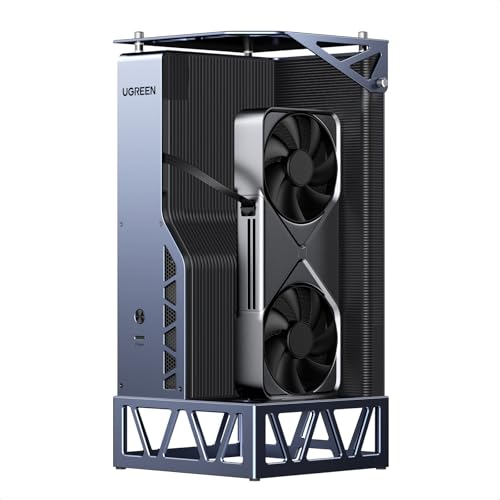
- 850W 80 Plus Gold PSU with ATX 3.1 support
- OCuLink and USB4 connectivity options
- Works with NVIDIA, AMD, and Intel GPUs
Best For: Power users who want a high-wattage eGPU dock for demanding desktop-class graphics cards.
Best for Thunderbolt 5 Speed

- Dual Thunderbolt 5 ports with 140W upstream PD
- PCIe 4.0 x4 GPU slot plus M.2 and SD expansion
- Compatible with ATX and SFX power supplies
Best For: Users who want a fast TB5 eGPU enclosure with extra storage and networking expansion.
Best Budget
AOOSTAR AG01 External GPU Dock

- 800W built-in PSU for power-hungry GPUs
- OCuLink connection with PCIe 4.0 x4 bandwidth
- Open-frame design fits long graphics cards
Best For: OCuLink users who want a high-power eGPU dock for full-size NVIDIA or AMD cards.
Best for PCIe 5.0 Builds

- PCIe 5.0 x4 bandwidth up to 128Gbps
- Supports standard ATX power supplies
- Flexible shielded 30cm cable and LED status lights
Best For: NVMe-only laptops, NUCs, or mini PCs pairing a modern GPU with a standard ATX PSU.
Best for High-Power OCuLink Builds

- 800W built-in PSU for GPUs up to 600W
- OCuLink connection for high-bandwidth eGPU use
- Open-frame design fits large cards like RTX 4090
Best For: OCuLink-equipped systems that need a high-wattage eGPU dock for flagship graphics cards.
Best for High-Speed OCuLink Builds

- PCIe 4.0 x4 / 64Gbps OCuLink connection
- Supports standard ATX PSUs and full-size GPUs
- Detachable enclosure with durable gold-plated contacts
Best For: PC builders who want a fast OCuLink eGPU dock and already have an ATX power supply.
Best for High-Power GPU Builds

- Supports RTX 4090 and RX 7900 XTX-class cards
- Uses standard ATX/SFX power supplies
- Oculink-based dock for bandwidth-focused builds
Best For: Enthusiasts who want a flexible high-wattage eGPU setup with a separate PSU.
Best for High-Power Builds – UGREEN 850W eGPU Dock
If you want an external gpu dock with power supply that can handle demanding desktop-class cards, this UGREEN option is built around a built-in 850W ATX 3.1 PSU and modern OCuLink/USB4 connectivity. It’s a strong fit for buyers who want more power headroom than typical slim docks and plan to use a laptop, handheld, or mini PC as a flexible workstation or gaming setup.
Best For: Users pairing high-performance GPUs with laptops, handhelds, or mini PCs who want an all-in-one dock and power solution.
Pros:
- 850W 80 Plus Gold power supply gives plenty of overhead for power-hungry GPUs.
- Supports OCuLink and USB4 for versatile high-speed host connections.
- ATX 3.1 design is a plus for modern GPU power delivery needs.
- Compatible with NVIDIA, AMD, and Intel graphics cards.
Cons:
- Larger and less portable than compact eGPU enclosures.
- Price may be hard to justify if you only need light external graphics support.
- Requires a separate GPU purchase, so total system cost can climb quickly.
Overall, this is a practical pick if you care more about power capacity and connection flexibility than compact size. For buyers comparing an external gpu dock with power supply, it stands out as a serious foundation for performance-focused builds.
Best for Thunderbolt 5 Speed – PELADN S-3 eGPU Dock
If you want an external gpu dock with power supply support built around newer Thunderbolt 5 hardware, the PELADN S-3 is a flexible pick. It combines dual 80Gbps Thunderbolt 5 ports, a 64Gbps PCIe 4.0 x4 graphics slot, and broad compatibility with modern laptops, mini PCs, and graphics cards.
Best For: Buyers who want a high-bandwidth eGPU dock with built-in expandability for storage, networking, and modern TB5 systems.
Pros:
- Dual Thunderbolt 5 ports with up to 140W PD on the upstream link
- PCIe 4.0 x4 slot plus PCIe 3.0 M.2 and SD 4.0 expansion
- Supports ATX and SFX power supplies for flexible builds
- Includes 2.5G Ethernet and USB 3.2 Gen2 Type-A
Cons:
- Requires a separate compatible power supply
- Thunderbolt 5 benefits are best realized on newer devices
- Bulkier than simpler plug-and-play eGPU enclosures
This is a strong choice if you want an external gpu dock with power supply compatibility and extra I/O in one enclosure. It makes the most sense for users who plan to pair a high-end GPU with a modern TB5 laptop or mini PC.
Best Budget – AOOSTAR AG01 External GPU Dock
The AOOSTAR AG01 is an external gpu dock with power supply built for desktop-class graphics cards, thanks to its integrated 800W PSU and OCuLink connection. It’s a practical pick if you want a no-frills enclosure that can handle demanding NVIDIA or AMD cards, as long as your laptop or mini PC already has OCuLink support.
Best For: Users with OCuLink-equipped systems who want a high-power eGPU dock for full-size, high-draw GPUs.
Pros:
- Built-in 800W power supply supports most current graphics cards
- Open-frame metal design fits long GPUs without length restrictions
- OCuLink connection offers strong PCIe 4.0 x4 bandwidth
- Compatible with Windows and Mac systems that support OCuLink
Cons:
- Only works with devices that have an OCuLink port
- OCuLink is not hot-pluggable on this dock, so power-off removal is required
- Built-in PSU powers the dock only, not the host device
If you already have the right port and want an external gpu dock with power supply that can support serious graphics hardware, the AG01 stands out for raw capacity more than convenience. It’s better for performance-focused builds than for plug-and-play portability.
Best for Flexible Power Inputs – PCIE 3.0 x16 eGPU Dock, 22Gbps
If you want an external gpu dock with power supply that gives you multiple ways to feed power and broad GPU compatibility, this dock is built for practical desktop-style performance on Thunderbolt 3/4 and USB4 systems. It’s a solid pick for Windows laptops, handheld PCs, and other supported devices when you need an external graphics setup for editing, AI work, or gaming.
Best For: Buyers who need a versatile eGPU dock with several power-input options and wide NVIDIA/AMD support.
Pros:
- Flexible power options: PD 3.0, 8-pin CPU, Molex, or DC5521
- Works with Thunderbolt 3, Thunderbolt 4, and USB4 systems
- Supports a wide range of NVIDIA and AMD GPUs
- Includes a Thunderbolt 4 cable in the box
Cons:
- 22Gbps bandwidth is below full desktop PCIe performance
- USB4 compatibility may require BIOS setup on some devices
- Not a great fit for Intel graphics cards
Overall, this is a flexible external gpu dock with power supply for users who care more about compatibility and power-input options than absolute top-end bandwidth. It makes the most sense for mixed-use setups where one dock may move between different devices or power sources.
Best High-Power Pick – AOOSTAR AG02 OCuLink eGPU Dock
If you want an external gpu dock with power supply that can handle serious desktop-class cards, the AOOSTAR AG02 is built for exactly that job. It combines OCuLink and USB4 support with an 800W server-grade PSU, making it a strong fit for compatible Windows 11 laptops, mini PCs, and handhelds that need a fast, flexible GPU upgrade path.
Best For: Windows 11 users who want a high-wattage eGPU dock for powerful graphics cards and OCuLink-compatible hosts.
Pros:
- 800W built-in PSU with up to 600W GPU power output
- OCuLink plus USB4 support for broad host-device compatibility
- PCIe x16 slot and 3 x 8-pin power connectors
- Compact dock format for desktops, mini PCs, and laptops
Cons:
- GPU is not included
- OCuLink is not hot-pluggable, so setup requires powering down first
- Compatibility can vary by device, firmware, cable, and GPU model
As an external gpu dock with power supply, the AG02 stands out for buyers who care more about wattage and expansion flexibility than plug-and-play simplicity. If your host device is confirmed compatible, it offers the kind of headroom that makes high-end eGPU builds more practical.
Best for PCIe 5.0 Builds – OwlTree PCIe 5.0 x4 eGPU Dock
If you need an external gpu dock with power supply support for a mini PC, NUC, or laptop with an NVMe M.2 slot, this OwlTree dock is built for high-bandwidth PCIe 5.0 setups. It targets users who want to run newer GPUs off a compact system while keeping the power and cable routing flexible.
Best For: Builders using NVMe-only M.2 hosts who want a PCIe 5.0 x4 dock for modern RTX or RX cards and a standard ATX power supply.
Pros:
- Supports PCIe 5.0 x4 bandwidth up to 128Gbps for modern GPUs
- Works with standard ATX power supplies for stronger, more familiar power setups
- Flexible 30cm shielded cable design helps reduce strain and interference
- Detachable dock design and LED indicators make it easier to manage and monitor
Cons:
- GPU and power supply are not included
- Requires an NVMe-protocol M.2 slot and does not support M.2 SATA, WiFi, or WWAN
- ATX power supplies only, so it is less convenient than compact PSU options
For buyers who want an external gpu dock with power supply compatibility aimed at newer graphics cards, this is a capable but specialized choice. It makes the most sense if your host system has the right NVMe M.2 connection and you already plan to use a full-size ATX PSU.
Best for High-Power OCuLink Builds – AOOSTAR AG02 EGPU Dock
If you want an external gpu dock with power supply for a high-end desktop-class card, the AOOSTAR AG02 stands out with its built-in 800W PSU and support for GPUs up to 600W. The open-frame metal design keeps large cards like the RTX 4090 or RX 7900 XTX physically unconstrained, while OCuLink helps deliver the kind of bandwidth power users expect for gaming, AI, or creator workloads.
Best For: OCuLink-equipped laptops, mini PCs, and handhelds that need a high-wattage eGPU dock for top-tier graphics cards.
Pros:
- Built-in 800W power supply supports demanding GPUs up to 600W
- OCuLink connection offers strong PCIe 4.0 x4 bandwidth
- Open metal frame fits long, full-size graphics cards
- Supports Windows and macOS, with hot-swap on compatible TGX devices
Cons:
- Requires an OCuLink-compatible host device
- OCuLink is not hot-pluggable, so power-down is required before disconnecting
- Not a universal dock for devices like Legion Go or Xbox Ally X
This is a strong pick if you specifically need an external gpu dock with power supply that can handle power-hungry cards without adding a separate PSU. Just make sure your host has OCuLink support, since that compatibility is the main deciding factor here.
Best for High-Speed OCuLink Builds – PCIe 4.0 x4 eGPU Dock
If you want an external gpu dock with power supply support for a laptop or mini PC, this OCuLink-to-PCIe x16 enclosure is built for high-bandwidth setups. It delivers PCIe 4.0 x4 throughput, uses a detachable design for easier transport, and accepts standard ATX power supplies for full-size graphics cards.
Best For: Users who already have an ATX PSU and want a fast OCuLink eGPU dock for desktop-class GPUs.
Pros:
- PCIe 4.0 x4 / 64Gbps link for strong external GPU performance
- Supports standard ATX power supplies and large cards like RTX 4090-class models
- Detachable enclosure design plus 10μ gold-plated contacts for durability
- Includes a flexible, shielded SFF-8611 cable to help reduce port stress
Cons:
- GPU and power supply are not included
- OCuLink is not hot-pluggable, so shutdown is required before disconnecting
- ATX PSU support only; not a turnkey all-in-one enclosure
This is a strong pick if you want an external gpu dock with power supply compatibility and care more about speed and full-size GPU support than plug-and-play convenience. It suits builders who already have the parts and want a stable, high-bandwidth OCuLink solution.
Best for High-Power GPU Builds – MINISFORUM DEG1 eGPU Dock
If you need an external gpu dock with power supply for a serious desktop-class card, the MINISFORUM DEG1 is built around flexible ATX/SFX PSU support and Oculink expansion. It’s aimed at users who want a more practical way to connect high-end GPUs like the RTX 4090 or RX 7900 XTX without committing to a full enclosure.
Best For: Enthusiasts building a high-wattage eGPU setup with an existing ATX or SFX power supply and Oculink-compatible host device.
Pros:
- Supports large, power-hungry GPUs such as RTX 4090 and RX 7900 XTX
- Works with standard ATX/SFX power supplies for easier parts matching
- Oculink connection helps maximize external GPU bandwidth
- Open design can simplify access and hardware swaps
Cons:
- Requires a compatible PSU and separate GPU purchase
- Not as compact or tidy as a fully enclosed dock
- Best suited to users comfortable with a more hands-on setup
As an external gpu dock with power supply, this MINISFORUM model makes the most sense if you already know your wattage needs and want maximum flexibility rather than an all-in-one enclosure. It’s a strong pick for builders who prioritize compatibility with big cards and standard power hardware.
Best for High-Power GPUs – MINISFORUM DEG1 eGPU Dock
If you want an external gpu dock with power supply support for a serious desktop-class graphics card, the MINISFORUM DEG1 is built around Oculink and full-size ATX/SFX PSU compatibility. It’s a practical pick for users who already have a compatible host system and want a flexible open-frame dock that can handle higher-end cards without forcing a proprietary power solution.
Best For: Enthusiasts building a powerful Oculink-based eGPU setup with their own ATX or SFX power supply.
Pros:
- Supports ATX and SFX standard power supplies for flexible power planning
- Designed for large, high-wattage GPUs like RTX 4090 and RX 7900 XTX
- Oculink connection can offer a cleaner, more capable eGPU link than USB-based options
- Open dock design makes swapping hardware straightforward
Cons:
- Requires an Oculink-compatible host system to use
- Open-frame design offers less protection than a closed enclosure
- Power supply is not included, so total setup cost can be higher
Overall, the DEG1 is a strong fit if you already have the parts and want an external gpu dock with power supply support that prioritizes compatibility with high-end cards over plug-and-play convenience.
How We Picked the Best External GPU Dock with Power Supply
We prioritized real-world compatibility, modern connection standards, and power capacity. For an External GPU Dock with Power Supply, the best options support common graphics cards, provide enough wattage headroom, and use interfaces such as OCuLink, USB4, or Thunderbolt where available. We also looked for designs that make installation easier and reduce the risk of bottlenecks.
Quick Comparison
In general, OCuLink-based docks offer the lowest-overhead GPU performance, while USB4 and Thunderbolt options are often easier to use with laptops and smaller systems. Higher-wattage units are better suited to flagship GPUs, while more modest power supplies may be enough for midrange cards. Choose based on your host device first, then match the dock to the graphics card you plan to install.
Key Buying Factors for an External GPU Dock with Power Supply
Connection Type
Check whether your laptop or mini PC supports OCuLink, USB4, or Thunderbolt. The interface determines both compatibility and performance, and it matters more than raw power alone.
Power Supply Headroom
Make sure the included PSU can handle your GPU’s peak draw plus any accessories. A larger power supply offers more flexibility, especially for higher-end cards and future upgrades.
GPU Size and Clearance
Confirm support for card length, thickness, and cooling design. Some docks fit only standard dual-slot cards comfortably, while others are better suited to large flagship models.
Platform Compatibility
Most buyers should verify Windows support, BIOS settings, and host-device requirements before purchase. Compatibility can vary more than the marketing suggests.
Who Should Buy Which External GPU Dock with Power Supply?
Choose a high-power OCuLink dock if you want the best performance from a desktop-grade GPU. Pick USB4 or Thunderbolt if ease of setup and broader laptop compatibility matter most. If you are using a compact PC, a mini workstation, or a gaming laptop, look for an External GPU Dock with Power Supply that matches your existing ports first and your target GPU second.
If your priority is top-tier graphics with fewer upgrade limits, aim for a dock with strong PSU capacity, stable cable options, and enough physical room for the card you actually plan to use.
