
An OCuLink eGPU dock can give a compatible mini PC, handheld, or laptop access to a desktop graphics card without replacing the whole system. The catch: the port, cable, power supply, and GPU all need to work together.
These 10 picks span straightforward PCIe 4.0 docks, a PCIe 5.0 option, and a hybrid dock with USB4 connectivity. Use the guide below to narrow down the right setup before you buy.
Best 10 External GPU Dock with Oculink Picks for 2026
Best All-Around Kit
RGEEK PCIe 4.0 OCuLink eGPU Dock

- PCIe 4.0 x4, up to 64 Gbps
- Shielded 50 cm cable included
- ATX PSU bracket and startup controls
Best For: OCuLink users building an ATX-powered GPU setup
Best for Clear Compatibility Guidance
VORZOKISPL PCIe 4.0 OCuLink Dock
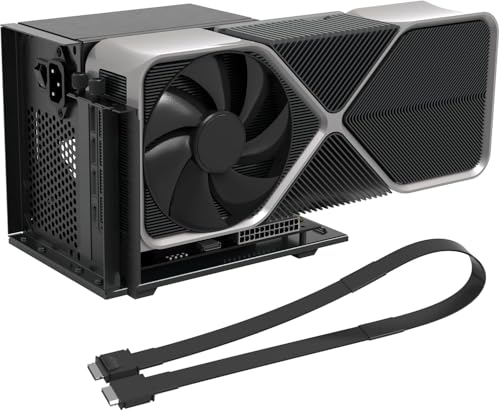
- Native OCuLink or separate adapter required
- 50 cm shielded cable and screws included
- ATX bracket and startup controls
Best For: Buyers verifying host compatibility before assembly
Best Compact Option

- Compact 5.51 × 2.56-inch footprint
- PCIe 4.0 x4, up to 64 Gbps
- Supports ATX and SFX power supplies
Best For: Space-conscious ATX or SFX eGPU builds
Best PCIe 5.0-Ready Pick
RGEEK Aluminum OCuLink eGPU Dock
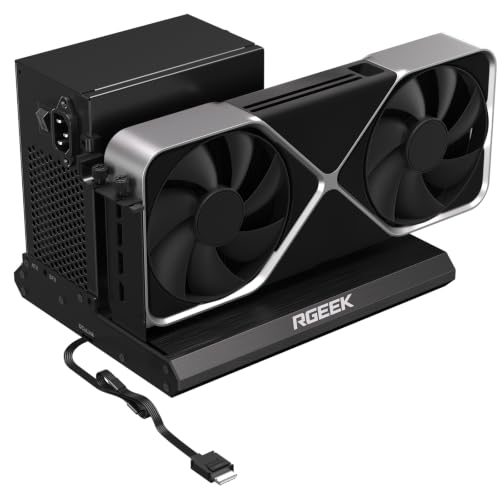
- PCIe 5.0 x4 support, up to 128 Gbps
- Attached 50 cm cable and aluminum body
- Works with ATX, SFX, or SFX-L PSUs
Best For: Builds with a PCIe 5.0-capable OCuLink connection
Cable-Included Pick
OwlTree PCIe 4.0 OCuLink eGPU Dock
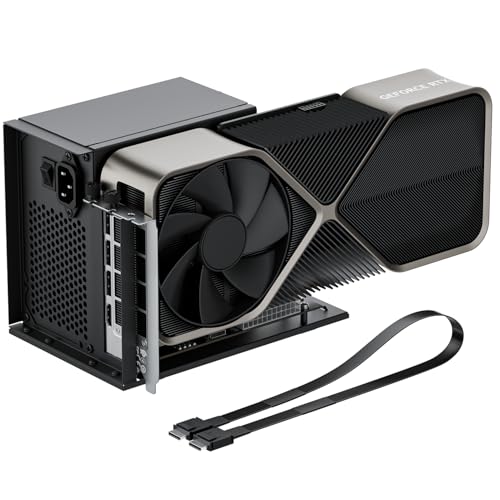
- 50cm OCuLink cable included
- PCIe 4.0 x4 connection
- Requires a standard ATX power supply
Best For: An OCuLink setup needing an included cable
OCuLink-Only Pick

- OCuLink PCIe 4.0 x4 connection
- Supports ATX and SFX power supplies
- No Thunderbolt support
Best For: OCuLink-equipped hosts needing ATX or SFX power support
Flexible Power Pick

- Supports ATX and SFX power supplies
- PCIe 4.0 x4 OCuLink connection
- Open frame accommodates long GPUs
Best For: Flexible-power mini PC or laptop builds
Straightforward ATX Pick

- PCIe 4.0 x4, rated at 64 Gbps
- Includes 50 cm shielded cable
- Requires a separate ATX power supply
Best For: Existing GPU and ATX PSU builds
PCIe 5.0 Pick

- PCIe 5.0 x4 support with compatible host
- Attached, shielded 50 cm cable
- ATX power supply sold separately
Best For: Compatible PCIe 5.0 eGPU builds
Best All-Around Kit – RGEEK PCIe 4.0 OCuLink eGPU Dock
This external gpu dock with oculink gives a laptop or mini PC with a suitable OCuLink connection a PCIe x16 slot for a desktop graphics card. The kit includes a 50 cm shielded cable, but you must supply the GPU and an ATX power supply.
Best For: Buyers who want a PCIe 4.0 x4 dock with a cable and an ATX PSU mounting bracket.
Pros:
- PCIe 4.0 x4 connection rated up to 64 Gbps.
- Includes a shielded 50 cm OCuLink cable.
- Open frame, ATX PSU bracket, status LEDs, and automatic or forced startup modes.
Cons:
- GPU and ATX power supply are sold separately.
- Cables must be connected or disconnected with the power off.
It is a practical package if you already have an OCuLink-capable host and plan to use an ATX PSU. Budget for the remaining parts and install your GPU drivers before first use.
Best for Clear Compatibility Guidance – VORZOKISPL PCIe 4.0 OCuLink Dock
If you are checking connections before buying an external gpu dock with oculink, this model spells out its requirements: a native OCuLink port or a compatible adapter for a spare M.2 NVMe or desktop PCIe slot. It does not connect through USB-C, USB4, or Thunderbolt.
Best For: Buyers assembling an OCuLink eGPU setup who want a cable, mounting hardware, and explicit host-connection guidance.
Pros:
- PCIe 4.0 x4 link rated up to 64 Gbps, with a 50 cm shielded cable included.
- Open-frame design and ATX power bracket accommodate different GPU sizes.
- Status LEDs and automatic or forced startup modes.
Cons:
- GPU, ATX PSU, and any needed host adapter are not included.
- Requires assembly and does not support hot-plugging.
The included screws, illustrated manual, and video guide help with assembly, but verify your host connection first. This is an OCuLink dock, not a USB-C eGPU enclosure.
Best Compact Option – MINISFORUM DEG1 OCuLink Dock
The MINISFORUM DEG1 is a compact external gpu dock with oculink, measuring approximately 5.51 by 2.56 by 0.79 inches. Its OCuLink 4i uplink connects to a PCIe x16 graphics-card slot over a PCIe 4.0 x4 link rated up to 64 Gbps.
Best For: Buyers who want a small dock board and the option to use either an ATX or SFX power supply.
Pros:
- Compact footprint with an open design that does not impose a GPU length restriction.
- Supports ATX and SFX power supplies.
- Locking OCuLink connector and LED-equipped forced-start control.
Cons:
- Follow-up startup is limited to MINISFORUM mini PCs using original cables.
- The OCuLink connection cannot be hot-plugged.
The small board offers flexibility for a space-conscious build, but the finished setup still needs room for a graphics card and PSU. Check your host and cable arrangement before relying on synchronized startup.
Best PCIe 5.0-Ready Pick – RGEEK Aluminum OCuLink eGPU Dock
This aluminum external gpu dock with oculink supports PCIe 5.0 x4, rated up to 128 Gbps, and is backward compatible with PCIe 4.0 and 3.0. That higher link speed requires a PCIe 5.0-capable host connection; most existing OCuLink ports top out at PCIe 4.0 speeds.
Best For: Buyers planning a PCIe 5.0-capable OCuLink build who also want broad PSU-size support.
Pros:
- PCIe 5.0 x4 support with backward compatibility.
- Aluminum construction and an attached 50 cm cable.
- Supports ATX, SFX, and SFX-L power supplies without a stated GPU size restriction.
Cons:
- A PCIe 5.0-to-OCuLink adapter, if needed for full speed, is sold separately.
- GPU and PSU are not included; hot-plugging is unsupported.
The key buying decision is your host’s PCIe generation: the dock can support a faster link, but a PCIe 4.0 OCuLink port will not deliver PCIe 5.0 bandwidth.
Most Versatile – MINISFORUM DEG2 Dual-Mode eGPU Dock
If you want an external gpu dock with oculink but also need a USB4 V2 connection, the MINISFORUM DEG2 offers both. Its hardware switch lets you choose between an all-in-one docking mode and a GPU-focused mode.
Best For: Users who switch between OCuLink and USB4 V2 hosts and want storage on the dock.
Pros:
- Supports OCuLink at up to 64Gbps and USB4 V2 at up to 80Gbps.
- Includes an M.2 2280 NVMe slot for files or AI models.
- Accepts standard ATX or SFX power supplies.
- Built-in signal re-driver is designed to stabilize PCIe transfers.
Cons:
- Requires a separate power supply and graphics card to complete an eGPU setup.
Choose this dock if connection flexibility and dock-mounted storage matter more to you than a basic OCuLink-only setup.
Cable-Included Pick – OwlTree PCIe 4.0 OCuLink eGPU Dock
The OwlTree is a straightforward external gpu dock with oculink for a compatible laptop or mini PC. It includes a 50cm OCuLink cable and connects through PCIe 4.0 x4, rated at 64Gbps.
Best For: Buyers who want an OCuLink dock with a cable included and plan to use an ATX power supply.
Pros:
- Includes a 50cm SFF-8611 male-to-male cable.
- Open dock accommodates graphics cards of various lengths.
- Flat, flexible cable uses shielding and EMI materials.
- Status LEDs provide device feedback.
Cons:
- Graphics card and power supply are not included.
- Supports standard ATX power supplies only.
- OCuLink is not hot-pluggable; shut down the computer before disconnecting it.
This is a practical choice if an included cable helps simplify your purchase and you do not need SFX power-supply support.
OCuLink-Only Pick – MINISFORUM DEG1 eGPU Dock
The MINISFORUM DEG1 is an external gpu dock with oculink for buyers who do not need a Thunderbolt connection. It links to a host through OCuLink 4i at PCIe 4.0 x4 and provides a PCIe x16 slot operating at PCIe 4.0 x4.
Best For: Users with an OCuLink-equipped host who want a dock that supports ATX or SFX power supplies.
Pros:
- Supports standard ATX and SFX power supplies.
- Designed for graphics cards such as the RTX 4090 and RX 7900 XTX.
- Offers a follow-start function with compatible MINISFORUM Mini PCs and original wires.
Cons:
- Does not support Thunderbolt.
- GPU and power supply are not included.
- OCuLink is not hot-pluggable; turn off the computer before disconnecting it.
Pick the DEG1 when your host already has OCuLink and ATX/SFX power-supply flexibility is more useful to you than an additional host interface.
Flexible Power Pick – AOOSTAR EG01 OCuLink GPU Dock
If you want an external gpu dock with oculink that offers more power-supply flexibility, the AOOSTAR EG01 supports ATX or SFX supplies and includes a 6-pin DC output for a compatible setup. Its open frame leaves room for long graphics cards.
Best For: Mini PC or laptop users who want an open-frame dock with ATX/SFX power-supply options.
Pros:
- PCIe 4.0 x4 OCuLink connection rated at 64 Gbps.
- Supports graphics cards drawing up to 350 W, according to the supplied specifications.
- Includes an OCuLink cable, 6-pin cable, and holder.
Cons:
- Standard OCuLink connections cannot be hot-plugged; power off before disconnecting.
- Open-frame design leaves the graphics card exposed.
The EG01 stands out for its ATX/SFX support and compact, unrestricted layout. Check your host’s OCuLink compatibility and power requirements before choosing a GPU.
Straightforward ATX Pick – UTLGAMENG OCuLink eGPU Dock
This external gpu dock with oculink is a straightforward option if you already have a graphics card and a standard ATX power supply. It pairs a PCIe 4.0 x4 OCuLink connection with an open-frame PCIe x16 slot and includes a 50 cm shielded cable.
Best For: Laptop or mini PC owners building an eGPU setup around an existing GPU and ATX power supply.
Pros:
- PCIe 4.0 x4 connection rated at 64 Gbps.
- Open frame has no stated graphics-card length limit.
- Includes a 50 cm shielded OCuLink cable and user manual.
Cons:
- GPU and ATX power supply must be supplied separately.
- OCuLink does not support hot-plugging; shut down before connecting or disconnecting.
It is a sensible bare-bones choice when you do not need extra power-supply formats. Install the appropriate GPU drivers before first use, as the manufacturer advises.
PCIe 5.0 Pick – RGEEK OCuLink eGPU Dock
The RGEEK is an external gpu dock with oculink for buyers planning a PCIe 5.0-capable setup. It supports PCIe 5.0 x4 with a stated 128 Gbps bidirectional bandwidth, but reaching that speed requires a suitable PCIe 5.0 M.2 slot or OCuLink adapter; the adapter is not included.
Best For: Users planning a compatible PCIe 5.0 external GPU build and willing to provide an ATX power supply.
Pros:
- Supports PCIe 5.0 x4 and is backward compatible with PCIe 4.0/3.0.
- Includes an attached, shielded 50 cm OCuLink cable.
- Status LEDs plus automatic and forced-start modes offer setup visibility and control.
Cons:
- Graphics card, ATX power supply, and any needed PCIe 5.0 adapter are not included.
- Cables must not be connected or disconnected while powered on.
Its higher-speed support is useful only when the host connection can match it. Budget for a suitable ATX supply; RGEEK advises choosing one rated 40% above the GPU’s full-load power.
How We Picked the Best External GPU Dock with Oculink
We focused on the connection and setup details that matter most when comparing an External GPU Dock with Oculink: advertised PCIe generation, power-supply options, included cables, physical layout, and any additional host connections. Product listings do not establish real-world frame rates or universal compatibility, so treat bandwidth figures as connection specifications—not performance guarantees. The two RGEEK PCIe 5.0 entries appear to share a name; check the exact listing and revision before assuming they differ.
Quick Comparison
Most docks here advertise OCuLink PCIe 4.0 x4, commonly listed as 64Gbps. That is the straightforward choice for a host with a matching PCIe 4.0 OCuLink port. The RGEEK listing advertises PCIe 5.0 x4 and 128Gbps, but you need a Gen 5-capable host connection to benefit from that higher link specification. The MINISFORUM DEG2 adds USB4 connectivity and an M.2 NVMe slot for buyers who want more than an OCuLink-only dock. MINISFORUM DEG1 listings emphasize ATX/SFX power-supply support and a force-power-on feature; confirm what is included in the particular package you choose.
Key Buying Factors for an External GPU Dock with Oculink
Host Port and Cable
Confirm that your computer has a usable OCuLink connection; USB-C ports are not interchangeable with OCuLink. Check connector type, cable length, and whether a cable is included. Some listings specify SFF-8611 or SFF-8612 connectors. An internal M.2-to-OCuLink adapter may be possible for some systems, but it can require opening the computer and routing a cable outside its chassis.
Power and GPU Fit
Check whether the dock includes a power supply or requires your own ATX/SFX unit. Match the supply’s wattage and PCIe power connectors to your graphics card, allowing headroom for power spikes. Also check GPU slot thickness, length, and airflow: an open dock still needs a stable place to sit and unobstructed cooling. Do not assume a quoted power rating covers every high-end card.
Bandwidth and Everyday Use
OCuLink PCIe 4.0 x4 and PCIe 5.0 x4 describe maximum link capabilities, not guaranteed gaming gains. Host hardware, GPU choice, workload, and display routing can all affect results. For a simpler setup, plan to connect your monitor directly to the graphics card. Follow your device maker’s instructions before connecting or disconnecting the dock; do not assume hot-plug support.
Who Should Buy Which External GPU Dock with Oculink?
Choose a basic PCIe 4.0 x4 dock if your host has a matching port and you already have a suitable PSU. Consider a DEG1 listing if ATX/SFX support and force-power-on controls suit your build. Look at the AOOSTAR EG01 if its stated DC-power arrangement fits your intended GPU, but verify the full power requirements first. Choose the DEG2 if you need its additional USB4 connection or NVMe slot, after checking host compatibility. A PCIe 5.0 RGEEK dock makes the most sense for a confirmed Gen 5 host or a planned upgrade—not as an automatic speed boost for a Gen 4 system.
