
Choosing an external GPU dock for RTX 5090 is less about raw enclosure size and more about bandwidth, power delivery, and platform compatibility. The right dock can make a high-end GPU far more practical for a laptop, mini PC, or handheld setup.
In this roundup, we focus on docks and enclosures that are better suited to demanding modern graphics cards, with an eye on stable connections, power supply support, and real-world usability.
Best 10 External GPU Dock for Rtx 5090 Picks for 2026
Best PCIe 5.0 Dock
OwlTree PCIe 5.0 x4 NVMe eGPU Dock

- PCIe 5.0 x4 / 128Gbps link for modern high-end GPUs
- Works with NVMe M.2 hosts like mini PCs, NUCs, and laptops
- Flexible 50cm riser and ATX PSU mounting improve installation stability
Best For: NVMe-based compact systems that need a high-bandwidth eGPU dock for RTX 50-series cards.
Best for Thunderbolt 5 Laptops

- 80Gbps Thunderbolt 5 links with 140W PD
- Supports RTX 5090-class GPUs
- Adds M.2, SD 4.0, Ethernet, and USB-A
Best For: Thunderbolt 5 laptop and mini PC owners building a high-end RTX 5090 eGPU setup.
Best for RTX 50-Series Builders
MK-L18 Thunderbolt 4 eGPU Dock

- Supports RTX 5090 and other RTX 50-series GPUs
- 85W PD charging for compatible laptops and handhelds
- Open-frame aluminum build with strong airflow
Best For: RTX 5090 buyers using Thunderbolt 4 or USB4 systems who want a flexible, high-airflow enclosure.
Best Oculink Pick
MINISFORUM DEG1 Oculink eGPU Dock

- Oculink 4i to PCIe 4.0 x4 connection
- Supports ATX and SFX power supplies
- Open-frame design for large desktop GPUs
Best For: Oculink mini-PC owners who want a direct-connect dock for a high-end GPU.
Best for 40Gbps USB4 Builds
RIITOP USB4 eGPU Dock for RTX 5090

- Supports RTX 50-series GPUs over USB4/TB4
- Open design fits large high-end graphics cards
- Good for Windows, Linux, and AMD Mac setups
Best For: Users who want a simple high-bandwidth eGPU enclosure for modern flagship GPUs.
Best for ATX Power Builds
OwlTree PCIe 4.0 x4 OCuLink eGPU Dock
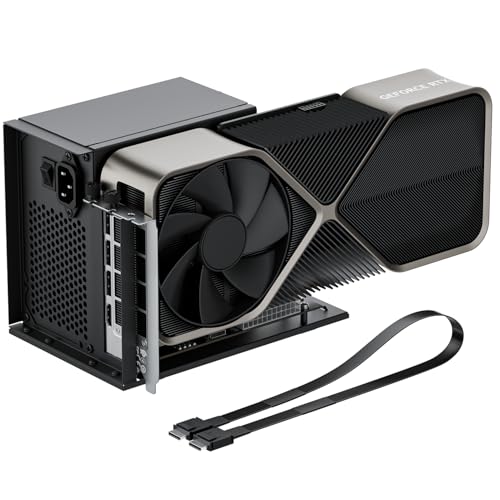
- PCIe 4.0 x4 OCuLink connection
- Supports big full-size GPUs and ATX PSUs
- Detachable dock with LED status indicators
Best For: Laptop and mini PC users building a high-power OCuLink eGPU setup with an ATX supply.
Best for RTX 50-Series Compatibility
GODLIY eGPU Dock Thunderbolt 3/4

- Supports TB3/TB4 and USB4 hosts
- Listed RTX 50-series compatibility, including RTX 5090 D
- 85W PD charging with extra hub-style ports
Best For: Users who want an RTX 50-series-ready eGPU dock for laptops, handhelds, and compact PCs.
Best PCIe 5.0 Dock – OwlTree PCIe 5.0 x4 NVMe eGPU Dock
If you need an external gpu dock for rtx 5090-class cards and want the highest-speed NVMe-to-PCIe link this dock can provide, OwlTree is built around PCIe 5.0 x4 bandwidth and a flexible 50cm riser cable. It is aimed at mini PC, NUC, and laptop users who already have an NVMe M.2 slot and want a practical way to run a full-size GPU with an external ATX power supply.
Best For: Enthusiasts with NVMe M.2 systems who want a PCIe 5.0 eGPU dock for high-end RTX 50-series cards and don’t mind supplying their own power supply and graphics card.
Pros:
- PCIe 5.0 x4 design with up to 128Gbps bandwidth
- Supports RTX 50-series and other full-size high-performance GPUs
- Detachable, flexible 50cm cable with shielding to help reduce interference
- Dual screw ATX PSU mounting adds stability
Cons:
- GPU and power supply are not included
- Requires an NVMe-protocol M.2 slot; SATA, WiFi, and WWAN M.2 slots are not supported
- Needs a standard ATX PSU of 500W or higher
This is a focused, hardware-heavy solution rather than a plug-and-play enclosure, but that’s exactly why it stands out as an external gpu dock for rtx 5090 upgrades. If your system has the right M.2 NVMe slot and you want a direct path to a top-tier card, OwlTree delivers the lane speed and flexibility many compact builds need.
Best for High-Power OCuLink Setups – AOOSTAR AG02 OCuLink eGPU Dock
If you need an external gpu dock for rtx 5090-class builds, the AOOSTAR AG02 stands out for its 800W built-in PSU, OCuLink input, and USB4 support. It’s designed to give compatible Windows laptops, mini PCs, and handhelds desktop-style expansion without requiring a separate power supply for the dock itself.
Best For: Power users with OCuLink or USB4 devices who want a high-wattage eGPU dock for demanding desktop GPUs and flexible Windows 11 setups.
Pros:
- 800W server-grade PSU with up to 600W GPU power output
- OCuLink and USB4 support for flexible host-device connections
- Compact dock design with PCIe x16 slot and triple 8-pin power leads
- Built for Windows 11 systems that can handle high-performance eGPU use
Cons:
- Not recommended for RTX 5090 / 5090D setups
- OCuLink is not hot-swappable, so power-off is required for cable changes
- Compatibility can vary by host device, firmware, drivers, and cable quality
For most enthusiasts, this is a strong high-power expansion dock, but it is not the right external gpu dock for rtx 5090 if that GPU is your target. It makes more sense for users with supported cards that fit within its power and compatibility limits.
Best for Thunderbolt 5 Laptops – PELADN S-3 eGPU Dock
If you want an external gpu dock for rtx 5090 that also keeps up with modern Thunderbolt 5 laptops and mini PCs, the PELADN S-3 is built around speed, flexibility, and broad card support. Its 80Gbps TB5 links, 64Gbps PCIe 4.0 x4 slot, and 140W power delivery make it a practical pick for high-end desktop GPU setups without giving up expansion options.
Best For: Buyers who want a Thunderbolt 5 eGPU enclosure for an RTX 5090 build and also value extra storage, networking, and charging support.
Pros:
- Thunderbolt 5 support with up to 140W PD for compatible laptops and mini PCs
- Broad GPU compatibility, including RTX 5090-class cards
- 64Gbps PCIe 4.0 x4 slot plus PCIe 3.0 M.2 and SD 4.0 expansion
- Includes 2.5G Ethernet and USB 3.2 Gen2 Type-A for extra I/O
Cons:
- Requires your own ATX or SFX power supply
- Bulkier than simpler eGPU docks with fewer expansion features
- Overkill if you only need a basic plug-and-play GPU enclosure
For power users, this is one of the more flexible options in the external gpu dock for rtx 5090 category because it combines next-gen bandwidth with storage, networking, and charging in a single enclosure. If you can supply your own PSU, it offers a strong balance of performance and expandability.
Best for RTX 50-Series Builders – MK-L18 Thunderbolt 4 eGPU Dock
If you need an external gpu dock for rtx 5090-class cards, the MK-L18 is built around modern Thunderbolt 3/4 and USB4 systems, with support for NVIDIA and AMD GPUs plus Windows 10/11 and Linux. Its certified controller and PCIe 4.0 x16 mode make it a strong fit for users who want a current-generation enclosure for demanding AI or compute setups.
Best For: Buyers pairing an RTX 5090 or other RTX 50-series card with a Thunderbolt 4/USB4 laptop, NUC, or handheld.
Pros:
- Supports RTX 5090, 5080, 5070 Ti, 5070, and AMD RX 7000 series cards
- 85W USB-C power delivery can charge compatible devices through one cable
- Open-frame aluminum design improves airflow and avoids GPU length limits
- Certified JHL7540/7440 controller and PCIe 4.0 x16 mode for stable performance
Cons:
- Requires Thunderbolt 3/4 or USB4; standard USB-C ports are not supported
- Not the best pick if you want a compact, fully enclosed dock
- Performance depends on host bandwidth and the GPU’s power needs
As an external gpu dock for rtx 5090 builds, the MK-L18 stands out for broad GPU support, charging, and an open-air layout that favors thermals over desk-friendly size. It is most compelling for users who care more about compatibility and stability than a polished enclosure look.
Best Oculink Pick – MINISFORUM DEG1 Oculink eGPU Dock
If you need an external gpu dock for rtx 5090 and already have an Oculink-enabled system, the MINISFORUM DEG1 is a straightforward expansion dock built for high-bandwidth PCIe 4.0 x4 links. It skips Thunderbolt entirely and focuses on a direct Oculink connection, which makes it a better fit for users who want maximum compatibility with desktop-class GPUs and a separate ATX or SFX power setup.
Best For: Oculink mini-PC owners who want a simple, open-frame dock for a flagship GPU and don’t need Thunderbolt support.
Pros:
- Oculink 4i to PCIe 4.0 x4 design is aimed at higher-throughput external GPU use
- Supports ATX and SFX power supplies for flexible builds
- Open docking layout can make large cards easier to mount and service
- Compatible with demanding GPUs like the RTX 4090 and RX 7900 XTX
Cons:
- Does not support Thunderbolt connections
- Requires powering down before connecting or disconnecting the Oculink cable
- Power supply and GPU are not included
For an external gpu dock for rtx 5090, this is the kind of purpose-built Oculink enclosure that makes sense if your PC already supports the interface. Just make sure your host system, PSU, and card size all line up before buying.
Best for 40Gbps USB4 Builds – RIITOP USB4 eGPU Dock for RTX 5090
If you need an external gpu dock for rtx 5090-class cards, the RIITOP enclosure is built around a full 40Gbps USB4/Thunderbolt 4 connection and a PCIe 4.0 x16 slot. It’s a practical pick for laptops, mini PCs, and older systems that need desktop-grade graphics for gaming, editing, rendering, or AI workloads.
Best For: Users who want a straightforward USB4/TB4 eGPU enclosure for high-end NVIDIA or AMD cards on compatible Windows, Linux, or AMD-based Mac setups.
Pros:
- Supports RTX 50-series GPUs, including the RTX 5090 D, over USB4/TB4
- Open-frame design fits large cards without tight enclosure limits
- Works with Windows 10/11, Linux, and AMD GPU setups on compatible Macs
- Includes cable and mounting hardware for a cleaner install
Cons:
- GPU and power supply are not included
- Requires a true 40Gbps full-function USB4 or Thunderbolt 4 port
- Mac support is AMD-only, with no NVIDIA driver support
Overall, this is a solid external gpu dock for rtx 5090 builds if you already have the right laptop or host device and want a simple enclosure that prioritizes compatibility with modern high-power graphics cards.
Best for Oculink Builds – MINISFORUM DEG1 eGPU Dock
If you need an external gpu dock for rtx 5090 and your setup supports Oculink, the MINISFORUM DEG1 is a straightforward dock-style enclosure built around PCIe 4.0 x4 connectivity. It is designed for desktop-class cards and pairs with ATX or SFX power supplies, making it a practical choice for high-wattage GPUs and custom compact builds.
Best For: Oculink-capable mini PCs and small-form-factor systems that need a flexible external GPU setup with a standard ATX/SFX power supply.
Pros:
- Oculink 4i link offers PCIe 4.0 x4 bandwidth for external GPU use
- Supports ATX and SFX power supplies for better PSU compatibility
- Works with large flagship cards like RTX 4090 and RX 7900 XTX
- Compact dock layout keeps the enclosure simple and space-efficient
Cons:
- Oculink is not hot-pluggable, so the system must be powered off to connect or disconnect
- Follow-start is limited to MINISFORUM mini PCs with original cables
- Requires careful handling because the locking connector can be damaged if forced
For buyers comparing an external gpu dock for rtx 5090, this model makes the most sense if you already have Oculink and want a no-frills dock that leans on your own power supply choice. It is less universal than Thunderbolt options, but it can be a strong fit for users who prioritize compatibility with desktop-grade graphics cards over plug-and-play convenience.
Best for High-Wattage eGPU Builds – PCIE 3.0 x16 22Gbps eGPU Dock
If you need an external gpu dock for rtx 5090, this PCIe 3.0 x16 eGPU dock is built around wide compatibility, stable Thunderbolt 3/4 and USB4 support, and a straightforward power setup. It is a practical pick for Windows laptops, Linux systems, consoles with the right ports, and power users who want an easy way to run a high-end desktop GPU externally.
Best For: Users who want a flexible, high-power eGPU dock for an RTX 5090 or other demanding NVIDIA/AMD cards.
Pros:
- Supports a wide range of NVIDIA and AMD GPUs, including the RTX 5090
- Works with Thunderbolt 3, Thunderbolt 4, and USB4 devices
- Includes four power input options for more build flexibility
- Comes with a Thunderbolt 4 cable and power jumper cable
Cons:
- PCIe 3.0 x16 / 22Gbps bandwidth is solid, but not the fastest class available
- USB4 on some consoles may need a BIOS update
- Not ideal if you want a plug-and-play solution with minimal setup
This is a sensible external gpu dock for rtx 5090 buyers who care more about compatibility and power options than chasing the absolute highest enclosure speed. It fits best in builds where stability, flexibility, and broad GPU support matter most.
Best for ATX Power Builds – OwlTree PCIe 4.0 x4 OCuLink eGPU Dock
If you want an external gpu dock for rtx 5090 upgrades, the OwlTree dock is aimed at builders who need a PCIe 4.0 x4 OCuLink connection, a full x16 GPU slot, and standard ATX PSU support. It’s a practical pick for desktop-like performance on a laptop or mini PC, especially if you already have the power supply and want a flexible open-air setup.
Best For: Enthusiasts using a laptop or mini PC who want an ATX-powered OCuLink eGPU dock for a high-end full-size card.
Pros:
- PCIe 4.0 x4 (64Gbps) OCuLink link for strong eGPU bandwidth
- Fits large cards like RTX 4090-class and similar full-size GPUs
- Supports standard ATX power supplies for easier high-wattage builds
- Detachable dock design with LED indicators for easier setup and monitoring
Cons:
- GPU and power supply are not included
- OCuLink is not hot-pluggable, so shutdown is required before disconnecting
- Uses an open dock design, not a closed enclosure
For buyers shopping an external gpu dock for rtx 5090, the main appeal here is compatibility with big cards and standard ATX power, not premium enclosure styling. It’s a solid utility-first choice if you want a straightforward dock that focuses on bandwidth, stability, and upgrade flexibility.
Best for RTX 50-Series Compatibility – GODLIY eGPU Dock Thunderbolt 3/4
If you want an external gpu dock for rtx 5090-class cards, the GODLIY eGPU enclosure is built around Thunderbolt 3/4 and USB4 systems with support for modern NVIDIA RTX 50-series GPUs. It pairs workstation-style expansion with 85W PD charging, making it a practical pick for laptops, handhelds, and compact PCs that need desktop-level graphics without a full internal upgrade.
Best For: Laptop and handheld users who want a Thunderbolt 3/4 or USB4 eGPU dock with RTX 50-series support.
Pros:
- Supports Thunderbolt 3/4 and USB4 devices for broad compatibility
- Listed support for NVIDIA RTX 50-series cards, including the RTX 5090 D
- 85W PD charging plus extra USB and daisy-chain ports for convenience
- Uses the JHL7440 controller for stable high-bandwidth eGPU performance
Cons:
- ATX power supply and graphics card are not included
- Requires a compatible TB3/TB4/USB4 port to work
- Setup warnings matter, so cable routing must be followed carefully
Overall, this is a strong choice if you need an external gpu dock for rtx 5090 support and want a flexible enclosure that also functions as a hub. Just factor in the separate power supply and the need for a compatible host device before buying.
How We Picked the Best External GPU Dock for Rtx 5090
For an External GPU Dock for Rtx 5090, we prioritized connection type, lane speed, power support, and enclosure design. The best options in this category should reduce bottlenecks, support a strong PSU, and fit the physical size and power needs of a flagship-class card.
We also looked for practical features such as OCuLink, Thunderbolt 4/5, USB4, PCIe lane provisioning, and compatibility with Windows-based systems that are commonly used with eGPU setups.
Quick Comparison
OCuLink-based docks are generally the strongest choice when you want the least compromised performance path. Thunderbolt 4 and USB4 are easier to use and widely compatible, but they can be more limiting for a card as powerful as the RTX 5090. PCIe-dock style units often appeal to advanced users who value flexibility and power headroom over portability.
Key Buying Factors for External GPU Dock for Rtx 5090
Bandwidth and Interface
The interface is the biggest performance factor. If your host device supports OCuLink, that is often the best starting point. Thunderbolt 5 improves on older connections, while Thunderbolt 3/4 and standard USB4 remain convenient but more constrained.
Power Supply and Card Clearance
RTX 5090-class cards are power-hungry and physically large. Make sure the dock supports a high-wattage ATX or SFX PSU, has enough space for a thick triple-slot card, and includes proper cable routing for stable operation.
Host Device Compatibility
Check whether your laptop, mini PC, or handheld supports the dock’s interface at full speed. A fast enclosure still underperforms if the host only negotiates a weaker link. Driver support on Windows is usually the smoothest path for gaming and creator workloads.
Display and Workflow Needs
If you plan to use the external GPU primarily for an external monitor, you’ll typically get better results than routing frames back to the internal display. Consider your desk setup, port availability, and whether you need charging passthrough for a laptop at the same time.
Who Should Buy Which External GPU Dock for Rtx 5090?
Choose OCuLink or PCIe-based docks if you want the most performance-focused setup and are comfortable with a more technical installation. Choose Thunderbolt 5 or USB4 if convenience, portability, and broad device support matter more than squeezing out every last frame.
If you are building around an RTX 5090, the safest pick is usually the dock that offers the strongest power delivery, the shortest and cleanest high-speed link, and enough physical room for the card you plan to install.
