
An external GPU dock for handheld gaming PC setups can transform a portable device into a much faster gaming machine at home. The right dock can improve frame rates, expand display support, and simplify your desk setup.
Below, we focus on the most practical options for different budgets, connection standards, and performance goals so you can choose with confidence.
Best 10 External GPU Dock for Handheld Gaming PC Picks for 2026
Best for High-Power GPUs
UGREEN eGPU Dock with 850W PSU
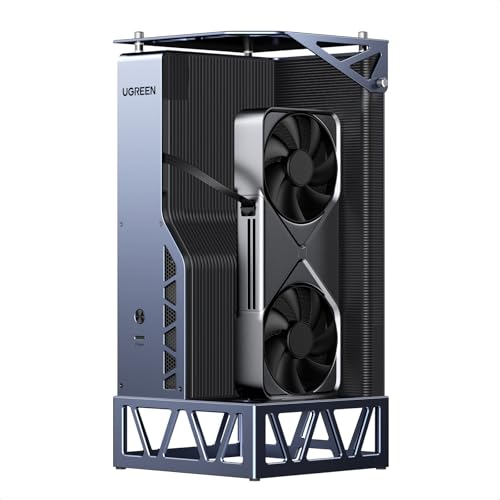
- 850W Gold PSU with ATX 3.1 support
- OCuLink 64Gbps and USB4 40Gbps inputs
- Fits dual-slot GPUs up to 370mm long
Best For: Handheld PC owners who want a high-headroom eGPU dock for full-size desktop graphics cards.
Best for Portable All-in-One Docking

- HDMI 2.0 for TV or monitor output
- 3 USB-A ports and gigabit Ethernet
- 100W passthrough charging with foldable stand
Best For: Handheld gamers who want a compact dock for display output, wired networking, and charging.
Best for Oculink Performance

- Built-in Radeon 7600M XT graphics
- Oculink and USB4 connectivity
- Four-display output support
Best For: Handheld gaming PC owners who want a compact eGPU dock with Oculink performance and multi-monitor support.
Best for Oculink Setups

- Oculink interface for direct external GPU connections
- ATX PSU support for desktop-style builds
- Power button with LED for simple operation
Best For: Handheld gaming PC and laptop users with Oculink who want to connect a full-size GPU.
Best for PCIe 5.0 Builds

- PCIe 5.0 x4 bandwidth for newer GPUs
- Works with NVMe-only M.2 devices
- Supports full-size cards and ATX PSUs
Best For: Power users building a high-bandwidth eGPU setup from an NVMe M.2 slot.
Best for Thunderbolt 4 Handhelds

- Thunderbolt 3/4 and USB4 support
- Certified JHL7440 controller
- Works with modern NVIDIA and AMD GPUs
Best For: Handheld PC and laptop owners with Thunderbolt or USB4 who want a flexible external GPU dock.
Best for High-Bandwidth ATX Builds

- PCIe 4.0 x4 / 64Gbps OCuLink link
- Supports large GPUs and ATX power
- Flexible 50cm shielded cable included
Best For: Handheld gaming PC and mini PC owners who want a high-bandwidth OCuLink eGPU dock with room for full-size graphics cards.
Best for High-Power GPUs – UGREEN eGPU Dock with 850W PSU
If you want an external gpu dock for handheld gaming pc use that can also handle a serious desktop card, this UGREEN dock is built for performance-first setups. Its OCuLink and USB4 inputs give you flexibility across handhelds, laptops, and mini PCs, while the 850W ATX 3.1 power supply is designed for higher-end GPUs without the usual power headaches.
Best For: Gamers and power users who want a desktop-class eGPU dock for a handheld gaming PC, especially if they plan to run a high-end NVIDIA, AMD, or Intel card.
Pros:
- 850W 80 Plus Gold PSU provides strong headroom for power-hungry GPUs
- OCuLink and USB4 support covers both max performance and broad compatibility
- Fits dual-slot GPUs up to 370mm for more upgrade flexibility
- Built-in 100W PD charging helps keep handheld setups simple
Cons:
- Not suitable for triple-slot graphics cards
- Large PSU-and-dock footprint is less travel-friendly than compact options
- Best value only makes sense if you already own, or plan to buy, a full-size GPU
As an external gpu dock for handheld gaming pc setups, this is a strong pick when you care more about headroom and long-term upgradeability than portability. It makes the most sense for users who want a stable, desktop-like experience from a handheld or mini PC.
Best for Portable All-in-One Docking – Razer Handheld Dock Chroma
If you want an external gpu dock for handheld gaming pc setups, the Razer Handheld Dock Chroma is really about turning a portable device into a tidy living-room or desk station. It doesn’t add GPU power by itself, but it gives you the core connections you need for an external graphics enclosure, monitor output, wired networking, controllers, and charging in one compact dock.
Best For: Handheld gamers who want a portable USB-C dock with HDMI, Ethernet, and passthrough charging for a cleaner external-gaming setup.
Pros:
- HDMI 2.0 output for big-screen play
- Three USB-A ports plus gigabit Ethernet for peripherals and stable online gaming
- 100W power delivery passthrough keeps your handheld charged while you play
- Foldable aluminum design is easy to pack and use on the go
Cons:
- Does not include an actual external GPU or GPU enclosure
- More of a dock/stand than a full desktop-style expansion solution
For buyers comparing an external gpu dock for handheld gaming pc use, this is a strong connectivity-first option rather than a graphics upgrade. It’s a good fit if you mainly want a polished, travel-friendly dock that simplifies charging, display output, and accessories without adding bulk.
Best for Oculink Performance – GMKtec AD-GP1 eGPU Dock
If you want an external gpu dock for handheld gaming pc use that prioritizes bandwidth and real desktop-class outputs, the GMKtec AD-GP1 is built around AMD’s Radeon 7600M XT and an Oculink connection for lower-latency performance. It’s a strong fit for players who want to boost frame rates on a handheld, mini PC, or compatible laptop without moving up to a full tower build.
Best For: Handheld gaming PC owners who want a compact eGPU dock with Oculink, USB4 support, and multi-monitor output.
Pros:
- Radeon 7600M XT gives it more built-in graphics power than enclosure-only docks
- Oculink support can deliver better bandwidth and lower lag than typical USB4-only setups
- Dual HDMI 2.1 and dual DisplayPort 2.0 outputs support up to four displays
- Compact 0.7kg design is easier to move between desk and travel setups
Cons:
- USB4 performance is limited to 40Gbps, so the fastest experience depends on Oculink
- Not ideal if you only want a simple plug-and-play enclosure with a separate desktop GPU
- Needs compatible handhelds or PCs with Oculink or USB4 support
For buyers comparing an external gpu dock for handheld gaming pc setups, the AD-GP1 stands out because it combines a built-in RDNA 3 GPU with high-bandwidth I/O in a compact chassis. That makes it a practical choice when you care more about real gaming gains and display flexibility than about using your own graphics card.
Best for High-Power Handheld Setups – AOOSTAR AG03 eGPU Dock
The AOOSTAR AG03 is a serious external gpu dock for handheld gaming pc setups that need desktop-class graphics, flexible host connections, and built-in power in one box. With OCuLink, dual Thunderbolt 5, and an included 800W PSU, it aims to simplify a high-performance eGPU build for compatible Windows 11 devices.
Best For: Handheld gamers and power users who want a high-wattage eGPU dock with both OCuLink and Thunderbolt 5 support.
Pros:
- Built-in 800W server-grade PSU helps keep the setup cleaner and reduces extra power brick clutter.
- Supports OCuLink plus dual Thunderbolt 5, giving you more host-connection flexibility.
- Up to 500W GPU power output is strong for demanding graphics cards and heavy workloads.
- Active cooling and compact dock format suit gaming, editing, and AI-accelerated tasks.
Cons:
- Compatibility is device-specific, and some handhelds and Mini PCs are explicitly not recommended.
- GPU is not included, and some cards may need an extra 12VHPWR or 12V-2×6 cable/adapter.
- Fan noise may be noticeable under load in quieter rooms.
This is a strong pick if you want an external gpu dock for handheld gaming pc use and care more about expansion headroom than plug-and-play simplicity. Just verify your handheld, port type, and GPU power needs before buying.
Best for Oculink Setups – PELADN S-2 Oculink eGPU Dock
If you want an external gpu dock for handheld gaming pc use and your device supports Oculink, the PELADN S-2 is built around a direct high-speed connection and ATX power support for desktop-class graphics cards. It is a more specialized dock than generic USB-C options, so it makes the most sense for users who already know their handheld or laptop is Oculink-ready.
Best For: Handheld gaming PC owners and laptop users with Oculink who want a straightforward dock for running a full-size GPU.
Pros:
- Supports Oculink for low-latency external GPU connections
- ATX power supply support gives you flexibility with desktop-grade builds
- Includes a power button with LED for easy startup checking
- Works well for users pairing a handheld gaming PC with a discrete GPU
Cons:
- Only works with devices that have an Oculink interface
- Requires the included/randomly shipped Oculink cable
- GPU compatibility should be confirmed before buying
For buyers shopping specifically for an external gpu dock for handheld gaming pc use, the PELADN S-2 stands out more for its Oculink-focused design than for broad compatibility. It is best viewed as a practical dock for informed builders who want a direct, performance-oriented connection.
Best for Broad Compatibility – PCIE 3.0 x16 eGPU Dock
If you want an external gpu dock for handheld gaming pc that can also double for a laptop or Windows/Linux setup, this PCIe 3.0 x16 eGPU dock is built around wide device and GPU compatibility. It supports Thunderbolt 3, Thunderbolt 4, and USB4 systems, includes a Thunderbolt 4 cable, and uses a JHL6340 controller for a more stable 22Gbps link.
Best For: Handheld gaming PCs like the Lenovo Legion Go, plus laptops and consoles that need a flexible external GPU solution.
Pros:
- Supports a wide range of NVIDIA and AMD GPUs with official drivers.
- Works with Thunderbolt 3/4 and USB4 devices for broad compatibility.
- Multiple power input options make it easier to match different setups.
- Includes a Thunderbolt 4 cable in the box.
Cons:
- 22Gbps is solid, but not as fast as higher-bandwidth eGPU solutions.
- USB4 handhelds may need a BIOS update before they work properly.
- Extra power supply and GPU are required; this is dock-only hardware.
This is a practical pick if you want an external gpu dock for handheld gaming pc use and value flexibility over top-end bandwidth. It fits well for users who want to test different GPUs or move the dock between devices without much hassle.
Best for High-Power Builds – AOOSTAR AG02 OCuLink eGPU Dock
If you want an external gpu dock for handheld gaming pc use that can also handle more serious desktop-class builds, the AOOSTAR AG02 is a strong candidate. It combines OCuLink and USB4 support with a built-in 800W PSU, so it’s aimed at users who want flexible connectivity and enough power headroom for demanding GPUs.
Best For: Handheld and mini PC owners who want a high-power eGPU dock with OCuLink support and room for bigger graphics cards.
Pros:
- Built-in 800W power supply with up to 600W GPU output
- Supports both OCuLink and USB4 for broader host compatibility
- PCIe x16 slot plus 3 x 8-pin GPU power connectors
- Useful for Windows 11 mini PCs, laptops, and gaming handhelds
Cons:
- Not a plug-and-play choice for every handheld or GPU model
- OCuLink requires powering off before connect/disconnect
- GPU, adapter cables, and some high-end card support are not included
The AG02 is best for buyers who care more about power delivery and expansion flexibility than compactness or simplicity. If your setup can handle the compatibility requirements, it’s a capable external gpu dock for handheld gaming pc setups that need serious upgrade potential.
Best for PCIe 5.0 Builds – OwlTree PCIe 5.0 x4 eGPU Dock
If you want an external gpu dock for handheld gaming pc setups that can also handle newer high-end cards, the OwlTree dock is built around an NVMe M.2 to PCIe x16 design with PCIe 5.0 x4 bandwidth. It’s a flexible choice for docks running off a handheld, mini PC, NUC, or laptop with an NVMe-only M.2 slot.
Best For: Tinkerers and power users who want a high-bandwidth eGPU dock for handheld gaming PCs, mini PCs, or laptops with NVMe M.2 support.
Pros:
- PCIe 5.0 x4 design with backward compatibility for older PCIe GPUs
- Supports full-size graphics cards and standard ATX power supplies
- Flexible 50cm flat cable helps reduce port stress and installation issues
- Detachable dock design and LED status indicators add convenience
Cons:
- Requires an NVMe-only M.2 slot, so SATA M.2 and wireless slots won’t work
- GPU and power supply are not included
- Needs a standard ATX PSU of 500W or higher
For buyers who prioritize raw bandwidth and future-ready GPU support, this is a strong external gpu dock for handheld gaming pc builds—just make sure your device has the right NVMe M.2 slot and enough power delivery for the graphics card you choose.
Best for Thunderbolt 4 Handhelds – eGPU Dock for Thunderbolt 3/4
If you want an external gpu dock for handheld gaming pc use without giving up laptop-style flexibility, this enclosure is built around Thunderbolt 3/4 and USB4 compatibility. It is a strong fit for owners who already have a supported handheld or laptop and want a straightforward way to add desktop-class NVIDIA or AMD graphics for gaming, AI, or creative work.
Best For: Handheld gamers and laptop users who already have Thunderbolt 3/4 or USB4 and want a flexible eGPU setup.
Pros:
- Supports Thunderbolt 3/4 and USB4 devices, including many handheld PCs and laptops
- Uses the certified JHL7440 controller for high-bandwidth external GPU performance
- Works with modern NVIDIA RTX and AMD RX cards for gaming or creative workloads
- Includes extra ports and 85W PD charging for a more useful dock setup
Cons:
- Does not include a graphics card
- Does not include an ATX power supply
- Requires a compatible Thunderbolt 3/4 or USB4 port to work
For buyers comparing an external gpu dock for handheld gaming pc setups, this is a practical option if you already own the necessary power supply and GPU. Just check port compatibility first, since that matters more here than flashy extras.
Best for High-Bandwidth ATX Builds – PCIe 4.0 x4 OCuLink eGPU Dock
If you want an external gpu dock for handheld gaming pc setups that prioritizes bandwidth and flexibility, this OCuLink dock is built for full-size GPU builds rather than compact plug-and-play convenience. It supports PCIe 4.0 x4 speeds, includes a 50cm SFF-8611 cable, and uses an open dock design that can handle large graphics cards and standard ATX power supplies.
Best For: Handheld gaming PC owners and mini PC users who want a more powerful, full-size GPU dock with OCuLink connectivity and don’t mind using an external ATX PSU.
Pros:
- PCIe 4.0 x4 / 64Gbps OCuLink connection for high-bandwidth eGPU use
- Fits large GPUs like RTX 4090 and RX 7900 XTX without length limits
- Detachable dock design with gold-plated contacts and status LEDs
- Includes a flexible, shielded 50cm cable to reduce port strain
Cons:
- GPU and power supply are not included
- Requires a standard ATX PSU, so it is less compact than all-in-one enclosures
- OCuLink is not hot-pluggable, so the device must be powered off before disconnecting
This is a strong pick if you want an external gpu dock for handheld gaming pc setups with desktop-class expansion headroom, but it makes the most sense for users who are comfortable assembling a more open, power-supply-dependent rig.
How We Picked the Best External GPU Dock for Handheld Gaming PC
We focused on docks that make sense for real handheld gaming use: strong compatibility, enough power delivery for demanding GPUs, and the fastest connection type your device can actually use. We also favored models with clearer hardware specs, standard power support, and layouts that are easier to live with on a desk.
Quick Comparison
If you want the simplest path, Thunderbolt and USB4-based docks are the easiest to set up, while OCuLink models usually offer lower latency and better raw bandwidth for an External GPU Dock for Handheld Gaming PC setups. PCIe-based docks and full enclosures can deliver excellent performance too, but they often require more careful planning around power, cabling, and physical space.
Key Buying Factors for an External GPU Dock for Handheld Gaming PC
Connection Type
Check whether your handheld supports USB4, Thunderbolt, or OCuLink. The connection is the biggest performance limiter, so a faster dock is only useful if your device can use it. For gaming-first builds, OCuLink is often preferred where available.
Power Supply and GPU Support
Make sure the dock includes enough wattage for the graphics card you plan to use, especially if the enclosure is expected to run a high-end desktop GPU. Standard ATX support is helpful if you want upgrade flexibility.
Portability Versus Desktop Use
Some users want a compact plug-in dock for occasional big-screen gaming, while others want a permanent desk setup. Smaller docks are easier to move, but larger enclosures often provide better cooling, more expansion, and fewer power compromises.
Display and I/O Features
Look for HDMI and DisplayPort versions that match your monitor, plus any extra USB or charging features you may need. If you dock a handheld daily, convenience features can matter almost as much as GPU performance.
Who Should Buy Which External GPU Dock for Handheld Gaming PC?
Choose a USB4 or Thunderbolt dock if you want the easiest setup and broad compatibility. Pick an OCuLink dock if your priority is maximum gaming performance and your handheld supports it. Go with a full-size enclosure or ATX-powered option if you plan to install a powerful desktop GPU and want the most upgrade room. For users who only want charging, stand functionality, and a few extra ports, a compact handheld dock may be the better value.
