
If you want more GPU power for local AI work without replacing your laptop, an external GPU dock can be a practical upgrade. The right setup can help with model testing, inference, rendering, and other graphics-heavy tasks.
Below, we focus on options that balance bandwidth, compatibility, power delivery, and real-world ease of use for an external GPU dock for AI laptop buyers in 2026.
Best 10 External GPU Dock for AI Laptop Picks for 2026
Best for AI and Handheld Performance

- Thunderbolt 3/4 and USB4 with JHL7440 controller
- Supports NVIDIA and AMD GPUs, including AMD 9000 series
- 85W PD charging plus extra hub ports
Best For: Laptop, mini PC, and handheld users who need a flexible eGPU dock for AI and gaming.
Best for Native OCuLink Speed
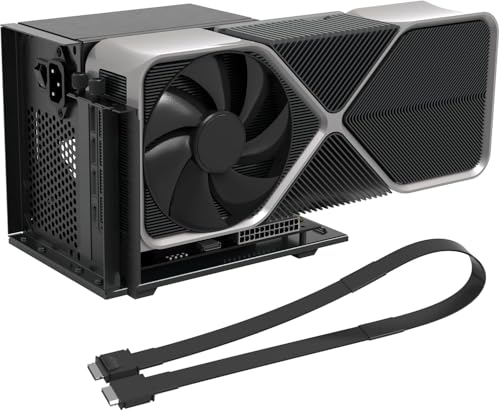
- Direct OCuLink-to-PCIe x16 with 64Gbps bandwidth
- Supports AMD, Intel, and NVIDIA GPUs
- Includes cable and GPU support bracket
Best For: Compatible laptop and mini PC users who want a low-latency external GPU path for AI and graphics work.
Best for AI GPUs

- Thunderbolt 3/4 and USB4 support
- Fits wide NVIDIA and AMD GPUs
- 80W USB-C PD plus hub-style ports
Best For: AI developers and creators who want to add desktop GPU power to a compatible laptop.
Best for PCIe 5.0 / RTX 50 Builds

- PCIe 5.0 x4 NVMe connection with 128Gbps bandwidth
- Supports RTX 50 Series and other next-gen full-size GPUs
- Flexible 30cm shielded cable and detachable dock design
Best For: AI laptop, NUC, or mini PC users building a high-bandwidth external GPU setup.
Best for Bigger Power Supplies
Thunderbolt 3/4 eGPU Dock for ATX Builds

- Thunderbolt 3/4 connectivity
- Supports NVIDIA/AMD PCIe GPUs
- ATX power supply compatible
Best For: AI laptop and gaming handheld users building a higher-power external GPU setup.
Best PCIe 5.0 Speed

- PCIe 5.0 x4 NVMe-based dock with up to 128Gbps bandwidth
- Supports full-size RTX 50 Series and RX 90xx GPUs
- Flexible 50cm shielded cable and detachable design
Best For: AI laptop and mini PC users who want a high-bandwidth DIY eGPU setup for modern graphics cards.
Best for ATX Builds

- PCIe 4.0 x4 / 64Gbps OCuLink link
- Fits large GPUs like RTX 4090-class cards
- Uses a standard ATX power supply
Best For: AI laptop users who want a desktop-style eGPU dock and already have an ATX PSU.
Best for High-Power OCuLink Builds – AOOSTAR AG02 eGPU Dock
If you need an external gpu dock for ai laptop use, the AOOSTAR AG02 is built for users who want desktop-class expansion with OCuLink or USB4 support and a strong built-in power supply. It’s a practical choice for compatible Windows 11 laptops, mini PCs, and handhelds when you want to run a full-size GPU without piecing together a separate enclosure and PSU.
Best For: Power users who need a high-wattage eGPU dock for supported Windows laptops, mini PCs, and handheld gaming devices.
Pros:
- Built-in 800W PSU with up to 600W GPU power output
- OCuLink and USB4 support for flexible host-device connections
- PCIe x16 slot and 3 x 8-pin GPU power connectors for many desktop cards
- Compact dock design with included power supply
Cons:
- GPU is not included
- Compatibility can vary by device, firmware, cable, and driver
- OCuLink is not hot-pluggable, so setup requires powering down first
For buyers comparing an external gpu dock for ai laptop workflows, the AG02 stands out for its power headroom and broad connection options, but it’s best suited to users who can confirm compatibility before purchase. If your system supports OCuLink or USB4 eGPU mode, it offers a serious foundation for GPU-heavy tasks.
Best for Flexible GPU Compatibility – PCIe 3.0 x16 eGPU Dock 22Gbps
If you want an external gpu dock for ai laptop use without locking into a single GPU brand, this PCIe 3.0 x16 eGPU dock is a practical option. It supports NVIDIA and AMD cards with available drivers, works over Thunderbolt 3/4 and USB4, and is aimed at Windows, Linux, and compatible consoles.
Best For: Buyers who need a flexible eGPU setup for AI work, graphics tasks, video editing, or gaming on a Thunderbolt/USB4 laptop.
Pros:
- Wide GPU support for most NVIDIA and AMD cards with official drivers
- 22Gbps JHL6340 controller for stable Thunderbolt 3/4 and USB4 use
- Four power input options make it easier to match your existing PSU setup
- Includes a Thunderbolt 4 cable and power jumper cable in the box
Cons:
- Not ideal if you need a plug-and-play solution with minimal setup
- PD input is limited, so stronger GPUs will usually need an external PSU
This is a solid pick if you need an external gpu dock for ai laptop workloads and want broad graphics card compatibility more than a polished all-in-one enclosure. The 22Gbps link and flexible power inputs make it better suited to tinkerers and performance-focused users than casual buyers.
Best High-Power eGPU Dock – AOOSTAR AG03 800W OCuLink/TB5 Dock
If you need an external gpu dock for ai laptop use, the AOOSTAR AG03 stands out for its built-in 800W PSU, OCuLink input, and dual Thunderbolt 5 support. It is designed to deliver desktop-class GPU performance to compatible Windows 11 laptops, mini PCs, and handhelds while keeping cabling cleaner than a setup with separate power bricks.
Best For: AI and creative users who want a high-power external GPU dock with flexible OCuLink or Thunderbolt 5 connectivity.
Pros:
- Built-in 800W server-grade PSU with up to 500W GPU output
- Supports both OCuLink and dual Thunderbolt 5 connections
- Useful for AI workloads, rendering, gaming, and video editing
- Cleaner setup with the power supply integrated into the dock
Cons:
- GPU not included, and some cards may need extra power adapters
- Compatibility depends on host device, BIOS, firmware, and drivers
- Fan noise may be noticeable under heavier loads
As an external gpu dock for ai laptop builds, the AG03 is appealing if you want a more serious expansion base than a basic enclosure and can verify compatibility before buying. Its power headroom and port flexibility make it a strong fit for performance-focused users, but it is not the easiest plug-and-play choice for every system.
Best for AI and Handheld Performance – ANQ-L336 Mini eGPU Enclosure
If you want an external gpu dock for ai laptop workloads, the ANQ-L336 is built around Thunderbolt 3/4 and USB4 connectivity with an officially certified JHL7440 controller. It’s a practical pick for boosting AI inference, training, gaming, and 3D rendering without jumping to a full desktop tower.
Best For: Laptop, mini PC, and handheld users who want a flexible eGPU setup with strong cross-platform support and handy charging passthrough.
Pros:
- Official JHL7440 controller supports fast, stable Thunderbolt 3/4 and USB4 performance.
- Works with NVIDIA and AMD cards, including strong AMD 9000-series compatibility.
- 85W PD charging can power devices like the ROG Ally X while the dock is in use.
- Extra USB-A and Thunderbolt 4 ports add hub-like convenience.
Cons:
- PSU is not included, so you’ll need to supply your own ATX, SFX, FLEX, or DC power.
- NVIDIA RTX 50-series support is limited, so it may not be the best choice for the newest cards.
- It’s more of a performance-focused dock than a compact plug-and-forget accessory.
For buyers comparing an external gpu dock for ai laptop use, this model stands out for its balance of bandwidth, compatibility, and charging support. It makes sense if you need a versatile enclosure that can move between a laptop, mini PC, and handheld gaming device.
Best for Native OCuLink Speed – OCuLink eGPU Dock PCIe 4.0 x4
If you want an external gpu dock for ai laptop setups without the usual Thunderbolt bottleneck, this OCuLink dock is built for direct PCIe 4.0 x4 connectivity. It’s a practical way to add a full-size GPU to a compact laptop, mini PC, or other small system for AI inference, rendering, and heavy graphics work.
Best For: Users who already have OCuLink support and want the lowest-latency path to an external GPU for AI, gaming, or creative workloads.
Pros:
- Native OCuLink to PCIe x16 connection with 64Gbps PCIe 4.0 x4 bandwidth
- Works with AMD, Intel, and NVIDIA GPUs for gaming and AI tasks
- Includes a 19.7-inch shielded cable and a sturdy GPU/PSU support bracket
- Auto-start and forced-start modes add flexibility for desktop-style use
Cons:
- GPU and power supply are not included
- No hot-plug support, so connections must be made with the system powered off
- Requires ATX power and enough headroom for the installed GPU
For an external gpu dock for ai laptop users who care more about bandwidth and latency than convenience features, this is a strong direct-connect option. It makes the most sense for buyers with compatible OCuLink hardware and a proper ATX PSU already on hand.
Best for AI GPUs – GOLDSOUN 3-Slot eGPU Dock
If you want an external gpu dock for ai laptop workflows, this GOLDSOUN enclosure is built around Thunderbolt 3/4 and USB4 support, PCIe 4.0 connectivity, and room for full-size NVIDIA or AMD cards. It’s a practical pick for users who need more GPU horsepower for training, inference, rendering, or accelerated creative work, but still want laptop portability.
Best For: AI developers, creators, and power users with a Thunderbolt 3/4 or USB4 laptop who want a flexible desktop GPU setup.
Pros:
- Supports Thunderbolt 3/4 and USB4 laptops and devices
- Works with wide GPUs, including modern NVIDIA RTX and AMD RX cards
- Includes 80W USB-C power delivery for compatible laptops
- Can double as a hub with USB-A and daisy-chain connectivity
Cons:
- Graphics card and ATX power supply are not included
- Requires a compatible TB3/TB4/USB4 port to work at all
- Setup can be sensitive if the power cables are connected incorrectly
As an external gpu dock for ai laptop use, this enclosure makes sense if you already have a strong desktop GPU to install and want a straightforward way to share it with a portable machine. It’s less of an all-in-one bundle and more of a capable foundation for a serious GPU-assisted workstation.
Best for PCIe 5.0 / RTX 50 Builds – OwlTree PCIe 5.0 x4 eGPU Dock
If you want an external gpu dock for ai laptop setups that can keep up with next-gen cards, the OwlTree dock is built around a PCIe 5.0 x4 NVMe connection and a full-size x16 riser. It’s a strong fit for compact systems that need desktop GPU performance, but it does require an NVMe-only M.2 slot and a separate ATX power supply.
Best For: users pairing an AI laptop, NUC, or mini PC with a high-end external GPU and standard ATX PSU.
Pros:
- PCIe 5.0 x4 design with up to 128Gbps bandwidth
- Supports new-gen GPUs, including RTX 50 Series and RX 90xx cards
- Flexible 30cm shielded cable and detachable dock design for easier placement
- LED status indicators help with quick monitoring and troubleshooting
Cons:
- GPU and power supply are not included
- Requires an NVMe-protocol M.2 slot; SATA, WiFi, and WWAN M.2 are not supported
- Needs a standard ATX PSU of 500W or higher, which adds size and cost
For buyers specifically shopping for an external gpu dock for ai laptop workloads, this is a performance-first option rather than a plug-and-play portable one. The upside is strong headroom for modern GPUs, but you should verify M.2 NVMe support and be ready to assemble the dock with your own power supply.
Best for Bigger Power Supplies – Thunderbolt 3/4 eGPU Dock for ATX Builds
If you want an external gpu dock for ai laptop setups that can handle a full desktop graphics card and a standard ATX power supply, this enclosure is built for that higher-power use case. It’s a practical pick for users who need more headroom than compact eGPU boxes typically provide.
Best For: AI laptops, gaming handhelds, and workstation users who want an eGPU setup with support for NVIDIA or AMD cards and an ATX PSU.
Pros:
- Compatible with Thunderbolt 3/4 connections
- Supports NVIDIA and AMD PCIe graphics cards
- ATX power supply support for more demanding builds
- Works with laptops and gaming handhelds
Cons:
- Bulkier than compact plug-and-play enclosures
- Requires a separate ATX power supply
For buyers comparing an external gpu dock for ai laptop workflows, this model makes the most sense when flexibility and power compatibility matter more than portability. It’s a solid enclosure-style option for users building a serious external GPU setup around a desktop-class card.
Best PCIe 5.0 Speed – OwlTree PCIe 5.0 x4 eGPU Dock
If you want an external gpu dock for ai laptop use that can keep up with newer cards, the OwlTree PCIe 5.0 x4 dock is built around NVMe-only M.2 connections and a 50cm riser for flexible placement. It supports full-size GPUs and standard ATX power supplies, making it a practical DIY-style option for high-throughput workloads.
Best For: AI laptop users, mini PC owners, and NUC builds that need a fast NVMe-based eGPU setup for modern PCIe 5.0 graphics cards.
Pros:
- PCIe 5.0 x4 design with up to 128Gbps bandwidth for newer GPUs
- Supports full-size NVIDIA RTX 50 Series and AMD RX 90xx cards
- Flexible 50cm shielded cable helps reduce stress on the M.2 port
- Detachable dock design and LED indicators make the setup easier to manage
Cons:
- Requires an NVMe M.2 slot; M.2 SATA, WiFi, and WWAN are not supported
- GPU and power supply are not included
- Uses standard ATX power supplies only, so it is less plug-and-play than simpler docks
This is a strong pick if your priority is bandwidth and compatibility with modern graphics cards rather than a compact all-in-one enclosure. For an external gpu dock for ai laptop workflows, it makes the most sense when you already have the right NVMe slot and are comfortable assembling the rest of the system.
Best for ATX Builds – PCIe 4.0 x4 OCuLink eGPU Dock
If you want an external gpu dock for ai laptop use without giving up desktop-class GPU options, this OCuLink-to-PCIe x16 dock is a practical pick. It supports PCIe 4.0 x4 bandwidth, works with standard ATX power supplies, and is built to handle large cards like the RTX 4090 or RX 7900 XTX.
Best For: Users who need a desktop-style eGPU dock for AI inference, GPU compute, or high-end laptop expansion and already have an ATX PSU on hand.
Pros:
- PCIe 4.0 x4 / 64Gbps OCuLink connection for strong external GPU performance.
- Supports large full-length graphics cards with no length restriction issues.
- Detachable design and 10μ gold-plated contacts help with portability and reliability.
- Flexible, shielded cable design reduces stress on ports and interference.
Cons:
- GPU and power supply are not included.
- Requires a standard ATX PSU only, so compact power setups won’t work.
- OCuLink is not hot-pluggable; the system must be powered off to disconnect.
This is a strong choice if you want an external gpu dock for ai laptop workloads and care more about raw compatibility and bandwidth than enclosure convenience. It’s less plug-and-play than a Thunderbolt setup, but for users with OCuLink-capable hardware, it offers a solid path to desktop GPU performance.
How We Picked the Best External GPU Dock for AI Laptop
We prioritized connection type, lane bandwidth, power support, chassis flexibility, and broad OS compatibility. For AI workloads, stable throughput matters more than raw peak specs alone, so we favored docks that reduce bottlenecks and support common workstation GPUs.
We also looked for practical ownership details such as cable quality, enclosure clearance, PSU support, and whether the dock fits modern laptops, mini PCs, and handhelds that are often used as mobile AI stations.
Quick Comparison
As a rule of thumb, Thunderbolt and USB4 models are the easiest to use across more laptops, while OCuLink and PCIe-based designs usually offer stronger performance potential. If you need a simpler plug-and-play path, choose broader compatibility. If you want maximum bandwidth for heavier AI workflows, prioritize the fastest link your system supports.
Also check whether the dock includes a power supply or expects you to add your own. That choice can affect both cost and GPU size support.
Key Buying Factors for External GPU Dock for AI Laptop
Interface and Bandwidth
The connection between laptop and dock is the biggest performance factor. Thunderbolt 3/4 and USB4 are convenient, but OCuLink and newer PCIe-based solutions can offer more headroom for demanding AI tasks. Match the dock to your laptop’s actual port support before buying.
GPU and Power Support
Check card length, slot width, and PSU capacity. Many AI users move from midrange cards to larger, higher-wattage GPUs, so an enclosure that supports standard ATX power and wider cards can be a better long-term choice.
System Compatibility
Windows usually offers the broadest support, but some docks also work with Linux or macOS in specific configurations. If you plan to use an External GPU Dock for AI Laptop development across multiple systems, verify driver and firmware support first.
Cooling and Physical Design
AI workloads can keep GPUs loaded for long periods, so airflow matters. Open-frame docks are often easier to service and can fit larger cards, while enclosed models may be neater for desk use.
Who Should Buy Which External GPU Dock for AI Laptop?
If you want the easiest setup for a portable laptop, choose a Thunderbolt 3/4 or USB4 dock. If your laptop supports OCuLink and you care about higher performance per dollar, that is often the better direction. Power users planning large GPUs or future upgrades should look at docks with ATX PSU support and generous clearance. For multi-device desks that may also serve a mini PC or handheld, pick a dock with the broadest compatibility and the most flexible cabling.
