
If you want clean gameplay capture without adding much setup complexity, an external capture card for 4K 60FPS is the simplest path for most streamers and console players.
Below, we focus on models that balance capture quality, passthrough performance, latency, and compatibility so you can choose the right card for your setup.
Best 10 External Capture Card for 4K 60fps Picks for 2026
Editor Pick
Elgato 4K S for PS5, Xbox, and Switch 2

- 4K60 capture in a compact USB-C design
- 1440p120 and 1080p240 passthrough support
- HDR10 and analog audio input for flexible setups
Best For: Console players who want a compact 4K60 capture card with HDR and high-refresh passthrough
Budget Multi-Device
XIIXMASK 4K60 USB 3.0 Capture Card

- 4K@60FPS capture with 4K@60Hz passthrough
- Plug-and-play setup with no drivers required
- Works with many OSes and devices
Best For: Budget streamers who want easy plug-and-play 4K60 capture across many devices
Premium HDMI 2.1
AVerMedia Live Gamer Ultra 2.1

- 4K60 capture with HDMI 2.1 support
- 4K144 HDR/VRR passthrough and low latency
- Party chat and 5.1 audio capture support
Best For: Serious console and PC creators who want premium HDMI 2.1 passthrough and low latency
Value Pick
XIIXMASK USB 3.0 Capture Card with Mic-In

- 4K 60Hz input and loop-out support
- Captures up to 1080p60 or 2K30 over USB 3.0
- Mic-in and broad device compatibility
Best For: Affordable 1080p60 streaming with 4K loop-out monitoring
Budget Pick
Rybozen 1080p60 HDMI Capture with 4K Passthrough
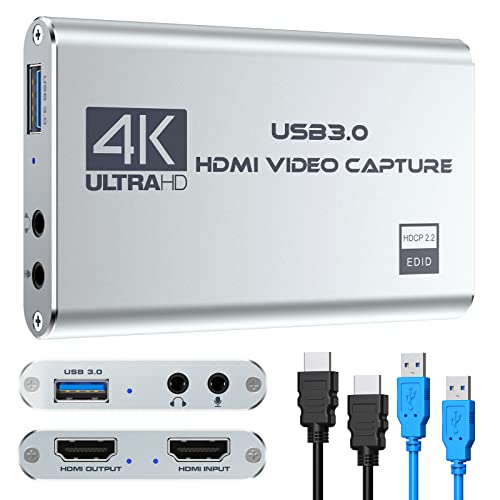
- 4K60 input/output with 1080p60 capture
- Plug-and-play USB 3.0 operation
- Mic-in port for live commentary
Best For: Users who want an affordable capture card with 4K passthrough and 1080p recording
Top 4K60 Choice
Guermok 4K60 Capture Card with Passthrough and Audio

- True 4K@60FPS capture over USB 3.0
- 4K@60Hz passthrough plus 2K/1080p high-refresh support
- 3.5mm audio in and mic out ports
Best For: Creators and gamers who want true 4K60 capture with passthrough and audio flexibility
Simple Pick
Kedok 1080p60 HDMI Capture with Loop-Out

- 4K60 input with 1080p capture
- Plug-and-play USB 3.0 operation
- HDMI loop-out and mic-in support
Best For: Streamers who need simple 1080p capture and 4K-capable input
Budget-Friendly USB Capture Card

- Plug-and-play with no drivers needed
- HDMI loop-out for low-latency passthrough
- Works with PS5, Xbox, Switch, PC, and Mac
Best For: Creators who want a simple portable capture card for consoles and computers
Ultra-Portable Type-C Capture Card
Guermok 4K USB3.0 HDMI to USB C

- USB-C and USB support for flexible connections
- Captures up to 1080p 60FPS from 4K@30Hz input
- Plug and play with ultra low latency
Best For: Travel-friendly setups and users switching between USB-C and USB devices
Feature-Rich Console Capture Card
acer USB 3.0 Video Capture Card

- 4K input with 1080P@60Hz output
- Built-in mic-in for commentary
- Plug-and-play with broad console support
Best For: Streamers who want simple commentary capture for consoles and PCs
Editor Pick – Elgato 4K S for PS5, Xbox, and Switch 2
If you want an external capture card for 4K 60fps with strong image quality and broad console support, the Elgato 4K S is built for straightforward streaming and recording. It captures in 4K60, supports higher refresh passthrough up to 1440p120 or 1080p240, and adds HDR10 support on Windows for more flexible gameplay setups.
Best For: Console players and creators who want a compact, modern USB-C capture card for 4K60 recording with HDR support.
Pros:
- 4K60 capture with USB-C connection
- 1440p120 and 1080p240 passthrough for high-refresh gaming
- HDR10 support on Windows with tone mapping
- Analog 3.5mm audio input for chat or commentary
Cons:
- Video capture resolution is listed as 1080p in the details section
- HDR10 tone mapping is Windows-only
- Requires Windows 11 for the listed minimum system requirements, with macOS 13 or later also noted
Overall, this is a polished option if you want a compact external capture card for 4K 60fps and high-refresh passthrough without giving up audio flexibility. It fits well for modern console setups where low-latency monitoring and simple USB-C connectivity matter.
Budget Multi-Device – XIIXMASK 4K60 USB 3.0 Capture Card
If you need an external capture card for 4K 60fps without a complicated setup, this XIIXMASK model is a practical plug-and-play choice. It supports up to 4K@60FPS capture, includes 4K@60Hz passthrough, and works across a wide range of devices and software for streaming, recording, and mirroring.
Best For: Budget-minded streamers who want broad compatibility and simple plug-and-play 4K60 capture.
Pros:
- Supports 4K@60FPS capture and 4K@60Hz passthrough
- Plug-and-play with no drivers or external power required
- Wide OS support including Windows, macOS, Linux, Android, and iPadOS 17+
- 3.5mm audio in and mic out for external audio integration
Cons:
- Details list video capture resolution as 4K, while output support is described separately
- Platform listing is Windows-focused despite broader OS compatibility claims
- Best known as a value option rather than a premium feature-rich model
This is a good fit if you want broad compatibility and basic 4K60 capture at a lower-friction price point. The included cables and driver-free setup make it especially convenient for quick streaming or recording workflows.
Premium HDMI 2.1 – AVerMedia Live Gamer Ultra 2.1
For buyers comparing an external capture card for 4k 60fps, the AVerMedia Live Gamer Ultra 2.1 stands out for its HDMI 2.1 features and low-latency design. It captures in 4K60, supports 4K144 HDR/VRR passthrough, and is aimed at PS5, Xbox, and PC or Mac streaming setups built around smooth real-time play.
Best For: Gamers and streamers who want HDMI 2.1 passthrough, low latency, and premium console support.
Pros:
- 4K60 capture with HDMI 2.1 input/output
- 4K144 HDR/VRR passthrough for high-end gaming displays
- Low-latency capture for OBS, Twitch, and YouTube workflows
- Built-in party chat support and 5.1-channel audio capture
Cons:
- Minimum system requirements list Windows 10 x64 or newer
- Not the most minimal option if you only need basic recording
- RGB lighting and advanced extras may be unnecessary for simple setups
If you want a more premium capture solution with modern passthrough support, this model is one of the strongest options here. It is especially appealing for serious console and PC creators who care about low latency, audio handling, and future-facing HDMI 2.1 connectivity.
Value Pick – XIIXMASK USB 3.0 Capture Card with Mic-In
This XIIXMASK option is a useful external capture card if you want straightforward recording and a lower-cost path into streaming, even though its capture output is not 4K. It supports 4K 60Hz input and loop-out, while the USB 3.0 output is listed at 1080p 60fps or 2K 30fps, making it better suited to practical live capture than native 4K60 recording.
Best For: Users who need an affordable, stable capture card for 1080p60 streaming with 4K loop-out monitoring.
Pros:
- 4K 60Hz input and loop-out for monitoring
- USB 3.0 capture output up to 1080p60 or 2K30
- Mic-in support for commentary
- Wide device and software compatibility across consoles, cameras, and OBS
Cons:
- Does not capture at 4K60
- Party chat is not supported through the mic-in feature
- Best for 1080p60 workflows rather than true 4K capture
As a budget-friendly capture device, this model makes the most sense if your priority is stable streaming with 4K loop-through rather than 4K recording. It is a sensible pick for creators who want compatibility, commentary input, and dependable 1080p60 output.
Budget Pick – Rybozen 1080p60 HDMI Capture with 4K Passthrough
If you want an external capture card for 4k 60fps that keeps costs down, this Rybozen model is built around 1080p60 recording with 4K60 input and passthrough. It suits users who need a simple HDMI-to-USB 3.0 capture setup for consoles, cameras, or a PC/Mac workflow without installing drivers.
Best For: Streamers and casual gamers who mainly need reliable 1080p60 capture with 4K60 passthrough.
Pros:
- Supports up to 3840×2160@60Hz input/output with 1080p recording over USB 3.0
- Plug-and-play design with no driver or external power required
- Mic-in port lets you add external commentary while gaming or streaming
- Wide compatibility with Windows, Mac, and common HDMI devices
Cons:
- Actual capture resolution is 1080p60, not 4K recording
- Best results depend on correct software settings
- Less advanced than higher-end cards built for native 4K capture
This is a practical pick if your priority is easy setup and 4K pass-through rather than full 4K capture. For viewers who mainly stream in 1080p, it covers the essentials well.
Top 4K60 Choice – Guermok 4K60 Capture Card with Passthrough and Audio
For buyers searching for an external capture card for 4k 60fps, this Guermok model is the most capable option in the group because it supports 4K@60FPS capture and 4K@60Hz passthrough. It also adds 2K@120FPS and 1080p@120FPS support, making it a strong fit for modern consoles, PCs, and camera workflows.
Best For: Creators and gamers who want true 4K60 capture plus high-refresh passthrough.
Pros:
- Supports 4K@60FPS capture over USB 3.0
- 4K@60Hz passthrough enables real-time monitoring while recording
- Includes 3.5mm audio in and mic out for commentary or external audio
- Broad device and software compatibility, including OBS, Streamlabs, and Zoom
Cons:
- Requires USB 3.0 or higher for full performance
- Some capture formats are limited compared with the headline 4K60 mode
- Audio setup may require restarting OBS after changes
This is the strongest match if you want native 4K60 capture rather than just pass-through. The extra high-frame-rate support and flexible audio ports make it especially useful for streaming and content creation.
Simple Pick – Kedok 1080p60 HDMI Capture with Loop-Out
This Kedok capture card is a straightforward external capture card for 4k 60fps input, but its recording target is 1080p60, not native 4K capture. It fits users who need an easy HDMI-to-USB 3.0 device for streaming from consoles, cameras, or PCs with minimal setup.
Best For: Streamers who want plug-and-play 1080p60 capture with 4K input support.
Pros:
- Supports 4K60 input while capturing up to 1080p
- Plug-and-play setup with no driver or external power needed
- HDMI loop-out helps reduce delay during gameplay
- Mic-in support is available for external commentary
Cons:
- Does not support 4K120Hz or 144Hz input
- Capture resolution tops out at 1080p, not 4K
- Windows-focused details make it less clearly positioned for non-Windows setups
Use this model if you mainly want easy 1080p streaming and need 4K-ready input compatibility. It is a practical, no-fuss choice, but it is not the right pick if native 4K capture is your goal.
Budget-Friendly USB Capture Card – 4K HDMI Capture Card USB 3.0
If you want an external capture card for 4k 60fps with simple setup, this USB 3.0 model is built for straightforward streaming and recording. It captures up to 1080p 60FPS, supports 4K HDMI input with loop-out, and is designed for plug-and-play use with popular apps like OBS, Streamlabs, and XSplit.
Best For: Streamers and gamers who want an easy-to-use, portable capture card for consoles, PCs, and cameras.
Pros:
- Plug-and-play operation with no drivers needed
- HDMI loop-out helps you play with low-latency passthrough
- Works with PS5, PS4, Xbox, Switch, DSLR cameras, PC, and Mac
- Compact and lightweight for travel or mobile setups
Cons:
- Recorded capture resolution is 1080p, not 4K
- Needs a USB 3.0 port to run properly
Overall, this is a practical pick if you care more about easy setup, broad compatibility, and smooth 1080p60 capture than native 4K recording. It makes sense for creators building a simple streaming rig without extra software headaches.
Ultra-Portable Type-C Capture Card – Guermok 4K USB3.0 HDMI to USB C
This external capture card for 4k 60fps is aimed at users who want a compact USB 3.0 capture solution with broad device support. It captures up to 1920×1080 at 60FPS, accepts up to 4K@30Hz input, and supports quick plug-and-play recording for streaming, video calls, and gameplay capture.
Best For: Mobile creators and multi-device users who need a lightweight USB-C or USB capture option.
Pros:
- USB-C and USB connectivity for flexible setups
- Plug and play with no external power or drivers
- Ultra low-latency design with real-time preview
- Wide compatibility with OBS, Zoom, PCs, phones, consoles, and cameras
Cons:
- Capture output tops out at 1080p 60FPS
- Designed for capture use, not direct screen casting to a monitor or TV
- Requires capture software to function
For users who value portability and broad compatibility over higher-resolution recording, this is a dependable everyday option. It fits especially well in travel kits, classroom setups, or compact streaming desks.
Feature-Rich Console Capture Card – acer USB 3.0 Video Capture Card
If you’re comparing an external capture card for 4k 60fps, this Acer model stands out for its 4K input support, 1080P@60Hz output, and built-in mic-in feature. It’s designed for low-latency audio and video capture, making it a solid fit for streaming, commentary, and console gameplay.
Best For: Streamers and teachers who want easy audio commentary support alongside reliable 1080p60 capture.
Pros:
- 4K input with smooth 1080P@60Hz output
- Mic-in port for direct voice commentary
- Plug and play with no extra drivers or external power
- Compatible with Switch, Switch 2, PS5, PS4, Xbox, PC, and macOS
Cons:
- Records at 1080p, not 4K
- Linux and Windows are listed in the details, while Mac support appears in the compatibility notes rather than the OS spec
As a capture-card choice, this one is strongest when you want built-in voice input and broad console compatibility in a small, easy setup. It’s especially useful if you prefer a single device for gameplay, live sessions, and commentary.
How We Picked the Best External Capture Card for 4K 60fps
We prioritized real-world usefulness over spec-sheet hype. The best External Capture Card for 4K 60fps should offer stable capture at 60 frames per second, reliable passthrough for playing on a monitor or TV, and straightforward USB connectivity. We also looked at HDR support, audio handling, and whether the card is practical for console, PC, and creator workflows.
Quick Comparison
Among these 10 picks, the main differences come down to passthrough resolution, capture resolution, and latency. Some models are tuned for simple 1080p60 recording, while others target higher-end setups with 4K60 capture and advanced passthrough such as 4K120 or 4K144. If you want the most future-ready option, prioritize HDMI 2.1 features; if you want value, a solid USB 3.0 4K60 card may be enough.
Key Buying Factors for an External Capture Card for 4K 60fps
Capture Vs. Passthrough
Don’t confuse capture resolution with passthrough. A card may let you play at 4K120 or 4K144 while recording at 4K60, or it may only capture at 1080p60. Choose based on whether recording quality or gameplay smoothness matters more.
Latency and Stability
Low latency matters if you play while monitoring through a preview window. For most users, passthrough to a display is the better experience, so check for near-zero or low-lag design claims backed by USB 3.0 or faster connections.
Compatibility and Software
Make sure the card works with your platform and recording app. Console users should confirm support for PS5, Xbox Series X/S, Switch, or Switch 2 as needed, while PC and Mac users should verify driver-free operation or software support.
Audio and HDR Support
Useful extras include HDR10 support, mic or line-in options, and clean audio pass-through. If you stream commentary or capture from a camera, audio flexibility can matter as much as the video spec.
Who Should Buy Which External Capture Card for 4K 60fps?
Choose a premium HDMI 2.1 model if you want the best passthrough for high-refresh gaming and a future-proof setup. Pick a midrange External Capture Card for 4K 60fps if you mainly need dependable console capture and streaming. Go with a budget 1080p60 card if you are starting out, mostly stream at 1080p, or want the lowest-cost plug-and-play option.
In short, the right card depends on your display, console, and workflow. Match the capture spec to how you actually record, then pay attention to passthrough, latency, and compatibility before you buy.
