
If you’re looking to enhance your media playback experience on your Mac, choosing the right external Blu-ray drive is essential. With various options available, from high-speed connectivity to support for UHD 4K content, it can be overwhelming to find the perfect fit. Each drive offers unique features that cater to different needs. So, which one should you pick to guarantee a seamless experience? Let’s explore the top contenders.
External Blu Ray Drive with USB 3.0 and Type-C

If you’re looking for a reliable external Blu-ray drive that works seamlessly with your Mac, the Wbacon External Blu-ray Drive is an excellent choice. This drive supports USB 3.0 and Type-C connections, ensuring compatibility with various devices. It reads CDs at up to 24x, DVDs at 8x, and Blu-rays at 6x, plus it burns CDs and DVDs easily. Its compact design makes it portable, while built-in wire grooves simplify storage. Just remember, you’ll need specific software for Blu-ray playback on your Mac, like Macgo Blu-ray Player. Overall, this drive combines performance and convenience for your media needs.
Best For: Users seeking a portable external Blu-ray drive that supports both USB 3.0 and Type-C connections for easy compatibility with various devices.
Pros:
- Compact design with built-in wire grooves for enhanced portability and storage.
- High read speeds for CDs, DVDs, and Blu-rays, making it versatile for different media types.
- Compatible with multiple operating systems, including older versions of Windows and Mac OS.
Cons:
- Requires additional software for Blu-ray playback, which may limit options for Mac users.
- USB cable is permanently attached and short, which may affect placement during use.
- Region code can only be changed five times, posing a limitation for international users.
7 in 1 External Blu Ray Drive for PC
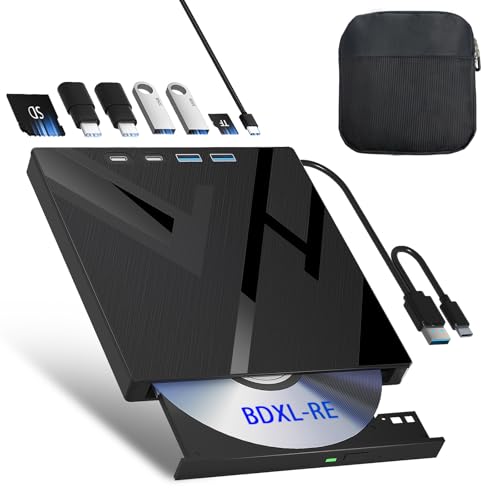
The 7 in 1 External Blu-ray Drive for PC stands out for its versatile connectivity options, making it an excellent choice for users who value flexibility and convenience. With an SD card slot, TF card slot, two Type-C ports, and USB ports, you can easily transfer data from various sources. It reads Blu-rays at 6x, DVDs at 8x, and CDs at 24x, supporting high-capacity 100GB discs. Its lightweight, slim design and included protective carrying case make it perfect for travel. Just remember, you’ll need compatible software like PowerDVD or VLC for playback—installation is required for operation.
Best For: Users seeking a versatile and portable external Blu-ray drive with multiple connectivity options for data transfer and media playback.
Pros:
- Supports high-capacity 100GB discs with fast reading speeds for Blu-rays, DVDs, and CDs.
- Lightweight and slim design coupled with a protective carrying case makes it ideal for travel.
- Versatile connectivity with multiple ports, including SD/TF card slots and both USB and Type-C options.
Cons:
- Requires compatible software installation for playback, which is not included.
- SD and TF cards cannot be used simultaneously, limiting simultaneous data access.
- May not be compatible with all operating systems or Blu-ray software without additional setup.
Verbatim Ultra HD 4K CD DVD Blu-ray Writer with USB-C Connectivity

For Mac users seeking a reliable and portable solution for high-capacity data storage and media playback, the Verbatim Ultra HD 4K CD DVD Blu-ray Writer with USB-C connectivity stands out. This slim, lightweight drive features USB 3.2 GEN 1 for fast data transfers and supports up to 100GB on BDXL discs. While it’s perfect for notebooks, you may need adapters for compatibility with Mac systems. The included Nero Burn and Archive software enhances your burning experience, although playback software must be obtained separately. With a 2-year warranty and positive customer ratings, it’s a solid choice for media enthusiasts.
Best For: Those seeking a portable and efficient Blu-ray writer for high-capacity data storage, particularly on notebooks and ultrabooks.
Pros:
- Compact and lightweight design, ideal for travel and use with portable devices.
- Supports high-capacity storage with up to 100GB on BDXL discs and includes Nero Burn and Archive software.
- Positive customer feedback highlights ease of use and effective data burning and archiving capabilities.
Cons:
- Playback software for Blu-ray movies is not included and must be purchased separately.
- Compatibility issues may arise for Mac users, requiring additional adapters.
- Some users have reported noise during operation and complexity in the software.
ASUS Blu-ray Drive with 16x Writing Speed and USB 3.0
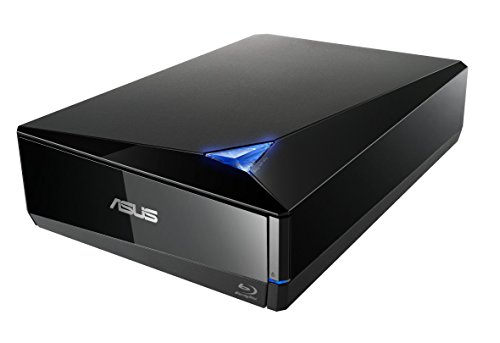
Designed for those who demand speed and reliability, the ASUS BW-16D1X-U Blu-ray Drive offers an impressive 16X writing speed, making it an excellent choice for Mac users looking to efficiently archive large files or create high-quality video projects. With USB 3.0 compatibility, it guarantees fast data transfer. This drive supports BDXL, allowing you to store up to 128 GB of data. The sleek design adds a touch of elegance to your setup, while the included Cyber Link Power2Go 8 software enhances your disc-burning experience. Users praise its efficiency, making it a reliable option for all your media needs.
Best For: Users seeking a fast and reliable external Blu-ray drive for archiving large files and creating high-quality video projects.
Pros:
- Fast 16X writing speed for efficient data burning.
- Elegant diamond-shaped design that enhances workspace aesthetics.
- Supports archival-quality storage with M-DISC for up to 1,000 years.
Cons:
- Compatibility issues reported by some Mac users with firmware updates.
- Power button located at the rear, which may be inconvenient for some.
- Plastic door may rattle during operation, affecting build quality perception.
archgon Premium Aluminum External USB 3.0 UHD 4K Blu-Ray Writer

If you’re looking for a sleek and portable external Blu-ray drive that supports UHD 4K Blu-ray writing and playback, the Archgon Premium Aluminum External USB 3.0 UHD 4K Blu-Ray Writer is an excellent choice. This drive features a sturdy aluminum finish and lets you read/write Blu-rays, DVDs, and CDs on your Mac, though 4K playback requires third-party software. Weighing just 1.34 pounds, it’s easy to carry. Users appreciate its performance, with UHD 4K movies ripping in about an hour. Just handle it with care, as some have reported durability issues. Overall, it offers great value for UHD enthusiasts.
Best For: Users seeking a reliable external Blu-ray drive with UHD 4K capabilities for both PC and Mac, especially those who appreciate portability and aluminum build quality.
Pros:
- Supports UHD 4K playback and writing with appropriate software.
- Sturdy aluminum construction and portable design for easy transport.
- Rips UHD 4K movies efficiently in about an hour.
Cons:
- Durability issues reported by some users, with units failing within a year.
- Requires third-party software for 4K playback, which can be a hassle.
- Performance may vary, with slower ripping times noted by some users.
External Blu-ray Drive for Laptop (USB 3.0 Type-C)

The External Blu-ray Drive for Laptop is an ideal choice for users seeking portability and versatility, thanks to its USB 3.0 and Type-C connectivity. This compact burner supports a variety of formats, including BD-R/RE/ROM and DVD±R/RW, enabling you to enjoy high-quality media playback. With read/write speeds of up to 24X for CDs and 6X for Blu-rays, you’ll experience efficient performance. It features a 7-in-1 hub with multiple ports and card readers, enhancing usability. While it doesn’t include playback software, it works seamlessly with popular options like VLC and PowerDVD. Enjoy reliable, high-speed media access wherever you go!
Best For: Users looking for a portable and versatile Blu-ray drive compatible with multiple operating systems and media formats.
Pros:
- Versatile Compatibility: Supports various formats and operating systems, including Windows, Linux, and Mac OS.
- High-Speed Performance: Offers impressive read/write speeds, making media access efficient.
- 7-in-1 Hub: Provides additional ports and card readers for enhanced functionality.
Cons:
- Additional Software Costs: Lacks included playback software, requiring users to purchase or download third-party options.
- Blu-ray Recognition Issues: Some users report difficulties in recognizing Blu-ray discs.
- Long Burn Times: Burning large files can take 2 to 2.5 hours for 90 GB, which may be inconvenient for some users.
External Blu Ray Drive for PC and Laptop

For anyone seeking a reliable and versatile solution for multimedia needs, the External Blu-ray Drive offers seamless compatibility with PCs and laptops, including Windows, MacOS, and Linux systems. It supports 50GB discs, featuring impressive read/write speeds of 6x for Blu-rays and 8x for DVDs. The plug-and-play design makes setup effortless via USB-A or USB-C, while its slim, portable build includes integrated cable storage. Although it doesn’t support 4K Ultra HD, it delivers immersive 3D playback at near 1080p resolution. With compatibility for various software, this drive is perfect for backups, multimedia playback, and large file storage.
Best For: Students, professionals, and home users looking for a modern, portable Blu-ray drive for backups and multimedia playback.
Pros:
- Fast read/write speeds for efficient data handling.
- Dual USB-A and USB-C support for versatile connectivity.
- Slim design with integrated cable storage for enhanced portability.
Cons:
- Does not support 4K Ultra HD discs.
- Durability concerns noted by some users.
- Initial setup may require manual software installation for optimal Blu-ray playback.
External Blu-ray Drive Player (USB 3.0 and Type-C)

Offering both USB 3.0 and Type-C connectivity, the External Blu-ray Drive Player is perfect for Mac users who need a versatile and efficient solution for reading and writing Blu-ray discs. With a fast reading speed of up to 5Gbps, it’s six times faster than USB 2.0, making it ideal for handling BD, DVDs, and CDs. Its compact design guarantees portability, while strong error correction and low noise enhance your experience. Keep in mind, though, you’ll need to purchase playback software separately. Plus, enjoy peace of mind with a one-year warranty and 24/7 expert support for any issues.
Best For: Users looking for a portable and efficient external Blu-ray drive compatible with both USB 3.0 and Type-C connections for reading and writing Blu-ray discs.
Pros:
- Fast reading speed of up to 5Gbps, six times faster than USB 2.0.
- Compact and lightweight design, making it easy to carry for travel.
- Strong error correction and low noise for a better user experience.
Cons:
- Does not include playback software, which must be purchased separately.
- Compatibility issues reported with certain Windows 11 laptops.
- Not compatible with TVs, Tablets, PS4, iPads, Chromebooks, Projectors, or Vehicles.
LG Ultra Slim Portable Hybrid Drive (BP60NB10)
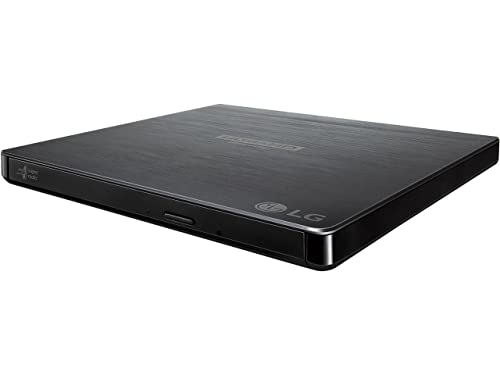
Designed for Mac users seeking versatility and reliability, the LG Ultra Slim Portable Hybrid Drive (BP60NB10) stands out with its UHD 4K and Blu-ray compatibility. Weighing just 9.6 ounces, this compact drive fits easily into your setup and supports USB 3.0 for quick transfers. With a 6x BD-R write speed and M-DISC support, you can count on superior data storage. Users appreciate its smooth playback and reliable burning capabilities, though some note it can be noisy during operation. While Mac users might need additional software, the BP60NB10 remains a top choice for archiving and media playback.
Best For: Those seeking a reliable and compact external drive for archiving and media playback, particularly Mac users.
Pros:
- Lightweight and portable design, making it easy to transport.
- Supports a variety of formats including UHD 4K, Blu-ray, DVD, and audio CDs.
- M-DISC support ensures superior reliability for long-term data storage.
Cons:
- Some users have reported noise during operation.
- Mac users may require additional software to fully utilize its capabilities.
- Build quality is noted as lightweight plastic, which may impact durability.
External Blu-ray Drive, USB 3.0 & Type-C BD/DVD/CD Burner

If you’re looking for a reliable and efficient way to read Blu-ray, DVD, and CD formats on your Mac, the External Blu-ray Drive with USB 3.0 and Type-C connectivity is an excellent choice. This compact and lightweight drive supports Blu-ray reading up to 6X and DVDs at 8X, ensuring quick access to your media. With plug-and-play simplicity, you won’t need additional drivers for CD/DVD use. The USB 3.0 technology offers transfer speeds up to 5Gbps, enhancing your experience. Enjoy low noise and energy efficiency while benefiting from customer support for playback issues and a return policy for peace of mind.
Best For: Users seeking a portable and efficient external drive to read Blu-ray, DVD, and CD formats on their computers without the need for additional drivers.
Pros:
- Compact and lightweight design for easy portability.
- Plug-and-play functionality for hassle-free setup.
- High-speed USB 3.0 and Type-C connectivity for fast data transfer.
Cons:
- Not capable of burning Blu-ray discs.
- Some users report reliability issues with disc reading after short usage.
- Average rating of 3.9 out of 5 stars suggests mixed customer satisfaction.
Factors to Consider When Choosing External Blu Ray Drives for Mac
When choosing an external Blu-ray drive for your Mac, you’ll want to take into account several important factors. Compatibility with macOS, software requirements, and read/write speeds can greatly impact your experience. Don’t forget to check the design, portability features, price, and warranty options to guarantee you get the best fit for your needs.
Compatibility With Macos
Choosing an external Blu-ray drive for your Mac requires careful consideration of compatibility with macOS. First, verify the drive supports macOS 10 or higher for the best experience. Many drives need third-party software for playback and writing, as macOS often lacks native support. While some drives can read and write standard Blu-ray, DVD, and CD formats, UHD 4K playback may be limited due to software constraints. Be aware that compatibility issues can arise with newer macOS versions, requiring specific software updates. For smooth playback, consider using recommended applications like Macgo Blu-ray Player or VLC Media Player, which may not come bundled with the drive. Always check compatibility details before making your purchase.
Software Requirements and Support
Understanding the software requirements and support for external Blu-ray drives is essential for a seamless experience on your Mac. Most drives need specific third-party software for Blu-ray playback, as macOS doesn’t always natively support it. Popular options like Macgo Blu-ray Player and VLC Media Player must be installed separately. Keep in mind that some drives may not be compatible with Blu-ray playback on Mac, so choose wisely. You might also find that software performance can vary between operating systems, with Windows users often reporting better reliability. Additionally, some drives come with bundled software for burning but may require separate purchases for playback, which can add to your overall costs. Always check compatibility before making a decision.
Read/Write Speed Capabilities
While selecting an external Blu-ray drive for your Mac, it’s crucial to take into account the read and write speed capabilities, as these directly impact your media experience. Most drives offer read speeds of up to 6X for Blu-ray discs, 8X for DVDs, and 24X for CDs, facilitating efficient data retrieval. When it comes to writing, some drives can achieve up to 16X for BD-R discs, allowing you to quickly burn high-capacity data. Compatibility with various disc formats—like BD-R, BD-RE, DVD±R/RW, and CD-R/RW—ensures versatility for your media needs. Plus, with USB 3.0 connections reaching up to 5 Gbps, you’ll enjoy considerably faster file transfers, enhancing overall performance.
Design and Portability Features
When selecting an external Blu-ray drive for your Mac, it’s vital to prioritize design and portability. Opt for a lightweight and slim drive that makes traveling and storage effortless. Look for models with built-in cable management to avoid tangling and simplify transport without needing extra accessories. A durable construction, ideally shock-resistant, is important to withstand the impacts of travel. Additionally, a compact form factor allows for vertical mounting, maximizing desk space when you’re not using it. Don’t forget to compare dimensions and weight to guarantee the drive fits comfortably in your laptop bag or travel case. This way, you can enjoy high-quality media playback wherever you go.
Price and Warranty Options
Price and warranty options play a significant role in your decision-making process for an external Blu-ray drive for your Mac. Prices can vary greatly, often exceeding $100, depending on features like read/write speed and software compatibility. When considering your budget, factor in the warranty, which typically ranges from 30 days to 2 years. A solid warranty often covers defects but remember to check the return policy for risk-free trials. Some users report excellent warranty support, while others have faced challenges, so research customer feedback to gauge service reliability. Ultimately, balancing the initial cost with long-term value from a strong warranty and responsive support can help you make a smart investment in your Blu-ray drive.
