
As you navigate the ever-evolving landscape of data storage in 2025, the choice of external SSDs can greatly impact your workflow. With the increasing demand for speed and capacity, finding the right 40Gbps external SSD for your Mac or PC is essential. From rugged designs to impressive storage options, these devices offer solutions tailored for professionals and enthusiasts alike. Curious about which models stand out? Let’s explore the top contenders.
Corsair EX400U 2TB USB4 Portable External SSD

If you’re looking for a high-performance external SSD that delivers lightning-fast speeds, the Corsair EX400U 2TB USB4 Portable External SSD is your go-to solution. With read speeds up to 4,000MB/s and write speeds reaching 3,600MB/s, this compact drive guarantees you’ll never wait long for file transfers. Weighing just 3.25 ounces and measuring 2.53 x 2.52 x 0.47 inches, it’s perfect for on-the-go use. Plus, its USB Type-C and Thunderbolt 4 interface assures broad compatibility with macOS and Windows systems. With a three-year warranty, you can confidently store your essential files knowing they’re safe and secure.
Best For: Users seeking a high-performance, portable external SSD for fast file transfers and reliable storage solutions.
Pros:
- Fast speeds with read speeds up to 4,000MB/s and write speeds of 3,600MB/s for efficient data transfer.
- Compact design and lightweight, making it ideal for travel and on-the-go use.
- Broad compatibility with macOS and Windows systems, plus support for Thunderbolt 4 and USB4.
Cons:
- Some users report compatibility issues with Thunderbolt on M-series Macs.
- Potential for hardware failure noted by certain customers.
- Customer ratings indicate a mixed experience, with an average rating of 3.9 out of 5 stars.
SanDisk 4TB Extreme Portable SSD

The SanDisk 4TB Extreme Portable SSD stands out as an ideal choice for photographers and videographers who need reliable, high-speed storage on the go. With impressive read speeds of up to 1050MB/s and write speeds of 1000MB/s, it handles large files effortlessly. Its compact design, weighing just 1.76 ounces, features a rubberized exterior for durability and a carabiner loop for easy attachment. Plus, it’s built to withstand drops and is IP65-rated for water and dust resistance. With 256-bit AES encryption, your data remains secure, making this SSD a top pick for anyone seeking performance and portability.
Best For: Photographers and videographers seeking reliable and high-speed portable storage solutions.
Pros:
- High Performance: Offers read speeds up to 1050MB/s and write speeds of 1000MB/s for fast file transfers.
- Durable Design: IP65-rated for water and dust resistance, plus up to 3-meter drop protection ensures longevity.
- Secure Storage: Features 256-bit AES hardware encryption to keep your data safe.
Cons:
- Price Point: May be more expensive compared to traditional external hard drives.
- Compatibility Limitations: Requires software download for full functionality on macOS.
- Performance Variation: Notable speed drop when the drive is partially filled.
SanDisk Professional 4TB PRO-G40 SSD
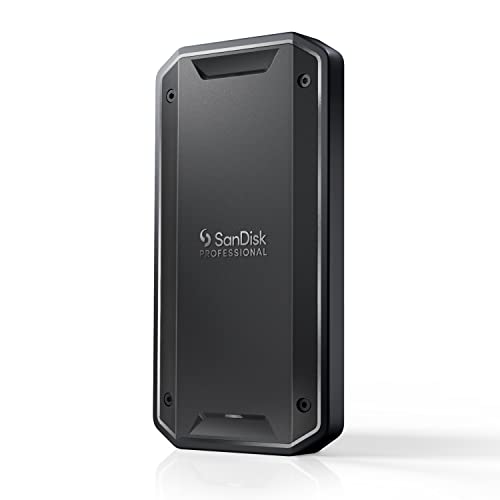
For creative professionals and content creators who demand high performance, the SanDisk Professional 4TB PRO-G40 SSD stands out with its remarkable speed capabilities, boasting up to 3000MB/s read and 2500MB/s write. Featuring Thunderbolt 3 and USB-C dual-mode compatibility, you can transfer 50GB in about a minute. Its ultra-rugged design includes IP68 dust and water resistance, 4000lb crush resistance, and 3m drop resistance, ensuring durability in tough environments. The cool aluminum core efficiently dissipates heat, maintaining peak speeds. Pre-formatted for Mac, it’s ready to use straight out of the box, making it an ideal choice for your storage needs.
Best For: Creative professionals and content creators who require high-speed, durable storage solutions for demanding tasks.
Pros:
- Ultra-fast speeds with up to 3000MB/s read and 2500MB/s write capabilities.
- Durable design featuring IP68 dust/water resistance, crush resistance up to 4000lbs, and drop resistance from 3m.
- Ready to use out of the box, pre-formatted for Mac, with dual-mode connectivity options.
Cons:
- Higher price point compared to standard SSDs due to its professional-grade features.
- Limited compatibility for Windows users without reformatting the drive.
- Physical size may be less portable compared to smaller SSD options.
Corsair EX400U 1TB USB4 Portable External SSD
Looking for lightning-fast data transfer? The Corsair EX400U 1TB USB4 Portable External SSD delivers with speeds up to 40Gbps. Its compact design makes it perfect for on-the-go use, weighing just 3.25 ounces. You can expect impressive sequential read speeds of 4,000MB/sec and write speeds of 3,500MB/sec, making file transfers a breeze. Compatible with both Windows PC and iOS Mac, it features a plug-and-play setup for easy connectivity. While reviews highlight its speed and portability, some users note occasional compatibility issues and overheating during extended use. Enjoy a three-year warranty for peace of mind with your purchase.
Best For: Those seeking a high-speed, portable external SSD for quick data transfers on both Windows and Mac systems.
Pros:
- Fast performance with read speeds up to 4,000MB/sec and write speeds up to 3,500MB/sec.
- Compact and lightweight design, making it easy to carry for on-the-go use.
- Plug-and-play setup ensures simple connectivity without the need for additional software.
Cons:
- Some users report compatibility issues with certain Mac models.
- Occasional overheating during extended use has been noted.
- Connectivity issues may arise with specific USB ports or setups.
SanDisk 4TB Extreme PRO Portable SSD

With a blazing speed of up to 2000MB/s, the SanDisk 4TB Extreme PRO Portable SSD is an ideal choice for creative professionals and tech enthusiasts who demand high performance. Its compact design, weighing just 2.75 ounces and measuring 0.41 x 2.28 x 4.36 inches, makes it easy to carry. The durable aluminum chassis offers IP65 water and dust resistance, plus 3-meter drop protection. You’ll appreciate the fast file transfers, especially for large 4K videos. Compatible with both Mac and PC, it also features a handy SanDisk Memory Zone app for effortless file management. Experience speed and reliability with this robust SSD.
Best For: Creative professionals and tech enthusiasts seeking high-performance, portable storage solutions.
Pros:
- Fast performance: Achieves read/write speeds of up to 2000MB/s for efficient file transfers.
- Durable design: Features an IP65 rating for water and dust resistance, along with 3-meter drop protection.
- Compact and lightweight: Easy to carry, weighing only 2.75 ounces and measuring 0.41 x 2.28 x 4.36 inches.
Cons:
- Short USB-C cable: Some users find the included cable to be too short for convenient use.
- Occasional connectivity issues: Users have reported problems connecting with Windows 10 systems.
- Heat during heavy use: The SSD may get warm during extensive file transfers, though it remains functional.
SAMSUNG T7 Portable SSD, 2TB External Solid State Drive

The SAMSUNG T7 Portable SSD, 2TB External Solid State Drive, stands out for its impressive transfer speeds of up to 1,050MB/s read and 1,000MB/s write, making it a top choice for creatives and professionals alike. Its compact design (3.3 x 2.2 x 0.3 inches) and lightweight build (just 2.08 ounces) allow for easy portability. With PCIe NVMe technology, it offers nearly double the speed of its predecessor, the T5. You can trust its durability, as it withstands drops from up to 6 feet. Compatible with various devices, it’s perfect for high-resolution video editing and everyday storage needs.
Best For: The SAMSUNG T7 Portable SSD is best for creatives and professionals who need high-speed, reliable storage for large files and high-resolution video editing.
Pros:
- Fast Transfer Speeds: Offers up to 1,050MB/s read and 1,000MB/s write speeds, significantly improving workflow.
- Durable Design: Solid aluminum unibody construction makes it shock-resistant and able to withstand drops from up to 6 feet.
- Compact and Portable: Lightweight and small dimensions make it easy to carry for on-the-go use.
Cons:
- Price Point: Higher cost compared to traditional external hard drives may deter budget-conscious buyers.
- Limited Capacity Options: While available up to 4TB, some users may require larger storage solutions.
- Heat Management: Although it maintains a safe temperature, intensive use may still cause noticeable warmth during operations.
Samsung T7 Portable SSD, 1TB External Solid State Drive
For anyone needing rapid file transfers, the Samsung T7 Portable SSD, 1TB, stands out as an exceptional choice among the best 40Gbps external SSDs for Mac and PC. With read speeds up to 1,050 MB/s and write speeds of 1,000 MB/s, it’s perfect for handling large files like 4K videos. Weighing just 2.08 ounces and measuring 3.3 x 2.2 x 0.3 inches, it’s highly portable. Plus, its shock-resistant design guarantees durability. Easy plug-and-play compatibility with various devices makes it user-friendly. Backed by Samsung’s reputation, you can trust the T7 for reliability and performance, achieving a stellar 4.7-star rating.
Best For: Professionals and content creators who require fast and reliable storage for large files, such as 4K videos and high-resolution images.
Pros:
- High-speed performance with read speeds up to 1,050 MB/s and write speeds of 1,000 MB/s, significantly faster than traditional external hard drives.
- Durable and portable design, featuring shock resistance and a lightweight aluminum unibody construction, making it easy to carry on the go.
- Wide compatibility with various devices including PCs, Macs, Android devices, and gaming consoles, ensuring versatile usage.
Cons:
- Limited storage options compared to some competitors, as it currently offers a maximum capacity of 4TB.
- Higher price point compared to traditional external hard drives, which may be a consideration for budget-conscious users.
- May require additional adapters for older devices that do not support USB Type C connectivity.
LaCie Rugged Mini SSD 4TB Solid State Drive

Designed for creative professionals and on-the-go users, the LaCie Rugged Mini SSD 4TB stands out with its impressive read speeds of up to 2000MB/s. Utilizing USB 3.2 Gen 2×2 technology, it guarantees fast file transfers while remaining compatible with future USB 40Gbps and Thunderbolt 4 devices. Its rugged design features an IP54 rating, making it dust and water-resistant, perfect for your active lifestyle. Compact and lightweight, it measures just 0.68 x 2.63 x 4.15 inches. With positive reviews highlighting its durability and performance, this SSD is a reliable choice for both Mac and PC users.
Best For: Creative professionals and on-the-go users seeking a high-performance, durable storage solution.
Pros:
- Fast transfer speeds of up to 2000MB/s ensure efficient file management.
- Rugged design with IP54 rating offers dust and water resistance for outdoor use.
- Compact and lightweight form factor makes it easy to carry anywhere.
Cons:
- Some users report USB connection stability issues, leading to potential data loss.
- Higher price point compared to traditional external hard drives may not fit all budgets.
- Limited warranty information might raise concerns about long-term reliability.
SanDisk 2TB Extreme Portable SSD
With its remarkable blend of speed and durability, the SanDisk 2TB Extreme Portable SSD stands out as the ideal choice for creative professionals and tech enthusiasts who need reliable storage on the go. Boasting read speeds up to 1050MB/s and write speeds of 1000MB/s, this compact SSD packs a punch. Its rugged design offers 3-meter drop protection and an IP65 rating against water and dust. Plus, with 256-bit AES encryption, your files remain secure. Weighing just 1.76 ounces, it’s easy to carry, and the SanDisk Memory Zone app helps you manage your files effortlessly.
Best For: Creative professionals and tech enthusiasts seeking a reliable, high-speed portable storage solution.
Pros:
- High Performance: Offers impressive read speeds up to 1050MB/s and write speeds of 1000MB/s for quick file transfers.
- Durable Design: Features 3-meter drop protection and an IP65 rating for water and dust resistance, making it ideal for on-the-go use.
- Security Features: Equipped with 256-bit AES hardware encryption for enhanced file security.
Cons:
- No Internal DRAM Cache: Lacks an internal DRAM cache, which may lead to reduced write speeds when the drive is partially filled.
- Speed Variability: Real-world write speeds can drop significantly when the drive is nearing capacity, potentially affecting performance.
- Software Requirement for Mac: Requires a software download for compatibility with macOS, which may be inconvenient for some users.
ORICO 4TB USB4.0 Portable SSD

The ORICO 4TB USB4.0 Portable SSD stands out as an exceptional choice for creative professionals in need of rapid data transfer speeds. With a blazing 3800MB/s transfer rate, you can move large files like 4K/8K videos in seconds, markedly boosting your workflow. Weighing just 3.17 ounces, its sleek, fanless aluminum design guarantees silent operation and durability. Plus, it’s compatible with USB4, Thunderbolt 3/4, and various devices, making it perfect for studio or remote work. Easy to use with no extra adapters needed, this SSD is tailored for creators who demand exceptional performance on the go.
Best For: Creative professionals seeking rapid data transfer speeds for large files like 4K/8K videos.
Pros:
- High data transfer rate of up to 3800MB/s, significantly reducing file transfer times.
- Durable fanless aluminum design ensures silent operation and resilience against drops and scratches.
- Wide compatibility with USB4, Thunderbolt 3/4, Mac OS, Windows, and Android devices without the need for extra adapters.
Cons:
- Limited to a capacity of 4TB, which may not suffice for users with extensive data storage needs.
- Higher price point compared to traditional external hard drives.
- Availability of warranty information only upon request may be inconvenient for some users.
Factors to Consider When Choosing an External 40GBPS SSD for Mac and PC
When choosing an external 40Gbps SSD for your Mac or PC, you’ll want to take into account several key factors. Compatibility with your devices, speed and performance, and durability are all essential aspects that can impact your experience. Additionally, think about portability and security features to guarantee you pick the right SSD for your needs.
Compatibility With Devices
Choosing the right external 40Gbps SSD for your Mac or PC means considering several compatibility factors to guarantee seamless performance. First, confirm the SSD supports USB4 or Thunderbolt 3/4 interfaces, as these deliver peak speeds. Next, check compatibility with your operating systems; many SSDs need macOS 13 or later and Windows 10 or newer for full functionality. Don’t forget about backward compatibility with older USB standards like 3.2 and 3.0, allowing use with various devices. Also, look at the file system format—some SSDs may come pre-formatted for Mac (APFS), which can hinder Windows access without reformatting. Finally, verify that the SSD offers a plug-and-play setup for easy connection without extra drivers.
Speed and Performance
To guarantee you get the best performance from your external 40Gbps SSD, focus on its speed specifications and technology. Look for SSDs with read speeds of at least 4,000MB/s and write speeds around 3,600MB/s to handle data-intensive tasks efficiently. Opt for devices utilizing USB4 technology, which supports transfer rates up to 40Gbps, drastically reducing your file transfer times. Interface compatibility matters, too; using USB Type-C or Thunderbolt 4 can help maximize performance on both Mac and PC systems. Don’t overlook the MTBF rating, as a higher rating (like 1,400,000 hours) indicates better reliability. Finally, make sure your SSD supports backward compatibility with older USB standards, so you maintain performance across various devices.
Durability and Design
While speed and performance are critical factors, durability and design also play a significant role in selecting an external 40Gbps SSD. Look for SSDs with high IP ratings, like IP65 or IP68, which offer excellent water and dust resistance. It’s wise to choose models with drop protection ratings of up to 3 meters to guard against accidental falls. The materials used in construction matter too; rubberized coatings and forged aluminum chassis can enhance impact resistance and heat management. Compact and lightweight designs improve portability, making it easier to carry your SSD without sacrificing storage capacity. Finally, verify it has proper cooling features to maintain performance and prolong its lifespan during intense use.
Portability and Size
Portability and size are essential factors when you’re on the hunt for an external 40Gbps SSD, especially if you need to transport it frequently. Look for options weighing less than 4 ounces and compact enough to slip into your pocket. A smaller form factor, around 2.5 inches, strikes the perfect balance between easy transport and ample storage capacity. Make certain you choose SSDs with rugged designs for added durability against drops and environmental factors. Features like a carabiner loop or lightweight structure can enhance usability while you’re on the go. Many portable SSDs offer up to 4TB of storage without compromising their compact profile, making them ideal for both professional projects and personal use.
Security Features Included
When selecting an external 40Gbps SSD for your Mac or PC, security features play a crucial role in safeguarding your data. Look for SSDs that offer 256-bit AES hardware encryption, as this guarantees your files are protected from unauthorized access. Password protection features can add another layer of security, especially for sensitive information. Make certain the SSD is compatible with your operating system, since some models may require additional software for encryption. Additionally, consider the durability ratings, such as IP65 for water and dust resistance, to help protect your data from environmental damage. Prioritizing these security features will give you peace of mind while using your external SSD.
Warranty and Support
Choosing an external 40Gbps SSD for your Mac or PC involves more than just performance and speed; warranty and support are equally important. First, consider the warranty period—longer warranties give you peace of mind about the product’s longevity and reliability. Look for manufacturers that provide thorough customer support, including help with installation and troubleshooting. Check if the SSD has a warranty covering defects for one to five years. Don’t forget to review the return policy; a flexible return option is helpful if the product doesn’t meet your expectations. Finally, make sure the manufacturer offers firmware updates and ongoing software support, as these can greatly enhance your SSD’s performance and security over time.
Price and Value
Understanding warranty and support is just one part of your decision-making process. When you evaluate external 40Gbps SSDs, remember that higher speeds often mean a higher price, typically exceeding $200 based on capacity and brand. To guarantee you get value for your money, compare performance metrics like read/write speeds against the price. Longer warranties, especially those over three years, can justify a higher cost by offering peace of mind against defects. Keep an eye out for sales and discounts, as prices fluctuate considerably, allowing you to snag better deals. Finally, check user reviews for insights on reliability and performance, which can greatly influence the overall value of your SSD compared to its initial purchase price.
