
If you’re a Mac user, you’ve likely felt the strain of using a standard mouse for extended periods. Finding the right ergonomic USB mouse can make a significant difference in your comfort and productivity. In 2025, several models stand out for their thoughtful designs and features tailored to enhance your experience. Let’s explore the top options that combine comfort and functionality, ensuring you can work efficiently without discomfort.
TECKNET Ergonomic Bluetooth Wireless Vertical Mouse
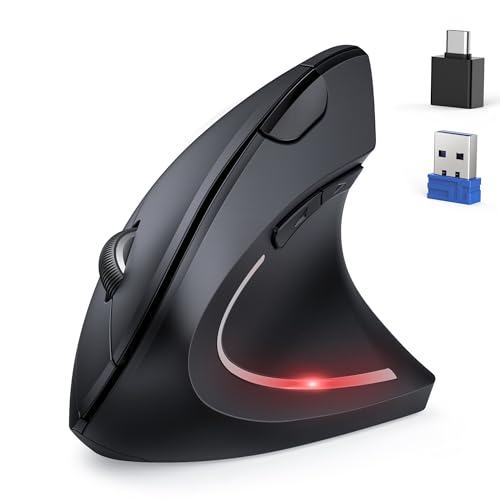
If you’re a Mac user seeking relief from wrist strain, the TECKNET Ergonomic Bluetooth Wireless Vertical Mouse is a fantastic choice. Its ergonomic design greatly reduces wrist pressure, making it perfect for extended use, especially for larger hands. With six adjustable DPI settings up to 4800, you can customize your sensitivity for best performance. The mouse connects via Bluetooth or a 2.4GHz USB, providing flexibility. Enjoy nearly silent clicks, ideal for quiet environments. Although it lacks a rechargeable battery, it boasts a power-saving mode and a 36-month warranty. Users consistently praise its comfort and value, making it a reliable option for Mac users.
Best For: Users seeking an ergonomic solution to reduce wrist strain during prolonged computer use, especially those with larger hands.
Pros:
- Ergonomic design significantly reduces wrist pressure and enhances comfort for extended use.
- Flexible connectivity options with Bluetooth and 2.4GHz USB modes make it versatile for various devices.
- Silent operation ensures nearly silent clicks, making it suitable for quiet work environments.
Cons:
- Not rechargeable, requiring users to replace batteries regularly.
- Side buttons are not functional on macOS, limiting usability for Mac users.
- Right-handed design may not accommodate left-handed users.
JJK Censi Newtral Ergonomic Vertical Wireless Mouse

The JJK Censi Newtral Ergonomic Vertical Wireless Mouse is an excellent choice for Mac users seeking comfort during long hours of work. Its 33° vertical angle encourages a natural handshake position, reducing wrist fatigue. With adjustable DPI settings (800/1200/1600), you’ll enjoy smooth performance across tasks. Weighing 4.6 ounces, it might feel a bit heavy, but the removable pinky support enhances comfort. While users appreciate its ergonomic design, some report the pinky rest can detach and the scroll wheel may squeak over time. Backed by a 1-year warranty, it’s a solid investment for your workspace.
Best For: Those seeking an ergonomic mouse to alleviate wrist strain during extended computer use.
Pros:
- Ergonomic Design: Promotes a natural handshake position to reduce wrist fatigue.
- Adjustable DPI: Three DPI settings (800/1200/1600) offer customizable sensitivity for various tasks.
- Removable Pinky Support: Enhances comfort for prolonged use.
Cons:
- Weight: Some users may find the 4.6-ounce weight a bit heavy for comfort.
- Pinky Rest Flimsiness: The pinky support can detach during use, affecting user experience.
- Scroll Wheel Issues: Users report that the scroll wheel may develop squeaking over time.
Logitech Lift Vertical Ergonomic Mouse (Wireless, Off White)

Designed specifically for small to medium right hands, the Logitech Lift Vertical Ergonomic Mouse is an excellent choice for Mac users seeking comfort and efficiency. Its 57-degree vertical shape promotes a natural wrist posture, reducing strain during prolonged use. You’ll appreciate the softly textured grip and snug thumb rest that enhance your comfort. With wireless connectivity via Bluetooth or the Logi Bolt USB receiver, it’s versatile and compatible with multiple operating systems. The mouse features four customizable buttons, whisper-quiet clicks, and SmartWheel for smooth scrolling. Plus, its battery lasts up to two years, ensuring uninterrupted productivity at work.
Best For: Individuals with small to medium right hands who seek an ergonomic mouse for enhanced comfort and productivity during extended use.
Pros:
- Ergonomic design promotes natural wrist posture, reducing strain.
- Whisper-quiet clicks provide a distraction-free working environment.
- Long battery life of up to 2 years for uninterrupted use.
Cons:
- Limited to right-handed users only due to its design.
- May not fit comfortably in larger hands.
- Customization features may require software installation for full functionality.
Ergonomic Wireless Bluetooth Vertical Mouse (Rechargeable, 6 Buttons, 1600 DPI)

For those who spend long hours working on their Mac, the Ergonomic Wireless Bluetooth Vertical Mouse is an excellent choice. Its unique design promotes a comfortable “handshake” wrist position, minimizing fatigue. With 6 buttons and adjustable DPI settings of 800, 1200, and 1600, it guarantees smooth tracking and easy navigation. It connects via Bluetooth or a dual USB receiver, offering seamless device pairing within a 10-meter range. The rechargeable 500mAh battery provides over a week of use, while the noise reduction feature keeps your workspace quiet. Lightweight and compact, it’s perfect for any setup, enhancing both comfort and productivity.
Best For: Individuals who spend long hours on their computers and seek ergonomic comfort to reduce wrist fatigue and improve productivity.
Pros:
- Ergonomic Design: Promotes a comfortable “handshake” wrist position, minimizing discomfort during extended use.
- Multiple Connectivity Options: Versatile connection modes (Bluetooth and USB) compatible with various devices, ensuring seamless pairing.
- Quiet Operation: Noise reduction feature significantly lowers clicking noise, creating a more peaceful work environment.
Cons:
- Battery Life Notifications: Some users report issues with battery life notifications, which may lead to unexpected interruptions.
- Dual Receiver Design: The USB dongle design may not be ideal for all users, potentially leading to connectivity issues.
- Limited Simultaneous Use: Bluetooth and 2.4G modes cannot be used at the same time, which may restrict flexibility in device pairing.
Ergonomic Wireless Rechargeable Mouse (Bluetooth+USB A+Type C)

Looking for a mouse that enhances your comfort while using your Mac? The ergonomic wireless rechargeable mouse features a vertical design with a 58-degree angle, promoting a neutral handshake posture that reduces wrist stress. With Bluetooth 5.3, 2.4GHz USB A, and USB C connectivity, you can easily switch between devices without hassle. Enjoy five adjustable DPI settings for precise tracking on various surfaces. Its rechargeable battery lasts 1-3 months and enters standby mode after 10 minutes. Plus, with six silent buttons, it’s perfect for quiet spaces. Compatible with multiple operating systems, this mouse combines comfort and functionality seamlessly.
Best For: Those seeking a comfortable and versatile mouse that reduces wrist strain and is compatible with various devices and operating systems.
Pros:
- Ergonomic design promotes a neutral handshake posture, reducing wrist and arm stress.
- Multiple connectivity options (Bluetooth 5.3, USB A, USB C) allow easy switching between devices.
- Silent operation with six buttons makes it ideal for quiet work environments.
Cons:
- Shortcut keys are not functional in macOS, limiting some features for Mac users.
- Rechargeable battery may require regular charging based on usage, which could be inconvenient for some users.
- Vertical design may take time to get used to for those accustomed to traditional mouse shapes.
seenda Ergonomic Vertical Wireless Mouse (MOU-302)
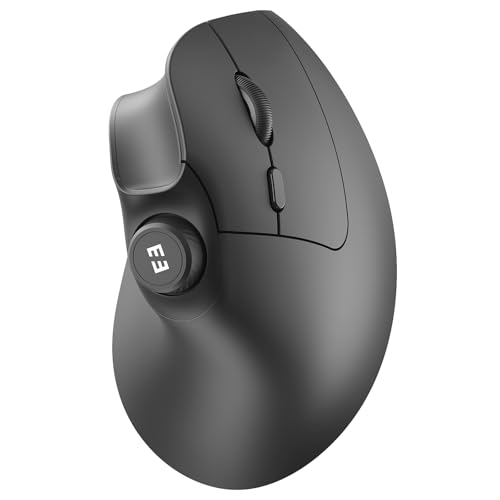
If you’re seeking a mouse that prioritizes comfort during long hours of use, the seenda Ergonomic Vertical Wireless Mouse (MOU-302) is an excellent choice for Mac users. Its ergonomic design promotes a natural hand position, reducing wrist pressure. You’ll appreciate the silent operation of its seven buttons, perfect for both work and gaming. With versatile connectivity options, it connects to up to three devices using Bluetooth and 2.4G technology, ensuring broad compatibility. Plus, the built-in rechargeable battery lasts up to two months on a single charge, making it incredibly convenient for your daily tasks. Enjoy enhanced multimedia control with ease!
Best For: Users seeking a comfortable and ergonomic mouse for extended use, particularly those who work on Mac devices.
Pros:
- Ergonomic design reduces wrist pressure, promoting comfort during long hours of use.
- Versatile connectivity options allow connection to up to three devices via Bluetooth and 2.4G technology.
- Built-in rechargeable battery lasts up to two months on a single charge for convenience.
Cons:
- The seven buttons are non-programmable, limiting customization options.
- Heavier than some traditional mice, which might not appeal to all users.
- Limited color options may not suit all aesthetic preferences.
Logitech Ergo M575S Wireless Trackball Mouse

The Logitech Ergo M575S Wireless Trackball Mouse stands out as an excellent choice for Mac users seeking a blend of comfort and functionality. Its sculpted shape promotes hand relaxation, reducing muscle strain in your forearm by 25%. You’ll appreciate the thumb control, allowing cursor movement without arm motion, perfect for small setups. With three customizable buttons, you can set shortcuts for efficiency. Plus, it connects via Bluetooth or Logi Bolt USB receiver, boasting an impressive 18 months of battery life. While some users faced software installation issues, overall, its ergonomic design and smooth operation make it a top pick.
Best For: Users seeking an ergonomic mouse that reduces forearm strain and is ideal for small workspaces.
Pros:
- Ergonomic design reduces muscle strain by 25%, promoting comfort during extended use.
- Customizable buttons allow for personalized shortcuts, enhancing productivity.
- Long battery life of up to 18 months ensures minimal interruptions.
Cons:
- Some users report software installation issues, particularly on Mac devices.
- Easy Switch feature for device switching may not function smoothly for all users.
- Limited compatibility may affect performance on certain surface types.
seenda Ergonomic Wireless Vertical Mouse for Mac and Windows
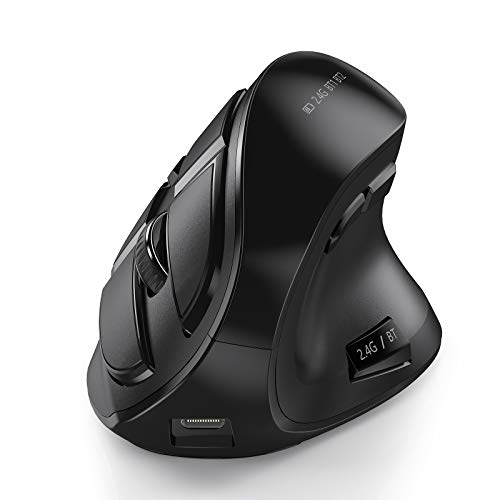
For Mac users seeking comfort during long hours of computer work, the seenda Ergonomic Wireless Vertical Mouse stands out with its innovative design that promotes a natural hand position. Weighing just 6.7 ounces, it’s easy to handle and rechargeable via USB. With Bluetooth 5.0 compatibility, you can connect up to three devices simultaneously, making switching effortless. The 9-button configuration includes noiseless options for discreet use. Users rate it 4.2 stars, praising its comfort and effectiveness, especially for those dealing with wrist pain. Whether for business tasks or gaming, this mouse adapts seamlessly to your needs.
Best For: Individuals experiencing wrist discomfort who require a comfortable and ergonomic mouse for extended computer use.
Pros:
- Ergonomic design promotes a natural hand position, reducing wrist and shoulder pain.
- Multi-device connectivity allows seamless switching between up to three devices.
- Excellent battery life lasting at least a week on a full charge, with noiseless click options for discreet use.
Cons:
- Some users report accidental button presses when switching devices.
- Lack of programmable buttons may limit customization for advanced users.
- Desire for more detailed battery indicators and additional color options.
Zhaman Ergonomic Vertical Mouse (Rechargeable, 2.4G USB & Type C)

Designed specifically for users with small to medium hands, the Zhaman Ergonomic Vertical Mouse offers an ideal solution for those seeking comfort during extended computer use. Its 60° vertical angle promotes a natural grip, reducing wrist fatigue considerably. With dual connectivity options—2.4G USB and Type C—this rechargeable mouse lasts up to two months on a full charge. You’ll appreciate the adjustable DPI settings for precise tracking and the low-noise operation, perfect for quiet environments. While some users have noted durability concerns, many rave about its ergonomic design and reduced wrist strain, making it a solid choice for ergonomic needs.
Best For: Users with small to medium hands seeking an ergonomic solution to reduce wrist strain during extended computer use.
Pros:
- Comfortable 60° vertical angle design that promotes a natural palm grip.
- Rechargeable with up to two months of battery life on a full charge.
- Adjustable DPI settings for precise tracking and low-noise operation suitable for quiet environments.
Cons:
- Some users report concerns about durability and material quality over time.
- A few find the weight insufficient for their preference.
- Button placement may feel awkward for certain users.
Lenovo WL310 Bluetooth Silent Mouse

When you’re looking for a mouse that combines comfort and quiet functionality, the Lenovo WL310 Bluetooth Silent Mouse stands out, especially for Mac users. Weighing just 2.4 ounces, its ergonomic design fits perfectly in your hand, reducing wrist strain during long sessions. The silent click technology makes it ideal for quiet environments like offices or libraries. With adjustable DPI settings, you can easily switch between 1000, 1200, and 1600 DPI for precision control. Plus, Bluetooth 5.0 connectivity guarantees a lag-free experience without needing a USB receiver. Its sleek grey design adds a modern touch to your workspace.
Best For: Those seeking a quiet, ergonomic mouse that is compatible with multiple devices, especially in office or library settings.
Pros:
- Ergonomic design reduces wrist strain and enhances comfort during extended use.
- Silent click technology ensures noiseless operation, perfect for quiet environments.
- Bluetooth 5.0 connectivity offers stable and lag-free performance without the need for a USB receiver.
Cons:
- Some users report that the mouse is not as quiet as advertised.
- A few customers have experienced issues with battery life.
- The compact size may not be suitable for users with larger hands.
Factors to Consider When Choosing Ergonomic USB Mice for Mac
When choosing an ergonomic USB mouse for your Mac, you’ll want to evaluate several key factors. Look for ergonomic design features that promote comfort, along with connectivity options that fit your setup. Compatibility with macOS, adjustable DPI settings, and battery life are also essential to guarantee a smooth and efficient experience.
Ergonomic Design Features
Choosing the right ergonomic USB mouse for your Mac can greatly enhance your comfort and productivity. Look for a vertical orientation that promotes a natural handshake position, reducing wrist and arm strain during long sessions. Adjustable DPI settings are essential, letting you customize sensitivity for smoother tracking tailored to your preferences. The shape and contour should fit the natural curvature of your hand, alleviating discomfort and fatigue. Features like thumb rests and pinky support can help you maintain a relaxed grip, making extended use more enjoyable. Additionally, silent click technology makes for quieter operation, which is especially beneficial in shared or quiet environments. Prioritizing these ergonomic design features guarantees a more comfortable and efficient user experience.
Connectivity Options Available
Finding the right connectivity options is essential for maximizing the functionality of your ergonomic USB mouse on a Mac. Look for mice that offer Bluetooth connectivity, allowing you to connect wirelessly without using a USB receiver, which is handy for laptops with limited ports. If your device doesn’t support Bluetooth, USB-A receivers provide a reliable alternative for seamless connectivity. Some ergonomic mice even support multi-device connectivity, so you can switch between devices effortlessly. This versatility is valuable for different setups. However, be sure to check compatibility with macOS, as certain features like side buttons may not work across all platforms. Choosing the right connectivity can greatly enhance your overall user experience.
Compatibility With Macos
Ensuring your ergonomic USB mouse works seamlessly with macOS is key to a smooth user experience. Always choose a mouse explicitly listed as compatible with macOS to avoid functionality issues, especially with side buttons. Many ergonomic mice may have limited features on macOS, so checking user reviews or product specs for compatibility is essential. If you prefer Bluetooth, look for mice that support this connection, as it enhances usability without needing extra adapters. Customizable buttons can also boost productivity, as macOS software often allows for remapping. Additionally, consider mice with a noise reduction design for quieter clicks, making them suitable for shared spaces like offices or libraries. Prioritize these factors for the best experience.
Adjustable DPI Settings
Adjustable DPI settings are essential for optimizing your ergonomic USB mouse experience on a Mac. These settings let you customize the mouse’s sensitivity, enabling smoother tracking and precise control for various tasks. Common DPI levels range from 800 to 4800, with many mice offering multiple options for added versatility. If you’re into graphic design or gaming, higher DPI settings can help with fine detail, while lower settings enhance accuracy for everyday office work. Look for mice that allow you to switch DPI settings on-the-fly, so you can easily adapt to different applications without interrupting your workflow. This is especially important if you frequently switch between different screen sizes or resolutions, ensuring consistent performance across devices.
Battery Life Considerations
Optimizing your ergonomic USB mouse experience goes beyond sensitivity settings; battery life is another key factor to contemplate. When choosing a mouse for your Mac, consider models with rechargeable batteries that can last anywhere from one to three months on a single charge. Some options even include energy-saving modes that automatically put the device to sleep after inactivity, extending battery life. Pay attention to the charging time, as some mice can fully charge in just a couple of hours, giving you weeks of use. Additionally, look for models with low battery alerts through LED indicators, so you’ll know when it’s time to recharge or replace batteries, ensuring uninterrupted productivity.
Size and Weight Factors
When you’re selecting an ergonomic USB mouse for your Mac, the size and weight can make a significant difference in your comfort during use. A mouse should fit your hand comfortably to guarantee ideal grip and control. If you have small to medium hands, look for compact shapes, while larger models are better for bigger hands to prevent strain. The mouse’s dimensions—length, width, and height—should align with your hand size for a natural wrist position. Additionally, consider the weight; lighter mice can help reduce hand fatigue during extended sessions. Some models even offer adjustable weights, allowing you to customize the feel for enhanced comfort as you navigate through your day. Choose wisely for your best experience!
