
A good desk fan should cool you without demanding constant adjustment. The best ergonomic USB desk fans combine directional airflow, compact designs, quiet operation, and convenient USB power for more comfortable work, study, or travel.
This roundup compares 10 options across speed control, rotation, portability, mounting flexibility, battery use, and desk-friendly design so you can choose the right personal cooling solution.
Best 10 Ergonomic USB Desk Fans Picks for 2026
Quiet Precision

- 100 adjustable speed levels
- Up to 8.5 hours of battery life
- Digital battery and speed display
Best For: Quiet, finely tuned cooling at home, work, or while traveling
All-Day Versatility
DIGIX 100-Speed Rechargeable Fan
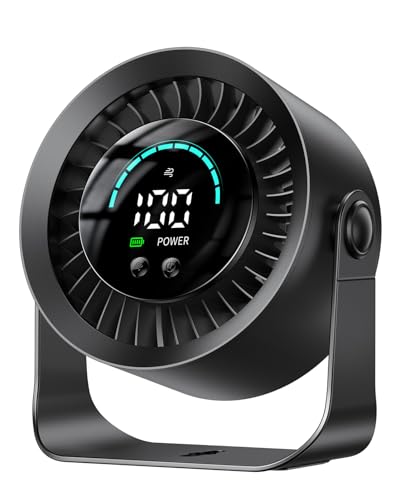
- Up to 17 hours on low speed
- 100 speeds with 360-degree rotation
- Tabletop or wall-mountable design
Best For: Long cordless use with flexible placement and precise control
Simple Desk Comfort

- Three-speed USB operation
- 360-degree airflow adjustment
- Removable front cover for cleaning
Best For: Simple plug-in cooling for desks, studies, and bedrooms
Best Compact Pick
Vornado PEBL Magnetic USB Desk Fan

- Magnetic base supports angled airflow
- Compact, lightweight travel-friendly design
- USB cable and wall adapter included
Best For: Small desks, travel, and adjustable personal cooling
Best Power Control
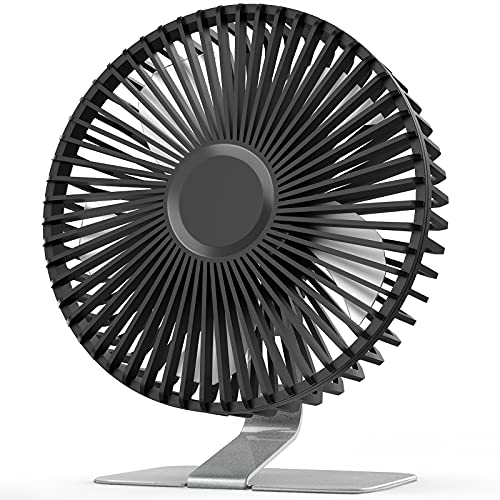
- Four adjustable speed settings
- 0–90-degree airflow tilt
- Stable metal base with easy-clean cover
Best For: Desks where stronger, more adjustable airflow is useful
Best Quiet Mini
TriPole 360-Degree USB Desk Fan

- 360-degree adjustable airflow direction
- Three speeds and stated 25 dB noise level
- Stable, vibration-reducing silicone feet
Best For: Quiet cooling on small desks, nightstands, and during travel
Best Quiet Power
Gaiatop 5.5-Inch 3-Speed USB Desk Fan

- Three speeds with airflow up to 5.3 m/s
- Stable silicone-padded base and 90° rotation
- Detachable cover and five-foot USB cable
Best For: Desks, nightstands, travel, and personal cooling
Best Ultra-Compact Pick
Gaiatop Mini 3-Speed USB Desk Fan

- Four-ounce design fits crowded workspaces
- Three speeds with 0–30° vertical adjustment
- Compatible with computers, power banks, and car chargers
Best For: Portable cooling in compact desks, cars, and travel bags
Best Easy-Clean Design
JZCreater Mini 3-Speed USB Desk Fan
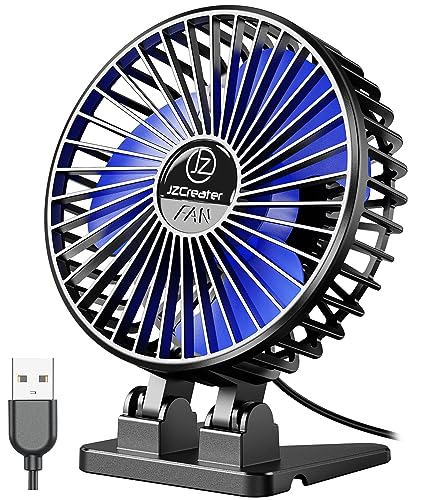
- Brushless motor with listed noise below 50 dB
- Removable front cover simplifies cleaning
- Three speeds and a 3.7-foot USB cable
Best For: Quiet home-office, bedroom, and travel cooling
Quiet Precision – KIMMOO 100-Speed USB Desk Fan
The KIMMOO is a strong option if you want ergonomic USB desk fans with highly precise airflow control. Its 100 speed settings, adjustable positioning, digital display, and rechargeable battery make it practical for focused work, relaxing, or travel.
Best For: Home-office users who want quiet, finely adjustable cooling and cordless portability.
Pros:
- 100 speed levels let you fine-tune the breeze from gentle to powerful.
- Runs at a stated 35 dB on its lowest setting for quieter use.
- Rechargeable battery provides up to 8.5 hours of cooling and charges in about 2.5 hours.
- Digital display shows wind speed and battery status.
Cons:
- Its compact airflow is better suited to personal cooling than broad room circulation.
- Requires charging when used away from a USB power source.
Choose this model when granular control and portability matter more than a simple plug-in design. The adjustable airflow and display make it especially convenient beside a desk or bed.
Flexible Clamp Cooling – BESKAR USB Clip-On Fan
The BESKAR stands out among ergonomic USB desk fans because it can sit on a desk or clamp to a surface. Its 360-degree adjustment and USB cord power make it a space-saving choice for offices, bedrooms, and other areas with a nearby power source.
Best For: Small workspaces where flexible placement and a secure clamp are more useful than cordless operation.
Pros:
- Clip supports surfaces up to 2.4 inches thick and includes soft rubber to help prevent scratches.
- 360-degree vertical and horizontal adjustment directs airflow from different angles.
- USB compatibility includes laptops, power banks, adapters, car chargers, and other USB sources.
- Compact clip-on and freestanding design saves desk space.
Cons:
- It has only three speed settings.
- No battery is included, so it must remain connected to USB power.
This is a practical pick for cramped desks, shelves, or bedside areas where a clamp can free up valuable surface space. Select it if dependable wired power is acceptable.
All-Day Versatility – DIGIX 100-Speed Rechargeable Fan
The DIGIX combines ergonomic USB desk fan flexibility with unusually long battery life. It works as a tabletop or wall-mountable fan, offers 100 speed levels, and rotates 360 degrees, making it useful when you need adjustable cooling without staying near an outlet.
Best For: Users who want long cordless runtime, precise airflow adjustment, and flexible placement.
Pros:
- 3000mAh battery provides up to 17 hours of cooling on low speed.
- 100 speed settings allow detailed control over airflow.
- 360-degree rotation helps direct air upward, downward, or sideways.
- Can be used on a tabletop or mounted to a wall with the included adhesive hook.
Cons:
- The 17-hour runtime applies to low-speed operation.
- Wall mounting depends on the included adhesive hook and a suitable surface.
For all-day office work, overnight use, or travel, the DIGIX offers a particularly flexible combination of battery life and positioning. Its display also makes speed and remaining power easy to monitor.
Simple Desk Comfort – SWEETFULL Quiet USB Fan
The SWEETFULL is a straightforward choice among ergonomic USB desk fans, with a broad 5.8-inch airflow area, three speeds, and 360-degree tilt adjustment. It is designed for simple plug-in cooling at a desk, in a study, or beside a bed.
Best For: Users who prefer an uncomplicated, quiet, USB-powered fan with easy cleaning.
Pros:
- Three speed settings provide simple low, medium, and high control.
- 360-degree adjustment helps aim airflow where it is needed.
- Removable front cover makes the blades and grille easier to clean.
- Includes a 4.7-foot USB cable and works with common USB power sources.
Cons:
- No battery is included, so it requires a USB connection during use.
- It offers fewer speed settings than the 100-speed models in this roundup.
This model makes sense when you want reliable personal cooling without extra displays or battery management. Its anti-slip base and cleanable front cover are useful everyday touches for a desk setup.
Best Compact Pick – Vornado PEBL Magnetic USB Desk Fan
For shoppers seeking ergonomic USB desk fans in a highly portable format, the Vornado PEBL combines a compact footprint with a magnetic base that makes airflow positioning simple. Its two speeds, USB power, and included wall adapter suit desks, bedside tables, and travel.
Best For: Small workspaces, travel, and users who want flexible airflow direction.
Pros:
- Magnetic cradle tilts to multiple angles for personalized airflow.
- Compact 4.65-inch design weighs just 10.4 ounces.
- Includes a 4-foot USB cable and wall adapter.
- Two-speed touch control offers simple adjustment.
Cons:
- Only two speed settings.
- Designed for indoor use and U.S. voltage requirements.
The PEBL is a strong choice when desk space and portability matter most. Its magnetic stand is especially useful for directing air around a monitor or other workspace setup.
Best Power Control – SLENPET 6-Inch USB Desk Fan
The SLENPET is one of the more adjustable ergonomic USB desk fans, offering four speed settings and a head that tilts from 0 to 90 degrees. Its sturdy metal base keeps it stable while USB power works with computers, power banks, and wall chargers.
Best For: Users who want stronger airflow control and a stable desktop fan.
Pros:
- Four speed levels provide more cooling choices.
- Adjustable head directs airflow from 0 to 90 degrees.
- Heavy-duty metal base helps keep the fan steady.
- Removable front cover makes cleaning easier.
Cons:
- The highest speed requires an output current of up to 2A.
- Larger and heavier than the mini fan options.
- Powered by USB cable rather than a battery.
Choose the SLENPET if variable airflow and a substantial base are higher priorities than minimal size. Its classic metal construction also makes it a practical fit for office or bedside use.
Best Quiet Mini – TriPole 360-Degree USB Desk Fan
The TriPole is a compact option for ergonomic USB desk fans, with a 360-degree adjustable head, three wind modes, and a stated 25 dB noise level. Its wide silicone-padded base helps reduce vibration, while the USB-A cable supports computers, chargers, and power banks.
Best For: Quiet personal cooling in compact workspaces, bedrooms, or while traveling.
Pros:
- 360-degree angle adjustment helps direct airflow precisely.
- Three speed modes support personalized cooling.
- Silicone feet help reduce vibration and improve stability.
- Detachable cover supports routine cleaning.
Cons:
- The third speed may require a 5V/1A USB charger.
- USB powered, with no battery operation listed.
With its small footprint and quiet operation, the TriPole is well suited to close-range cooling without taking over a desk or nightstand. It is a particularly practical pick for users who value precise positioning.
Best Quiet Power – Gaiatop 5.5-Inch 3-Speed USB Desk Fan
If you want ergonomic USB desk fans with useful airflow control and a stable footprint, this compact Gaiatop model is a practical choice. Its three speeds, 90-degree rotation, five-foot cable, and detachable cover suit workspaces, nightstands, and travel setups.
Best For: Personal cooling at a desk, bedside, or while traveling when you want stronger airflow without a bulky fan.
Pros:
- Three speed settings range from a gentle breeze to stronger cooling airflow.
- Upgraded motor delivers airflow up to 5.3 m/s with listed noise levels of 30–50 dB.
- Stable silicone-padded base helps resist sliding and tipping.
- Detachable cover makes routine cleaning easier.
Cons:
- Requires a 5 V/2 A power supply for operation as specified in the notes.
- USB cable is included, but no wall charger is supplied.
- It is USB-powered rather than battery-powered.
The 5.5-inch body keeps this fan easy to place, while its longer cable and stable base add flexibility around a desk. Choose it if you prioritize a combination of compact size, adjustable airflow, and cleaning convenience.
Best Ultra-Compact Pick – Gaiatop Mini 3-Speed USB Desk Fan
Among ergonomic USB desk fans, this Gaiatop model stands out for its very small, lightweight design. It offers three speeds, a vertically adjustable head, and USB compatibility for offices, cars, bedrooms, and travel.
Best For: Small workspaces and portable personal cooling where minimal weight and a compact footprint matter most.
Pros:
- Weighs about four ounces and takes up little desk space.
- Three speed settings provide adjustable airflow.
- Fan head tilts vertically from 0 to 30 degrees for directional cooling.
- Works with USB ports, power banks, car chargers, and compatible adapters.
Cons:
- The 3.3-foot cable is shorter than the cable on some compact alternatives.
- The highest speed requires a 5 V/1 A power source according to the notes.
- It is designed for USB power and does not include a stated battery.
This is a straightforward option for users who need a fan that can move easily between locations. Its compact size is convenient, though the shorter cable may limit placement when the USB port is farther away.
Best Easy-Clean Design – JZCreater Mini 3-Speed USB Desk Fan
This JZCreater fan is one of the ergonomic USB desk fans worth considering for quiet personal airflow in a compact form. Its brushless motor, three speed levels, removable front cover, and 3.7-foot USB cable make it suitable for home offices, bedrooms, and travel.
Best For: Quiet desktop or bedside cooling with convenient directional airflow and a cover that can be removed for cleaning.
Pros:
- Brushless motor is specified to produce less than 50 dB at high speed.
- Three speed settings allow low, medium, and high airflow selection.
- Removable front cover supports easier cleaning and maintenance.
- Indicator light automatically turns off after 30 seconds, according to the notes.
Cons:
- It has no built-in battery and must remain connected to USB power.
- The compact fan uses a three-blade design, which may offer a different airflow feel than larger fans.
- It is intended for tabletop or free-standing use rather than mounting.
With a 4.8-ounce body and a 3.7-foot cable, this fan balances portability with practical desk placement. It is a sensible pick when quiet operation and easy cleaning are more important than cordless use.
How We Picked the Best Ergonomic USB Desk Fans
We focused on features that affect everyday comfort and usability rather than maximum airflow alone. The selected models represent a range of desk-fan designs, including rechargeable units, cord-powered fans, clip-on models, magnetic-base options, and compact travel fans.
Our comparison criteria included airflow adjustment, quiet operation, directional control, footprint, power flexibility, stability, and ease of use. Models with multiple speeds or broad rotation ranges offer more control, while simpler fans may be preferable for shoppers who want straightforward cooling at a lower cost.
Quick Comparison
| Feature | Why It Matters |
|---|---|
| Speed settings | More settings make it easier to balance cooling, noise, and comfort. |
| Rotation and tilt | Helps direct airflow toward your face, hands, or a wider area. |
| Power source | USB, rechargeable, and cord-powered designs suit different workspaces. |
| Mounting style | Clip, magnetic, and freestanding bases can save valuable desk space. |
| Size and noise | Important for offices, bedrooms, dorms, and other shared environments. |
Key Buying Factors for Ergonomic USB Desk Fans
Adjustability and Airflow Control
Look for several speed levels if you want precise control over cooling. A wide rotation range, adjustable head, or tilt mechanism can reduce the need to reposition the fan repeatedly. Models with digital controls or many speed settings may suit users who are particularly sensitive to temperature or noise.
Desk Placement and Stability
Consider where the fan will sit before buying. A compact freestanding base works well beside a monitor, while a clip-on fan can attach to a shelf, desk edge, or bed frame. Magnetic bases are useful when you need flexible placement on compatible metal surfaces. A stable base matters at higher speeds, especially on a crowded desk.
USB Power and Battery Life
USB-powered fans are convenient with laptops, power banks, hubs, and wall adapters. Rechargeable models provide more freedom from a nearby outlet, but battery capacity and charging time become important. If the fan will remain in one place, a cord-powered option may offer simpler, uninterrupted operation.
Noise, Size, and Maintenance
For video calls, sleep, or focused work, prioritize quiet operation at the speeds you normally use. Smaller fans are easier to travel with but may move less air than six-inch designs. Removable grilles or accessible blades can also make routine dust cleaning easier.
Who Should Buy Which Ergonomic USB Desk Fans?
Choose a rechargeable fan if you move between rooms, work away from outlets, or want backup cooling during travel. A clip-on design is best for small desks and shelves where surface space is limited. Select a magnetic-base model when flexible mounting is more important than maximum coverage.
For quiet offices and bedrooms, prioritize low-speed noise, stable placement, and fine airflow adjustment. For warmer rooms or users who want stronger personal airflow, consider a larger fan or one with more speed levels and broader rotation. If you simply need dependable cooling beside a computer, a compact cord-powered USB model can provide the best balance of simplicity, value, and consistent operation.
