
Too many cords can turn even a great desk setup into clutter fast. The right tray keeps power bricks, charging cables, and accessories out of sight while making your workspace easier to clean and adjust.
In this roundup, we focus on practical, ergonomic under-desk cable trays that balance capacity, mounting style, and everyday usability for home offices and standing desks.
Best 10 Ergonomic Under-Desk Cable Trays Picks for 2026
Clamp-Mount Simplicity

- Clamp-on installation with no drilling
- Rubber pads help protect desk edges
- Holds cords, power strips, and hubs up to about 15 lbs
Best For: Quick setup on flat-edge desks and standing desks
All-in-One Kit

- Includes 316 pieces across 17 varieties
- Open-top metal raceways make cable changes easier
- Screw-mount design supports secure installation
Best For: Users who want a full cord-management kit for a desk setup
Extra-Length Tray

- 25-inch tray offers extra storage room
- No-drill clamp mount for quick installation
- Mesh and open sides support airflow and easy routing
Best For: Larger desk setups that need more cable storage
Low-Profile Classic

- Low-profile tray with a clean, minimal look
- Partially closed design hides cords and devices
- Metal build supports up to 11 lbs
Best For: Minimal desk setups that need tidy cord concealment
Premium Fabric Clamp Tray
Univivi 36-inch No-Drill Cable Tray

- 36" fabric tray fits larger adapters and power strips
- Clamp-on or screw-in installation for different desks
- Built-in ties and flame-retardant 600D oxford fabric
Best For: Large desks and users who want flexible mounting with high capacity
Low-Profile Metal Pair
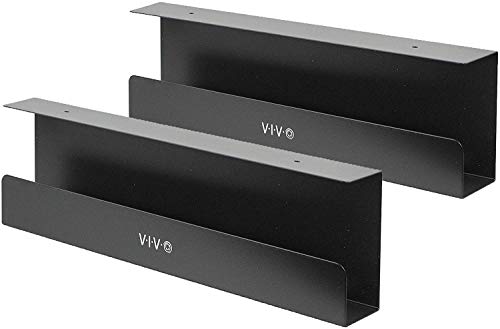
- Two 16.5" x 3" trays for split cable management
- Metal build supports up to 11 lbs per tray
- Low-profile design with front opening for easy access
Best For: Minimalist desks and buyers who want two sturdy trays
Ventilated Steel Tray
Univivi 32-inch Cord Organizer

- Hollow steel design improves ventilation and heat dissipation
- Large space fits power strips, chargers, and cords
- C-clips or screw mount installation options
Best For: Users who want a sturdy, ventilated tray for larger cable loads
No-Drill Metal Clamp-On Tray
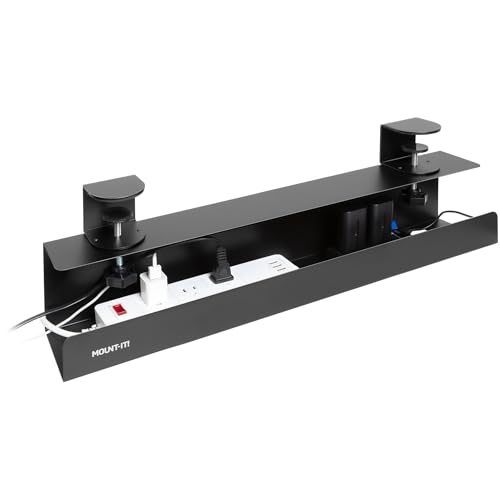
- Clamp-on install with no drilling required
- Steel tray supports up to 11 lbs
- Open design helps airflow and cable access
Best For: Desks that need a secure, non-permanent cable tray
Fabric Cord Hider Tray

- Flame-retardant Oxford cloth construction
- Large capacity for power strips and adapters
- Clamp-on or screw-mount installation
Best For: Busy desks that need a roomy, fabric-covered cable organizer
High-Capacity Mesh Tray

- Clamp-on install with no tools or drilling
- Supports up to 15 lbs of gear
- Open mesh improves airflow and access
Best For: Heavier cable setups that need a strong no-drill tray
Clamp-Mount Simplicity – No-Drill Metal Mesh Tray
If you want ergonomic under-desk cable trays that install fast and stay out of the way, this clamp-on mesh tray is a practical pick. It mounts without drilling, uses rubber pads to help protect the desk, and the open mesh basket keeps power strips and cords tucked up off the floor.
Best For: Renters, standing desks, and anyone who wants a quick no-drill cable tray with simple clamp-on installation.
Pros:
- No-drill clamp mount installs in about 3 minutes.
- Rubber pads help prevent scratches on desk edges.
- Carbon steel build is rated to hold about 15 lbs.
- Mesh basket and side holes help route cables cleanly.
Cons:
- Fits flat-edge desks only, from 0.4" to 2" thick.
- Smaller than a long raceway style tray.
- Clamp design may not suit every desk shape.
This is a straightforward under-desk organizer for keeping cords, USB hubs, and power bricks hidden while preserving easy access. The inward or outward installation options add flexibility, but the real strength here is the fast setup and sturdy everyday cable control.
All-in-One Kit – 316-Piece Metal Cable System
For buyers who want ergonomic under-desk cable trays plus a full cord-management kit, this EUREKA ERGONOMIC bundle goes well beyond a basic tray. It includes metal raceways, clips, sleeves, holders, ties, and fasteners, so you can build a more complete routing system for desks, walls, and workstations.
Best For: People who want one large cable-management kit with multiple ways to organize cords around a desk setup.
Pros:
- Huge 316-piece assortment covers many cable-management needs.
- Includes metal raceways with an open-top design for easier access.
- Screw-mount structure is built for secure, stable installation.
- Also includes clips, sleeves, cord holders, and reusable ties.
Cons:
- More involved than a simple tray-only solution.
- Screw-in mounting is less convenient than clamp-on installation.
- May be more kit than some users need for a basic desk.
This bundle is best when you want a more customized cable layout rather than just hiding a power strip. The variety of included pieces makes it flexible for desks and adjacent routing, but it makes the most sense for users willing to spend time planning the setup.
Extra-Length Tray – 25-Inch Desk Cable Organizer
If your setup needs more room than a compact tray can offer, this 25-inch option is one of the more practical ergonomic under-desk cable trays to consider. It gives you a larger basket for cords and sockets, while the clamp mount, open side design, and mesh structure keep installation and airflow straightforward.
Best For: Larger desk setups that need extra cable space without switching to a screw-mounted tray.
Pros:
- 25-inch length provides generous storage space.
- No-drill clamp mount installs quickly on desks 0.4" to 2" thick.
- Mesh design helps with ventilation and dust reduction.
- Open sides make cable routing and repositioning easy.
Cons:
- Requires assembling the two tray sections with screws.
- Clamp fit is limited to flat desk edges in the listed thickness range.
- Larger size may be more than you need for a minimal setup.
This tray is a strong fit if you want a roomy under-desk organizer that still installs without drilling. It balances capacity and convenience well, especially for standing desks and home offices with multiple cords or power accessories.
Low-Profile Classic – 16.5-Inch Steel Cable Rack
For a simpler take on ergonomic under-desk cable trays, this VIVO rack focuses on low-profile cable concealment rather than maximum capacity. The partially closed steel tray hides cords and power strips neatly, while the front opening makes it easy to add or remove cables when your setup changes.
Best For: Users who want a clean, minimal under-desk tray for everyday cord hiding.
Pros:
- Low-profile 16.5-inch tray keeps the look unobtrusive.
- Partially closed design helps hide cords and devices.
- Front opening makes cable changes easier.
- Durable metal build supports up to 11 lbs.
Cons:
- Screw-in installation requires mounting under wood or particle board.
- Shorter tray size offers less room than larger organizers.
- Mounting holes are fixed at 11 inches apart.
This is a solid pick if you want a dependable tray that blends into a home or office desk setup without drawing attention. It is not the largest option here, but it does a good job of keeping power strips and AV cables tucked away in a tidy, accessible way.
Premium Fabric Clamp Tray – Univivi 36-inch No-Drill Cable Tray
If you want ergonomic under-desk cable trays that can handle more than just a few loose cords, this Univivi 36-inch tray is built for larger setups. The wide fabric body is designed to hold adapters, sockets, power strips, and cables in one hidden space, while the unfoldable design makes it easier to add or remove items during setup changes.
Best For: Bigger desks, mixed-device workstations, and users who want a roomy tray with no-drill or screw-in mounting options.
Pros:
- Large 36″ x 5.5″ x 5.5″ capacity for power strips, adapters, and cables
- Supports both clamp-on and screw-fixing installation
- Heavy-duty clamp and thick 600D oxford fabric with flame-retardant construction
- Built-in ties help keep items fixed in place
Cons:
- Requires at least 5.3 inches of edge space if the desk has drawers or a back rod
- Clips need tabletop space, so it cannot be completely invisible
Overall, this is a practical pick if your priority is capacity and flexible mounting rather than the smallest possible profile. It fits a wide range of table materials, but it works best when you have enough clearance for the clamp system.
Low-Profile Metal Pair – VIVO 2-Pack 17-inch Trays
For buyers comparing ergonomic under-desk cable trays, this VIVO 2-pack focuses on a low-profile metal design that keeps cords out of sight without adding much bulk. Each tray is sized to route AV cables and power strips neatly under a wood or particle board desktop, and the front opening makes cable changes easier when your setup evolves.
Best For: Minimalist desks, dual-tray cable routing, and users who want a sturdy metal solution with a simple screw-in install.
Pros:
- Set of two 16.5″ x 3″ trays for flexible cable distribution
- Durable metal build supports up to 11 lbs per tray
- Low-profile design blends well with modern office setups
- Front opening helps with adding or removing cables
Cons:
- Screw-in installation only
- Designed for wood or particle board desktops, so material compatibility is narrower
This is a straightforward option if you want a clean, hidden cable path and prefer the structure of metal over fabric. The two-pack makes it especially useful when you need to separate devices or spread out cable runs.
Ventilated Steel Tray – Univivi 32-inch Cord Organizer
This Univivi tray is aimed at users who want ergonomic under-desk cable trays with a more rigid, ventilated design. The hollow steel structure helps with heat dissipation, while the enlarged cable holes and wide storage area make it easier to route power strips, chargers, and data cables in a cleaner layout.
Best For: Home or office desks that need a sturdy, ventilated tray with flexible cable routing options.
Pros:
- Large storage space for power strips, cords, chargers, and data cables
- Ventilated hollow structure helps dissipate heat
- Dual installation options: C-clips or screws
- Enlarged cable holes and front/back placement flexibility
Cons:
- Installation is screw-in by default in the supplied details, so confirm setup needs carefully
- At 32″ wide, it may be more tray than smaller desks require
As a cable-management upgrade, this model stands out for airflow and practical routing convenience. If you want a strong under-desk organizer that prioritizes safe storage and easy cable access, it is a solid fit.
No-Drill Metal Clamp-On Tray – Mount-It! 23.6" Black
If you want ergonomic under-desk cable trays that install fast and stay put, this clamp-on metal tray is built for a clean, no-drill setup. It’s a practical pick for desks where adhesives or permanent mounting aren’t ideal, including glass desks and standing desks, while still giving you solid support for power strips and cable bundles.
Best For: Users who want a sturdy clamp-on tray for desks that can’t be drilled into.
Pros:
- No-drill clamp-on installation makes setup quick and reversible.
- Powder-coated steel construction supports up to 11 lbs.
- Dual-facing mounting lets you hide cords or keep power strips accessible.
- Open wire design helps airflow and makes cleaning easier.
Cons:
- Weight capacity is lower than some larger metal trays.
- Best suited to desks within the stated thickness range.
Overall, this tray is a straightforward option if you want durable cable control without permanent installation. The open-frame design and flexible orientation make it especially useful for office, gaming, and standing-desk setups.
Fabric Cord Hider Tray – Cotohim 35.8" Black
For ergonomic under-desk cable trays with extra coverage, this fabric option focuses on capacity and safer cable concealment. Its flame-retardant Oxford cloth body is made to hide power strips and cords, and the clamp-or-screw mounting gives you flexibility for different desk styles without requiring drilling.
Best For: Users who want a larger-capacity tray with fabric coverage and flexible mounting options.
Pros:
- Thickened flame-retardant Oxford cloth adds safety-minded coverage.
- Large capacity handles power supplies, adapters, and multiple wires.
- Clamp-on or screw-mounted installation offers setup flexibility.
- Includes cable ties and accessories for organizing a fuller setup.
Cons:
- Fabric tray may not feel as rigid as a metal organizer.
- Larger size may be more than needed for simple cable runs.
This is a strong choice if you prefer a softer, hidden look and need room for a busier desk setup. The combination of capacity, flame-retardant material, and flexible mounting makes it useful for home office cable management.
High-Capacity Mesh Tray – 25.3" No-Drill Clamp
This no-drill metal tray is a solid fit if you’re comparing ergonomic under-desk cable trays for heavier cable loads. With a 25.3-inch frame, 15-lb capacity, and open mesh construction, it’s designed to keep power strips and cords organized while still making them easy to reach.
Best For: People who need a stronger clamp-on tray with more room for cables and accessories.
Pros:
- No-drill clamp installation works on desks up to 2 inches thick.
- Supports up to 15 lbs for heavier cable and power-strip setups.
- Open mesh design helps airflow and reduces dust buildup.
- Large access holes make cord routing simpler.
Cons:
- Clamp range is limited to desks up to 2 inches thick.
- Mesh styling may not hide equipment as fully as enclosed trays.
For a clean, sturdy under-desk organizer, this model balances capacity with easy access. It’s especially useful if you want a secure tray that can handle multiple devices without adding installation hassle.
How We Picked These Ergonomic Under-Desk Cable Trays
We prioritized tray designs that solve real workspace problems: cord crowding, awkward access, and messy cable drop points. The best options offer enough depth for power strips or adapters, stable mounting, and a layout that keeps cables from hanging where they can snag.
We also looked at installation type, desk compatibility, material quality, and whether the tray makes future changes easier. For many buyers, the best choice is not the largest tray, but the one that matches the number of devices and the underside space available.
Quick Comparison: What Matters Most
When comparing Ergonomic Under-Desk Cable Trays, start with three questions: how many cables do you need to hold, how much space do you have under the desk, and do you want no-drill installation or a more permanent mount? Clamp-on and no-drill models are ideal for rented spaces and quick setup changes, while screw-mount options can feel more fixed and secure.
Also compare tray width and depth. Shorter trays work well for simple setups, but longer trays are better if you run a monitor arm, docking station, surge protector, and multiple charging cables.
Key Buying Factors for Ergonomic Under-Desk Cable Trays
Mounting Style
No-drill and clamp-on trays are the easiest to install and remove. Screw-mounted trays are better if you want maximum stability or plan to leave the setup in place long term. Fabric raceway-style organizers can be useful if your cable bundle is lighter and flexibility matters more than rigid structure.
Capacity and Cable Clearance
Check whether the tray can fit your power strip, wall adapter, and cable slack without forcing bends. A tray that is too shallow may still look neat, but it can make unplugging or rearranging devices frustrating.
Desk Compatibility
Make sure the mounting hardware fits your desk edge and thickness. Standing desks often benefit from low-profile trays that move cleanly with height adjustments and do not interfere with crossbars, drawers, or monitor arm clamps.
Material and Finish
Metal mesh and steel trays usually offer better durability and airflow around power accessories. The finish matters too, especially if the tray will be visible from the side of the desk.
Who Should Buy Which Ergonomic Under-Desk Cable Trays?
If you want the easiest setup, choose a no-drill or clamp-on tray. If you have a large workstation with multiple peripherals, pick a longer tray with more capacity. If you want a flexible and budget-friendly cable path, a fabric or raceway-style option may be enough. For buyers building a more permanent office, sturdier metal Ergonomic Under-Desk Cable Trays are typically the safest long-term choice.
In short, match the tray to your desk, your device load, and how often your setup changes. That approach will deliver the cleanest and most practical result.
