
Long sessions of masking, retouching, and navigating a canvas can make an uncomfortable mouse hard to ignore. A vertical design may help you work with a more neutral wrist position, but the right fit matters more than the shape alone.
These 10 picks cover wired and wireless options, compact and larger grips, and different approaches to switching between devices. Use the guide below to narrow them down for your desk and workflow.
Best 10 Ergonomic Mice for Digital Artists Picks for 2026
Best for Multi-Device Workflows
Uineer Tri-Mode Vertical Mouse
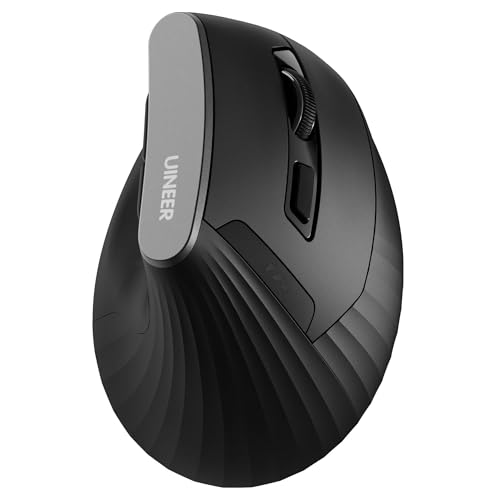
- Connects to up to three devices
- Four DPI settings, up to 2400
- AA-powered with quiet main clicks
Best For: Artists switching between computers and tablets
Best for Smaller Hands
ProtoArc EM11 NL Rechargeable Vertical Mouse

- Sized for hands under 7.5 inches
- Rechargeable via USB-C
- Three-device wireless connectivity
Best For: Small- to medium-handed artists wanting a rechargeable mouse
Best for Cursor Speed Control

- 57-degree grip with thumb rest
- 4000 DPI optical sensor
- Dedicated cursor-speed switch
Best For: Artists who adjust pointer speed frequently
Best Wired Option
J-Tech Digital V628 Vertical Mouse

- Wired USB, no battery needed
- Detachable palm rest
- Three settings up to 1600 DPI
Best For: Single-computer setups needing a wired vertical mouse
Best for Easy Setup
UGREEN Ergonomic Wireless Mouse

- Vertical, right-handed grip for larger hands
- Bluetooth and 2.4G; switches among three devices
- Four DPI settings up to 4000
Best For: Artists with larger hands using multiple devices
Best for Everyday Use

- Wired USB connection
- Vertical handshake-style grip
- 1000/1600 DPI settings
Best For: Artists who prefer a simple wired setup
Best for Comfort

- 57-degree grip for small to medium right hands
- Customizable buttons and SmartWheel
- Bluetooth or Logi Bolt connection
Best For: Right-handed artists with small to medium hands
Best for Multi-Device Setups
TECKNET 4800 DPI Vertical Mouse

- Switches among three device connections
- Six DPI settings: 800–4800
- Nearly silent left and right clicks
Best For: Right-handed artists using multiple devices
Best Simple USB Option

- 2.4GHz connection via USB receiver
- Three DPI settings: 800–1600
- Next and previous browsing buttons
Best For: Right-handed artists who prefer simple USB wireless
Best Rechargeable Pick
J-Tech Digital V638W Vertical Mouse

- Bluetooth and 2.4GHz dongle modes
- USB-C rechargeable battery
- Removable palm rest; up to 3200 DPI
Best For: Right-handed artists with medium to large hands
Best for Multi-Device Workflows – Uineer Tri-Mode Vertical Mouse
Among ergonomic mice for digital artists, the Uineer is a practical pick if you move between a desktop, laptop, and tablet. Its 59-degree right-handed grip and four DPI settings give you a vertical alternative for everyday editing and navigation.
Best For: Right-handed artists who switch between up to three devices and prefer a replaceable battery.
Pros:
- Bluetooth and 2.4 GHz wireless options support up to three device connections.
- Adjustable 800, 1200, 1600, and 2400 DPI settings.
- Quiet left and right clicks; an included AA battery powers the mouse.
Cons:
- Forward and back buttons do not work on macOS.
- The vertical shape may take time to get used to.
Choose this one for connection flexibility rather than specialized creative controls: its side buttons are for navigation, and the listed maximum sensitivity is 2400 DPI.
Best for Smaller Hands – ProtoArc EM11 NL Rechargeable Vertical Mouse
The ProtoArc EM11 NL stands out among ergonomic mice for digital artists who find larger vertical models awkward. It is designed for right hands under 7.5 inches long and offers a rechargeable battery instead of disposable cells.
Best For: Artists with small to medium hands who want a rechargeable mouse for up to three devices.
Pros:
- Designed for hand lengths under 7.5 inches.
- Dual Bluetooth and 2.4 GHz USB-A connections support up to three devices.
- Three DPI settings—1000, 1600, and 2400—and quiet main clicks.
Cons:
- Buttons are not programmable, and forward/back buttons do not work on macOS.
- The USB-C cable charges the mouse but does not provide a wired connection.
Measure your hand before buying. Its size-specific shape is the main draw, while the nonprogrammable buttons limit shortcut-heavy creative workflows.
Best for Cursor Speed Control – Logitech MX Vertical
For ergonomic mice for digital artists, the Logitech MX Vertical offers a useful combination of a 57-degree right-handed grip and a 4000 DPI optical sensor. Its cursor-speed switch lets you change pointer speed without digging through settings.
Best For: Artists who want a vertical grip and quick cursor-speed changes while navigating large displays or detailed workspaces.
Pros:
- 57-degree angle with a thumb rest and textured grip.
- 4000 DPI sensor and a dedicated cursor-speed switch.
- Includes a receiver and USB-C cable; listed battery life is four months.
Cons:
- Right-handed design is not suited to left-handed use.
- The supplied notes do not establish programmable creative shortcuts.
This is the strongest fit here if pointer-speed adjustment matters more than extra buttons. It remains a mouse for cursor work, not a substitute for a drawing tablet.
Best Wired Option – J-Tech Digital V628 Vertical Mouse
If you prefer a USB connection, the J-Tech Digital V628 is a straightforward wired entry among ergonomic mice for digital artists. Its right-handed vertical design includes a removable palm rest and selectable sensitivity for routine cursor work.
Best For: Artists who work at one computer and want a wired vertical mouse with a detachable palm rest.
Pros:
- Wired USB connection requires no battery.
- Removable palm rest allows a choice of grip setup.
- 600, 1000, and 1600 DPI settings, plus thumb buttons.
Cons:
- A cable limits placement compared with wireless models.
- 1600 DPI maximum is lower than the other mice listed here.
The detachable rest makes this model worth considering if palm support is a priority. Check that your workspace suits a cable and that its DPI range meets your needs.
Best for Easy Setup – UGREEN Ergonomic Wireless Mouse
Among ergonomic mice for digital artists, this right-handed UGREEN model is worth considering if you move between a desktop, laptop, or tablet. Its vertical grip encourages a natural handshake position, while Bluetooth and 2.4G wireless let you switch among up to three devices.
Best For: Artists with larger hands who want a quiet vertical mouse for multiple devices.
Pros:
- Four selectable DPI settings, from 1000 to 4000, accommodate different cursor-speed preferences.
- Quiet clicks and PTFE glide feet help keep desk work smooth and unobtrusive.
- Five buttons and dual wireless connections support everyday navigation across devices.
Cons:
- Right-handed shape is not suited to left-handed use.
- Requires one AA battery.
The broad DPI range and device switching make it a flexible desk companion, though its larger-hand fit is worth considering before buying.
Best for Everyday Use – Anker USB Vertical Mouse
If you prefer a straightforward USB connection, the Anker is a practical entry among ergonomic mice for digital artists. Its vertical handshake-style grip supports a more natural wrist and arm position, and its optical sensor offers 1000 and 1600 DPI settings.
Best For: Artists who want a vertical mouse with a wired USB connection and simple sensitivity choices.
Pros:
- Wired USB connection needs no battery.
- Two DPI settings provide a choice of cursor sensitivity.
- Next and previous buttons make routine navigation easier.
Cons:
- The 4.9-foot cable limits placement compared with wireless models.
- Maximum sensitivity is 1600 DPI, with fewer settings than the other mice here.
This is a sensible pick if you value a predictable wired setup over device switching or a wider DPI range.
Best for Comfort – Logitech Lift Vertical Mouse
The Logitech Lift stands out among ergonomic mice for digital artists with small to medium right hands. Its 57-degree vertical shape, textured grip, and thumb rest are designed for a comfortable forearm posture during long desk sessions.
Best For: Right-handed artists with small to medium hands who want comfortable wireless navigation.
Pros:
- Customizable buttons and a SmartWheel offer flexible navigation.
- Quiet clicks suit shared or focused workspaces.
- Connects through Bluetooth Low Energy or the included Logi Bolt USB receiver, with up to two years of stated battery life.
Cons:
- Right-handed design is not a fit for left-handed artists.
- Small-to-medium-hand fit may be less comfortable for larger hands.
Choose the Lift if grip fit and easy-to-reach controls matter most; check the hand-size guidance before committing.
Best for Multi-Device Setups – TECKNET 4800 DPI Vertical Mouse
For digital artists comparing ergonomic mice for digital artists, the TECKNET offers a right-handed vertical grip, six sensitivity settings, and connections for up to three devices. It suits a workstation where you switch between computers or tablets with compatible mouse support.
Best For: Right-handed artists who want to switch between multiple devices and adjust pointer sensitivity.
Pros:
- Connects through two Bluetooth pairings and a 2.4GHz USB-A receiver.
- Six DPI settings range from 800 to 4800.
- Left and right clicks are nearly silent.
Cons:
- Designed for right-handed use only.
- Requires two AAA batteries, which are not included.
- Side buttons do not work with macOS.
The broad DPI range and device switching make this a flexible navigation mouse, but Mac users who rely on side-button shortcuts should look elsewhere.
Best Simple USB Option – Anker 2.4G Vertical Mouse
Among ergonomic mice for digital artists, the Anker is a straightforward choice if you want a right-handed vertical grip without Bluetooth pairing. Its USB receiver provides a 2.4GHz connection, while three DPI settings let you choose a comfortable pointer speed.
Best For: Right-handed artists who want a basic wireless mouse for a computer with an available USB port.
Pros:
- Handshake-style shape encourages a neutral wrist and arm position.
- Offers 800, 1200, and 1600 DPI settings.
- Includes next and previous buttons for browsing.
Cons:
- Uses a USB receiver rather than Bluetooth.
- Two AAA batteries are required but not included.
- Clicks are audible.
This is the uncomplicated pick for navigating reference pages and everyday work; artists seeking higher DPI settings or Bluetooth should consider another model.
Best Rechargeable Pick – J-Tech Digital V638W Vertical Mouse
The J-Tech Digital V638W is worth considering among ergonomic mice for digital artists if you want a rechargeable, right-handed vertical mouse. It offers Bluetooth and 2.4GHz USB-dongle modes, four DPI settings, and a removable palm rest.
Best For: Right-handed artists with medium to large hands who prefer USB-C charging and an optional palm rest.
Pros:
- Switches between Bluetooth and a 2.4GHz USB dongle.
- Built-in battery recharges over USB-C; a cable is included.
- Removable, non-skid palm rest provides another grip option.
- Selectable 800, 1200, 1600, and 3200 DPI settings.
Cons:
- Designed for right-handed users with medium to large hands.
- The Back to Desktop button may need remapping if its default shortcut does not fit your workflow.
The charging setup and palm rest distinguish this model, though artists with smaller hands or specific shortcut needs should check its fit and button behavior before choosing it.
How We Picked These Ergonomic Mice for Digital Artists
We focused on practical differences that affect everyday creative work: hand fit, connection type, adjustable pointer speed, button access, and power source. The selected mice span wired USB models, wireless receiver models, and options with Bluetooth or multiple connection modes. We also considered whether a design is better suited to a fixed workstation or a desk shared with a laptop or tablet. These are selection criteria, not a promise that any mouse will prevent discomfort.
Quick Comparison: Match the Mouse to Your Workflow
For a fixed desktop setup, a wired option such as the Anker USB Wired Vertical Mouse or J-Tech Digital Wired Vertical USB Mouse removes charging and wireless pairing from the equation. If you switch computers, look at multi-mode choices such as the Uineer, ProtoArc EM11 NL, UGREEN, TECKNET, or J-Tech Digital wireless model; check the exact connection modes against your devices before buying. Logitech’s MX Vertical and Lift offer two distinct fit directions within the same brand, while the Anker 2.4G Wireless model suits shoppers who prefer a USB-receiver connection.
Key Buying Factors for Ergonomic Mice for Digital Artists
Hand Fit and Desk Position
A vertical grip is only useful if you can hold it without stretching for the buttons or pinching the mouse. Compare the stated hand-size guidance where available, and leave enough desk space to move from your forearm rather than repeatedly twisting your wrist. A palm rest may help some users but can feel restrictive to others. If you work primarily with your left hand, verify orientation carefully: many vertical models are right-handed.
Pointer Control and Shortcuts
Adjustable DPI can help you move between broad canvas navigation and smaller interface targets, but a higher maximum DPI does not automatically mean better drawing precision. Consider your monitor size, preferred pointer speed, and whether you can reach any extra buttons comfortably. In art software, assign shortcuts only after you know the mouse’s buttons work reliably with your operating system and application. A mouse complements a pen tablet or stylus; it rarely replaces one for pressure-sensitive strokes.
Connections, Power, and Click Feel
Wired mice are straightforward at a permanent desk. Bluetooth can keep a USB port free, while a 2.4GHz receiver can be convenient on a dedicated computer; multi-device switching matters most if you actually use more than one machine. Check battery type, charging method, and whether a rechargeable model can be used while charging. Quiet clicks may be welcome in a shared studio, though switch feel remains a personal preference.
Who Should Buy Which Ergonomic Mice for Digital Artists?
Choose a wired Anker or J-Tech model if you want a simple, stationary setup. Start by comparing the Logitech Lift and MX Vertical if hand fit is your main concern, rather than assuming one size suits everyone. Consider UGREEN, Uineer, ProtoArc, TECKNET, or the wireless J-Tech if flexible connectivity is a priority; confirm their specific modes and device compatibility on the listing. For a single computer with a receiver, the Anker 2.4G model is another straightforward route. Whichever you choose, introduce a new grip gradually and adjust your desk height and pointer speed alongside it.
