
The right boom arm can make a desk microphone easier to position, less intrusive, and more comfortable to use during long recording or streaming sessions. This roundup compares 10 ergonomic desk boom arms across low-profile designs, full-motion mounts, cable management, reach, and compatibility.
Whether you use a Blue Yeti, Shure SM7B, HyperX QuadCast, Elgato Wave, or another microphone, focus on load capacity, clamp stability, adjustment range, and how neatly the arm fits your workspace.
Best 10 Ergonomic Desk Boom Arms Picks for 2026
Studio-Grade Pick
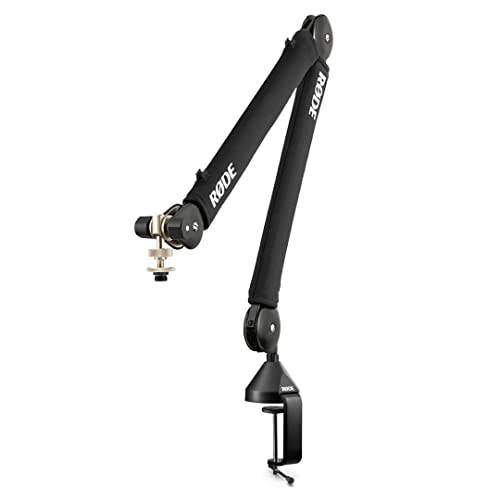
- Quiet internal spring damping for on-air adjustments
- Supports microphones from 0.25 to 1.2 kg
- 360° rotation with integrated cable management
Best For: Podcasters and streamers seeking quiet, polished desk mounting
Low-Profile Value

- Space-saving arm extends from below the monitor
- 29-inch reach with broad angle adjustment
- Metal build supports up to 1.5 kg
Best For: Compact home-office, gaming, and podcast desks
Best Cable-Managed Pick

- Built-in channels for cleaner cable routing
- 32.3-inch horizontal reach with included riser
- Supports microphones up to 3.5 pounds
Best For: Streamers and podcasters who prioritize tidy cable management
Best Long-Reach Pick

- 38-inch maximum arm reach
- Steel build with internal springs
- Includes clamp and flange mounting options
Best For: Large desks and setups requiring extended microphone reach
Best Overhead Design
Heightened Extension Riser Mic Arm

- 31.5-inch riser clears monitors
- Clamp fits desks up to 4.2 inches thick
- Tool-less adjustments and multiple adapters
Best For: Overhead recording setups and monitor-heavy desks
Best Low-Profile Versatility

- Low-profile design keeps the monitor view clear
- Supports up to 3.3 pounds
- Built-in channels organize USB and XLR cables
Best For: Streamers and creators needing flexible mounting options
Best for Stability

- Low center of gravity helps limit movement
- 360-degree arm rotation and 180-degree vertical swing
- Supports microphones up to 2 kilograms
Best For: Gaming and recording setups that need steady positioning
Studio-Grade Pick – RØDE PSA1+
The RØDE PSA1+ is a polished choice among ergonomic desk boom arms for podcasters and streamers who want quiet movement, broad microphone compatibility, and a tidy desktop. Its 360-degree rotation, internal cable management, and support for microphones from 0.25 to 1.2 kg make it well suited to regular on-air adjustments.
Best For: Podcasting and streaming setups that prioritize silent operation and a clean, professional appearance.
Pros:
- Internal spring damping helps reduce creaks and handling noise while repositioning the arm.
- Supports microphones from 0.25 to 1.2 kg and includes 3/8-inch and 5/8-inch thread adaptors.
- 360-degree rotation and integrated cable management support flexible, uncluttered setups.
- Clamps to desks up to 70 mm thick.
Cons:
- Its 1.2 kg maximum load is lower than some heavy-duty desktop stands.
- The desk clamp may not suit desks thicker than 70 mm.
The PSA1+ is a strong fit when quiet, smooth repositioning matters more than maximum load capacity. It is especially appealing for voice creators who want a professional boom arm with fewer visible cables.
Low-Profile Value – FIFINE BM88W
The FIFINE BM88W is a practical option for shoppers comparing ergonomic desk boom arms for a compact recording or gaming workspace. Its low-profile design can extend from below a monitor, while 360-degree horizontal movement, 220-degree vertical adjustment, and built-in cable channels support flexible positioning.
Best For: Home offices, gaming desks, and podcast stations where saving monitor and desktop space is important.
Pros:
- Low-profile format helps keep the workspace visually open and unobstructed.
- Metal construction and a 1.5 kg maximum recommendation provide solid support.
- Offers up to 29 inches of extension, 220-degree vertical adjustment, and 360-degree horizontal adjustment.
- Includes a desk clamp, rotatable ball-head, adapters, and cable management.
Cons:
- The clamp fits desktops from 0.8 to 2.4 inches thick.
- The section near the C-clamp cannot be adjusted vertically.
- The microphone is not included.
The BM88W makes the most sense when a low-profile arm and broad positioning range are more useful than maximum microphone capacity. Check your desk thickness and preferred adjustment points before buying.
Heavy-Duty Desktop Stand – InnoGear MS069
The InnoGear MS069 takes a different approach to ergonomic desk boom arms, using a weighted desktop base instead of a desk clamp. Its adjustable boom, height shaft, and vibration-absorbing EVA pad make it a versatile choice for microphones used at a desk, near instruments, or with amplifiers.
Best For: Users who need a stable desktop stand for heavier microphones, podcasting, live performance, or instrument recording.
Pros:
- Heavy-duty 5.4 lb base and EVA pad help improve stability and reduce unwanted resonance.
- Supports up to 4.4 lb in the stated configuration and accommodates heavier microphones such as the Blue Yeti.
- Height adjusts from 9.84 to 14.57 inches, excluding the boom arm.
- Boom arm can be removed for a streamlined setup or adapted for floor applications.
Cons:
- The weighted base occupies more desk space than a clamp-mounted arm.
- The listed 4.4 lb capacity varies by boom configuration, with up to 8 lb available only in a specified setup.
- It does not provide the concealed cable-management features found on some clamp arms.
The MS069 is best viewed as a flexible, stability-first desktop microphone stand rather than a minimalist monitor-mounted arm. Choose it when load support and multi-use positioning outweigh a smaller footprint.
Full-Motion Choice – Mount-It! MI-7612
The Mount-It! MI-7612 is a flexible pick among ergonomic desk boom arms for streaming, gaming, podcasting, and recording. Its low-profile design can work beneath a monitor, while the included riser, clamp, and grommet mounting options make it easier to adapt the setup to different desks and microphone positions.
Best For: Creators who want broad adjustment, multiple mounting options, and compatibility with microphones using 3/8-inch or 5/8-inch threads.
Pros:
- Full-motion design includes arm swivel, joint tilt, and head tilt for precise positioning.
- Supports microphones up to 4.4 lb and fits 3/8-inch and 5/8-inch threads.
- Low-profile configuration reaches up to 27.8 inches with the included riser column.
- Includes both C-clamp and grommet mounting options plus hidden cable management.
Cons:
- The 4.4 lb maximum capacity may not suit microphones or accessories above that weight.
- The riser is needed for the full stated height of 27.8 inches.
The MI-7612 is a well-rounded option when adjustability and installation flexibility are priorities. Its low-profile design is particularly useful for keeping a microphone accessible without taking over the space beneath a monitor.
Best Cable-Managed Pick – InnoGear Mic Arm
The InnoGear Mic Arm is a practical choice for anyone building an ergonomic desk boom arms setup around a Blue Yeti, SM7B, or similar microphone. Its built-in cable channels, broad reach, and included riser help keep the microphone positioned cleanly over a busy desk.
Best For: Streamers, podcasters, and home studios that want tidy cable routing and flexible positioning.
Pros:
- Built-in cable channels help reduce visible cable clutter.
- Reaches up to 32.3 inches horizontally and 37.4 inches vertically with the riser.
- Supports microphones weighing up to 3.5 pounds and includes a clamp for desks up to 2 inches thick.
- Offers adjustable movement, a 360-degree rotating base, and a 12-month warranty.
Cons:
- The desk clamp is limited to desks up to 2 inches thick.
- The shock mount is not included.
With strong load support and useful cable management, this arm balances clean aesthetics with practical adjustability. It is especially well suited to standard-thickness desks and microphone setups that benefit from extra height.
Best Long-Reach Pick – Samson MBA38
Samson MBA38 38" Microphone Boom Arm Studio Podcast USB Mic Stand w/Desk Clamp
Check Price On AmazonThe Samson MBA38 is a straightforward option among ergonomic desk boom arms when you need extended microphone reach. Its 38-inch articulating arm and steel construction make it useful for podcasting, streaming, and studio work where the microphone must extend across a larger workspace.
Best For: Users who need a long boom arm with a sturdy clamp and simple studio-focused design.
Pros:
- Provides up to 38 inches of maximum arm reach.
- Durable steel construction with internal springs for quieter positioning.
- Supports microphones up to 5 pounds.
- Includes both a C-clamp for desks up to 2 inches thick and a flange mount with wood screws.
Cons:
- The included C-clamp is limited to desks up to 2 inches thick.
- Its 4-pound weight may be more substantial than lighter desktop arms.
The MBA38 focuses on reach and dependable construction rather than extra accessories. Choose it when a 38-inch arm is more important than built-in cable channels or a supplied height riser.
Best Overhead Design – Heightened Extension Riser Mic Arm
This overhead microphone stand is one of the more adaptable ergonomic desk boom arms for setups that need to clear monitors. Its 31.5-inch extension riser, wide clamp capacity, and tool-less joint adjustments make it suitable for switching between seated and standing recording positions.
Best For: Overhead microphone setups, monitor-heavy desks, and creators who need broad height adjustment.
Pros:
- The 31.5-inch riser can position the microphone over monitors.
- Heavy-duty steel construction and a clamp that fits desks up to 4.2 inches thick provide a broad mounting range.
- Tool-less clips allow quick height and angle adjustments.
- Includes multiple thread adapters and supports several common microphone models.
Cons:
- Its maximum recommended microphone weight is 2.6 pounds.
- The tall, overhead design has a larger footprint than a basic clamp arm.
- Setup includes multiple components and requires assembly.
This model stands out when monitor clearance and height flexibility are the priority. Its lower weight rating makes it better suited to compatible lighter microphones than especially heavy microphone-and-mount combinations.
Best Low-Profile Versatility – NEEWER MS007 Boom Arm
The NEEWER MS007 is a versatile choice for ergonomic desk boom arms, combining a low-profile design with adjustable positioning and built-in cable routing. Its aluminum construction supports microphones and compatible accessories up to 3.3 pounds while keeping the area beneath your monitor clear.
Best For: Streamers, podcasters, and video-call users who want broad compatibility and a tidy, unobtrusive setup.
Pros:
- Low-profile dual-arm design helps preserve screen and desk visibility.
- 360-degree horizontal rotation, 100-degree arm tilt, and a swiveling ball head offer flexible positioning.
- Built-in cable channels and included straps help manage USB and XLR cables.
- Adapters support 1/4-inch, 3/8-inch, and 5/8-inch connections, with up to a 3.3-pound load.
Cons:
- The C-clamp fits desks from 0.4 to 2.4 inches thick, so thicker desktops may not be compatible.
- Its many adjustment points may require setup and tightening with the included wrench.
Choose the MS007 if you want an ergonomic desk boom arm that stays visually subtle without giving up mounting flexibility. The cable channels and accessory compatibility make it especially adaptable for multi-purpose creator desks.
Best for Stability – Aokeo AK-58i Low-Profile Arm
The Aokeo AK-58i focuses on stable, low-profile positioning, making it a practical option among ergonomic desk boom arms for gaming, podcasting, and recording. Its steel construction and low center of gravity are designed to help keep the microphone steady during use.
Best For: Users who prioritize a stable microphone position and a clean sightline across the bottom of their monitor.
Pros:
- Low center of gravity helps reduce shaking and shifting.
- Both arms rotate 360 degrees, while the microphone arm swings vertically through 180 degrees.
- The low-profile arm helps reduce visual distraction and conceals the microphone cable.
- Supports up to 2 kilograms and includes 1/4-inch and 5/8-inch adapters.
Cons:
- It fits tables less than 7 centimeters thick, limiting compatibility with some desks.
- The microphone is not included.
The AK-58i is a straightforward pick when stability matters more than extensive accessory mounting. Its steel build, broad arm movement, and concealed cable path suit a focused gaming or recording station.
Best White Desk Match – Aokeo AK-55 Boom Arm
The white Aokeo AK-55 offers a discreet way to add an ergonomic desk boom arm without making the microphone setup dominate your workspace. Its low-profile metal design supports up to 2 kilograms and provides wide adjustment for gaming, streaming, and recording.
Best For: Users building a white or light-colored desk setup who want stable, adjustable microphone placement.
Pros:
- White powder-coated finish can coordinate with lighter desk equipment.
- Both arms rotate 360 degrees, and the microphone arm swings up and down 180 degrees.
- Low-profile construction helps reduce visual obstruction and routes the microphone cable along the arm.
- Supports up to 2 kilograms and includes 1/4-inch and 3/8-inch thread compatibility.
Cons:
- The clamp fits tables less than 7 centimeters thick.
- Only 1/4-inch and 3/8-inch thread sizes are listed in the product details.
- The microphone is not included.
The AK-55 makes the most sense when appearance and low-profile positioning are both important. Its white finish distinguishes it from typical black arms, while the adjustable metal construction handles common microphone setups.
How We Picked These Ergonomic Desk Boom Arms
We selected arms that address the main desk-mounting needs of streamers, podcasters, musicians, and remote workers: stable mounting, smooth adjustment, useful reach, microphone compatibility, and a footprint that preserves desk space. The selection includes premium studio-style arms, low-profile models, long-reach designs, and budget-friendly options.
We also considered practical details such as spring or tension control, cable routing, clamp construction, thread adapters, riser extensions, and whether an arm can keep a microphone positioned without sagging. Always verify the microphone’s weight and mounting hardware before buying.
Quick Comparison
| Best for | Look for | Featured options |
|---|---|---|
| Premium studio use | Smooth movement and strong damping | RØDE PSA1+ |
| Low-profile setups | Horizontal reach and compact clearance | FIFINE BM88W, NEEWER MS007, Aokeo AK-58i, AK-55 |
| Heavy or larger microphones | High load support and a reinforced clamp | Samson MBA38 and extended-riser models |
| Flexible positioning | Full-motion joints and broad adjustment | Mount-It! and InnoGear arms |
| Cleaner cable routing | Integrated clips or channels | InnoGear cable-management model |
Key Buying Factors for Ergonomic Desk Boom Arms
Reach and Positioning
Choose an arm that places the microphone near your mouth without forcing you to lean forward. Measure the distance from your desk edge to your usual seating position, then check the arm’s horizontal and vertical reach. Low-profile models work well when you want the microphone to pass beneath a monitor or camera.
Load Capacity and Stability
Check the combined weight of the microphone, shock mount, pop filter, and any accessories. A strong clamp and adjustable tension are essential for heavier microphones. A model that supports the load comfortably is less likely to drift, wobble, or require repeated readjustment.
Clamp Fit and Desk Clearance
Measure your desktop thickness and inspect the space beneath the mounting point. A deep clamp may be more secure, while a compact clamp can fit crowded desks. Avoid mounting over unstable surfaces, cable trays, or thin desk sections.
Movement and Cable Management
Spring damping, friction joints, and smooth pivots affect how quietly and precisely the arm moves. Integrated cable clips or channels help prevent cords from catching during adjustments and keep the workspace tidy.
Thread and Microphone Compatibility
Many arms support common 3/8-inch and 5/8-inch threads, but adapters may still be necessary. Confirm compatibility with your microphone mount, shock mount, and any riser or extension before ordering.
Who Should Buy Which Ergonomic Desk Boom Arms?
Choose a premium damped arm if you record frequently and want the smoothest, most polished operation. Pick a low-profile arm if monitor clearance and desk space matter most. A long-reach or riser-equipped model suits larger microphones or overhead placement, while a cable-management arm is ideal for a clean, permanent setup. For occasional streaming or calls, a basic adjustable arm can provide the needed flexibility without adding unnecessary cost.
