
If you want portable storage that adds a biometric layer to your data protection, encrypted USB drives with fingerprint are a smart upgrade. They help keep files accessible to you while making casual access much harder for everyone else.
Below, we break down seven standout options for security, speed, compatibility, and real-world convenience so you can choose the right drive with confidence.
Best 7 Encrypted USB Drives with Fingerprint Picks for 2026
Best for Fast Biometric Access
Lexar JumpDrive Fingerprint F35 PRO 128GB

- Under-1-second fingerprint unlocking
- Supports up to 10 stored fingerprints
- 256-bit AES encryption with fast USB 3.2 speeds
Best For: Users who want secure, quick fingerprint access to sensitive files.
Best for Biometric Security
VCOM Fingerprint Encryption SSD Enclosure

- Fingerprint login with 256-bit AES hardware encryption
- 10Gbps USB 3.2 Gen2 speed for fast file transfers
- Supports both NVMe and SATA M.2 SSDs
Best For: People who want portable encrypted storage with fingerprint access and SSD flexibility.
Best for Fingerprint Access
Fingerprint USB C Drive 16-256GB

- Biometric fingerprint lock for controlled access
- USB-C compatibility for phones and laptops
- Metal, portable design with up to 256GB capacity
Best For: People who want a simple fingerprint-secured USB-C drive for private files, backups, and travel.
Best for Multi-Device Security
4-in-1 Fingerprint Encrypted USB Drive
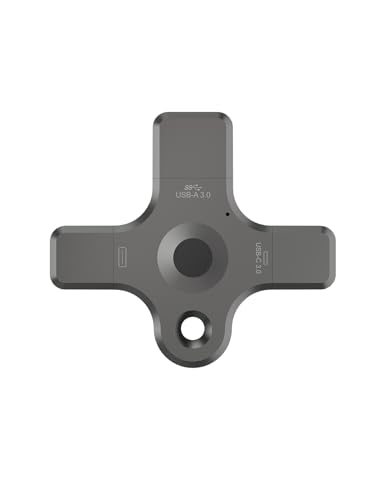
- 4-in-1 connectivity for Lightning, USB-C, USB-A, and Micro
- Fingerprint plus PIN protection for private files
- Strong fit for iPhone/iPad users who also need cross-device access
Best For: People who want fingerprint-protected storage that can move easily between phones, tablets, and computers.
Best for Password-Free Biometric Access
Verbatim 32GB Fingerprint Secure USB 3.0 Drive

- Fingerprint unlock with no password required
- 256-bit AES hardware encryption
- Supports up to 6 fingerprints
Best For: Users who want quick fingerprint access with hardware-encrypted storage.
Best for Apple Devices
iPhone/iPad USB3.0 Fingerprint Encrypted Drive

- Fingerprint and password lock stored on-drive
- Lightning and USB 3.0 for Apple devices and PCs
- App support for file viewing and management
Best For: Apple users who want a secure, portable drive for private files and quick transfers.
Best for Fast Biometric Access – Lexar JumpDrive Fingerprint F35 PRO 128GB
If you want one of the more practical encrypted usb drives with fingerprint login, the Lexar JumpDrive Fingerprint F35 PRO stands out for combining biometric access, AES protection, and fast USB 3.2 Gen 1 transfer speeds in a single portable drive. It’s a smart fit when you need quick access to sensitive files without relying on passwords alone.
Best For: Professionals, teams, or personal users who want secure file access with fast fingerprint unlocking and dependable everyday performance.
Pros:
- Fingerprint authentication unlocks the drive in under 1 second
- Supports up to 10 fingerprints for shared or multi-user access
- 256-bit AES encryption adds an extra security layer for confidential files
- Up to 400 MB/s read and 300 MB/s write speeds help move files quickly
Cons:
- Fingerprint setup adds more steps than a standard flash drive
- Top speeds depend on the host device and file type
- Metal body is durable, but not the smallest option for pocket carry
Overall, this Lexar model is a strong choice if you want encrypted usb drives with fingerprint support that feel secure without sacrificing speed. It’s especially appealing for anyone who regularly carries confidential documents and wants quick, repeatable access.
Best for Biometric Security – VCOM Fingerprint Encryption SSD Enclosure
If you want encrypted usb drives with fingerprint protection that still move files quickly, this VCOM SSD enclosure is a strong pick. It combines biometric login, hardware encryption, and a built-in LCD so you can check status at a glance while using your own M.2 NVMe or SATA SSD.
Best For: Users who need portable, hardware-encrypted storage with fingerprint access for work files, client data, or travel.
Pros:
- Fingerprint access plus 256-bit AES hardware encryption for layered security
- 10Gbps USB 3.2 Gen2 performance for fast transfers
- Supports both M.2 NVMe and SATA SSDs in common 2242/2260/2280 sizes
- LCD screen shows connection status, capacity, and security mode
Cons:
- Requires a compatible SSD, so it is not a ready-to-use flash drive
- May be more complex than simple plug-in encrypted USB options
This is a smart choice if you want encrypted usb drives with fingerprint-style protection in a more flexible SSD enclosure format. It is especially appealing for users who value stronger security and faster performance over the simplicity of a standard thumb drive.
Best for Business Data Protection – Fingerprint Encrypted USB Drive
If you want encrypted usb drives with fingerprint access for office files, client records, or travel-ready backups, this metal USB 3.0 drive is built around simple biometric unlocking and fast plug-and-play use. It leans more toward practical business security than flashy extras, with multiple capacity options to match everyday storage needs.
Best For: Business users who need a compact, fingerprint-protected flash drive for securing sensitive documents and moving files between computers.
Pros:
- Fingerprint encryption adds convenient biometric protection for sensitive business data.
- USB 3.0 transfer support helps speed up document, media, and backup workflows.
- Metal body, keyring hole, and compact size make it easy to carry for meetings and travel.
- Driver-free operation keeps setup simple across mainstream systems.
Cons:
- Write speed is modest compared with faster high-end USB drives.
- No write-protect switch for extra offline file-locking control.
- Security-focused design may be more than casual users need.
Overall, this is a sensible pick if your priority is straightforward fingerprint access and portable file security. Among encrypted usb drives with fingerprint, it stands out as a business-friendly option for secure everyday backups and document transfers.
Best for Fingerprint Access – Fingerprint USB C Drive 16-256GB
If you want one of the more practical encrypted usb drives with fingerprint for everyday private storage, this USB-C model is built around biometric access, metal construction, and simple plug-and-play use. It is a straightforward option for carrying sensitive documents, backups, and media between phones, laptops, and other compatible devices.
Best For: Users who want a portable fingerprint-secured drive for work files, school projects, travel backups, and private document transfers.
Pros:
- Fingerprint authentication adds a clear layer of access control
- USB-C design improves compatibility with modern devices
- Metal корпус and compact size make it travel-friendly
- Available in multiple capacities up to 256GB
Cons:
- Read and write speeds are modest compared with faster premium drives
- May not suit users who need advanced enterprise encryption features
- Fingerprint setup can be less convenient than a standard thumb drive
For shoppers comparing encrypted usb drives with fingerprint, this model stands out for simple biometric protection and broad USB-C portability rather than raw speed. It makes the most sense if secure access matters more than top-end transfer performance.
Best for Multi-Device Security – 4-in-1 Fingerprint Encrypted USB Drive
If you want one of the more versatile encrypted usb drives with fingerprint support, this 4-in-1 model is built for mixed-device use. It combines Lightning, USB-C, USB-A, and Micro connections, so you can move files between iPhone, iPad, Android, Mac, and PC without juggling separate drives.
Best For: Apple users who want fingerprint-protected storage that can also work across Android and computer setups after initial setup.
Pros:
- Four-in-one design covers Lightning, USB-C, USB-A, and Micro connections
- Fingerprint and PIN protection add a stronger privacy layer for sensitive files
- Works with the companion app on supported iPhone and iPad devices for setup
- Useful for fast file transfers across phones, tablets, and computers
Cons:
- Fingerprint and password setup is limited to Apple iOS devices through the app
- Android, USB-A, and USB-C/Micro users cannot configure security settings directly
- Feature set may be more complex than a standard plug-and-play flash drive
For buyers comparing encrypted usb drives with fingerprint, this model stands out for breadth of compatibility more than simplicity. It makes the most sense if you need one drive that can secure personal files and still connect to a wide range of devices.
Best for Password-Free Biometric Access – Verbatim 32GB Fingerprint Secure USB 3.0 Drive
Verbatim 32GB Fingerprint Secure USB 3.0 Flash Drive with AES 256 Hardware Encryption – Silver
Check Price On AmazonIf you want encrypted usb drives with fingerprint login instead of typing a password, this Verbatim model is a practical fit. It combines 256-bit AES hardware encryption with fingerprint unlocking, so your files stay protected while access remains quick and simple.
Best For: People who want a straightforward biometric USB drive for securing everyday confidential files without relying on memorized passwords.
Pros:
- Fingerprint unlock with no password required
- 256-bit AES hardware encryption for stronger file protection
- Supports up to 6 registered fingerprints
- USB 3.0 performance with USB 2.0 compatibility
Cons:
- 32GB capacity may feel limited for larger media libraries
- Windows and newer macOS support only, so compatibility is narrower than standard drives
For buyers comparing encrypted usb drives with fingerprint access, this Verbatim drive stands out for its simple biometric workflow and hardware-based security. It is a solid, no-fuss option if you value convenience and data protection in one compact drive.
Best for Apple Devices – iPhone/iPad USB3.0 Fingerprint Encrypted Drive
If you want one of the more specialized encrypted usb drives with fingerprint support for Apple users, this model stands out for its iPhone/iPad-first setup. It combines fingerprint and password protection with a Lightning connector for iOS devices and a USB 3.0 plug for computers, making it a practical option for secure file transfer and local backups.
Best For: iPhone and iPad users who want a fingerprint-locked flash drive for private photos, videos, and documents.
Pros:
- Fingerprint and password protection are stored on the drive for added privacy
- Lightning plus USB 3.0 design works across Apple devices and computers
- App-based file management supports common photo and video formats
Cons:
- Fingerprint/password setup is limited to Apple iOS devices
- Requires the companion app for first-time use on iPhone and iPad
For buyers comparing encrypted usb drives with fingerprint authentication, this is a strong fit if your workflow centers on Apple devices and you want simple, portable protection without relying on cloud storage.
How We Picked These Encrypted USB Drives with Fingerprint
We focused on drives and storage devices that combine fingerprint access with practical everyday use. That means checking encryption method, storage capacity, read/write performance, build quality, device compatibility, and whether the security features feel usable instead of cumbersome. We also looked for products suited to different needs, from simple flash drives to higher-performance SSD enclosure options.
Quick Comparison
Most Encrypted USB Drives with Fingerprint fall into a few categories: compact flash drives for quick file transfer, multi-device models for phones and computers, and larger-capacity storage solutions for backups or business use. If you mainly need pocketable convenience, a standard biometric flash drive is usually enough. If you move large files often, speed and compatibility matter more than size alone.
Key Buying Factors for Encrypted USB Drives with Fingerprint
Encryption Type
Look for hardware encryption when possible. It keeps security functions on the device itself and is generally more reliable than software-only protection. AES 256-bit is a strong baseline for sensitive documents and business files.
Capacity and Speed
Choose capacity based on your workload. Smaller drives can work for passwords, PDFs, and light document storage, while 128GB and above is better for photo libraries, project folders, and backups. USB 3.0 or USB 3.2 support helps prevent bottlenecks when transferring larger files.
Compatibility
Not every biometric drive works equally well across Windows, macOS, iPhone, iPad, Android, and USB-C devices. If you switch between phones and laptops, prioritize broad device support and the correct connector types before focusing on capacity.
Security Convenience
The best Encrypted USB Drives with Fingerprint balance security and speed. A drive that is too restrictive can slow you down, while one that is too easy to unlock may not add enough protection. Look for a smooth enrollment process, reliable fingerprint recognition, and sensible fallback options if supported.
Who Should Buy Which Encrypted USB Drives with Fingerprint?
Business users and travelers should lean toward drives with stronger encryption and dependable biometric access. Students and everyday users may prefer a compact, affordable model for private files and backups. If you work across multiple devices, pick a drive with flexible connector support and clear platform compatibility. For large or performance-heavy storage needs, an enclosure-based option can offer more room and speed than a standard flash drive.
In short, the right choice depends on how much data you carry, how often you access it, and which devices you use most. Focus on security first, then match the drive to your workflow so you get protection without sacrificing convenience.
