
When it comes to safeguarding your sensitive information, choosing the right encrypted SSD with password protection is essential. With various options available, you’ll want to take into account factors like encryption methods, capacity, and durability. Each model offers unique features that cater to different user needs. So, what are the top contenders that combine security and performance? Let’s explore the best encrypted SSDs that guarantee your data remains secure.
Kingston Ironkey Locker+ 50 Encrypted USB Flash Drive (32GB)

If you’re looking for a reliable and secure way to store sensitive data, the Kingston Ironkey Locker+ 50 Encrypted USB Flash Drive (32GB) is an excellent choice. With its robust XTS-AES encryption, your files are shielded against unauthorized access. This USB 3.2 Gen 1 device features a durable metal casing and offers impressive read speeds of up to 145MB/s and write speeds of up to 115MB/s. Plus, you can manage security with multi-password options and a virtual keyboard to protect against keyloggers. Enjoy automatic personal cloud backup for extra peace of mind, making it a smart investment for your data security needs.
Best For: Individuals and organizations seeking a secure and efficient solution for storing sensitive data.
Pros:
- Robust security features with XTS-AES encryption and protection against brute force and BadUSB attacks.
- Fast performance with read speeds up to 145MB/s and write speeds up to 115MB/s.
- User-friendly management options including multi-password settings and a virtual keyboard for enhanced security.
Cons:
- Limited storage capacity of only 32GB, which may not be sufficient for users with large data requirements.
- Higher price point compared to standard USB flash drives without encryption.
- Potential compatibility issues with older USB ports or devices that do not support USB 3.2 Gen 1.
Kingston IronKey Vault Privacy 80 1.92TB External SSD
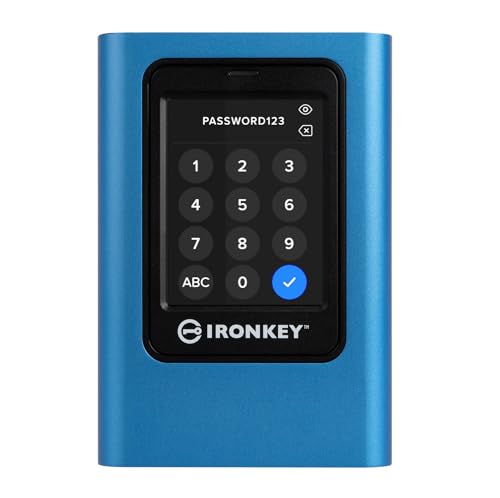
For professionals and individuals who prioritize data security, the Kingston IronKey Vault Privacy 80 1.92TB External SSD stands out with its FIPS 197 certification and robust XTS-AES 256-bit encryption. You can easily manage security with multi-password options, allowing separate Admin and User access. The intuitive touch-screen interface simplifies navigation, while configurable password rules enhance protection. Its dual read-only modes safeguard your data against unauthorized changes, and built-in malware protection keeps threats at bay. With 1.92TB of storage capacity, this SSD combines convenience and security, ensuring that your sensitive information remains safe and easily accessible whenever you need it.
Best For: Professionals and individuals who prioritize high-level data security and accessibility.
Pros:
- FIPS 197 Certification ensures compliance with rigorous security standards.
- Intuitive touch-screen interface makes navigation and management user-friendly.
- Multi-password options allow for customizable access control for enhanced security.
Cons:
- The price point may be higher compared to standard external SSDs without security features.
- Limited to 1.92TB storage capacity, which may not meet the needs of users with larger data requirements.
- The advanced security features may require additional setup time for users unfamiliar with encryption technology.
SANDISK 1TB Extreme Portable SSD (SDSSDE61-1T00-G25)

The SanDisk 1TB Extreme Portable SSD (SDSSDE61-1T00-G25) stands out as an ideal choice for professionals and adventurers alike who prioritize data security without sacrificing performance. With read speeds up to 1050MB/s and write speeds reaching 1000MB/s, it’s engineered for high-capacity storage. Its IP65 rating guarantees water and dust resistance, while its drop protection withstands falls from up to 3 meters. Plus, password protection with 256-bit AES hardware encryption keeps your data safe. The included SanDisk Memory Zone app helps you manage files effortlessly. With a 5-year warranty and rave reviews, it’s a smart investment for your data security needs.
Best For: Professionals and adventurers who need secure, high-speed storage for their data on the go.
Pros:
- High performance: Offers read speeds up to 1050MB/s and write speeds up to 1000MB/s for efficient data transfer.
- Durability: Features IP65 water and dust resistance along with drop protection from heights of up to 3 meters.
- Security: Equipped with 256-bit AES hardware encryption for enhanced data protection and a user-friendly management app.
Cons:
- Price: May be more expensive compared to traditional external hard drives.
- Compatibility: Requires software download for full functionality on macOS.
- Limited capacity options: Only available in a 1TB model, which may not suffice for users needing larger storage solutions.
SANDISK 1TB Extreme PRO Portable SSD

Designed for professionals and creatives on the go, the SANDISK 1TB Extreme PRO Portable SSD delivers exceptional performance with read/write speeds of up to 2000MB/s. Its forged aluminum chassis not only looks sleek but also acts as a heatsink, ensuring sustained speeds. With an impressive IP65 rating for water and dust resistance, plus 3-meter drop protection, you can trust this drive in tough conditions. Security’s a priority too; it features password protection with 256-bit AES hardware encryption. Plus, the SanDisk Memory Zone app helps you manage files efficiently. This SSD is a reliable choice for ultimate data security.
Best For: Professionals and creatives who need high-speed, portable data storage with robust security features.
Pros:
- High Performance: Offers read/write speeds of up to 2000MB/s for efficient data transfer.
- Durable Design: Built with a forged aluminum chassis for heat dissipation and includes 3-meter drop protection.
- Security Features: Equipped with 256-bit AES hardware encryption and password protection for enhanced data privacy.
Cons:
- Price Point: Higher cost compared to standard external hard drives may not fit every budget.
- App Dependency: Requires the SanDisk Memory Zone app for optimal file management, which must be downloaded and installed.
- Performance Variability: Actual performance may differ based on host device and usage conditions.
Kingston IronKey Vault Privacy 80 External SSD (480GB)

If you’re seeking robust security features in an external SSD, the Kingston IronKey Vault Privacy 80 (480GB) stands out with its FIPS 197 certification and XTS-AES 256-bit encryption. This compact 2.5-inch drive offers dual read-only modes and a touch screen for managing multiple passwords, ensuring your data stays safe. It effectively protects against brute force attacks by crypto-erasing after 15 incorrect attempts. With a read speed of 250 MB/s and USB 3.2 Gen 1 connectivity, transferring files is quick and easy. Plus, it comes with a travel case and cables, making it a practical choice for secure storage on the go.
Best For: Those seeking a highly secure external SSD with advanced encryption and robust protection features for sensitive data storage.
Pros:
- FIPS 197 Certified for enhanced data security.
- Touch-screen interface allows for easy management of multiple passwords.
- Dual read-only modes protect against malware and unauthorized access.
Cons:
- Limited to 480 GB capacity, which may not suit users with very large storage needs.
- Read speed of 250 MB/s may be slower compared to some other high-performance SSDs.
- Higher price point compared to standard external SSDs without advanced security features.
Kingston Ironkey Keypad 200 Encrypted USB (32GB)

For those seeking robust security in a portable format, the Kingston IronKey Keypad 200 Encrypted USB (32GB) stands out with its military-grade XTS-AES 256-bit hardware encryption. It features FIPS 140-3 Level 3 certification (pending), ensuring exceptional protection against unauthorized access. The alphanumeric keypad allows you to create a multi-PIN setup for added security, while the lightweight design makes it easy to carry. With read speeds of 145 MB/s and write speeds of 115 MB/s, it delivers efficiency alongside security. Plus, it’s compatible with various operating systems, adding to its versatility for your data protection needs.
Best For: Individuals and organizations that prioritize high-level data security and require portable storage solutions.
Pros:
- Military-grade XTS-AES 256-bit hardware encryption ensures robust data protection.
- Lightweight and portable design makes it easy to carry for on-the-go use.
- Multi-PIN setup option enhances security by allowing the use of both admin and user PINs.
Cons:
- Pending FIPS 140-3 Level 3 certification may raise concerns for some users until confirmed.
- Price may be higher compared to standard USB drives without advanced security features.
- Alphanumeric keypad may require adjustment for users accustomed to traditional USB drives.
Kingston Ironkey Vault Privacy 50 USB-C Encrypted Flash Drive (512GB)

The Kingston IronKey Vault Privacy 50 USB-C Encrypted Flash Drive (512GB) stands out as an ideal choice for professionals and individuals who prioritize data security. With FIPS 197 certification and XTS-AES 256-bit hardware encryption, your data’s well-protected against threats like BadUSB and brute force attacks. You’ll appreciate the dual read-only settings and multi-password options, including a new passphrase mode. Offering impressive performance, it boasts read speeds of 310 MB/s and write speeds of 400 MB/s. Plus, it’s compatible with various devices via USB Type-A and Type-C ports, ensuring seamless connectivity for all your needs.
Best For: Professionals and individuals who prioritize data security and require reliable storage solutions.
Pros:
- FIPS 197 certified for enhanced security and compliance.
- High-speed performance with read speeds up to 310 MB/s and write speeds up to 400 MB/s.
- Versatile compatibility with devices featuring USB Type-A and Type-C ports.
Cons:
- Limited storage capacity compared to some larger flash drives on the market.
- Higher price point compared to non-encrypted flash drives.
- Dependent on USB interface which may require adapters for certain devices.
Kingston Ironkey D500S 256GB Encrypted Flash Drive

Looking for a secure solution to protect your sensitive data? The Kingston Ironkey D500S 256GB Encrypted Flash Drive is an outstanding choice. With its FIPS 140-3 Level 3 certification and XTS-AES 256-bit encryption, your information stays safe from unauthorized access. Enjoy fast performance with read and write speeds of 240 MB/s, all housed in a rugged zinc casing. You can customize passwords with multiple options, and its dual hidden partitions add an extra layer of security. Backed by a limited 5-year warranty, this drive is a reliable companion for anyone serious about data protection.
Best For: Individuals and businesses seeking a highly secure and reliable solution for protecting sensitive data.
Pros:
- FIPS 140-3 Level 3 certification ensures top-tier security for sensitive information.
- Fast read and write speeds of 240 MB/s enhance productivity while transferring files.
- Rugged zinc casing provides protection against physical damage and unauthorized access.
Cons:
- Higher price point compared to standard flash drives may not be suitable for budget-conscious consumers.
- Limited storage capacity of 256 GB may not meet the needs of users with extensive data requirements.
- Customization features may be complex for less tech-savvy users to navigate effectively.
SanDisk Professional 4TB G-Drive ArmorLock SSD

With its innovative ArmorLock security technology, the SanDisk Professional 4TB G-Drive ArmorLock SSD stands out as an ideal choice for creative professionals who prioritize both performance and data security. This encrypted NVMe SSD offers pro-grade speeds of up to 1000MB/s for seamless file transfers. Its ultra-rugged design guarantees durability in demanding environments. Accessing is simple—just use your phone, and you won’t need a password. Plus, the auto-access feature with pre-authorized devices adds convenience. Manage multiple users and drives effortlessly through its intuitive interface. With 4TB of storage capacity, it’s perfect for all your creative projects.
Best For: Creative professionals who prioritize performance and data security in demanding environments.
Pros:
- Pro-grade speeds of up to 1000MB/s for fast file transfers.
- ArmorLock security technology allows simple unlocking with a phone, eliminating the need for passwords.
- Ultra-rugged design ensures durability in challenging conditions.
Cons:
- Higher price point compared to non-encrypted SSDs.
- Limited compatibility with older USB devices without a USB-C adapter.
- Potential learning curve for managing multiple users and drives through the interface.
Samsung T7 Portable SSD 1TB External Solid State Drive

For those seeking a reliable and speedy storage solution, the Samsung T7 Portable SSD 1TB stands out with its impressive read and write speeds of up to 1,050/1,000 MB/s. Utilizing PCIe NVMe technology, it nearly doubles the performance of its predecessor, the T5. The compact design guarantees portability, while its extensive compatibility with PCs and mobile devices makes it ideal for gaming, video editing, and photography. Plus, it’s shock-resistant with fall protection up to 6 feet, thanks to its sturdy aluminum unibody. Manufactured by the world’s leading flash memory brand, you can trust its quality and reliability for your data security needs.
Best For: Those in need of a fast, portable storage solution for gaming, video editing, and photography.
Pros:
- High-speed performance with read/write speeds of up to 1,050/1,000 MB/s, making it perfect for large file transfers.
- Durable design with shock resistance and fall protection up to 6 feet, ensuring data safety during transport.
- Wide compatibility with PCs and mobile devices, catering to various user needs and applications.
Cons:
- Price point may be higher compared to traditional external hard drives.
- Limited storage options at 1TB for users needing more extensive capacity, although larger options are available.
- Heat generation during extensive use could be a concern for some users.
Factors to Consider When Choosing Encrypted SSDs with Password Protection.
When you’re choosing an encrypted SSD with password protection, there are several key factors to keep in mind. You’ll want to take into account the encryption standards, password complexity requirements, and data transfer speeds. Additionally, don’t overlook the physical durability ratings and compatibility with your devices to guarantee you make the best choice.
Encryption Standards and Types
Choosing the right encrypted SSD with password protection involves understanding various encryption standards and types that guarantee your data remains secure. One widely used standard is XTS-AES, which encrypts data in 128-bit or 256-bit blocks, offering robust protection. Look for FIPS 197 certification to confirm compliance with federal security standards, indicating that the encryption methods are reliable. Multi-password options are beneficial as they allow you to set different access levels, enhancing control over who can access your data. Additionally, brute force attack protection is essential; it erases your data after a set number of incorrect attempts. Finally, consider SSDs with tamper-evident designs and digitally signed firmware to safeguard against physical tampering and malicious software attacks.
Password Complexity Requirements
While selecting an encrypted SSD with password protection, it is crucial to evaluate password complexity requirements to bolster your data security. Look for options that require a mix of uppercase and lowercase letters, numbers, and special characters. This combination enhances security, making it harder for unauthorized users to gain access. Some SSDs offer multi-password options, allowing you to choose between complex passwords and passphrases for added safety. Configurable password rules give you control over length and complexity, ensuring compliance with your organization’s policies. Additionally, consider devices with brute force protection, which can erase data after several incorrect attempts. Dual read-only modes further safeguard against unauthorized modifications, providing extra layers of security alongside password protection.
Data Transfer Speeds
To guarantee efficient data access and transfer, pay close attention to data transfer speeds when considering encrypted SSDs with password protection. Speeds can vary considerably, with some models achieving read speeds up to 2,000 MB/s and write speeds of 1,000 MB/s or more. Look for SSDs that utilize USB 3.2 Gen 2 interfaces, as they support faster transfer rates compared to older USB versions. Keep in mind that the type of encryption also affects performance; for example, XTS-AES 256-bit encryption introduces minimal latency. However, actual speeds depend on your host device and usage conditions, so it’s wise to select SSDs with high read and write speeds, especially for handling large files or high-resolution media effectively.
Physical Durability Ratings
When selecting an encrypted SSD with password protection, it’s crucial to evaluate physical durability ratings, as they directly impact the drive’s longevity and reliability. Look for models that offer drop protection, ideally with resistance against falls from heights of up to 3 meters. Check the IP rating for water and dust resistance; a rating like IP65 indicates solid protection against dust and low-pressure water jets. Additionally, consider SSDs with rugged design features, such as aluminum chassis or zinc casings, which enhance physical protection. If you work in extreme environments, choose drives designed to withstand high temperatures and humidity. Finally, verify the SSD has shock resistance features to safeguard your data during accidental drops or impacts.
Compatibility With Devices
Choosing an encrypted SSD with password protection means considering how well it’ll work with your devices. First, confirm the SSD supports multiple interfaces, like USB-C and USB 3.2, for maximum compatibility with PCs, laptops, and smartphones. Check if it works across different operating systems, including Windows, macOS, and Linux, as some drives might need specific software. Look for backward compatibility with older devices, often indicated by support for USB 1.1 or 2.0. If you plan to use it with tablets or smartphones, consider drives that offer mobile compatibility and support USB On-The-Go (OTG) technology. Finally, verify if the SSD lists compatibility with specific applications, such as gaming or video editing, to guarantee peak performance.
Warranty and Support Options
A solid warranty and reliable support options can make a significant difference when you’re selecting an encrypted SSD with password protection. Start by checking the warranty duration; options typically range from 3 to 5 years, with varying levels of coverage. Review the return policy for refunds, often available within 30 days for defective items, but be aware of specific conditions. Make sure the manufacturer offers customer service for warranty requests, which is essential for resolving issues or getting replacements. Look for limited warranties covering defects in materials and workmanship, protecting you against manufacturing faults. Additionally, consider brands that provide extra support, like software updates or technical assistance, enhancing the overall value of their warranty offerings.
