
When it comes to safeguarding your sensitive files, choosing the right encrypted SSD is essential. With so many options available, it can be overwhelming to determine which one best suits your needs. You want something that offers robust security features and reliable performance. The good news is we’ve narrowed it down to the ten best encrypted SSDs on the market. Let’s explore these options and find the perfect solution for your data protection needs.
SANDISK 1TB Extreme Portable SSD (SDSSDE61-1T00-G25)

If you’re someone who needs secure and reliable storage for sensitive files, the SanDisk 1TB Extreme Portable SSD (SDSSDE61-1T00-G25) is an ideal choice. With a capacity of 1TB, it boasts impressive read speeds of up to 1050MB/s and write speeds of 1000MB/s, perfect for active lifestyles. Its durable design features drop protection up to 3 meters and an IP65 rating for water and dust resistance. Plus, with 256-bit AES hardware encryption and password protection, your files stay safe. Compatible with Windows and macOS, it’s also backed by a 5-year limited warranty, ensuring peace of mind.
Best For: Individuals seeking secure and high-speed storage solutions for sensitive files while on the go.
Pros:
- High Performance: Offers impressive read speeds up to 1050MB/s and write speeds up to 1000MB/s.
- Durable Design: Features drop protection up to 3 meters and an IP65 rating for water and dust resistance.
- Security Features: Includes 256-bit AES hardware encryption and password protection for enhanced data security.
Cons:
- Software Requirement for Mac: Requires a software download for compatibility with macOS.
- Price Point: May be more expensive than traditional external hard drives.
- Performance Variability: Performance may vary depending on the host device and usage conditions.
Kingston IronKey Vault Privacy 80 1.92TB External SSD
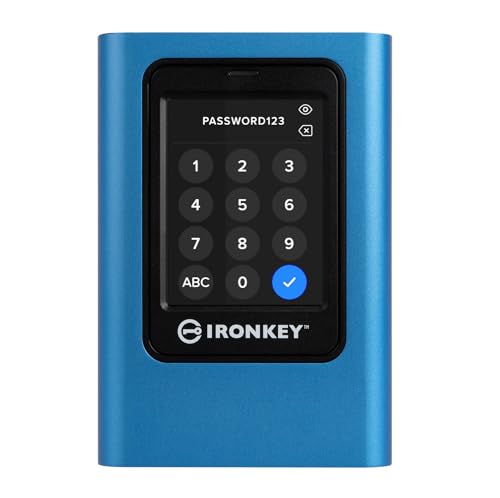
For professionals handling sensitive information, the Kingston IronKey Vault Privacy 80 1.92TB External SSD offers unparalleled security with its FIPS 197 certification and robust XTS-AES 256-bit encryption. You’ll appreciate the intuitive touch-screen interface that allows easy access via PIN or passphrase modes. With multi-password options and configurable password rules, you can tailor security to fit your needs. The dual read-only modes protect your data against unauthorized writing, while built-in malware protection keeps threats at bay. With 1.92TB of storage, this SSD guarantees you have ample space to securely store your crucial files. Secure your data effectively today!
Best For: Professionals handling sensitive information who require secure data storage solutions.
Pros:
- FIPS 197 Certified for enhanced security compliance.
- Intuitive touch-screen interface makes accessing data simple and user-friendly.
- Robust malware protection helps safeguard against potential threats.
Cons:
- May be more expensive compared to standard external SSDs.
- The touch-screen interface might be less durable than traditional buttons.
- Limited to 1.92TB of storage, which may not suffice for users with larger data needs.
SANDISK 4TB Extreme PRO Portable SSD

The SANDISK 4TB Extreme PRO Portable SSD stands out with its impressive read/write speeds of up to 2000MB/s, making it an ideal choice for professionals who need to transfer large files quickly. Its NVMe solid-state performance guarantees smooth operation, while USB-C and USB 3.2 Gen 2×2 connectivity enhance versatility. Built with a forged aluminum chassis, this SSD offers durability with up to 3-meter drop protection and IP65 water and dust resistance. The handy carabiner loop makes it easy to secure, and the SanDisk Memory Zone app helps you manage files effortlessly. Plus, it comes with a 5-year limited warranty for peace of mind.
Best For: Professionals and content creators who require fast data transfer and reliable storage for large files.
Pros:
- High performance with read/write speeds up to 2000MB/s, ideal for handling large files.
- Durable design featuring drop protection and water/dust resistance for outdoor use.
- Convenient file management with the SanDisk Memory Zone app and a handy carabiner loop for portability.
Cons:
- Higher price point compared to traditional external hard drives.
- Limited capacity options, as this model only offers a 4TB variant.
- USB-C connectivity may require adapters for compatibility with older devices.
Samsung T7 Portable SSD, 1TB External Solid State Drive

When you need fast, reliable storage for sensitive files, the Samsung T7 Portable SSD stands out with its impressive read/write speeds of up to 1,050MB/s. This compact drive, equipped with PCIe NVMe technology, offers excellent performance for tasks like gaming, video editing, and photography. It’s compatible with various PCs and mobile devices, ensuring versatility. Plus, it’s shock-resistant, with durability features that protect against falls from up to 6 feet. Manufactured by the world’s #1 flash memory brand, you can trust its quality and performance for safeguarding your data. Choose the Samsung T7 for a secure, efficient storage solution.
Best For: Professionals and creatives who require fast, reliable external storage for high-performance tasks like gaming, video editing, and photography.
Pros:
- Fast read/write speeds of up to 1,050MB/s, enabling efficient file transfers and performance.
- Shock-resistant design with fall protection up to 6 feet, ensuring durability in various environments.
- Extensive compatibility with a wide range of PCs and mobile devices, making it versatile for different applications.
Cons:
- Higher price point compared to traditional external hard drives.
- Limited to USB 3.2 Gen 2 ports for optimal speeds, which may not be available on all devices.
- No built-in encryption for sensitive data, requiring additional software for secure storage.
Samsung T7 Shield 2TB Portable SSD

Whether you’re a photographer capturing high-resolution images or a gamer needing fast load times, the Samsung T7 Shield 2TB Portable SSD stands out with its impressive read speeds of up to 1050MB/s and rugged design. With IP65 water and dust resistance, plus drop protection from nearly 10 feet, it’s built for adventure. You can easily transfer large files thanks to its PCIe NVMe technology. Compatible with PCs, Macs, Android devices, and gaming consoles, it’s perfect for anyone on the go. Plus, Samsung Magician software helps you keep your drive optimized and secure. Trust in Samsung, the world’s #1 flash memory brand.
Best For: Photographers, content creators, and gamers seeking a durable and high-speed portable storage solution.
Pros:
- Fast performance: Offers read speeds up to 1050MB/s and write speeds of 1000MB/s for quick file transfers.
- Rugged design: IP65 rated water and dust resistance along with drop protection from heights up to 9.8 feet ensures durability in various environments.
- Versatile compatibility: Works seamlessly with PCs, Macs, Android devices, and gaming consoles, making it suitable for a wide range of users.
Cons:
- Price: Higher cost compared to traditional hard drives or lower-capacity SSDs.
- Limited operating temperature: May not function optimally outside the 0°C to 60°C range.
- Dependence on software: Full optimization and monitoring require the Samsung Magician software, which may not be user-friendly for everyone.
SANDISK 1TB Portable SSD – External Solid State Drive

For professionals and tech-savvy users seeking a reliable and secure storage solution, the SanDisk 1TB Portable SSD stands out with its impressive read speeds of up to 800MB/s. Weighing just 1.44 ounces and featuring a durable rubber enclosure, it’s designed to withstand drops from up to two meters. With USB 3.2 Gen 2 and USB Type-C connectivity, you can easily connect it to laptops and other devices. Backed by a 3-year limited warranty, this SSD is a top choice, earning a stellar 4.6 out of 5 stars from nearly 10,000 reviews, making it a trusted companion for your sensitive files.
Best For: Professionals and tech-savvy users looking for a reliable and secure portable storage solution.
Pros:
- Impressive read speeds of up to 800MB/s for fast data transfer.
- Durable design with a rubber enclosure and drop protection up to two meters.
- Wide compatibility with USB 3.2 Gen 2 and USB Type-C devices.
Cons:
- Write speed is not specified, which may be a concern for some users.
- Limited storage capacity of 1TB may not meet the needs of users with larger data requirements.
- Potential performance variance based on host device and conditions.
Kingston Ironkey D500S 256GB Encrypted Flash Drive

The Kingston Ironkey D500S 256GB Encrypted Flash Drive is an ideal choice for professionals and organizations that handle sensitive information. With its FIPS 140-3 Level 3 pending certification and XTS-AES 256-bit encryption, your data stays secure. You’ll appreciate the dual hidden partition feature and robust protection against brute force and BadUSB attacks. Its USB 3.2 Gen 1 interface offers blazing read and write speeds of 240 MB/s, while the rugged zinc casing guarantees durability. Plus, with a limited 5-year warranty and excellent customer reviews, you can trust this flash drive to protect your files efficiently and effectively.
Best For: Professionals and organizations that require secure storage for sensitive information.
Pros:
- FIPS 140-3 Level 3 pending certification ensures high-level security for sensitive data.
- Dual hidden partition feature allows for enhanced data organization and security.
- Durable zinc casing provides protection against physical damage and penetration attacks.
Cons:
- Higher price point compared to standard flash drives may not be suitable for budget-conscious users.
- Limited storage capacity of 256 GB may not meet the needs of those requiring larger storage solutions.
- Potential complexity in managing multiple passwords and complex security features may deter some users.
Kingston Ironkey Locker+ 50 Encrypted USB Flash Drive (32GB)

When you need a reliable solution for safeguarding sensitive data, the Kingston Ironkey Locker+ 50 Encrypted USB Flash Drive (32GB) stands out with its robust XTS-AES encryption. This USB 3.2 Gen 1 flash drive features a durable metal casing and offers impressive read speeds up to 145MB/s and write speeds up to 115MB/s. With multi-password options and protection against brute force and BadUSB attacks, your data remains secure. Plus, its automatic personal cloud backup and virtual keyboard enhance usability, shielding your passwords from potential threats. Trust Kingston to keep your sensitive files safe and accessible.
Best For: Individuals and businesses looking for a secure solution to store and transport sensitive data.
Pros:
- Robust Security: Features XTS-AES encryption and protection against brute force and BadUSB attacks.
- High Performance: Offers impressive read speeds of up to 145MB/s and write speeds of up to 115MB/s.
- User-Friendly: Includes multi-password options and a virtual keyboard for enhanced password security.
Cons:
- Limited Capacity: At 32GB, it may not be sufficient for users with extensive data storage needs.
- Price Point: Higher cost compared to standard USB flash drives without encryption features.
- Bulkiness: The metal casing may make it slightly heavier than plastic alternatives.
Kingston IronKey Vault Privacy 80 480GB External SSD

Sensitive data deserves robust protection, and the Kingston IronKey Vault Privacy 80 480GB External SSD delivers just that. With FIPS 197 certification and XTS-AES 256-bit encryption, your files are well-secured. The touch-screen interface lets you manage multiple passwords while configurable password rules enhance your security. Plus, dual read-only modes guard against malware, and after 15 incorrect attempts, it crypto-erases the data. You’ll enjoy solid performance with read speeds up to 250 MB/s via USB 3.2 Gen 1 connectivity. Packaged with a travel case, it’s both portable and reliable, backed by a three-year warranty for peace of mind.
Best For: Individuals and businesses looking for a secure and portable storage solution for sensitive data.
Pros:
- FIPS 197 Certified with XTS-AES 256-bit encryption for enhanced data security.
- User-friendly touch-screen interface allows management of multiple passwords with configurable rules.
- Solid performance with read speeds of up to 250 MB/s, making data transfers efficient.
Cons:
- Limited storage capacity of 480 GB may not suit users with extensive data needs.
- The price point may be higher compared to non-encrypted external SSDs.
- Some users may find the touch-screen interface less intuitive than traditional methods.
Lexar 2TB Armor 700 Portable SSD

For creative professionals and gamers alike, the Lexar 2TB Armor 700 Portable SSD offers a powerful blend of speed and security. With impressive read/write speeds of 2000MB/s, you’ll experience rapid data transfers using USB 3.2 Gen 2×2. Its rugged design resists water and dust (IP66 rated) and withstands drops from up to 3 meters. Plus, it’s compatible with a wide range of devices, including PCs, Macs, and gaming consoles. You can rest easy knowing your sensitive files are protected with 256-bit AES encryption via Lexar DataShield. Enjoy peace of mind with the included five-year limited warranty.
Best For: Creative professionals and gamers who need fast, secure, and durable storage solutions for their digital files.
Pros:
- High read/write speeds of 2000MB/s for accelerated data transfers.
- Rugged design with IP66 rating, ensuring water and dust resistance.
- Includes 256-bit AES encryption for enhanced data security.
Cons:
- Limited to a five-year warranty, which may be shorter than some competitors.
- Requires a separate magnetic ring for optimal compatibility with iPhone 15 Pro and Pro Max for Apple Pro Res recording.
- Slightly heavier than some other portable SSD options on the market.
Factors to Consider When Choosing Encrypted SSDs for Sensitive Files
When choosing encrypted SSDs for sensitive files, you should consider several key factors. Pay attention to encryption standards, storage capacity, and speed, as these elements directly impact security and performance. Additionally, durability features and user interface can greatly enhance your overall experience.
Encryption Standards and Types
Choosing the right encryption standards and types for your encrypted SSDs is essential to guaranteeing your data remains secure. Look for FIPS 197 certification and XTS-AES 256-bit encryption, which safeguard your data both at rest and in transit. Multi-password options can enhance security by offering different access levels, allowing you to customize password rules. Additionally, consider features like brute-force attack protection that erases data after multiple incorrect attempts. Ascertain compatibility with various operating systems for seamless use across devices without sacrificing security. Finally, opt for SSDs with digitally-signed firmware to protect against threats like BadUSB attacks, further bolstering your data’s safety. Prioritize these factors to choose the best encrypted SSDs for your sensitive files.
Storage Capacity Options
Selecting the right encrypted SSD also involves considering storage capacity options that align with your data needs. Encrypted SSDs typically range from 256GB to 4TB, so you can choose an option that fits your requirements. If you handle large files like high-resolution videos or extensive databases, a higher capacity, such as 1TB or more, is ideal. On the other hand, smaller capacities are often sufficient for basic file storage. Keep your future storage needs in mind; opting for a higher capacity SSD provides flexibility as your data requirements grow. Many encrypted SSDs offer various capacities within a single product line, ensuring you can select the most suitable size without sacrificing security features.
Speed and Performance Metrics
While evaluating encrypted SSDs for sensitive files, speed and performance metrics are important factors that can greatly affect your workflow. Look for SSDs with read speeds up to 1050MB/s and write speeds reaching 1000MB/s for ideal data transfer. The interface you choose matters too; USB 3.2 Gen 2 enables faster transfers compared to older options. If you need even higher speeds, consider SSDs leveraging NVMe technology, which often surpass traditional SATA performance. Although encryption can slightly impact performance, many modern SSDs maintain impressive speeds when encryption is enabled. For those working with large files, like 4K videos, higher write speeds are vital for quicker backups and file transfers, making speed a top consideration in your selection process.
Durability and Resistance Features
When it comes to protecting sensitive files, durability and resistance features of encrypted SSDs play an essential role in ensuring data integrity. Look for SSDs with high water and dust resistance ratings, like IP65 or IP66, to shield against environmental hazards. It’s also vital to choose drives that can withstand drops from at least 3 meters, ensuring they’re protected from physical damage. Opt for rugged designs made from durable materials that resist impacts and harsh conditions. Assess the operating temperature range; SSDs built for extreme environments will handle varying conditions better. Finally, verify if the SSD has been tested for resistance to temperature fluctuations, vibrations, and moisture exposure, as these factors greatly influence data longevity.
User Interface and Usability
An intuitive user interface is essential for encrypted SSDs, as it allows you to effortlessly navigate security features and manage your files. Look for options with multi-password capabilities and configurable password rules, making it easier to secure your data. Touchscreen functionality can enhance usability, giving you an interactive experience for managing passwords and accessing settings. Automatic personal cloud backup features simplify data management, guaranteeing your files are always protected. Additionally, user-friendly design elements, like virtual keyboards for password entry, help shield against keylogging threats while maintaining easy access. Prioritizing these features will enhance your overall experience and guarantee you effectively safeguard your sensitive information without unnecessary complications.
Compatibility With Devices
Selecting an encrypted SSD requires careful thought of compatibility with your devices to guarantee seamless functionality. First, check the SSD’s support for USB standards like USB 3.2 Gen 1 or Gen 2 to confirm peak performance. It’s also important to evaluate operating system compatibility, as some SSDs may need specific software or drivers for platforms like Windows or macOS. Make sure the SSD offers connectivity options like USB-C or USB-A for easy integration with your hardware. Look for drives that work across multiple device types, including PCs, gaming consoles, and mobile devices, to enhance usability. Finally, verify backward compatibility with older USB versions to connect to legacy devices effortlessly.
Warranty and Support Policies
Warranty and support policies are essential factors to take into account when choosing an encrypted SSD for sensitive files. Look for warranty periods that range from 3 to 5 years, as this can give you peace of mind for long-term use. Check the return policy, which usually allows full refunds within 30 days for damaged or unopened products, but be aware of specific conditions and restocking fees. It’s vital to confirm if the warranty includes data recovery services, especially when handling sensitive information. Additionally, consider the manufacturer’s customer service options and availability for resolving encryption and security issues. Some brands also offer helpful resources like user manuals and software, which can enhance your overall experience with the SSD.
Price Versus Security Value
When considering an encrypted SSD for sensitive files, it’s crucial to balance the initial cost with the long-term security value. Weigh the purchase price against potential data breach costs, which can far exceed your investment in robust security features. Higher-priced SSDs often offer advanced certifications, like FIPS 197 and 256-bit AES encryption, enhancing data protection. Additional features such as multi-password options and malware protection can justify a higher price point. By investing in a more expensive encrypted SSD, you can greatly reduce the long-term risks of data loss or theft, ultimately saving money on recovery efforts. Don’t forget to factor in the warranty and support; a longer warranty can safeguard your investment and guarantee reliable performance.
