
If you need portable storage that keeps sensitive files protected, an encrypted external SSD with keypad offers a strong mix of speed, convenience, and hardware-level security.
This roundup highlights the best options for business users, field professionals, and anyone who wants simple PIN-based access without relying on software alone.
Best 10 Encrypted External SSD with Keypad Picks for 2026
Best for Keypad Security
Glyph SecureDrive+ Encrypted Rugged Mobile SSD 1TB

- AES 256-bit XTS encryption
- Physical keypad PIN access
- Rugged aluminum, Mac/Windows ready
Best For: Professionals and security-minded users who want hardware PIN protection in a portable SSD.
Best for Hardware Encryption
Sentry K350 Encrypted Micro SSD 512GB

- AES 256-bit encrypted storage
- FIPS 140-2 Level 3 security focus
- Compact 512GB portable design
Best For: Professionals and security-conscious users who need portable encrypted storage.
Best for Fast, Portable Security

- USB 3.2 Gen 2 speeds up to 1050MB/s read
- 256-bit AES encryption software for file protection
- Lightweight 42g design fits easily in a pocket
Best For: People who want a compact encrypted portable SSD for fast transfers and everyday travel use.
Best for PIN-Controlled Security
Kingston IronKey Vault Privacy 80 960GB
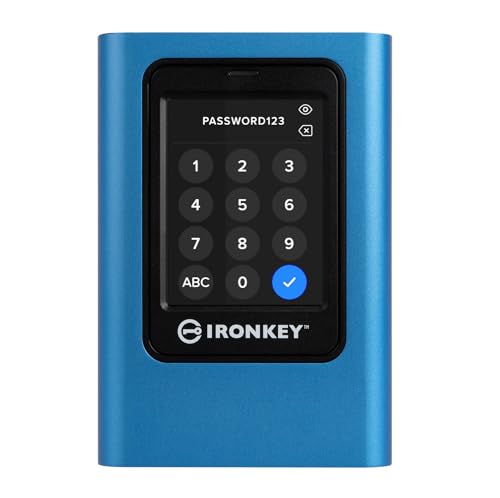
- Touchscreen PIN and passphrase access
- FIPS 197 with XTS-AES 256-bit encryption
- Admin/user modes and read-only protection
Best For: Professionals and teams that need a secure portable SSD with keypad-style PIN access.
Best for Fast File Transfers

- Up to 1050MB/s read and 1000MB/s write
- 256-bit AES encryption for file protection
- Compact 42g design with Type-C cable
Best For: People who want a fast, pocketable SSD with software-based encryption for everyday use.
Best for Phone-Based Security
G-Technology ArmorLock 2TB NVMe SSD

- Phone unlock with no password needed
- 256-bit AES-XTS hardware encryption
- Up to 1000 MB/s read and write speeds
Best For: Secure mobile users who want fast, rugged encrypted storage without a keypad.
Best for Compliance Teams

- Keypad unlock with hardware encryption
- FIPS 140-2 Level 3 compliance focus
- Mac and Windows compatible
Best For: Organizations that need a keypad-unlocked encrypted drive for regulated data storage.
Best for Biometric Security
VCOM Fingerprint SSD Enclosure

- Fingerprint unlock with 256-bit AES hardware encryption
- 10Gbps USB 3.2 Gen2 speeds
- LCD status screen and NVMe/SATA support
Best For: Users who want secure portable storage with biometric access and live drive status.
Best for Keypad Security – Glyph SecureDrive+ Encrypted Rugged Mobile SSD 1TB
If you want an encrypted external ssd with keypad authentication, the Glyph SecureDrive+ is built for users who care more about physical access control than software-only protection. It combines AES 256-bit XTS encryption with a PIN-based keypad, plus USB-C speeds and rugged hardware for dependable everyday transport.
Best For: Professionals, small teams, and anyone storing sensitive files who wants hardware-level PIN access without relying on security software.
Pros:
- AES 256-bit XTS encryption adds strong data protection.
- Physical keypad PIN access avoids software-based login weaknesses.
- Rugged aluminum body helps protect the drive during travel.
- Pre-formatted exFAT makes it ready for Mac and Windows use.
Cons:
- More expensive than standard portable SSDs.
- Keypad security can add a bit of setup and access friction.
- 1TB may be limiting if you store large media libraries.
For buyers comparing an encrypted external ssd with keypad options, this model stands out for its simple hardware-first security and rugged build. It’s a smart fit when convenience, compatibility, and physical access control all matter in one portable drive.
Best for ProRes iPhone Shooters – TWOPAN Magnetic 2TB ProRes SSD
If you want an encrypted external ssd with keypad, this isn’t that kind of drive—but it is a strong pick for creators who care more about speed, portability, and direct iPhone recording. With up to 990MB/s read and 960MB/s write, it’s built for ProRes 4K 60fps capture, fast offloads, and easy cross-device transfers.
Best For: iPhone creators, mobile videographers, and users who need fast external storage for ProRes recording and quick backups.
Pros:
- Fast enough for ProRes 4K 60fps recording on supported iPhone models
- Built-in cooling fan and LCD status display help during long transfers and shoots
- MagSafe-ready design keeps it compact and easy to use on the go
- USB-C PD support lets you charge your phone while recording
Cons:
- Does not include keypad-based encryption or hardware password entry
- Cooling fan and heat buildup may still be a concern in extended 4K shoots
- Geared more toward media workflows than secure data protection
For buyers comparing an encrypted external ssd with keypad, this TWOPAN model is better viewed as a creator-focused portable SSD than a security-first drive. Its real advantage is stable, high-speed recording and easy iPhone integration, not built-in access control.
Best for Hardware Encryption – Sentry K350 Encrypted Micro SSD 512GB
If you want an encrypted external ssd with keypad-style access and true hardware-backed protection, the Sentry K350 is built for secure portable storage. Its AES 256-bit encryption, FIPS 140-2 Level 3 rating, and compact 512GB design make it a practical choice for safeguarding sensitive files on the go.
Best For: Professionals, IT teams, and anyone storing confidential files who wants strong encryption in a portable drive.
Pros:
- AES 256-bit encryption for secure file storage
- Fast 190 MB/s read and write speeds
- Compact 512GB portable form factor
- USB 3.1 Gen 1 connectivity for easy use
Cons:
- 512GB may feel limiting for larger media libraries
- Premium security features likely increase the price
- Not the fastest option for heavy-duty workstation transfers
This is a strong pick if security matters more than raw capacity, especially when you need an encrypted external ssd with keypad-like access behavior and compact portability. It fits well for business files, travel, and everyday protection where data security is non-negotiable.
Best for Fast, Portable Security – Lexar ES3 1TB Portable SSD
If you want an encrypted external ssd with keypad-style protection in a slim, travel-friendly drive, the Lexar ES3 focuses on speed and privacy without adding bulk. Its USB 3.2 Gen 2 performance is quick enough for large file transfers, and the included DataShield AES encryption software adds a layer of file security for everyday carry.
Best For: Users who want a compact, high-speed external SSD for backups, media, and encrypted file storage across laptops, consoles, and mobile devices.
Pros:
- Up to 1050MB/s read and 1000MB/s write for fast transfers
- 256-bit AES encryption software for file protection
- Very portable at 42g and 10.5mm thick
- Broad compatibility with iPhone 17 series, Mac, PS5, Xbox, PC, and more
Cons:
- No built-in keypad, so it is software-encrypted rather than hardware-unlocked
- Peak speeds depend on USB 3.2 Gen 2 support
- Not compatible with iPhone 14 and older models
For buyers comparing an encrypted external ssd with keypad options, this model is better viewed as a sleek encrypted portable SSD than a physical-lock drive. It is a strong pick if you value easy plug-and-play use, strong transfer speeds, and lightweight security for files on the go.
Best for PIN-Controlled Security – Kingston IronKey Vault Privacy 80 960GB
If you want an encrypted external ssd with keypad-style access, the Kingston IronKey Vault Privacy 80 is built for strict data protection rather than casual plug-and-play use. Its touchscreen PIN entry, FIPS 197 certification, and XTS-AES 256-bit encryption make it a strong fit for sensitive files, while the admin/user password options add useful control for shared environments.
Best For: Professionals, teams, and anyone storing confidential data who wants touchscreen PIN access and hardware encryption in one portable drive.
Pros:
- Touchscreen PIN and passphrase entry instead of relying on software locks
- FIPS 197 certified with XTS-AES 256-bit hardware encryption
- Admin/user modes and configurable password rules for tighter control
- Dual read-only modes help reduce malware and accidental write risks
Cons:
- More expensive than standard external SSDs
- Security-focused setup is less convenient for quick everyday transfers
- Touchscreen PIN workflow may feel slower than simple password entry
This is a strong encrypted external ssd with keypad-style protection if security matters more than speed of access. It’s especially appealing for users who want physical PIN control, policy-driven access, and hardware-level safeguards in a single drive.
Best for Fast File Transfers – Lexar ES3 1TB Portable SSD
If you need an encrypted external ssd with keypad features on the shortlist but prefer a simpler, faster portable drive, the Lexar ES3 is a solid pick. It focuses on speed, pocket-friendly portability, and built-in AES encryption software for keeping sensitive files protected.
Best For: Users who want a compact, high-speed external SSD for everyday backups, media, and encrypted file storage across laptops, phones, and consoles.
Pros:
- Up to 1050MB/s read and 1000MB/s write for quick transfers
- Lexar DataShieldTM 256-bit AES encryption helps secure files
- Lightweight 42g design with included Type-C cable for easy carry
- Wide compatibility with iPhone 17 series, Mac, PC, PS5, Xbox, and more
Cons:
- Does not use a keypad-style hardware lock
- Performance may drop on devices without USB 3.2 Gen 2 support
For shoppers comparing an encrypted external ssd with keypad options, this model is better viewed as a fast, software-encrypted alternative than a true keypad-lock drive. It makes the most sense if speed and portability matter more than a physical PIN pad.
Best for Phone-Based Security – G-Technology ArmorLock 2TB NVMe SSD
If you want an encrypted external ssd with keypad-style convenience without actually carrying a keypad, the G-Technology ArmorLock is a smart pick. It uses phone-based unlocking, 256-bit AES-XTS hardware encryption, and rugged NVMe performance, making it a strong fit for secure portable storage.
Best For: Users who want high-security portable storage with easy phone-based access, fast transfers, and rugged protection.
Pros:
- 256-bit AES-XTS hardware encryption with ArmorLock security
- Phone unlock replaces password entry for quick access
- Up to 1000 MB/s speeds for demanding workflows
- IP67-rated and built for drops, dust, and water exposure
Cons:
- No physical keypad for PIN entry
- Requires a compatible smartphone for unlocking
- Pricier than basic external SSDs
For buyers comparing an encrypted external ssd with keypad options, this drive stands out because it delivers similar security-minded convenience in a more streamlined, app-based design. It is especially appealing if you value speed and ruggedness alongside strong data protection.
Best for Compliance Teams – SecureData SecureDrive KP 1TB
If you need an encrypted external ssd with keypad for regulated work, the SecureData SecureDrive KP 1TB is built around hardware encryption, keypad-based unlocking, and broad compliance support. It’s a practical pick for anyone who wants fast USB 3.0 storage with stronger access control than a standard password-only drive.
Best For: Businesses, healthcare teams, and IT buyers who need a keypad-unlocked encrypted drive that aligns with compliance requirements.
Pros:
- Hardware encryption with keypad unlock adds a strong physical layer of access control.
- FIPS 140-2 Level 3 and compliance-oriented positioning suit regulated environments.
- Works with Mac and Windows, making it easier to deploy across mixed fleets.
- USB 3.0 support keeps everyday file transfers straightforward.
Cons:
- More expensive than basic portable SSDs without encryption.
- Keypad workflows can feel slower than simple plug-and-play drives.
As an encrypted external ssd with keypad, this model makes the most sense when security and policy compliance matter more than speed or minimal setup. It’s a specialized drive, but that specialization is exactly what many business and government users need.
Best for iPhone ProRes Video – TWOPAN Portable iPhone SSD 1TB
This TWOPAN drive is a practical pick if you want fast portable storage for iPhone ProRes capture and everyday transfers, but it is not an encrypted external ssd with keypad. It focuses instead on convenience features like a magnetic mount, LCD status display, USB-C PD pass-through, and active cooling for longer recording sessions.
Best For: iPhone creators and Mac users who need a compact, high-capacity SSD for 4K video workflows and quick plug-and-play storage.
Pros:
- Magnetic design makes it easy to attach to supported iPhones while shooting
- Built-in cooling fan helps support sustained recording and transfers
- LCD display gives at-a-glance drive status
- USB-C connectivity works across iPhone, iMac, and MacBook setups
Cons:
- Does not provide hardware encryption or keypad access control
- Best suited to video storage, not security-focused backups
Overall, this is a strong content-creator drive if speed, mounting convenience, and thermal stability matter more than encryption. If your priority is an encrypted external ssd with keypad, you’ll need a different model built specifically for secure access.
Best for Biometric Security – VCOM Fingerprint SSD Enclosure
If you want an encrypted external ssd with keypad-style access control without relying on a separate app, this VCOM enclosure is built around fingerprint unlock, hardware encryption, and a real-time LCD status display. It’s a strong fit for users who need portable SSD security plus fast 10Gbps transfers for everyday work.
Best For: Professionals and mobile users who want biometric protection, hardware encryption, and easy status monitoring in one portable SSD enclosure.
Pros:
- Fingerprint access with hardware-level 256-bit AES encryption
- 10Gbps USB 3.2 Gen2 performance for fast file transfers
- LCD screen shows connection, capacity, and security status
- Supports both M.2 NVMe and SATA SSDs
Cons:
- Requires your own compatible M.2 SSD
- Fingerprint-based access may not suit users who prefer a physical keypad
- Security-focused design adds more complexity than a basic enclosure
This is a practical choice if you prioritize secure portable storage over a plain external drive, especially when biometric access is more convenient than carrying keys or passwords. For buyers comparing an encrypted external ssd with keypad alternatives, the VCOM stands out for combining speed, encryption, and live status feedback.
How We Picked the Best Encrypted External SSD with Keypad
We focused on drives that combine solid hardware encryption, dependable PIN-based access, and practical portability. Priority went to models with recognized security standards, sturdy enclosures, and real-world speed that makes them useful for everyday backups, travel, and on-site work.
We also favored products that balance security with usability. A keypad or PIN unlock should be fast, but the drive still needs to feel reliable, compact, and easy to carry.
Quick Comparison
The strongest Encrypted External SSD with Keypad options usually fall into three groups: rugged drives for travel and field work, business-focused models with compliance-friendly security, and compact portable SSDs for users who want easier everyday unlocking. If speed matters most, look for USB 3.2 Gen 2 performance. If data protection is the priority, look for hardware encryption, FIPS certification, and tamper-resistant design.
Key Buying Factors for an Encrypted External SSD with Keypad
Security Standards
Check for hardware encryption and certifications such as FIPS 140-2 or FIPS 197 when available. These standards can matter for regulated industries and sensitive personal data.
Unlock Method
A keypad is ideal if you want standalone access without installing software. Make sure the PIN system is intuitive, responsive, and supports secure reset or lockout behavior.
Capacity and Speed
Choose capacity based on your workload. 512GB may suit documents and project files, while 1TB to 2TB is better for video, backups, and larger archives. For performance, USB 3.2 Gen 2 models can offer noticeably faster transfers than older USB 3.0 drives.
Durability and Portability
Rugged housings, compact designs, and resistance to shock or daily wear matter if you carry the drive often. A secure drive is only useful if it survives life on the move.
Compatibility
Confirm support for your devices and operating systems, especially if you plan to use the drive across Windows, macOS, tablets, or mobile workflows.
Who Should Buy Which Encrypted External SSD with Keypad?
If you need compliance-focused security for work, choose a keypad-unlocked model with strong encryption and certification. If you travel frequently, prioritize a rugged Encrypted External SSD with Keypad and a compact form factor. If you mainly want secure personal storage, pick the simplest model that offers the right balance of capacity, speed, and easy PIN access.
For buyers comparing encrypted drives, the best choice is usually the one that matches your workflow first and your security requirements second. That way you get protection that is actually convenient enough to use every day.
